Categories
Chipset Mobile

Best Smartphones With Snapdragon 888 Chipset To Buy In India

The newest chips in the market might be the Snapdragon 8 Gen 1 and the Snapdragon 8+ Gen 1. However, the Snapdragon 888 chipset is now the one to beat if you’re trying to buy a premium phone with great value.

For all of 2021, the majority of high-end and ultra-premium smartphones were powered by the Snapdragon 888 chipset. Between 2020 and 2022, many Snapdragon 888 smartphones were introduced in India and it is still a great chipset for daily usage. So, we’ve put together this list of the top smartphones using the Snapdragon 888 chipset for you.

OnePlus 9 Pro

The Qualcomm Snapdragon 888 chipset along with Adreno 660 GPU power the OnePlus 9 Pro. It features a 6.7-inch QHD+ AMOLED display that supports up to 120Hz of dynamic refresh rate along with support for HDR10+ playback. The phone has up to 12GB RAM and 256GB storage options. It further runs on Android 12-based OxygenOS 12. The device is equipped with a 4,500mAh battery that supports 65W fast wired and 50W fast wireless charging. The OnePlus 9 Pro is available for sale at Rs. 49,999 in India.

Realme GT 2

Powered by the Snapdragon 888, the Realme GT 2 is a performance-oriented smartphone. It comes with a 6.62-inch AMOLED display with a 120Hz refresh rate, HDR10+ support, and 1300 nits peak brightness. Also, the phone has Corning Gorilla Glass 5 protection. There is also a 5,000mAh battery with 65W fast charging, stereo speakers, and an under-display fingerprint sensor. The Realme GT 2 will cost you Rs. 34,999 in India.

iQOO 9 SE

The iQOO 9 SE comes with a sleek design and is powered by the Snapdragon 888. The phone sports a 6.62-inch 120Hz AMOLED display with 1200 nits peak brightness. The device also features an under-display fingerprint sensor, stereo speakers, and a 4,500mAh battery that supports 66W fast charging. In India, the price of iQOO 9 SE starts at Rs. 33,990 for the 8GB + 128GB model.

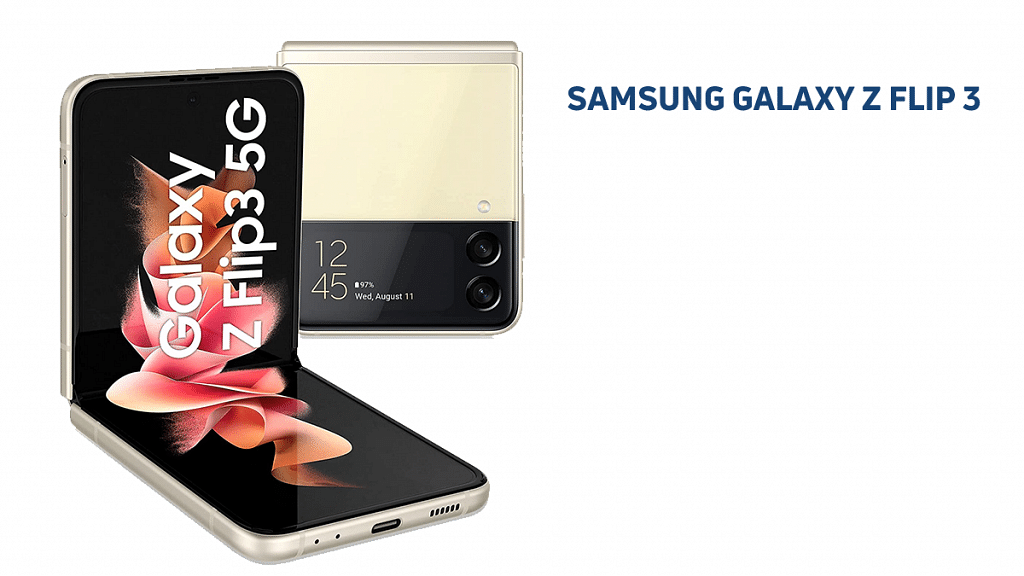
Samsung Galaxy Z Flip 3 5G

The Samsung Galaxy Z Flip 3 is a clamshell foldable phone powered by the Snapdragon 888 processor. It features a 6.7-inch Full HD+ resolution AMOLED display with a 120Hz refresh rate. The device also has HDR10+ support along with a 1.9-inch Super AMOLED cover display. Besides, the phone got stereo speakers tuned by AKG and houses a 3,300mAh battery that supports 15W wired charging and 10W wireless charging. The Galaxy Z Flip 3 5G will cost 84,999 in India.

Asus 8Z

The Snapdragon 888 chipset powers the Asus 8Z phone. It has a 5.9-inch Full HD+ Super AMOLED screen with a refresh rate of up to 120Hz, and on top of it is a layer of Gorilla Glass Victus. The dual speakers of the Asus 8Z can play back high-resolution audio. A 4,000mAh battery that supports 30W fast charging is included, and there is an in-screen fingerprint scanner. You can get the phone for Rs. 42,999 in India.


Categories
Accessories Smart Watch Tablet

Realme Pad X, Watch 3, Buds Air 3 Neo, More Launched In India: All Details

Realme held the ‘Hey Creatives’ launch event today to unveil several artificial intelligence of things (AloT) devices as part of its Realme TechLife brand. The company unveiled its new range of products. The launch event was live streamed on YouTube and the social media channels of the company. Here’s what Realme launched at the event:

Realme Pad X Tablet Specifications

The Realme Pad X features a 10.95-inch LDC display with 450 nits of brightness. It has a resolution of 2000 x 1200 pixels and 16.7 million colors. The tablet is powered by the Qualcomm Snapdragon 695 SoC. The device runs Android 12-based Realme UI 3.0 for Pad. It further comes with features like Limelight (Apple Center Stage knockoff), PC Connect, and split-view to name a few.

The Realme Pad X sports a 13MP single rear camera and an 8MP front camera paired with a 105-degree FOV. Besides, the tablet is backed by an 8,340mAh battery with support for 33W fast charging.

The Realme Pad X also features support for Realme Pencil and Folio keyboard. The tab comes in two color options, i.e., Glacier Blue, and Glowing Grey.

Realme Pad X Price

The Realme Pad X will retail in three variants. The 4GB + 64GB (WiFi-only) variant will be available for Rs. 19,999, while the 4GB + 64GB (WiFi + 5G) version will cost you Rs. 25,999. Besides, the 6GB + 128GB (WiFi + 5G) is priced at Rs. 27,999 in India.

Realme Watch 3 Specifications

The Realme Watch 3 has a rectangular dial shape. It features a 1.8-inch LCD display with horizon curved glass and 500 nits peak brightness. The watch has a curved glass ‘Horizon Curved Glass’ on top of the display. It includes AI environmental noise cancellation (ENC) Bluetooth calling.

With the new Realme Watch 3, Realme has attempted Bluetooth calling for the first time. For a better calling experience, it has an integrated speaker, a smart audio amplifier, and a microphone.

Over 100 watch faces including dynamic and customizable watch faces are included in the Realme smartwatch. More than 110 sports modes including boxing, golf, strength training, yoga, free training, jogging, walking, table tennis, elliptical, trekking, basketball, and others will also be available on it.

Realme Watch 3 Price

In India, the Realme Watch 3 is available at a discounted price of Rs. 2,999. On August 2, 2022, it will be offered for purchase on Flipkart. The watch will come in black and grey color variations.

Realme Buds Air 3 Neo, Buds Wireless 2S Specifications

The Realme Buds Air 3 Neo are TWS earbuds that were earlier launched in China. They are touted to offer a total playback time of up to 30 hours. The dynamic bass drivers in these TWS earbuds measure 10mm in diameter. They have Dolby support and feature AI ENC. The new truly wireless earbuds also support an IPX5 rating for splash resistance.

On the other hand, the Buds Air 3 Neo features an in-canal design with narrow stems. The Realme Buds Wireless 2S feature AI ENC noise reduction and 11.2mm dynamic bass drivers. Dolby Atmos is supported, although it only functions with compatible tablets and smartphones. These are touted to offer 30 hours of music playback.

Realme Buds Air 3 Price

The Realme Buds Air 3 Neo TWS earbuds arrive with a price tag of Rs. 1,999 and will be offered for Rs. 1,699 as an introductory offer. The Realme Buds Air 3 Neo is available in two color options in India, i.e., White and Blue.

On the other hand, the Buds Wireless 2S has a price tag of Rs. 1,499 and its introductory offer will bring the cost down to Rs. 1,299.

Realme Flat Monitor, Smart Keyboard Specifications

Realme Flat Monitor is the company’s first monitor. It features a 23.8-inch Full HD LED display with a three-sided, thicker chin and bezel-less panel. The monitor provides a refresh rate of 75Hz and a response time of 8-millisecond. The overall appearance of the monitor is pretty sleek and modern.

The Realme Smart Keyboard with a 280mAh battery and Realme Pencil with up to a 10.6-hour battery was also a part of today’s launch event schedule.

Realme Flat Monitor Price

The Realme Flat Monitor price in India is set at Rs. 18,999. Realme will soon reveal the monitor’s selling date and it will be available for purchase on Flipkart.

Categories
Gaming Info

Garena Free Fire: Here’s The Best Game Settings Tips And Guide

Are you having issues with Garena Free Fire and do you consistently lose games? Much of it depends on your sensitivity settings in Garena Free Fire. Battle royale games definitely require a thorough understanding of player positioning and the ability to turn a bad situation to your advantage and win. However, having all of that and being unable to shoot and kill enemies is pointless. We are here to help you, so don’t worry.

You might need to adjust your Free Fire sensitivity settings because gamers use a variety of smartphone models with varying refresh rates and hardware capabilities. Here are some of the sensitivity settings for Free Fire that will enable you to take the best headshots.

Here Are The Free Fire Sensitivity And Game Settings

Sensitivity For Headshots

These levels can be altered by players to fit their individual preferences. Before making any necessary alterations, they can first put them through their paces on the practice range.

Gamers should be aware that altering their sensitivity settings won’t help them aim better for headshots. They would have to work hard to continuously get better.

Sensitivity OptionsDefaultRecommended
General6590-100
Red Dot8590
2X Scope7585
4X Scope6570
Sniper Scope5058
Free Look5066

How To Change Game Settings In Free Fire

Typically, the player’s device should determine how the game is set up. The best graphics settings are playable on good mid-range or high-end devices.

On the other side, users with lesser requirements can choose “Smooth” for visuals and “High” for FPS. They can also disable Shadow to make sure the gameplay runs smoothly. Simply adhere to the simple instructions. You can instantly change your sensitivity options and start your game. The steps are as follows:

Step 1: Open Free Fire on your mobile phone.

Step 2: Tap on the icon “Gear” (Settings).

Step 3: The settings tab will show up on your screens. Then, they can go ahead and alter the required one. For instance, to change the sensitivity settings, you would have to visit the “Sensitivity” tab. That’s it.

Categories
Comparison Smart Watch

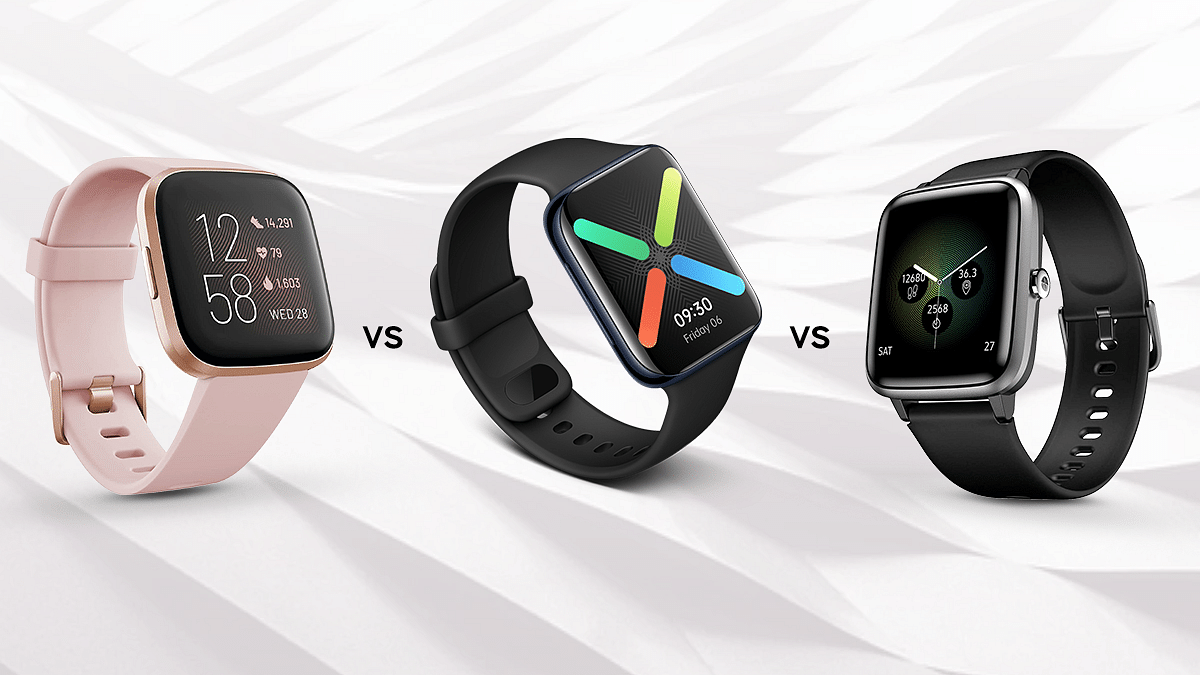
Fitbit Versa 2 Vs OPPO Watch Vs Noise Colorfit Pro 2: Which Smartwatch Wears The Crown?

The requirement for owning a smartwatch is constantly increasing purely due to the convenience that a user is receiving. They allow you to check smartphone messages as well as manage music and keep tabs on your health. You can also track your activities and health with a smartwatch from a number of brands, including Fitbit, OPPO, and Noise.

To assist you in selecting the best smartwatch, we will compare the Fitbit Versa 2, OPPO Watch, and Noise Colorfit Pro 2 in this article. Let’s check out which one you should consider buying:

Design And Display

The face of the Fitbit Versa 2 smartwatch is square and features rounded corners. The band is generally comfortable and the aluminum shell has a good appearance. At this pricing point, the Versa 2’s swim-proofness is a must-have feature.

On the other hand, the OPPO Watch can be mistaken as an imitation of the Apple Watch. The watch is available by the company in two distinct case sizes. While the 46mm model has a dual-curved glass front, the smaller 41mm variant has a flat display.

Moving to the Noise Colorfit Pro 2, it has a simple yet fashionable design. The device is offered in mist grey, teal green, and jet-black colors. The watch has a square touchscreen dial that, when lit up, looks amazing.

In terms of display, the color AMOLED touchscreen on the Fitbit Versa 2 has an attractive appearance. The Versa 2’s settings even allow you to set the display to always-on. While the high-resolution AMOLED display on the OPPO Watch shines brilliantly. Icons beautifully flow off the curved edges and look visually stunning.

Besides, the Noise Colorfit Pro 2 gets 1.3-inch in size with a resolution of 240 x 240 pixels. The display on the Fit Pro is sufficiently bright and offers bright visuals even in sunlight.

Overall, all three watches have a decent design and display. But, the OPPO Watch stands out among the other two in our opinion.

Features And Operating System

The Fitbit Versa 2 is a smartwatch with great features. You can take or discard incoming phone calls on the watch but you cannot make calls from it. It supports swift replies for notifications but only on Android. On the watch, you can also access music streaming services like Spotify or Deezer. You can use the smartwatch to check the weather, set timers, and manage your Echo devices as it supports Amazon’s Alexa.

On the other hand, the OPPO watch is powered by the Qualcomm Snapdragon Wear 3100 processor. It has 1GB of RAM which significantly improves performance. It is compatible with both Android and iPhone smartphones and runs Google’s Wear OS. As for daily activity, it helps you show a breakdown of steps, calories, workout time, and activity sessions throughout the day. The device even ties into a number of OPPO’s watch face complications as well as offers integration with Google Fit.

If we talk about the Noise Colorfit Pro 2, it has a sleep tracking feature that gauges and monitors your sleeping pattern throughout the day. The watch supports physical activities like walking, running, biking, hiking, climbing, treadmill, spinning, and Yoga and the monitoring functions work very well.

Battery And Connectivity

The battery life on the Fitbit Versa 2 is fairly good. It can last two days on a single charge. You can stretch out battery life to even three or maybe four days by disabling the always-on display or turning off push notifications completely.

Moving to the OPPO watch, the battery can last a full day and a bit more which allows for activities such as sleep tracking. On the other hand, the Noise ColorFit Pro 2 comes with a 210mAh battery which is decent for the price. It offers up to 45 days of standby time.

As for connectivity, the Fitbit Versa 2, OPPO Watch, and the Noise ColorFit Pro 2 – all three watches can be paired with an Android smartphone as well as an iPhone.

Price Comparison

The Fitbit Versa 2 is available for around Rs. 15,000 in India. Undoubtedly, it offers an improved display and battery front. No smartwatch comes close to the Versa 2’s battery life or sleep tracking ability at that price. However, its lack of in-built GPS limits its utility a lot. For a premium fitness device, this is an evident oversight.

On the other hand, the OPPO Watch is very well designed and is a full-featured smartwatch running Google’s Wear OS. The 46mm model can be purchased for Rs. 15,999. Besides, the Noise ColorFit Pro 2 price is Rs. 2,599 which is way too low if compared to the other two watches.

The Noise ColorFit Pro 2 is a perfect buy if you are looking for a smart fitness band without shelling out too much money. However, if you can spend more, you can go for the OPPO Watch.

Categories
How To Laptop

Set Up Your Brand-New Laptop Like A Pro: Here’s The Step-By-Step Guide

Key Highlights

  • Most laptops come with Windows 10 and follow a similar setup process
  • Doing the setup right helps avoid future security and performance issues
  • Just follow the steps in order, and it’s simpler than you might think

It may be both thrilling and terrifying to set up a brand-new laptop. However, it’s pretty simple. Most laptops now on the market have Windows 10 installed. Although it can vary depending on the brand, the setup process is generally the same. You’ll avoid security issues and other troubles in the future by doing everything correctly and in the appropriate order the first time. Here is everything you require to set up your new laptop or PC.

Also Read | Top 5 Effective Ways To Protect Laptop From Overheating

Unbox Your Laptop And Plug It In

To get started, open the box and plug in the original power adapter and cables. It could take some time to set up the laptop, so make sure you have enough power to keep it running. On the majority of the most recent laptops, rectangular Type-A connectors have been replaced by USB-C connections. In this situation, just plug the charger into your device’s Type-C connector.

Turn On Your Laptop

Press the power button. On some models, it could be on the right side of the computer or at the upper right corner. Nevertheless, it might be located somewhere else.

The Welcome screen will appear when you first boot up, and Cortana, Microsoft’s virtual assistant, will offer you a voice walkthrough. On some laptop models, she’ll ask you questions, and you can reply with your voice (but keep in mind that this will not work on many laptops). You can adjust the level by clicking the speaker icon at the bottom of the screen if you want to mute her voice.

How To Set Up Your Windows Laptop

Step 1: Select your country or region and then click Yes.

Step 2: Select your keyboard layout. On the ‘Want to add a second keyboard layout screen’, click ‘Skip’.

Step 3: Connect to a Wi-Fi network. Enter your password and click Next. Choose ‘I don’t have internet’ if you don’t currently have a connection to the internet.

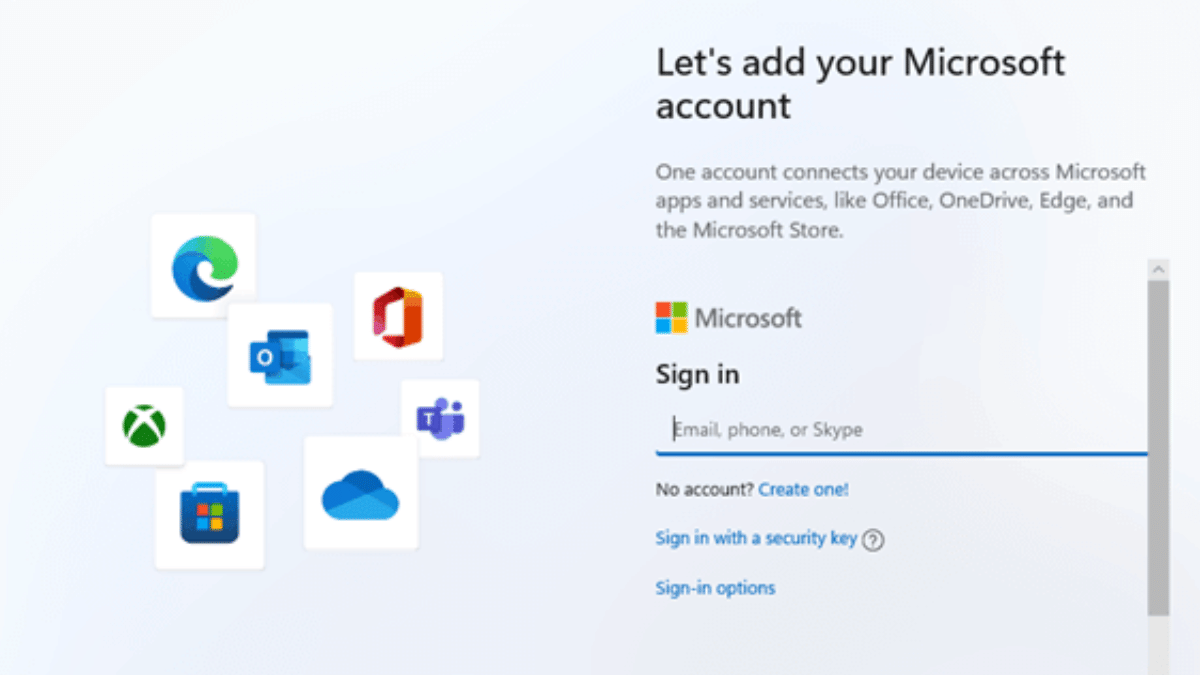
Step 4: Sign in to your Microsoft account. In the ‘Email, phone, or Skype’ box, enter your email address, phone number, or Skype username. Then press Next. Choose ‘Create account’ if you do not already have a Microsoft account.

Step 5: Create a PIN. It is not advised to use your Microsoft account password to login in if you don’t create a PIN. Select Create PIN to create a PIN.

Step 6: Select your privacy settings. Microsoft has every setting enabled by default, but you might want to have a look at them to see if there’s anything you want to turn off. Click the blue slider switch next to a setting to make it inactive. When finished, press the Accept button or tap to proceed.

Step 7: Customize your device. Click ‘Skip’ if you do not wish to customize your device.

Step 8: You might see some steps after this one that doesn’t apply to you. Only if you chose a certain customization option may some of the options shown in this article apply to you. You should skip any steps that you see that don’t match what you are viewing.

Step 9: Connect your phone to your laptop. To access it from your PC, you simply link your iPhone or Android device to your computer. Choose ‘Skip for now’ if you don’t want to connect your phone to your laptop.

Step 10: Whether or not to back up your files to OneDrive is up to you. The option ‘Only save files to this PC’ should be chosen if you don’t wish to backup your files. However, bear in mind that if you select this option, your files can be lost forever.

Step 11: Await the setup’s completion. Just be careful not to unintentionally shut off your PC. You will need to reinstall Windows otherwise.

Also Read | Windows 11 Laptop, PC Reset Guide: How To Perform System Reset Without Loosing Data

Run All Windows Updates

It’s likely that your laptop will automatically download a number of Windows 10 updates, so why not get it over with by forcing them to install manually?

Step 1: In the search box, type ‘updates’.

Step 2: Tap on ‘Check for updates’.

Step 3: If Windows doesn’t automatically search for updates, select the ‘Check for updates’ box. That’s all!

For the tech geeks, stay updated with the latest cutting-edge gadgets in the market, exclusive tech updates, gadget reviews, and more right on your phone’s screen. Join Giznext’s WhatsApp channel and receive the industry-first tech updates.

Categories
Info Mobile

Android Tips And Tricks: Here’s How To Make Your Smartphone More Useful

Android is a mobile operating system that is remarkably innovative and powerful. It is loaded with great tips, decent features, and time-saving techniques. The user interface appears to be straightforward enough for casual users who only want to text, call, and utilize their apps. However, there are a variety of power-user options and features buried one or two layers deep in the UI. All you need to do is know where to look.

Here, in this article, we have come up with the best tips and tricks to make your Android smartphone more useful. Let’s check out:

Use Digital Well-Being Feature

The Bedtime and Focus mode of Android 11 is part of the Digital Wellbeing feature. The Bedtime mode silences your phone at a set time and changes the screen to black-and-white, in case you do have to look at the screen after hours. While the Focus mode silences noisy apps’ notifications, a quick and easy way to get relief from disturbances.

Clear App Defaults

When a link opens in an app rather than the browser, it is quite unpleasant. It might be a Facebook page, a tweet, or a YouTube link. You’ll have to wait until your phone switches to a different browser after closing Chrome or your preferred browser. This can be easily fixed by clearing defaults which you can find in your phone’s Settings.

‘OK Google’ Voice Match

On your Android mobile phone, you can start searching for anything at any time just by saying “OK Google.” This works automatically on the home screen as well as in the search box.  However, you can find ‘OK Google’ working everywhere if you go into the search settings.

In the search options, you have to go to Voice > Voice Match. When you enable ‘Access with Voice Match,’ the phone will ask you to say ‘OK Google’ a few times so that it can recognize your voice. Now, from any screen and while the device is awake, you can use the hotword any time.

Try Launchers / Android Themes

Different device manufacturers offer their own unique user interfaces, such as TouchWiz by Samsung. You are using Android, which is well-known for allowing users to personalize its user interface. The default phone screen and its user interface are not very robust or convenient. By installing the alternative launchers, you may customize your Android device’s home screen in a more advanced way and use it more effectively.

Categories
Mobile

Best Smartphones Powered By MediaTek Helio G Series Chipsets Under Rs. 15,000

MediaTek is quite famous for making decent budget SoCs for mobile phones. The chipset provides proper performance, a good gaming experience, and leading-edge networking. So, if you want to buy the Mediatek-powered smartphone in India, we have curated a list of the best smartphones with Mediatek Helio G Series to make your purchase easier. Let’s check out:

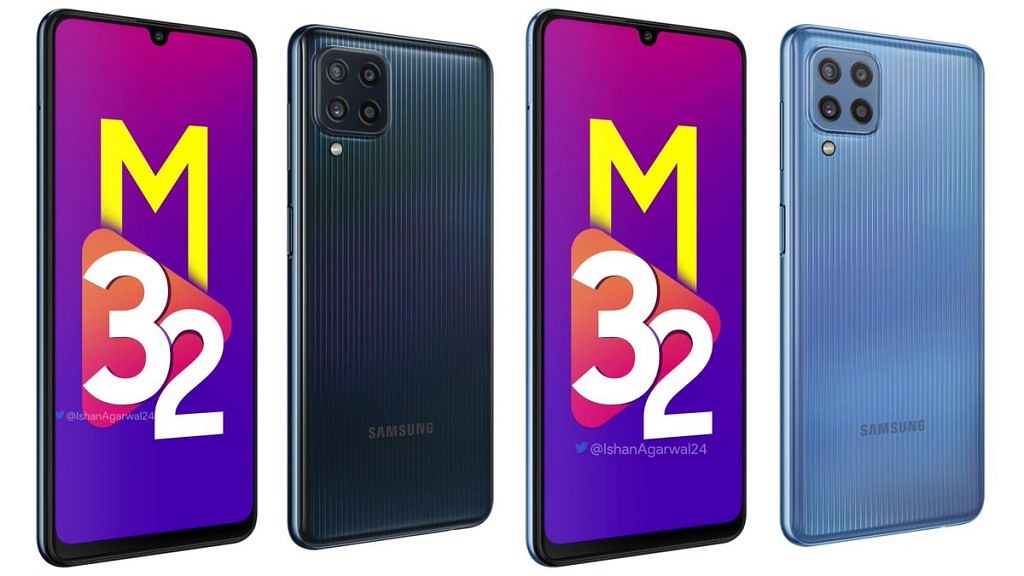
Samsung Galaxy M32

The Samsung Galaxy M32 is powered by the MediaTek Helio G80 processor, powering a Mali-G52 MC2 GPU and an Octa-core Cortex A75 2GHz Dual-core + Cortex A55 1.8GHz Hexa core processor layout. The smartphone has a 6.4-inch Super AMOLED display, having a resolution of 1080 x 2400 pixels along with a 20:9 aspect ratio. It boasts a massive 6000mAh battery capacity backed by 15W Fast Charging technology. The Samsung Galaxy M32 will cost you Rs. 14,999 in India.

Oppo A57 2022

The Oppo A57 2022 comes equipped with the MediaTek Helio G35 chipset. It gets a PowerVR GE8320 GPU and an Eight-core processor with a dual Cortex A53 layout. The smartphone sports an IPS LCD display measuring 6.56-inch. It comes with 4GB RAM and 64GB of internal storage. The device houses a 5,000mAh non-removable battery. The Oppo A57 is available online for Rs. 13,999 in India.

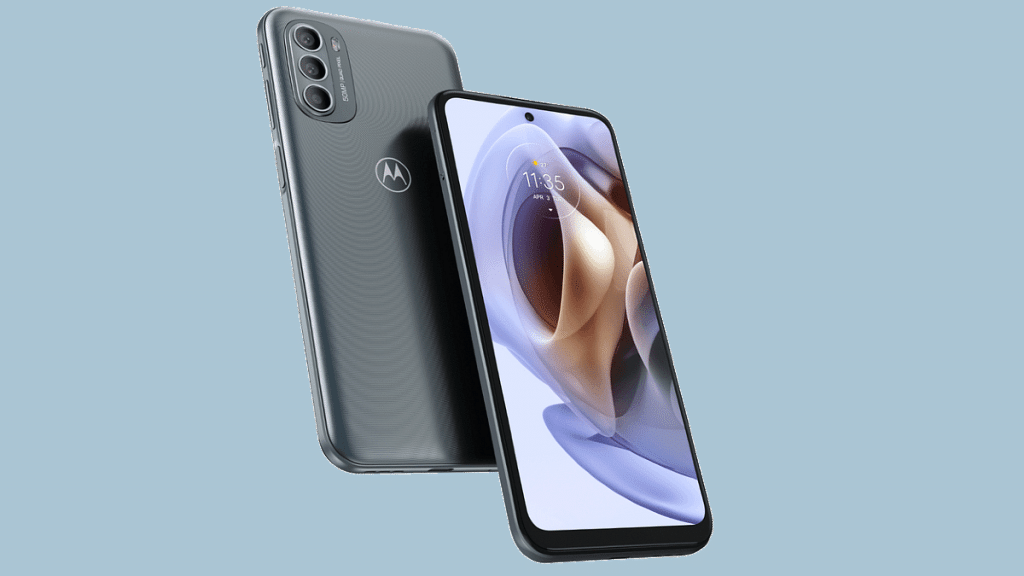
Motorola Moto G31

The Moto G31 packs the MediaTek Helio G85 chipset along with Mali-G52 MC2 graphics. It has an Octa-core processor comprising Cortex A55 and A75 layout. The smartphone comes with a 6.4-inch AMOLED front screen with a resolution of 1080 x 2400 pixels. As for power, the device is equipped with a 5,000mAh Li-Polymer battery. The price of the Motorola Moto G31 is Rs. 11,140 in India.

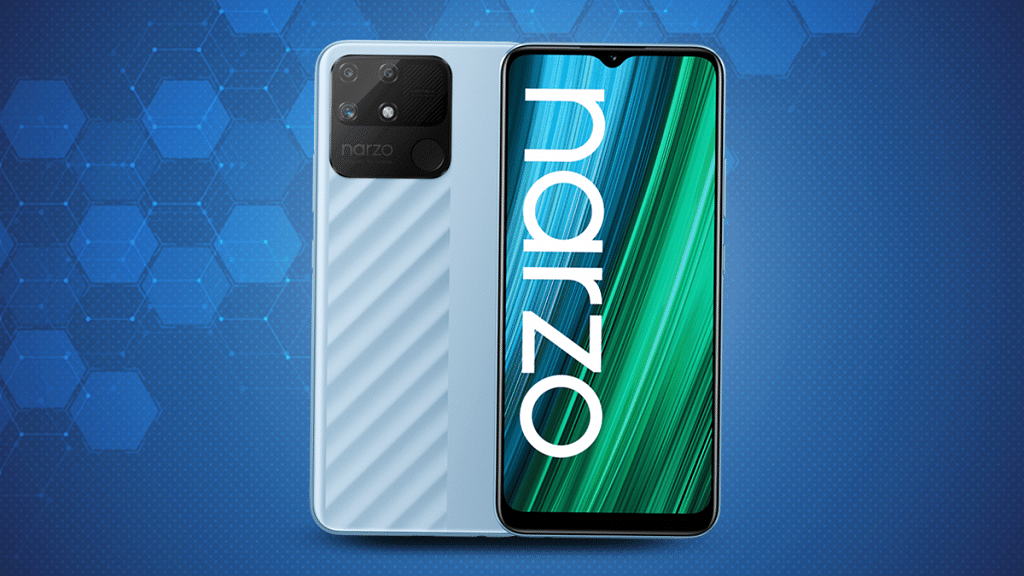
Realme Narzo 50A

The Realme Narzo 50A is equipped with the MediaTek Helio G85 Chipset paired with an Octa-core CPU consisting of Dual-core 2GHz Cortex A75 and Hexa-core 1.8GHz Cortex A55. The smartphone flaunts a 6.5-inch IPS LCD with a 60Hz refresh rate and 720 x 1600 pixels screen resolution. Besides, the device boasts a massive 6,000mAh Li-ion battery. The Narzo 50A will cost you Rs. 10,980 in India.

Vivo Y22 2022

The MediaTek Helio G85 chipset powers the Vivo Y22 2022. It comes with 4GB of RAM and a Mali-G52 MC2 GPU. You will get a 6.44-inch IPS LCD with a resolution of 1600 x 720 pixels, a refresh rate of 90Hz, and a pixel density of 272ppi. As for the power, it houses a 5,000mAh battery capacity and supports an 18W Fast Charging system. The Vivo Y22 2022 is available for sale for Rs. 14,301.

Categories
Featured Info

Worried About How To Use An Air Fryer? Here’s The Step-By-Step Guide

Air fryers can be used to shallow fry veggies in addition to making traditional fried dishes like potato chips. They are a healthier alternative to fried food since they have a comparable texture and flavor to deep-fried foods with just a tablespoon of oil. So much has been said about this cook’s best buddy. But how does it function?

How Does An Air Fryer Work?

Your air fryer is like a convection oven. It is a small but mighty appliance and you can roast, broil, or bake food in it. However, you cannot be used an air fryer to deep fry.

An air fryer has a heating element that generates heat and a blower that moves hot air around the food inside the air fryer basket. You can use a lot less oil than you could in an oven and still get the crispy dishes you want thanks to the hot air circulation.

How To Use An Air Fryer?

Step 1: Open the frying basket and arrange the vegetables, appetizers, or whatever else that you want to fry. Before placing the food in the fryer basket, make sure it has been thoroughly dried. Don’t pack the basket too tightly.

Step 2: A negligible amount of oil should be applied using an oil brush. You don’t even need to use oil while preparing non-vegetarian meals. The fatty oils from the food will be used by the air fryer to cook it.

Step 3: Depending on what you are cooking, adjust the Air Fryer’s temperature indicator and timer. Typically, it takes 10 minutes to fry veggies, compared to at least 15 minutes for non-vegetarian dishes. However, the fryer’s user handbook will also provide pre-designed menus for various dishes.

Step 4: Then, shake the contents after opening the Air Fryer basket. It will ensure that the hot air reaches every side of the food that is being cooked.

Step 5: To enhance a mouthwatering flavor, add or sprinkle oregano seasoning, spices, and several other decorative items.

Step 6: It’s time to let your taste senses go wild now that the dish is ready. And that’s all.

Using an air fryer is not rocket science. You only need to follow the above-mentioned steps and you are all done. Besides, in our previous coverage, we have also listed the best air fryers you can buy for under Rs. 10,000 which can check here.

Categories
Gaming Info

Garena Free Fire Redeem Codes For 23 July 2022: Here Are The Steps To Redeem

Garena Free Fire has gained a lot of popularity in India particularly in the absence of PUBG Mobile. It has exclusive rewards and in-game items that players look forward to every day. One of the most demanding items in the game has always been Free Fire Redeem codes.

Garena Free Fire is one of the most exciting battle royale games to play. Today, it is one of the most popular games in the world and has a high rating on the Google Play Store. In the game, players can create their own strategies such as landing positions, acquiring weapons and supplies, and engaging in combat with the enemy. Here’s how to redeem the codes to get free FF rewards:

Here Are The Garena Free Fire Max Redeem Codes For Today, July 23, 2022

Garena Free Fire Redeem codes help to unlock resources that are otherwise too hard to get in the game. Also, they get a chance to win exclusive free rewards like vouchers and many more. For the players, new redeem codes for 23 July 2022 have been released.

  • FGYT GVCD RTYJ
  • FKFU FGUR RCXG
  • FQWE RTYU 8YH0
  • FVGB NMKL GFDX
  • FYTF CCDW S2ZA
  • FO2W KMBV GVUG
  • F8VT GYWY TF8S
  • FAER TYUI OKJN
  • FVBN JUYT REWA
  • F8RU FH8F 8Y8Y
  • FMKL POIU YTFD
  • FVCD SRTY UIOP
  • FMKI 88YT GFD8
  • IUYT RFDE SXDC
  • XSDC FVGH JKLO
  • FE8S RYUJ HGFD
  • FKJH BNJK OPOL
  • FDRD SASE RTYH
  • FHBV CDFQ WERT
  • FU821 OUYT RDVB

How To Redeem Garena Free Fire Codes For 23 July 2022

Step 1: Go to the official website of Free Fire redeem code redemption.

Step 2: Log in to your account using Twitter, Facebook, Google, and Apple IDs.

Step 3: Copy and paste any of the above-listed redeem codes into the text box.

Step 4: Press the confirm button to continue.

You can check the embedded game mail section for the rewards. It might take around 24 hours for the rewards to show up in the game mail section of the players.

Also, note that the Free Fire Redeem Codes have a claim limit. If the redeem code fails, maybe they have been already claimed by too many other players. However, there is always another day for new codes. Check back here every day for Garena Free Fire’s new redeemable codes.

Categories
Apps Featured Info

Robert Pattinson Starrer ‘The Batman’ To Stream On Amazon Prime Video

Key Highlights

  • The Batman coming to Prime Video on July 27
  • Robert Pattinson plays Batman in the movie
  • The movie will be available in six Indian languages

“The Batman” (2022) is going to make its formal streaming debut on Amazon Prime Video. Robert Pattinson plays the reclusive millionaire Bruce Wayne and Batman in the movie. It is written and directed by Matt Reeves and produced by Reeves and Dylan Clark.

The movie was released in theatres on March 4, 2022. The superhero movie has previously been available for rent on a number of OTT services but it is now accessible to all Amazon Prime Video customers.

The Batman’ Will Premiere On Prime Video From July 27

One of the most recent DC Universe projects, The Batman, will debut on Amazon Prime Video next week, on July 27. It will be available on Amazon Prime Video in six Indian languages that include English, Hindi, Tamil, Telugu, Malayalam, and Kannada. The movie got its theatrical release in India in four languages: Hindi, English, Tamil, and Telugu.  Presently, Amazon is offering this movie at a rental price of Rs. 149.

About ‘The Batman’

“The Batman” is the first movie in which Twilight star Robert Pattinson assumed the role of a wealthy vigilante and detective. The movie’s honest and menacing representation of Gotham City was well praised by the viewers.

The movie, which is based on DC Comics characters, stars Paul Dano as The Riddler, Zoe Kravitz as Catwoman, Jeffrey Wright as James Gordon, Andy Serkis as Alfred Pennyworth, and Colin Farrell as Oswald “Oz” Cobblepot, aka The Penguin.

Fans of the caped crusader will enjoy seeing “The Batman” on the platform as he explores the hidden dark corruption in Gotham and raises issues about his family’s complicity in it. The movie is a cinematic classic, combining outstanding performances with heart-pounding action scenes. In addition, the movie’s musical score enhances every scene. The movie will leave one at the edge of their seat.

The film’s production value, performances, and action scene execution all earned it high praise. The movie, which starred Robert in a dual role, was dubbed the darkest Batman movie ever.