Categories
Featured Info Mobile

iQOO 13 With Snapdragon 8 Elite Debuts In India: Top Features

Key Highlights

  • Snapdragon 8 Elite for unmatched performance
  • Q10 2K 144Hz Ultra Eyecare Display
  • Pre-booking starts at Rs. 51,999 on December 5

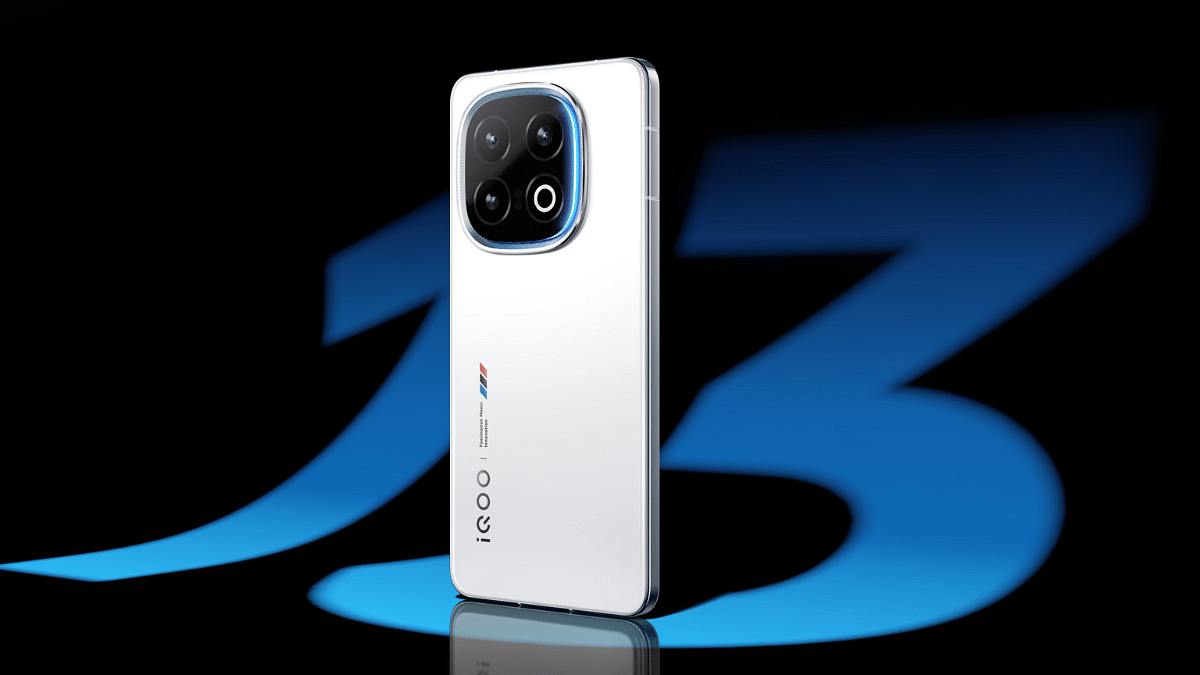
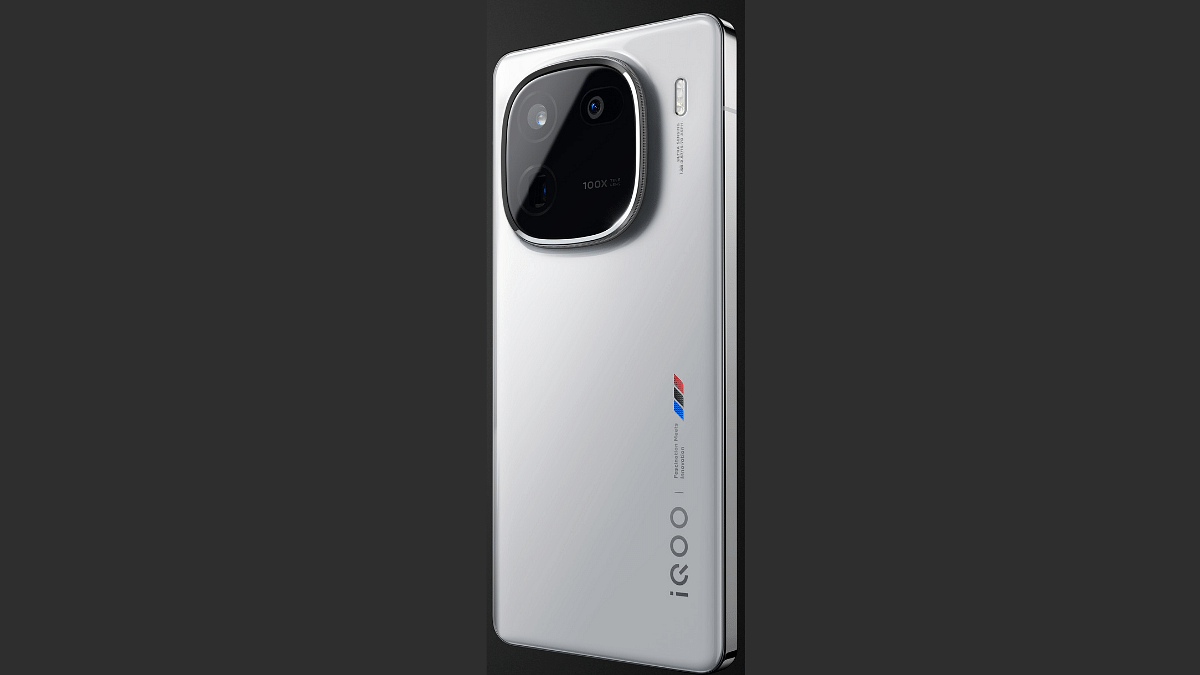
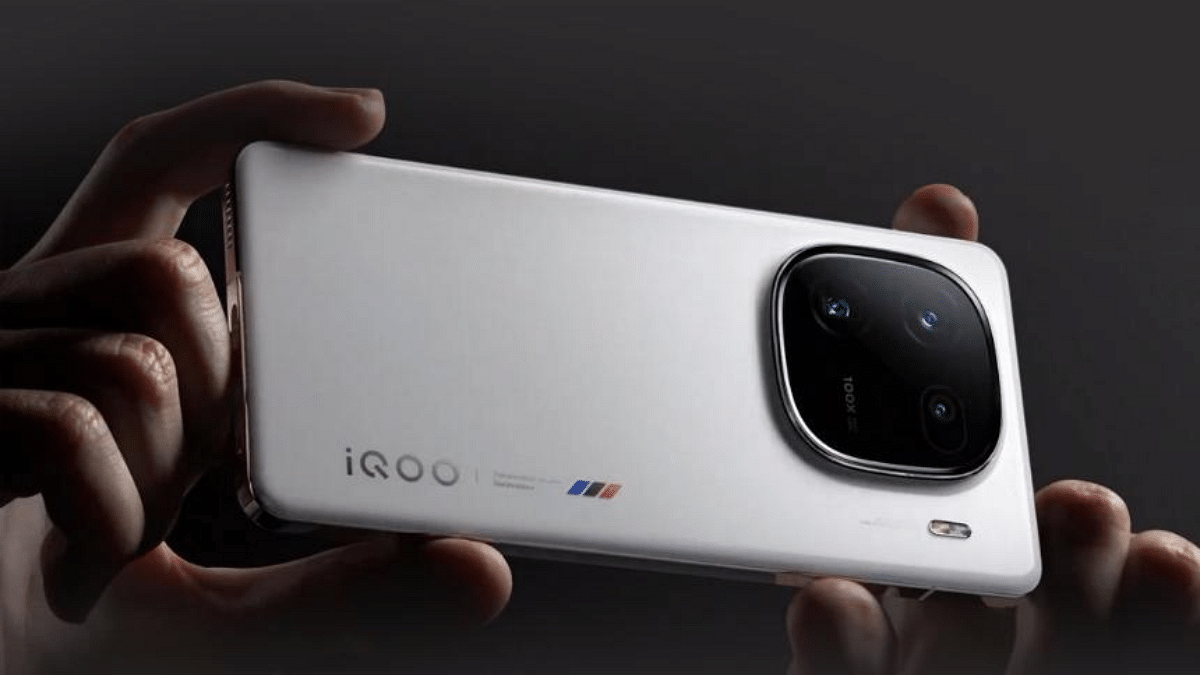
iQOO has unveiled its latest flagship, the iQOO 13. The smartphone is hailed as India’s fastest smartphone. It is packed with cutting-edge features like the Qualcomm Snapdragon 8 Elite chipset and a Q10 2K display. The device promises unmatched performance, gaming capabilities, and advanced camera tech, all in a sleek, durable design. Here are some of its key features.

Also Read | OnePlus 12 vs iQOO 12: Top Flagship Smartphones Compared

Pricing And Availability

VariantEffective PriceAvailability
12GB + 256GBRs. 51,999Pre-booking: Dec 5 (12 PM)
16GB + 512GBRs. 56,999First Sale: Dec 11 (12 PM)

Available in two colors: Legend and Nardo Grey at vivo exclusive stores, iQOO e-store, Amazon, and other retail outlets.

Display And Design

  • World’s first Q10 2K 144Hz Ultra Eyecare display with advanced flicker-reducing technology.
  • IP68 and IP69-rated for water and dust resistance.
  • Stylish Monster Halo light around the camera for interactive notifications.

Performance And Power

  • Powered by Snapdragon 8 Elite processor. It has achieved an impressive AnTuTu score of over 3 million.
  • Features LPDDR5X memory, UFS 4.1 storage, and a 7000mm VC cooling system for top-notch efficiency and performance.
  • Massive 6,000mAh battery with 120W ultra-fast charging. The smartphone delivers a full charge in just 30 minutes.

Gaming Excellence

  • Supercomputing Chip Q2 enables 2K Super Resolution and 144 FPS game frame interpolation.
  • Features Zero-Latency Frame Interpolation and adaptive refresh rates for smooth, immersive gameplay.
  • Peak brightness of 4,500 nits ensures seamless gaming in any lighting.

Camera
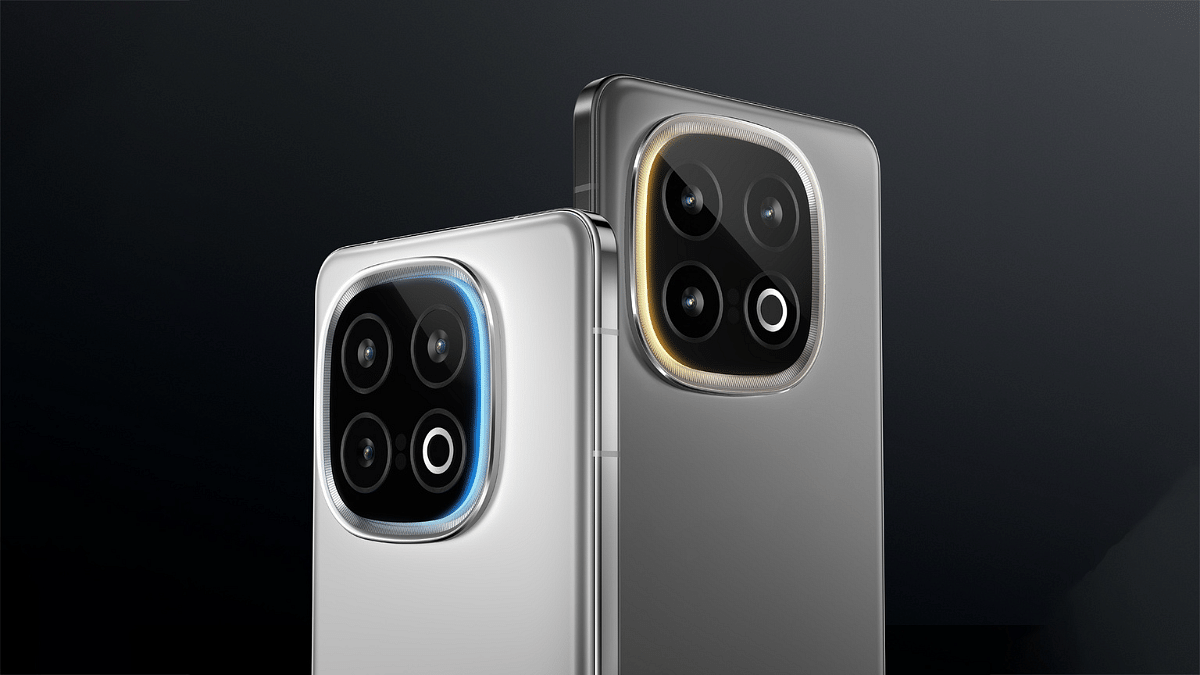
  • Triple-camera setup: 50MP Sony IMX 921 VCS, 50MP telephoto, and 50MP ultrawide lens.
  • 32MP front camera supports 4K videos at 60fps.
  • Features AI Photo Enhancer, Instant Text extraction, and up to 30x zoom.

Also Read | iQOO 12 Vs OnePlus 11: Top Flagship Android Phone Comparison

Software And AI

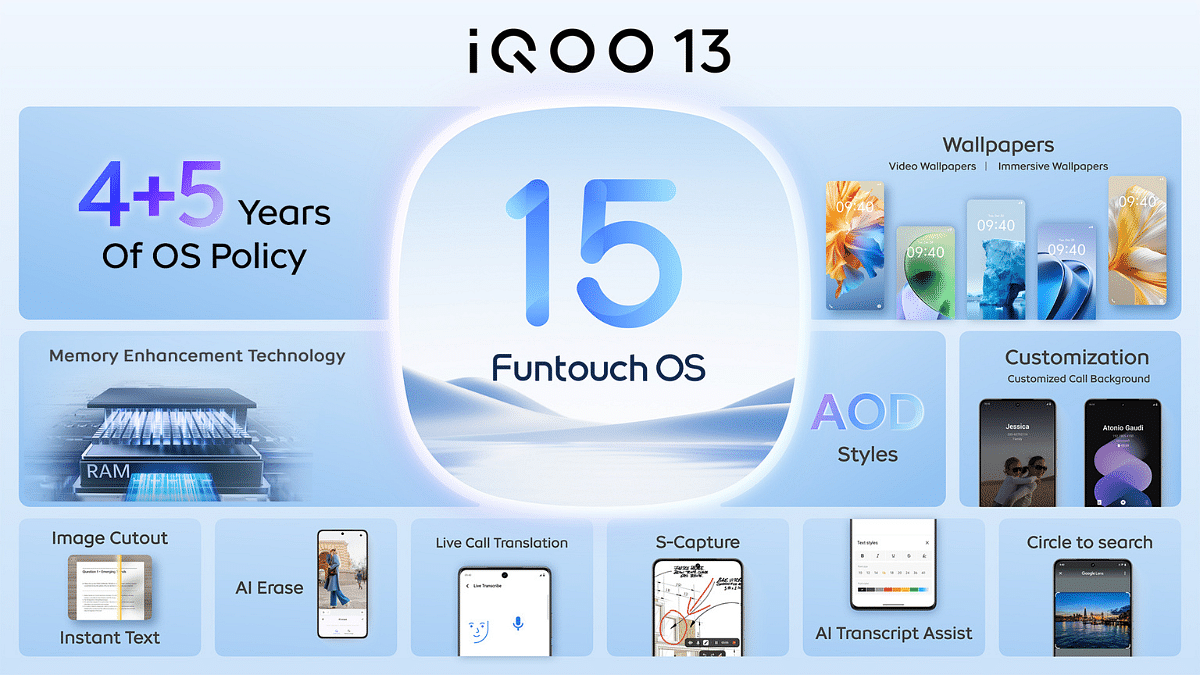
  • Runs on Funtouch OS 15, based on Android 15, with 4 years of Android updates and 5 years of security updates.
  • Includes features like Live Call Translate and Live Transcribe for improved accessibility.

For the tech geeks, stay updated with the latest cutting-edge gadgets in the market, exclusive tech updates, gadget reviews, and more right on your phone’s screen. Join Giznext’s WhatsApp channel and receive the industry-first tech updates.
Categories
Featured Info Mobile

iQOO 13 To Come With 4 Years Of Android And 5 Years Of Security Updates

Key Highlights

  • iQOO 13 to offer 4 years of Android and 5 years of security updates
  • Features AI tools like Photo Enhance and real-time translation
  • Improved performance and customization options

The iQOO 13, company’s flagship smartphone, is all set to be unveiled tomorrow, December 3. With four years of Android upgrades and five years of security updates, the phone will run the most recent version of Funtouch OS 15 which offers the longest software support ever. Here’s what to expect from this latest update.

Also Read | OnePlus 12 vs iQOO 12: Top Flagship Smartphones Compared

AI-Powered Features

  • AI Photo Enhance: Automatically adjusts brightness, contrast, color saturation, and white balance to improve your photos.
  • Instant Text: Allows you to extract, copy, and share text from any image with ease.
  • Instant Cutout: Instantly removes the background from images and helps in creating clean subject cutouts.
  • AI Super Document: Uses AI to remove shadows from documents. This ensures clearer text and images.
  • Circle to Search: Simply circle content on your screen to get instant, relevant search results.
  • Screen Translation: Translates on-screen content instantly, supporting multiple languages.
  • AI Translation during Calls: Translates your phone conversations into your preferred language in real time.
  • Live Transcribe: Converts speech into text, supporting over 80 languages online and 9 offline.

Optimized Performance

  • Smart Scheduling: Allocates resources to foreground apps, improving app launch speed by 15 percent.
  • Memory Enhancement Technology: Increases compression speed by 40 percent, making storage management easier.
  • Smooth Touch: Optimizes over 700 touch scenarios to ensure a smooth touch experience.

Customization

  • UI Customization: Choose from over 3,800 design elements like live/static wallpapers, new fingerprint animations, and Always On Display options.
  • Personalize Your Icons: Adjust icon styles, hide/show names with a switch, and add new Home Screen Clock Widgets.
  • Local Video Wallpapers: Set your own videos as live wallpapers and choose from 5 call background options.

Also Read | iQOO Neo 7 5G Vs OPPO Reno 8T 5G Full Comparison: Best Phone Under Rs. 30,000

Ultra Game Mode

  • Game Mode UI: The updated Ultra Game Mode includes features like Touch Sampling adjustment and Network Switch setting for better performance.
  • Game Small Window: Play games in a smaller window for multitasking while gaming.
  • FPS Meter: Monitor your gaming performance with the newly introduced FPS meter.

For the tech geeks, stay updated with the latest cutting-edge gadgets in the market, exclusive tech updates, gadget reviews, and more right on your phone’s screen. Join Giznext’s WhatsApp channel and receive the industry-first tech updates.
Categories
Featured How To Mobile

Call Barring On Android And iOS: Here’s How To Enable It To Block Spams/ Scam Calls And Enhance Privacy

Key Highlights

  • Call barring feature allows blocking unwanted calls
  • Calls can be barred for incoming and outgoing calls
  • International call barring can also be activated

Smartphones and modern telecom network have proved to be a blessing in disguise for the modern masses. While these pocket-sized gadgets are making out daily routine more convenient, the bad effects are getting difficult to get rid off. From usage addiction to users getting scammed, smartphone side-effects are definitely ramping up. But thankfully, there are several ways that can help you to stay safe from such adverse affects. And in this article, we will be guiding you with one of the easiest ways to stay protected from potential scammers who take undue advantages by calling and posing as authorities, recruiters, etc. The call barring feature is what comes to rescue here and the steps to activate it are fairly easy too.

Also Read: ChatGPT’s Advanced Voice Mode Lands On The Web: Here’s How To Use

How To Enable Call Barring Manually Using Phone Settings

You can enable the call barring feature on both Android and iOS smartphones. The procedure is almost same which helps you block advertisement and scam calls.

Step 1: Unlock your respective smartphones and launch the dialer app.

Step 2: Locate the menu option (three vertical dots) on the top right of the dialer app

Step 3: You will see the “Settings” option. Tap on it

Step 4: Select the Calling Accounts option

Step 5: Another new settings page will open up with ‘Operator-related Settings’ option. Click on it.

Step 6: Now, tap on the Call barring option. Depending on the phone’s model, this setting could also be mentioned as Call Blocking and other names.

Step 7: You will now see the list of calls that can be barred including “All Incoming Calls”, “Outgoing International”, “Outgoing International Roaming”, “Reject All Incoming Calls”, and “Reject Incoming Calls While Roaming”

Categories
Featured Info Mobile

OPPO Find X8 Series Launched In India: Check Specifications, Price And Availability

Key Highlights

  • OPPO Find X8 unveiled in India
  • Lineup include OPPO Find X8 and OPPO Find X8 Pro
  • Price starts at Rs. 69,999

The much-awaited Find X8 Series has been revealed in India by OPPO. The series redefines high-end smartphones with its flagship MediaTek Dimensity 9400 SoC, quad-camera setup, and advanced AI technologies. Starting at Rs. 69,999, these devices will be available from December 3 on major platforms and retail outlets.

Also Read | OPPO F27 5G Review: A Potent Mid-Tier Player In Town

Variants And Pricing

ModelVariantPrice
OPPO Find X8 Pro16GB + 512GBRs. 99,999
OPPO Find X812GB + 256GBRs. 69,999
OPPO Find X816GB + 512GBRs. 79,999

Design

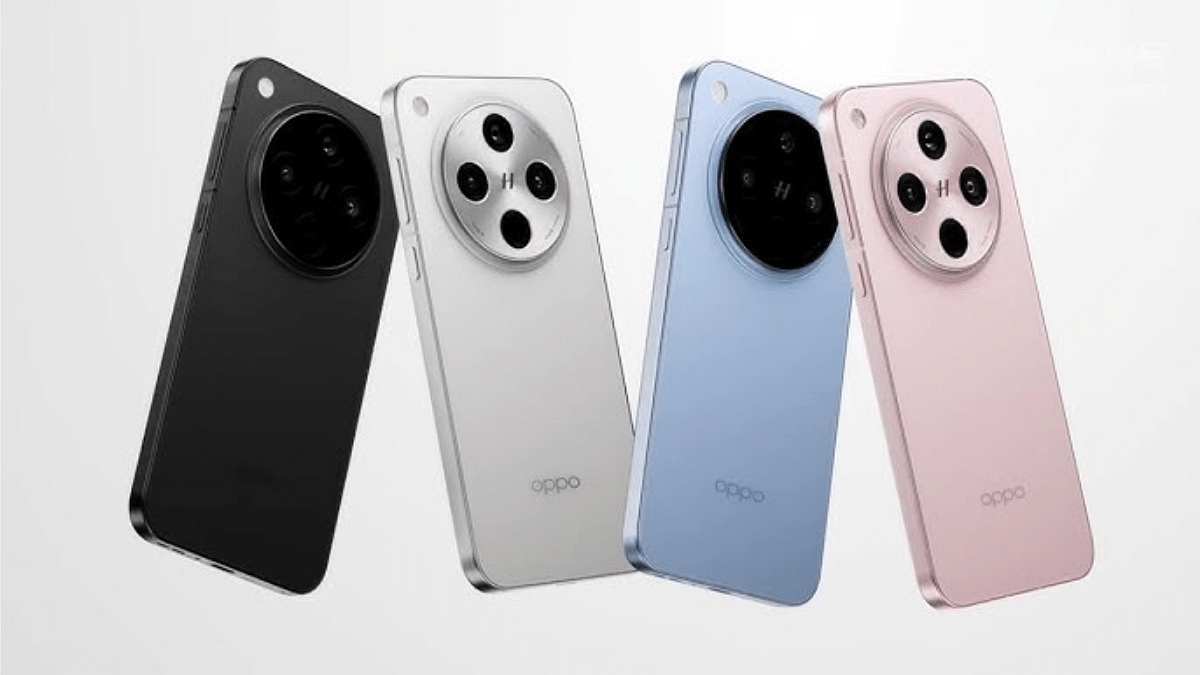
  • Find X8 Pro has quad-curved glass, 8.24mm thin, weighs 215g. Available in Space Black and Pearl White (unique pearlescent patterns)
  • Find X8 has flat-sided design, 7.85mm thin, weighs 193g. Available in Star Grey and Space Black
  • Both models boast IP68 and IP69 certifications, Gorilla Glass 7i protection, and peak brightness of 4500 nits

Camera

  • Quad-camera setup on both models with dual telephoto lenses
  • Find X8 Pro features the LYT808 primary sensor, 50MP Triple Prism Lens 3x Telephoto, 50MP Periscope 6x Telephoto, and 50MP ultra-wide cameras
  • AI-backed Telescope Zoom offers seamless zoom up to 120x
  • Hasselblad-tuned colors and Dolby Vision video recording
  • Lightning Snap enables ultra-fast burst shots of up to 200 photos in 30 seconds

Performance

  • MediaTek Dimensity 9400 processor with 40 percent power efficiency improvement
  • AI-powered features enhance photography, productivity, and gaming

Silicon Carbide battery

  • Find X8 Pro: 5910mAh, full charge in 55 minutes (80W SUPERVOOC)
  • Find X8: 5630mAh, full charge in 58 minutes

Also Read | Oppo Reno 11 Vs Poco X6 Pro: Mid-Range Android Phone Comparison

Launch Offers

  • 10 percent cashback on select bank cards and no-cost EMI for up to 24 months
  • Pre-booking benefits: One-year extended warranty
  • Exchange bonus: Rs. 5,000 + upgrade bonus of up to Rs. 3,000 for OPPO users.

For the tech geeks, stay updated with the latest cutting-edge gadgets in the market, exclusive tech updates, gadget reviews, and more right on your phone’s screen. Join Giznext’s WhatsApp channel and receive the industry-first tech updates.

Categories
Tech Gadgets

Mahindra BE 6E Real-Life Spy Shots Emerge: Flush-Fitted Door Handles, ORVM-Integrated Turn Indicators, And More

Key Highlights

  • BE 6E spied in full production-ready avatar
  • Spotted during testing
  • Flush-fit door handles

Mahindra BE 6e is the upcoming hot shot in the compact e-SUV market which is set to break covers next week in the country. Mahindra has been teasing the new electric SUVs design and other key highlights via its social media handles. And after the official teasers, its real-life images has been snapped for the first time.

For the tech geeks, stay updated with the latest cutting-edge gadgets in the market, exclusive tech updates, gadget reviews, and more right on your phone’s screen. Join Giznext’s WhatsApp channel and receive the industry-first tech update.

Also Read: Mahindra XUV 400 Electric SUV Achieves 5 Star Rating In BNCAP Crash Tests

Mahindra BE 6e Real-Life Snapshots Leak: Details Revealed

https://packaged-media.redd.it/l31yzdvk011e1/pb/m2-res_1920p.mp4?m=DASHPlaylist.mpd&v=1&e=1732010400&s=17d6af0addcdb0b3d2dfdada08f4ea37746f4812

The Mahindra VE 6e has been spotted during its test run. The first-ever spy-shots of the BE 6E showcases the final production-ready model sprinting through the Indian roads wrapped in bluish camouflage covers. The Spy video shared on Reddit shows the upcoming e-SUV’s futuristic design approach including the coupe design language, C-shaped LED headlamps and connected LED lights both at the front and the rear.

The final production-ready unit of the BE 6e is also seen with flush-fitted door handles. The rear panel gets C-pillar mounter door handles similar to the Tata Punch. But what instantly grabs the attention is the overall angular design approach of the coupe-style electric SUV and the big cavity-like (centrally positioned) bonnet design.

Also Read: Tata Harrier EV March 25 India Launch Confirmed

Mahindra BE 6e: Details Confirmed Till Now

Mahindra BE 6e’s confirmed details include the November 26, 2024 launch date. This e-SUV will be debuting alongside the XEV 9e whose first look has also been revealed via official teasers. The BE 6e is known to be underpinned by the new INGLO Skateboard platform and will be a performance-oriented e-SUV. The BE 6e will feature a dual screen layout on the dashboard and will come equipped with a new two-spoke steering wheel.

Categories
Featured How To Laptop Mobile

Zero-Day Vulnerabilities Hit Apple Users: Here’s How To Secure Your Devices

Key Highlights

  • Apple released urgent updates for security flaws
  • Hackers can exploit these to steal data
  • Update devices now to stay secure

Apple just released critical security updates for users of the iPad, iPhone, and Mac. Two serious ‘zero-day’ vulnerabilities that hackers have actively exploited are addressed by these upgrades. These vulnerabilities could allow hackers to take over your device or steal confidential information if they are not fixed. Software updates are essential for your security. What you need know about the vulnerabilities are covered in this post.

Also Read | Password Privacy: How To Create And Remember Strong Passwords

What Are Zero-Day Vulnerabilities?

These are security flaws that are discovered by attackers before the software maker, in this case, Apple. This makes them highly dangerous as they can be exploited without warning.

Who Discovered The Issues?

Google’s Threat Analysis Group, known for investigating cyberattacks, found the flaws. They noted that the vulnerabilities were being actively used in targeted attacks.

What Do The Flaws Target?

The vulnerabilities affect WebKit and JavaScriptCore, software components essential for running web content on Apple devices. WebKit, in particular, is frequently targeted by hackers.

How Could Hackers Exploit This?

By tricking users into visiting malicious websites or opening harmful content, hackers could execute malicious code on the device. This could lead to malware installation or data theft.

Which Devices Are Affected?

The security issues impact:

  • Intel-based Mac computers.
  • iPhones running iOS 17 or older versions.
  • iPads using iPadOS or older software.

Apple has rolled out fixes for all these devices, including older models.

Why Should You Update Immediately?

Delaying updates could leave your device vulnerable to cyberattacks. Here’s why updating is crucial:

  • Protects against malware and hackers.
  • Prevents unauthorized access to private data.
  • Ensures a safer browsing experience.

How To Update Your Device

Follow these steps to secure your Apple devices:

  • For iPhone or iPad: Go to Settings > General > Software Update.
  • For Mac: Open System Preferences > Software Update.
  • Install immediately to close the security gaps.

Also Read | Online Safety: Eight Essential Cybersecurity Tips For Kids

Stay Safe Online

Cyber threats are growing more advanced. However, frequent upgrades might protect your devices from possible damage. Now is a good time to upgrade your iPad, iPhone, or Mac. Don’t risk your safety. Keep your software up to date to stay one step ahead of hackers.

For the tech geeks, stay updated with the latest cutting-edge gadgets in the market, exclusive tech updates, gadget reviews, and more right on your phone’s screen. Join Giznext’s WhatsApp channel and receive the industry-first tech updates.

Categories
Featured Info Laptop Mobile

Apple Declares Older Devices Vintage And Obsolete: Full List Inside

Key Highlights

  • Apple emphasizes sustainability
  • Devices discontinued for 5-7 years are now listed as Vintage
  • Obsolete devices no longer receive hardware support

Recently, Apple has announced that a number of its older devices, such as iPhones and MacBooks, have been categorized as Vintage or Obsolete. Older models are classified as obsolete with little to no hardware support, while devices that have been discontinued for five to seven years are classified as vintage. Here’s what it means for you.

Also Read | Foldable Devices On The Horizon: What Apple Has in Store For iPhones And iPads

What Does Vintage And Obsolete Mean?

  • Vintage Devices: Products that are stopped from being distributed for 5-7 years.
  • Obsolete Devices: Products discontinued entirely with hardware service no longer available, except where required by law.

Vintage Products List

MacBook:

  • Retina, 12-inch (2017)

MacBook Air:

  • 11-inch (Early 2015)
  • Retina, 13-inch (2018)

MacBook Pro:

  • 13-inch (2017, 2 TBT3 and 4 TBT3)
  • 13-inch (2018, 4 TBT3)
  • 13-inch (2019, 4 TBT3)
  • 15-inch (2017 and 2018)
  • Retina, 15-inch (Mid 2015)

Mac Desktops:

  • iMac (21.5-inch, Early 2013)
  • Retina 4K, 21.5-inch (2017)
  • Retina 5K, 27-inch (Mid 2015 and 2017)
  • Mac mini (Late 2014)
  • Mac Pro (Mid 2012)

Vintage iPhone Models

These iPhones are considered vintage:

  • iPhone 4 (8GB)
  • iPhone 5
  • iPhone 6s Plus
  • iPhone SE
  • iPhone 8 Red and 8 Plus Red
  • iPhone X and XS Max

Obsolete iPhone Models

The following iPhones are now obsolete worldwide:

  • iPhone 3G, 3GS, and 4 models (all variants)
  • iPhone 5C
  • iPhone 5S
  • iPhone 6 and 6 Plus
  • iPhone 6s and 6s Plus (32GB)

Also Read | From New York To Tokyo: Five Best Apple Stores Around The World

Extended Repair Options

For up to 10 years following purchase, Apple provides extended battery-only repair for MacBooks. The parts’ availability depends on this. This program makes sure that devices last longer. It will promote environmental sustainability and lessen electronic waste.

For the tech geeks, stay updated with the latest cutting-edge gadgets in the market, exclusive tech updates, gadget reviews, and more right on your phone’s screen. Join Giznext’s WhatsApp channel and receive the industry-first tech updates.

Categories
Featured Info Mobile

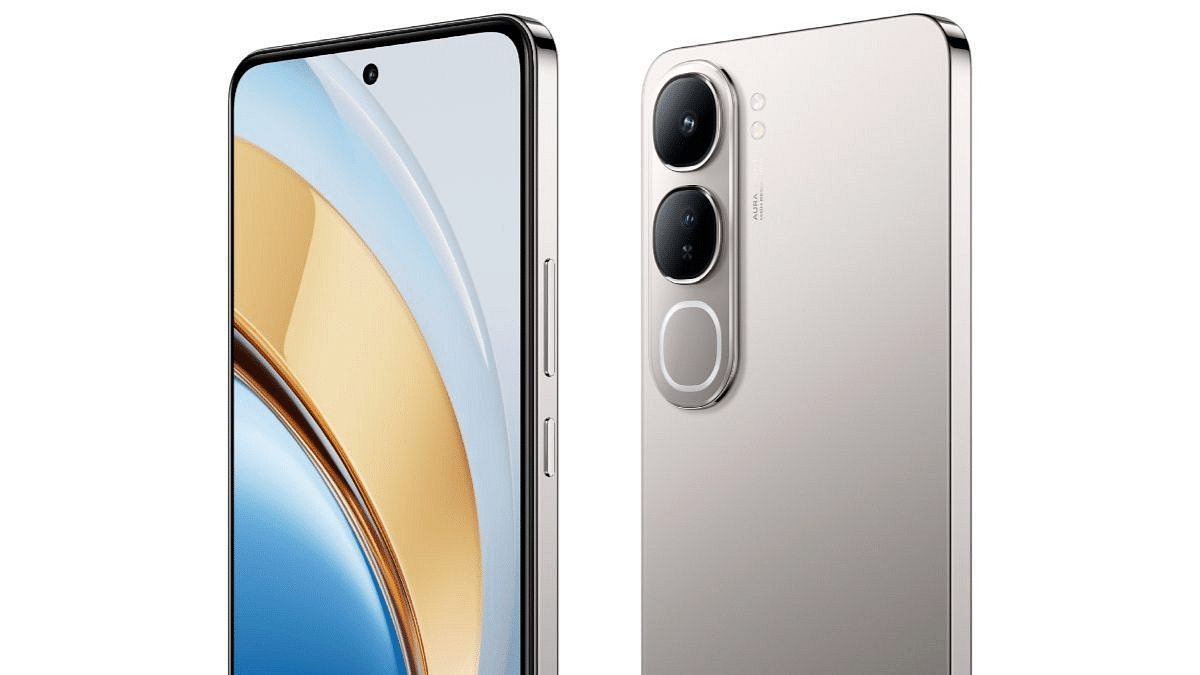
Vivo Y300 5G To Launch On November 21 In India: Check Expected Features

Key Highlights

  • Vivo Y300 5G launch date is on November 21
  • Titanium-inspired design with dual Sony IMX882 cameras
  • Snapdragon 4 Gen 2, up to 8GB RAM
  • 5,000mAh battery with 80W support

Vivo is set to introduce its latest mid-range smartphone, the Vivo Y300 5G, in India. The brand recently teased the device on social media platform X, showcasing its sleek rear design. Here’s a rundown of what we know so far.

Also Read | Vivo T3 Ultra 5G Smartphone Review: A Flagship Experience For Less?

Vivo Y300 5G: Expected Features

Stylish Titanium-Inspired Design

  • The smartphone will have a titanium-inspired design and sleek look.
  • It may come in three color options: Titanium Silver, Emerald Green, and Phantom Purple.

Fast Performance

  • The Vivo Y300 5G is expected to be powered by the Snapdragon 4 Gen 2 processor for solid performance in daily tasks.
  • It may be available with up to 8GB of RAM for smooth multitasking and app performance.

Dual Camera Setup

  • The Vivo Y300 5G is set to feature a dual-camera system on the back. It is arranged vertically alongside an LED flash.
  • The primary camera is rumored to have a Sony IMX882 sensor.
  • Vivo’s signature “Aura Light” feature is also expected.

Long-Lasting Battery

  • This phone will likely come with a 5,000mAh battery.
  • It is tipped to support 80W fast charging.

Also Read | Vivo T3 Pro 5G Review: Mixed Bag Or Real Deal?

Pricing and Availability

  • The Vivo Y300 5G is expected to fall under the Rs. 25,000 price range, similar to its predecessor, the Vivo Y200.
  • Vivo has confirmed the launch date of Y300 to be on November 21, 2024, at 12 noon.

For the tech geeks, stay updated with the latest cutting-edge gadgets in the market, exclusive tech updates, gadget reviews, and more right on your phone’s screen. Join Giznext’s WhatsApp channel and receive the industry-first tech updates.
Categories
Featured How To Mobile

Android Tips And Tricks: How To Check And Share Wi-Fi Password

Key Highlights

  • Multiple devices can be connected with a single Wi-Fi network
  • Option to check Wi-Fi password available on Android OS
  • Latest Android OS version offers a simplified process

Android OS is the most potent mobile operating systems powering modern smartphones, tablets, and even other gadgets. With an Android smartphone, you can now get done with endless tasks moving away from basic calling and messaging. Internet connectivity has proved to be the game changer for mobile phones. And thanks to the technology upgrades, faster internet speeds can now be achieved with smartphones when connected to a Wi-Fi or high-speed 4G/ 5G mobile networks. If you wish to know the steps to share or check the Wi-Fi password on your Android smartphone or tablet, then this quick guide is what you need to go through.

For the tech geeks, stay updated with the latest cutting-edge gadgets in the market, exclusive tech updates, gadget reviews, and more right on your phone’s screen. Join Giznext’s WhatsApp channel and receive the industry-first tech update.

Also Read: ChatGPT Search Quick Hacks: How To Use ChatGPT As Default Search Engine In Google Chrome

How To Check And Share Wi-Fi Password Using Any Android Smartphone/ Tablet

To get done with checking Wi-Fi password using any Android smartphone, you need to first ensure the OS version of your device is the latest. The newer Android versions offer a simplified process to check the Wi-Fi internet password.

Step 1: Unlock your Android smartphone and scroll down the notification bar

Step 2: Tap on the Wi-Fi icon. You can also visit the Setting menu and launch the Wi-Fi option

Step 3: If you are already connected to a network, simply tap on the “i” button in front it. Or else, connect to a network first and then hit the “i” tab.

Step 4: You will see three different options, “Disconnect”, “Forget”, and “Share”.

Step 5: Click on Share

Step 6: You will be prompted to unlock the device using fingerprint or pattern/pin passwords.

Step 7: Once the Step 6 is performed, a new tab will open up showing the QR code which any other user can scan on their device to get connected to the same Wi-Fi network.

Step 8: You will also be able to see the Wi-Fi password on the top.

Step 9: Share the Wi-Fi password or the scan code with desired users and you are all set.

Categories
Featured How To Mobile

Motion Sickness? Here’s How To Turn On Vehicle Motion Cues In iOS 18 For A Comfortable Ride

Key Highlights

  • Reduces motion sickness while using iPhone in a moving vehicle
  • Uses device sensors to adjust the screen with animated dots
  • Easy to activate via Accessibility settings

A useful feature ‘Vehicle Motion Cues’ in iOS 18 is designed to lessen motion sickness when using your iPhone or iPad in a moving car. It makes screen adjustments using your device’s sensors. Here’s how to activate it and how it functions.

Also Read | iOS Tips And Tricks: How To Manage Automatic ETA Sharing Using iPhone, iPads In Apple Maps

Vehicle Motion Cues: What Is It?

Motion sickness can occur when there’s a mismatch between what we see and what we feel. Apple’s Vehicle Motion Cues feature adds animated dots to the screen’s edges to help in this. These dots show how the motion of the car has changed which lessens the discomfort that comes from sensory conflict when using your phone. It determines whether you are in a car by using the sensors that are already installed on your iPhone or iPad. After that, it automatically adjusts to improve your comfort level.

How To Turn On Motion Cues For Vehicles In iOS 18

Using this new feature is easy. Just follow these simple steps:

Step 1: Tap on the Settings app on your device to begin.

Step 2: Scroll down and tap on ‘Accessibility.’

Step 3: Under the ‘Accessibility’ menu, tap on ‘Motion.’

Step 4: Look for the option that says ‘Show Vehicle Motion Cues’ and toggle it on.

Also Read | iOS Tips & Tricks: Learn How To Set Up Your Contact Poster On iPhone

Once enabled, whenever your iPhone or iPad senses movement, the animated dots will show up on the screen’s edges. These indicators change in real time. This can lessen motion sickness by adjusting to the motion of the car. The Vehicle Motion Cues feature can be set to automatically turn on whenever the device detects motion, so you don’t have to manually adjust it each time.

For the tech geeks, stay updated with the latest cutting-edge gadgets in the market, exclusive tech updates, gadget reviews, and more right on your phone’s screen. Join Giznext’s WhatsApp channel and receive the industry-first tech updates.