
Key Highlights
- Aadhaar card is an important ID document
- Duplicate aadhaar card can be applied online
- Applications for duplicate aadhaar card can also be done offline
Aadhaar card is validated as the most essential identity document by the government of India. It is mandate for every single citizen to apply for a Aadhaar identification card which can be done via UIDAI (Unique Identification Authority of India). For those who already own an Aadhaar card, loosing it can be a scary situation. If you somehow land in such situation where your Aadhaar card has been misplaced or stolen then you don’t have to panic. Thanks to the digitisation, it is now super easy to apply for a duplicate Aadhaar card online. Let’s dive into the steps below:
For the tech geeks, stay updated with the latest cutting-edge gadgets in the market, exclusive tech updates, gadget reviews, and more right on your phone’s screen. Join Giznext’s WhatsApp channel and receive the industry-first tech update.
Also Read: Summer 2025 Buying Guide: How To Choose The Perfect Air Conditioner And Pay Less Electricity Bills
Steps To Apply For Duplicate Aadhaar Card Online
1. Retrieve Your Aadhaar Number (If Not Available)
This is the most crucial step to initiate the process of applying a duplicate Aadhaar card. If you already remember your EID (Enrolment ID) or UID (Aadhaar number) then you can simply jump to the step 2.
How To Check Aadhaar UID/ EID On Laptop/ PC

- Open any web browser and go to the official UIDAI website (https://uidai.gov.in).
- Head to the ‘My Aadhaar’ section.
- Tap on the “Retrieve Lost UID/EID”
- You will need to enter the registered mobile number or email ID associated with your Aadhaar.
- Enter the CAPTCHA for verification
- Tap on the “Send OTP” option.
- You will receive an OTP on your registered mobile number. Enter it and click submit.
- You will receive the Aadhaar number or Enrolment ID on your registered mobile via SMS.
How To Check Aadhaar UID/ EID On Android, iOS

- Download an install Umang app via Google Play Store or App store on iOS
- Search Aadhaar services
- Go to Retrieve EID/ Aadhaar Number section
- Select EID or Aadhaar number option
- Enter your register mobile number or email address
- After completing the captcha verification, tap on Send OTP
- Enter the OTP and tap on submit. You will receive the EID/ Aadhaar number on your mobile via an SMS.
Also Read: Summer 2025 Buying Guide: How To Choose The Perfect Air Conditioner And Pay Less Electricity Bills
2. Order a Reprint of Aadhaar Card/ Duplicate Aadhaar Process

Once you have retrieved the EID or Aadhaar number, it will be become easy for you to apply for a duplicate aadhaar card. You can also request for a reprint which will cost you minimal charges of Rs. 50.
- Visit the official UIDAI website once again. Open any browser and search https://uidai.gov.in.
- Open ‘My Aadhaar’ section
- Tap on “Order Aadhaar Reprint” option. This is the step for printing a duplicate aadhaar card.
- You will need to enter the Aadhaar number or Virtual ID.
- Confirm and enter the security code
- Now, click on the “Send OTP” option.
- Verify the OTP that you will receive on the registered mobile number.
- A nominal fee of Rs. 50 (including GST and speed post charges) will be charged. Complete the payment.
- Once all these steps are performed, the duplicate Aadhaar card will be sent to the registered address via post. Estimated timeline for the same is around 5- 7 working business days.
3. Download e-Aadhaar Card Online For Emergencies
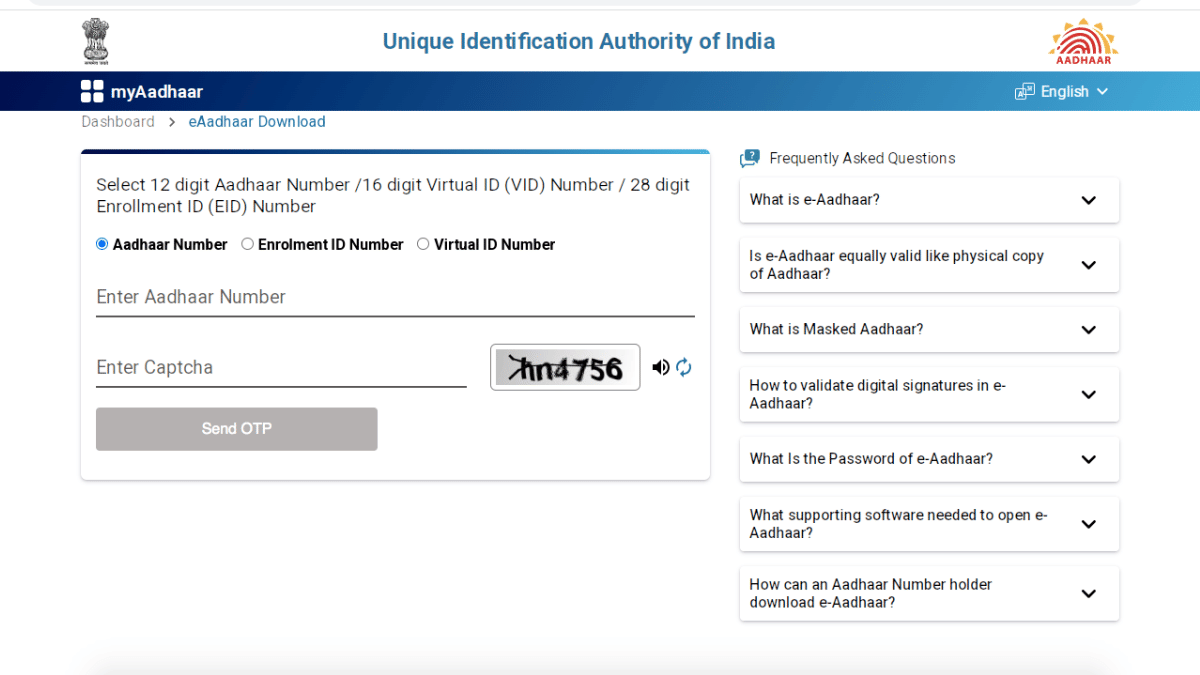
You can always keep a copy of e-Aadhaar card in case of lost or misplaced physical card. The steps for the same are below
- Launch https://eaadhaar.uidai.gov.in website.
- Navigate to the Download Aadhaar option and click on it
- Enter your Aadhaar number, Enrolment ID, or Virtual ID.
- Complete CAPTCHA verification
- Select the “Send OTP” option.
- Enter the OTP which will be sent on the registered mobile number.
- Click “Download Aadhaar”. The file will be saved as PDF.
