Categories
Accessories Featured Info

Philips Launches ‘Sneaker Cleaner GCA1000/60’ In India: Know Price And Features

Key Features

  • Philips Sneaker Cleaner launched in India
  • It caters to the rapidly growing sneaker community in India
  • The Sneaker Cleaner is priced at Rs. 2,595

India’s sneakerheads won’t have to worry about cleaning their shoes any more thanks to a nifty solution from Philips. A new product from the home appliance company has been introduced to meet the needs of the nation’s growing sneakerhead population. In order to capitalize on the growth that Indian sneaker culture is seeing, Philips has introduced the GCA1000/60, a new sneaker cleaning that is a first-of-its-kind product from the company.

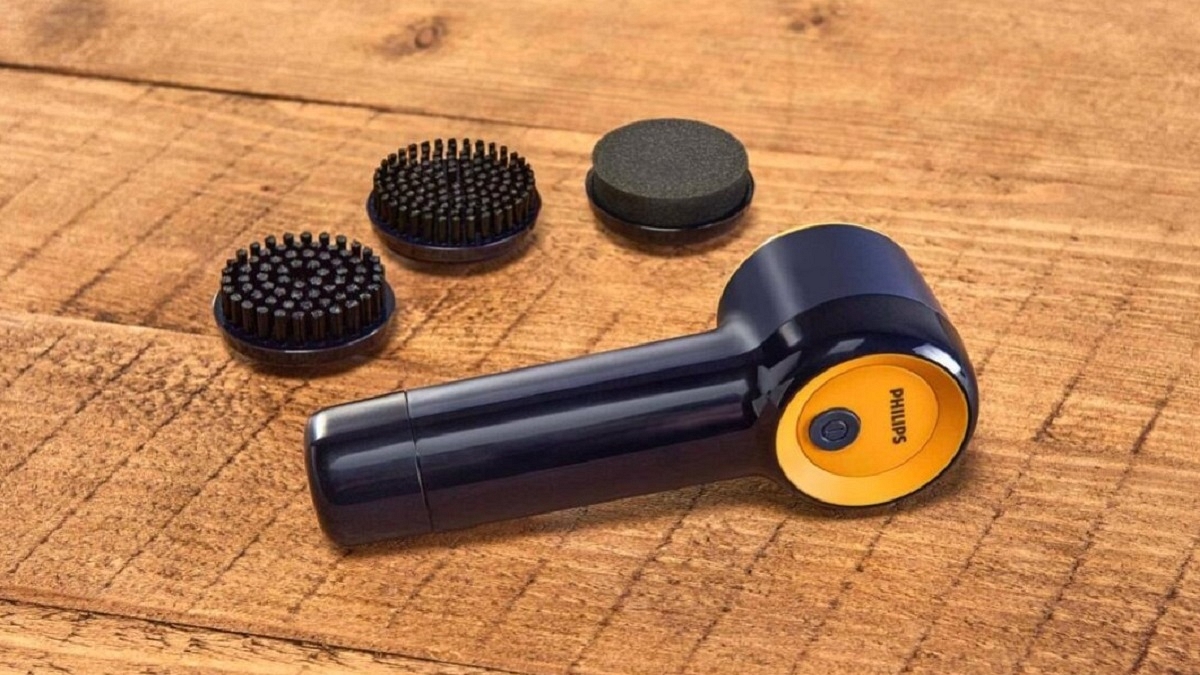
The Philips Sneaker Cleaner GCA1000/60 is an automated cleaning device. This helps sneakerheads always keep their sneakers or shoes spotless, clean, and crease-free. Here is everything you should know about the newly released product:

Philips Sneaker Cleaner: Features

The Philips Sneaker Cleaner GCA1000/60 is a portable handheld sneaker cleaner that promises to make cleaning your sneakers “a seamless, hassle-free, and affordable experience.” It features a motor with 500 RPM.

The Philips Sneaker Cleaner GCA1000/60 further has an IPX5 waterproof rating. The cordless sneaker cleaner weighs 0.35 kg which makes it lightweight and portable. The cleaner automates the rubbing and scrubbing part of cleaning sneakers. It comes with effective bristles and a water-resistant head, which works at a touch of a button. The device further comes with four 6V AA battery and claims to have a run time of 80 minutes.


The Hard Brush is best for deep cleaning tough surfaces like textured rubber or shoe soles, while the Soft Sponge is best for delicate fabrics like PVC, leather, and suede. Apart from this, it has a water-resistant head that ensures the device remains safe. The Soft Brush has multipurpose usage and is ideal for mesh and canvas.

Philips Sneaker Cleaner: Price And Availability

The price of the ‘Sneaker Cleaner GCA1000/60’ in India is set at Rs. 2,595. The product comes with two years of worldwide guarantee and has a Black and Yellow color combination. It is exclusively available for sale through Philips Domestic Appliances e-store.
Categories
Apps Featured How To

iOS 16 Tips And Tricks: How To Add Up To 15 Stops In Maps With iOS 16 Beta

The iOS 16 took the centerstage at the WWDC 2022 even hosted a while ago. Apple released the iOS 16 with some major improvements over the previous-gen versions including the iOS 15 which is currently the backbone of the iPhone 13 series. Apple not just introduced a facelift with the iOS 16 but has also added multiple new features to the new-generation firmware for the upcoming iPhone 14 series and the supported older models. If you have one of the latest iPhones, you can also download and install the iOS 16 beta version and test all the latest features being added to the OS.

We have previously covered the steps to download and use the iOS 16 beta version on eligible phones. Now, we are back with another tips and tricks article where we will be discussing one of the latest features that have been released for the iOS 16 beta version. You will now be able to add up to 15 different stops with the iOS 16. What factors do you need to keep in mind and how can you add multiple stops on a route using the default Maps app on eligible iPhones? Read on to know:

iOS 16 Lets You Add Multiple Stops In Default Maps App

Apple had introduced multiple new features with iOS 16 and Maps isn’t left behind. The option to add up to 15 different stops has now been made possible with the latest iOS beta version. You can make the changes to the stops before starting with your trips on Apple Maps. You just need to enter the destination to where you are traveling and then add the required stops in between the transit route. The steps for the same aren’t tricky and can easily be applied while using iOS 16-powered iPhones. Take a look below:

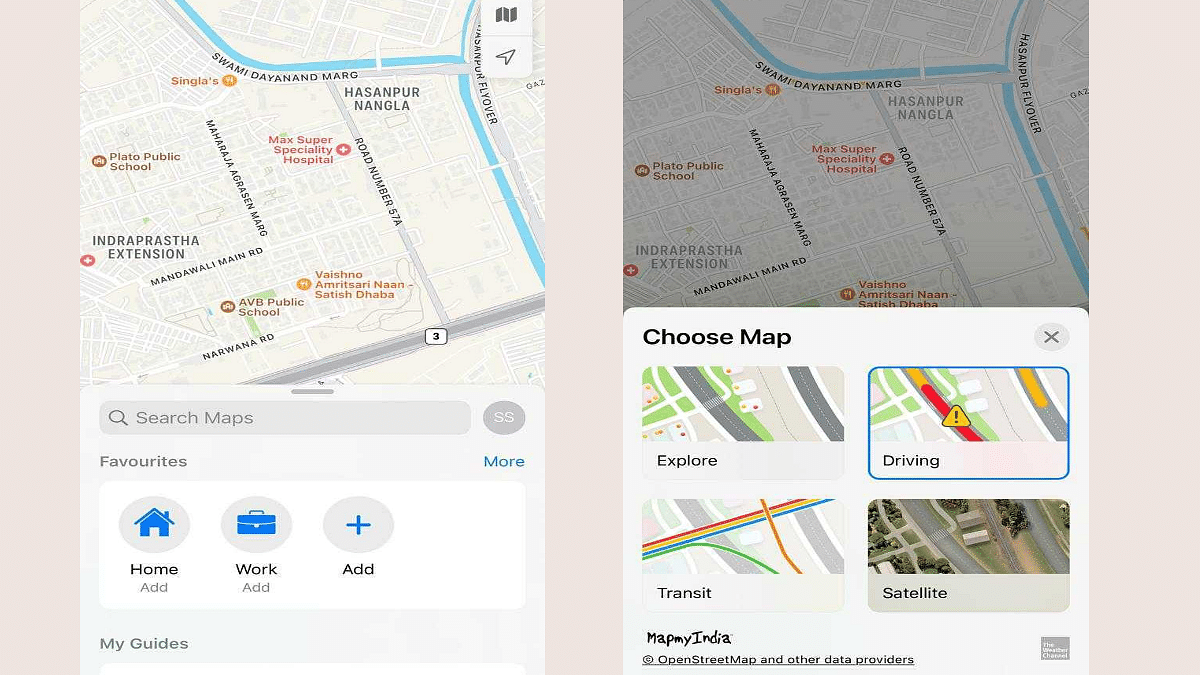
Step 1: Launch the default Maps app on your respective iPhones. Make sure the device is running on the iOS 16 beta build. Update your phone to the latest build version so that you can use this feature.

Step 2: In the search bar, enter the destination where you wish to travel.

Step 3: Select the driving option. This is the only transit mode where you will be able to add multiple stops to the destination. This feature is currently not supported with public, and bike transit modes. We are not sure if Apple will add this support with the stable iOS 16 version.

Step 4: Add the first stop. To do so, locate the first stop on the map. You can also use the search bar for the same and then select the location.

Step 5: Select the blue direction arrow under the location option.

Step 6: You will see the Add option right above the Routes tab. Tap on it and your first stop is added.

Step 7: Do the same to add the next stops. Only 15 stops can be added to the transit route as of now.

Step 8: If you wish to edit or re-arrange the route then drag the stop by clicking on the menu (three lines option). That’s it. You are all set.

Just to recap, Apple had also added the estimated transit fares on Maps with iOS 16. Another key feature released includes the option to share locations from Mac laptops or PCs to iPhones.

Categories
Featured Leaks Mobile

Samsung Galaxy Z Fold 4, Galaxy Z Flip 4 Cases Leak: All You Need To Know

Key Highlights

  • Cases design for the Galaxy Z Fold 4, Galaxy Z Flip 4 leaked
  • Both the smartphones are now available for pre-order
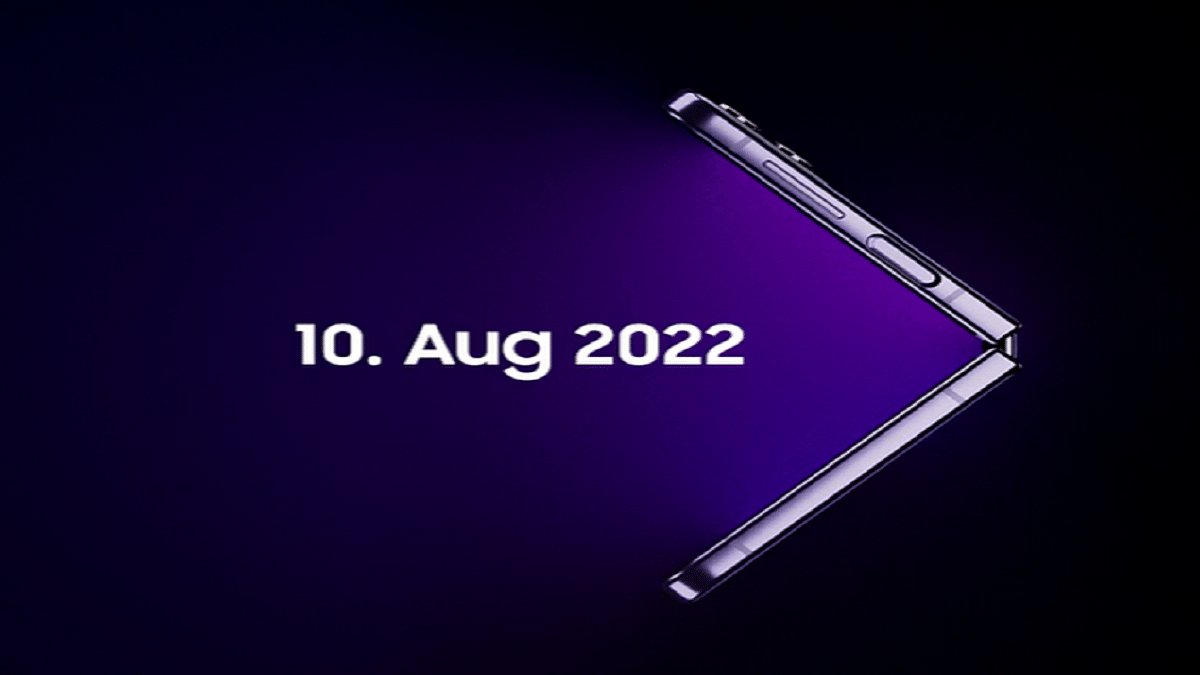
  • The devices will be unveiled on August 10

The Samsung Galaxy Unpacked 2022 event is around the corner. We are just a week away from the launch event where the South Korean tech giant will introduce two new foldable smartphones along with new smartwatches and Galaxy Buds TWS. However, leaks continue to occur on a regular basis.

The latest leaks show off cases for the Samsung Galaxy Z Fold 4 and Galaxy Z Flip 4 foldable devices. It shouldn’t be surprising that the cases don’t appear all that different because while the designs of the two phones have been modified, the basic concepts remain the same.

Samsung Galaxy Z Fold 4, Galaxy Z Flip 4: Case Designs Leaked

The Galaxy Z Flip 4 and the Galaxy Z Fold 4 appear to have silicone covers with straps made by Samsung. The white Z Flip 4 cover comprises white top and bottom halves that are connected by an orange strap. The white Silicone Cover with Strap for the Galaxy Z Fold 4 contains an orange strap to hold the phone. A white silicone piece further shields that strap. The device’s hinge, though, doesn’t seem to be protected in any way by the case.

In addition to these cases, Samsung also created the Clear Cover with Ring and the Flap Leather Cover for the Galaxy Z Flip 4. In addition to this, there is a Slim Standing Cover for the Galaxy Z Fold 4. This is great for propping the foldable up as a tablet during video calls and while watching videos and photos.

Samsung Galaxy Z Fold 4, Galaxy Z Flip 4: Launch Date

The Samsung Galaxy Z Fold 4 and the Galaxy Z Flip 4 foldable phones will be launched on August 10, 2022, during Samsung’s Galaxy Unpacked event. Although the launch event will take place virtually, interested people can watch it live on Samsung’s website and YouTube channel on August 10 at 6:30 PM.

Samsung Galaxy Z Fold 4, Z Flip 4 Now Available For Pre-Order

The upcoming foldable smartphones are already available for pre-order. According to the South Korean tech giant’s Indian division, customers can pre-reserve the Next Galaxy Fold and Flip smartphones for a small token price and receive certain additional perks at the time of the launch.

By paying a nominal fee of Rs. 1,999 on Samsung’s website and through Samsung Exclusive Stores, users who are eager to be among the first to obtain the Galaxy Fold 4 and the Galaxy Flip 4 will be able to pre-reserve or pre-order their foldable devices.

Categories
Featured Info Laptop

Asus Vivobook S 14 Flip, Zenbook 14 Flip OLED, And Vivobook 15 (Touch) Launched In India

Key Highlights

  • Asus unveils new laptops in India
  • The new lineup includes Asus Vivobook S 14 Flip, Zenbook 14 Flip OLED, And Vivobook 15 (Touch)
  • The starting price is Rs. 49,990

Asus introduced a compelling lineup of laptops today for the Indian market. Zenbook 14 Flip OLED, Vivobook S 14 Flip, and Vivobook 15 (touch) are among the new lineup of laptops. The new laptops, which have a starting price of Rs. 49,990, are stated to have compact and sleek designs, offer great performance, and enable users to multitask.

Asus Vivobook S 14 Flip

The 14-inch IPS panel on the Asus Vivobook S 14 Flip has a Full HD+ resolution of 1920 x 1200 pixels and a 16:10 aspect ratio. The touchscreen panel is 300 nits bright. Additionally, the laptop has been certified with TUF Rheinland for low blue light emissions.

The AMD Ryzen 5 5600H with AMD Radeon Graphics and the Intel Core i512500H with Intel Iris Xe graphics versions of the Asus Vivobook will both be available in India.

Asus Zenbook 14 Flip OLED

The Zenbook 14 Flip OLED is features 14-inch, 2.8K, 90Hz OLED touchscreen. It offers a screen-to-body ratio of 88 percent, a 16:10 aspect ratio, 550 nits of brightness, and a 4-sided NanoEdge design. The laptop can differentiate between 4,096 levels of pressure sensitivity and also enables stylus input.

The display of the Asus Zenbook 14 Flip OLED can be flipped to any position thanks to its 360-degree ErgoLift hinge. It has 16GB of LPDDR5 RAM on all variants and the most recent gaming-grade Intel 12th Gen H-series processors.

Asus Vivobook 15 (Touch)

Vivobook 15 is a sleek and lightweight device providing the experience of a 15.6-inches full HD screen with slim bezels with an immersive 82 percent screen-to-body ratio. The company claims that the Vivobook 15 is sleeker and lighter than its predecessors with an improved screen, a larger battery, and improved computing capabilities. The device’s overall weight has decreased from 1.9kg to 1.7kg.

Asus Vivobook S 14 Flip, Zenbook 14 Flip OLED, And Vivobook 15 Touch Price

The price of Vivobook S 14 Flip in India starts from Rs. 66,990. While the pricing for Zenbook 14 Flip starts from Rs. 99,990 and Vivobook 15 at Rs. 49,990 onwards. These newly launched Asus laptops will be available online and offline retail outlets such as Asus e-store, and Amazon.in, Flipkart, and Multi-Brand retailers.

Categories
Featured Leaks Mobile

OnePlus 10T With Snapdragon 8+ Gen 1 Chip Launched In India: Details Inside

Key Highlights

  • OnePlus 10T launched in India
  • It is powered by the new Qualcomm Snapdragon 8+ Gen 1 chip
  • The phone is priced starting at Rs. 49,999

Update:

OnePlus has launched OnePlus 10T 5G in India and around the world. The new OnePlus flagship smartphone is the latest model in the 10 series. It is powered by the new Qualcomm Snapdragon 8+ Gen 1 chip, making it the most powerful device in the brand’s portfolio to date. The phone also packs other flagship features such as a 50MP triple camera setup, up to 16GB of RAM, and a 4,800mAh battery with 150W fast charging support.

The OnePlus 10T 5G is priced starting at Rs. 49,999 in India and is up for pre-order until August 4. The smartphone’s open sales will begin on August 6, 2022, in the country.

OnePlus is all set to add a new member to the flagship OnePlus 10 series in India and global markets. The company now expanding this lineup with the launch of the OnePlus 10T in the country. The latest OnePlus 10 handset is breaking covers via an online launch event which will be streamed live via the brand’s social media handles. OnePlus has teased its upcoming flagship Android phone on several occasions and has revealed some of the key hardware details. What all improvements do the latest OnePlus 10 series phone brings to the table and how can you watch the launch event today? Read the details here:

OnePlus 10T Launch Live Stream Details, Expected Price

The OnePlus 10T official India launch has been confirmed for August 3, 2022In India. This arrival confirmation of the next OnePlus 10 flagship in India comes from the brand itself. The latest flagship Android phone will be launched via an online event. You can either head directly to the OnePlus official YouTube channel or click on this link to watch the OnePlus 10T live launch stream event. Just for reference, the launch event is being hosted at Gotham Hall, New York, and will begin at 7.30 PM IST.

While OnePlus has shared multiple details related to the hardware, it didn’t spill any beans related to the pricing. However, if we go by the leaks, the OnePlus 10T is expected to launch under Rs. 50,000 in India. We will update this section once the device goes official and the pricing and sale details have been announced.

OnePlus 10T Expected Specifications In India

The OnePlus 10T is arriving as yet another premium range Android phone by the Chinese tech giant. The handset will be driven by the Snapdragon 8+ Gen 1 processor. With this the OnePlus 10T will be amongst the first few smartphones powered by Qualcomm’s newest octa-core flagship chipset. OnePlus 10T is expected to ship with up to 16GB RAM and 256GB storage configuration. It will come void of expandable storage support as other high-end OnePlus phones.

The OnePlus 10T will boot on Android 12 OS and will feature a custom OxygenOS UI. The device will flaunt an FHD+ AMOLED screen that will have measure 6.7-inches. The panel will support 120Hz refresh rate that will ensure smooth feedback while scrolling and gaming. The OnePlus 10T’s imaging setup will comprise a 50MP triple rear camera module and a 32MP selfie snapper. A 4,800 mAh battery will keep the processor ticking on the OnePlus 10T. The device will feature 150W SuperVOOC flash charging technology as well.

Categories
Featured Home Appliances Info

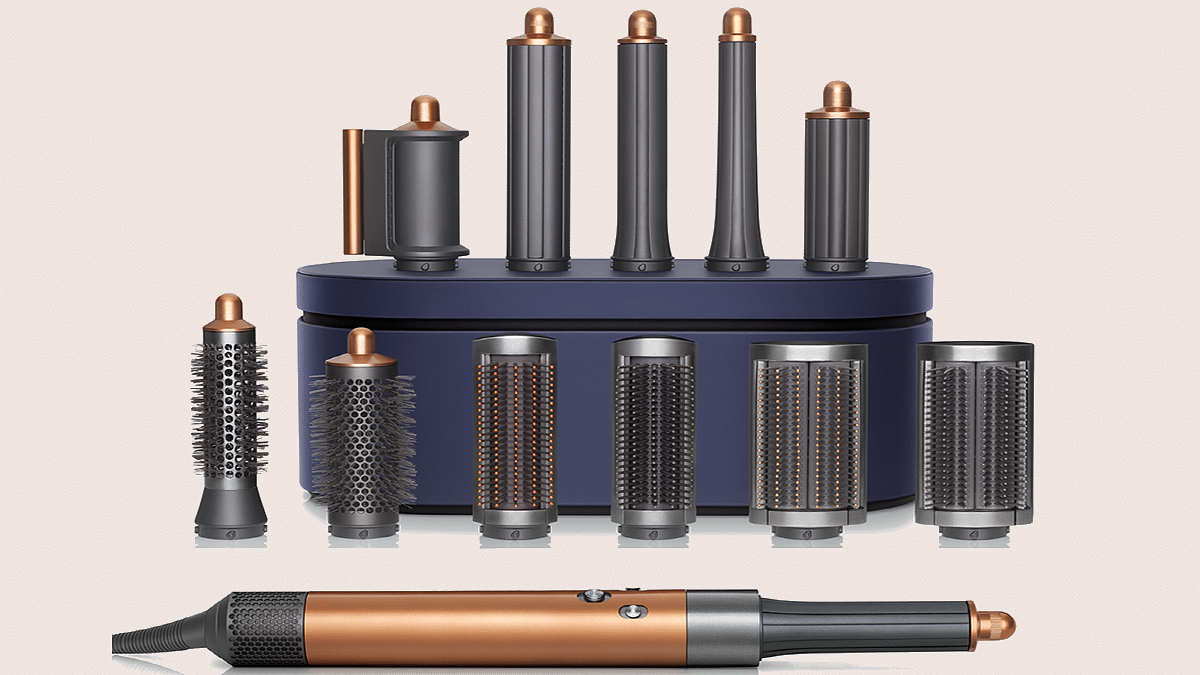
The Next Generation Dyson Airwrap Multi-Styler Is Here: Check All Details

Key Highlights

  • Dyson Airwrap multi-styler launched in India
  • It is re-engineered for faster, easier styling
  • Airwrap multi-styler is priced at Rs. 45,900

Since most people cannot afford the luxury of a professional hairstyle, the next best thing is to equip yourself with dependable, effective hair products to use at home. In order to better serve the Indian market, Dyson today introduces the next generation of the Airwrap multi-styler.

Curls and waves can be achieved more quickly and easily with the next-generation styling barrels’ spinning cool tip and without risking heat damage. Users can now style the full head, creating both clockwise and counterclockwise curls and waves. And this, without having to switch attachment mid-style thanks to the combination of the results previously obtained with two barrels into one attachment.

For the first time, the existing Dyson Airwrap styler owners can upgrade to these modern attachments while keeping their original unit. This is based on the sustainable mindset adopted throughout the development of the machine. Designing in the digital world reduces reliance on physical prototypes and dramatically reduces energy and material consumption.

Dyson Airwrap Multi-Styler: Efficient Engineering

The motor in the Dyson Airwrap multi-styler drives the device through to increased effectiveness and performance, ultimately leading to less energy consumption.

The Coanda effect, which enables users to curl, wave, smooth, and dry hair without the need for severe heat, is at the core of the Airwrap story. This effect is powered by a rapid, high-pressure motor. When air is driven at the proper speed and pressure, it naturally follows an adjacent surface, entraining the surrounding air and its accompanying hair in the Coanda phenomenon.

The Dyson Airwrap multi-styler reduces the need for intense heat and protects the hair from unnecessary damage by providing wet to dry styling using powerful and accurate airflow on damp (80 percent dry) hair.

An all-new dual-purpose Coanda smoothing dryer and redesigned brush attachments enable precision shaping with improved Coanda performance. The Coanda smoothing dryer, which combines two attachments into one, conceals flyaways in a single pass without using severe heat and switches from a strong drier to a smoothing dryer with the flip of a switch.

Dyson Airwrap Multi-Styler: Price And Availability

The new Dyson Airwrap multi-styler will be sold for Rs. 45,900 from August 3, 2022. The new attachments are entirely compatible with current machines. Owners can upgrade their complete set of attachments for Rs. 14,900. To buy, you can visit the Dyson Demo shops and experience the Dyson Airwrap multi-styler.

Categories
Featured Info Mobile

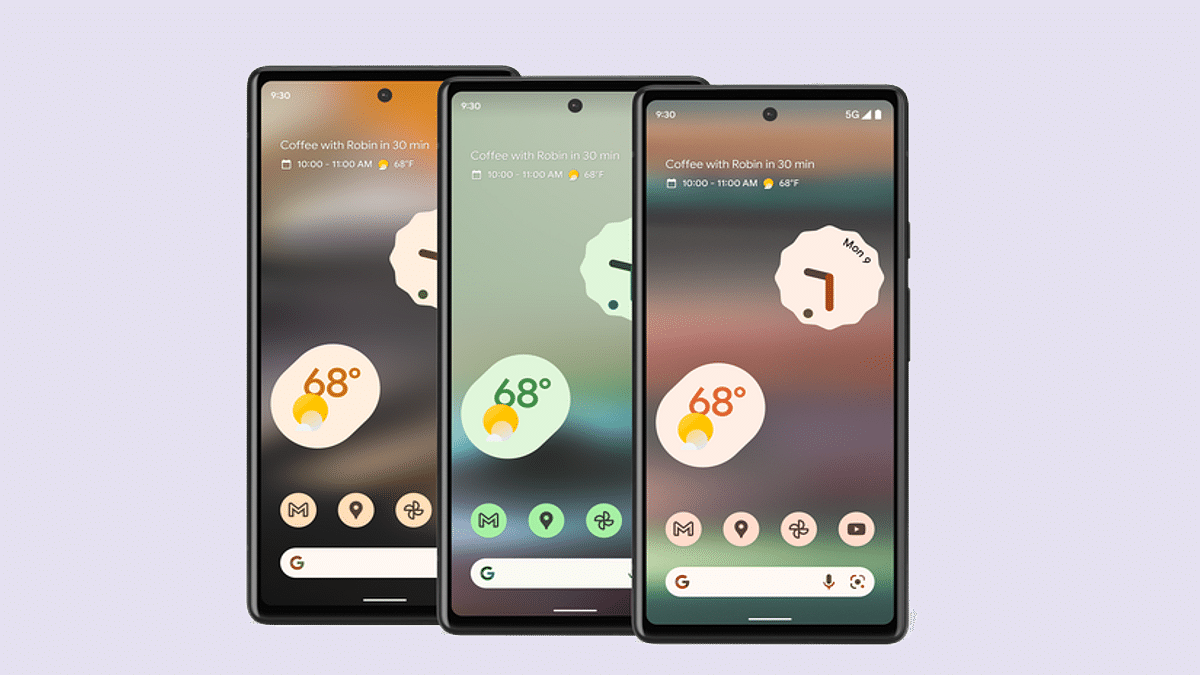
Google Pixel 6a Android 13 Beta Build Released In India: How To Download And Install

Google Pixel 6a is the latest affordable Pixel handset by the Mountain View tech giant. The device has finally set its foot in the Indian market with the custom Tensor processor and dual rear cameras. The Pixel 6a has arrived with an asking price of Rs. 43,999 in the country and ships with Android 12 OS. However, soon after its debut in India, the Pixel 6a is also getting the latest Android 13 beta update. How can you download and use the Android 13 beta version on your Pixel 6a devices? Read on the details below:

Google Pixel 6a Eligible For Android 13 Beta Update: How To Download And Install

Google has started dishing out the latest Android 13 beta update for the Pixel 6a in India. This development comes just a few weeks after the launch of the latest affordable Pixel 6 series phone in the country. Notably, Google has already started the Android 13 beta program for supported Pixel series phones. The top-end models including the standard Pixel 6 and the Pixel 6a have already started receiving this update in the international markets.

Google has released the Android 12 Beta 4.1 build to the Pixel 6a in India. As of now, the company has not announced when the stable Android 13 version will be available for all supported Pixel and other Android devices. However, the possibility of it arriving in August itself is highly likely. Also, this is the first and last Android 13 beta build that the Google Pixel 6a is said to receive. Google is expected to directly update the Pixel 6a to the stable Android 13 OS after this.

How To Download And Install Android 13 Beta 4.1 Update On Pixel 6A

Since the latest firmware comes under the Beta program, you’ll need to enroll first to start using the Android 13 Beta update on your respective Pixel 6a devices. You won’t get a notification for the Android update similar to the stable version update.

If you wish to use the Android 13 Beta build on your Pixel 6a phone, then you can directly visit the Android Beta webpage and enroll in the program. The secondary method that you can opt to download and use the Android 13 beta build on your phone is by downloading the latest system image from Google and flashing it on your Pixel 6a handset. But since you are downloading a new firmware version, it is advised to take a backup so that you don’t loose any data during the installation process.

Categories
Featured Info Mobile

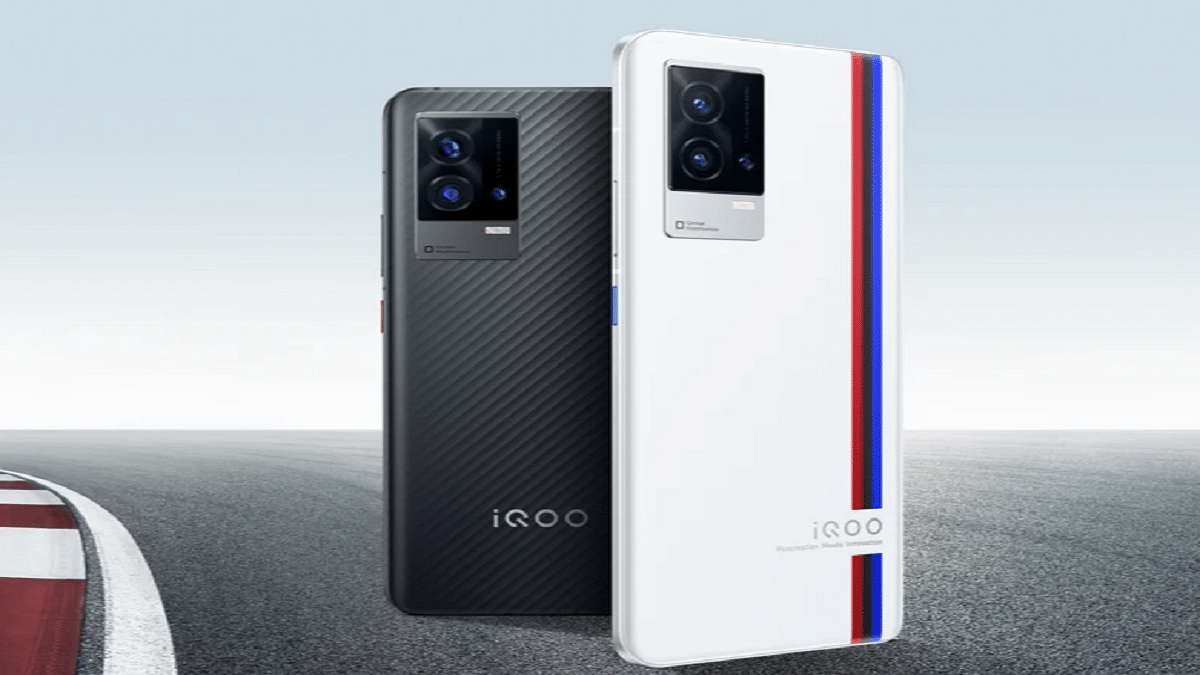
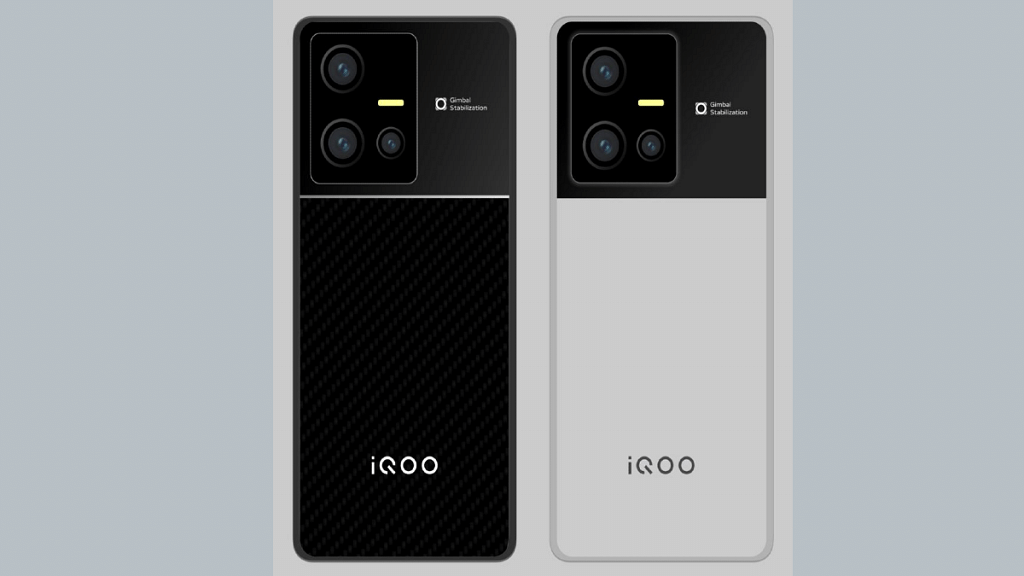
iQOO 9T With Snapdragon 8+ Gen 1 Chipset Launched In India: All Details

Key Highlights

  • iQOO 9T has been launched in India
  • It is powered by the Snapdragon 8+ Gen1 chipset
  • The starting price of iQOO 9T in India is Rs. 49,999

The iQOO 9T is finally now official in India. Touting it as ‘India’s most powerful smartphone, it comes with the Snapdragon 8+ Gen 1 chipset. Also, the device has a Vivo V1+ display chip that allows real-time extreme night vision. The key specifications include a 120Hz AMOLED display with FHD+ resolution, Android 12 OS, 50MP primary camera, and a 16MP selfie snapper on the front. Here’s everything you need to know about the latest iQOO 9 series:

iQOO 9T Specifications

The iQOO 9T comes with a 6.78-inch E5 AMOLED screen with Full HD+ resolution. The display is capable of peak brightness of 1500 nits and a refresh rate of 120Hz. The smartphone is powered by the Snapdragon 8+ Gen 1 CPU. It has up to 12GB of RAM and 256GB of internal storage. The device further uses the customized interface on top of the Android 12 operating system.

For extended gaming sessions without getting too hot, the iQOO 9T smartphone now has a vapour cooling mechanism. It is among the heaviest in its sector, weighing about 205 grams. As for security, the smartphone has an in-display fingerprint sensor.

Moving to the optics, the smartphone comes with a triple rear camera configuration. It has a 50MP GN5 sensor with OIS, a 13MP ultrawide-angle sensor, and a 12MP telephoto sensor. The device further packs a 4700mAh battery capacity that supports 120W charging.

In addition, the iQOO 9T has stereo speakers, Hi-Fi audio, and no 3.5mm audio port. 5G, 4G LTE, Wi-Fi 6, Bluetooth 5.2, GPS, and a USB Type-C port for charging and data transfer are among the connectivity features.

iQOO 9T Price In India

The 8GB / 128GB variant of the iQOO 9T costs Rs. 49,999 in India. The 12GB RAM/256GB storage model is also available for Rs. 54,999. As part of the launch offer, paying with an ICICI Bank card will save you Rs. 4,000. Besides, early purchasers receive an iQOO Gamepad worth Rs. 3,999. Starting at 12.30 PM IST today, the device will be available for purchase on the company’s website and from August 4 on Amazon.

Categories
Apps Featured How To

YouTube Account Hacked: What Should You Do? How You Can Protect Your YouTube Account If Hacked?

YouTube is one of our prime sources of entertainment nowadays. It started as a free platform where users could watch different videos on the go without paying any extra charges for the services. However, Google has gradually released subscription plans with which you can get an ad-free experience on YouTube.

Over the years, YouTube has also improved its policies specifically for content uploading, channel monetization, and more. And ever since YouTube announced monetization policies, content creators have been flooding this platform to make the most of it. You can easily create a channel on YouTube and start uploading videos and earn money out of it. Google has also improved the privacy features on YouTube and has released strict guidelines for users related to the same.

But despite all the security and privacy measures, we come across reports of a YouTube channel hack. This can be a tricky situation if someone gets hold of your account on YouTube and takes entire control making unnecessary changes or even upload videos that aren’t created by you. If you think your YouTube account has been compromised and is hacked, you don’t have to panic at all. We are mentioning some of the best ways with which you can fix your hacked YouTube account.

How To Fix A Hacked YouTube Account Easily?

The first step that you need to check is whether you are able to log into your Google account. If you are able to log in successfully to your Google account, the first thing you would need to do is secure your account. You can also add two-factor authentication to make sure there is no security breach on your YouTube account in the future. If for some reason you are unable to log in to your Google account, follow the steps listed below to recover your account. Then continue with securing your profile.

Step 1: Initiate the Google Account recovery process using this link.

Step 2: Follow the on-screen process to reset your password. You will need to answer the security questions and then complete the account recovery steps.

Step 3: Once the account recovery is complete you can set up the new password. Make sure this time you select a strong password.

How To Protect Your Google And YouTube Account From Hacks

Step 1: Open your Google Account.

Step 2: From the navigation panel, tap on Security.

Step 3: Now head to the “Signing in to Google” option.

Step 4: Select Add recovery option.

Step 5: Toggle on the two-step verification option.

Step 6: Once you setup two-step verification process, you will get two options Your Password and Your Phone.

Step 7: Allow 2-step verification.

Step 8: You can also setup Gmail filters to safeguard your YouTube account from hacks.

Categories
Featured How To Mobile Tablet

Use Live Text With iOS 15 On iPhone And iPad: Here’s How

With the release of iOS 15, many new features have been added and some handy features flew under the radar. This is the case with Live Text, a new feature for iPhone and iPad available as part of iOS 15 and iPadOS 15 respectively. It uses built-in smarts to analyze your photos for text and make them interactive so you can copy, translate, or do anything you can do with digital text on your iPhone or iPad.

How To Enable Live Text On iPad And iPhone

In iOS 15 and iPadOS 15, Live Text is enabled by default. But, in case you disabled it not knowing what it was, here’s how to reactivate this handy feature.

Step 1: Go to Settings.

Step 2: Tap on ‘Camera’.

Step 3: Go to ‘Live Text’ and enable it.

Live Text can recognize information in photos and online images so you can make calls, send emails, get directions, and more with just a tap. Point your camera at a photo or image that contains text and click the Live Text button.

How To Use Live Text In The Camera App

Live Text is also available in the Camera app and when using the camera with other apps like Notes and Reminders. It requires iPhone XS, iPhone XR, or later with iOS 15 or later. To turn on Live Text for all supported languages, you need to follow these steps:

Step 1: Open the Camera app on your iPhone or iPad.

Step 2: Point the camera at the text you’d like to select.

Step 3: When the device detects text, the Live Text feature will be activated, the text will be surrounded by a yellow box, and a new icon will appear in the lower right corner. Click the icon to ‘grab’ the text.

Step 4: Select the section of text you want to use and tap to either Copy, Select All, Translate or Share depending on what you want to do with the text. To select a specific portion of captured text, long press the text to select it. For phone numbers, tap the number on the screen to initiate a call on your device.

Additionally, iPad Pro 12.9-inch (3rd generation) and later models, iPad Air (3rd generation), iPad Pro 11-inch (all models), iPad mini (5th generation), and iPad (8th generation) with iPadOS 15.1 or later are all compatible with Live Text.