Key Highlights
- WhatsApp users can now watch Instagram Reels via Meta AI
- The feature is limited but offers quick entertainment within the app
- Just update WhatsApp, tap the Meta AI icon, and ask for Reels
Instagram Reels have taken over our screens, and now, thanks to Meta AI, you don’t even need to leave WhatsApp to watch them. Whether you are in the middle of a chat or just killing time, you can now enjoy trending Reels directly in your WhatsApp app. This new feature blends AI magic with social entertainment, giving you quick access to your favorite content in seconds. Curious to know how it works? Here’s a quick step-by-step guide to get started in no time.
Also Read | Instagram Tips And Tricks: How To Share Music/ Songs As DMs With Friends On Instagram
How To Watch Instagram Reels In WhatsApp Using Meta AI
Step 1: Make sure your WhatsApp is updated to the latest version on Android or iOS. This feature only works on the most recent update, so check the app store before you begin.
Step 2: Open WhatsApp and look for a glowing blue-pink animated circle above your chat list. That’s the Meta AI icon. Tap on it to launch the feature.

Step 3: You’ll be directed to a chat-like interface, similar to any WhatsApp conversation. At the bottom, there’s a text box where you can type your prompt.
Step 4: In the chat, type something like “Show me Instagram Reels” and hit send. Within seconds, a handful of Instagram Reels will pop up right in the chat.
Step 5: Tap on any of the Reels shown to start watching them directly within WhatsApp. No need to switch apps.
Want Reels From A Specific Creator?
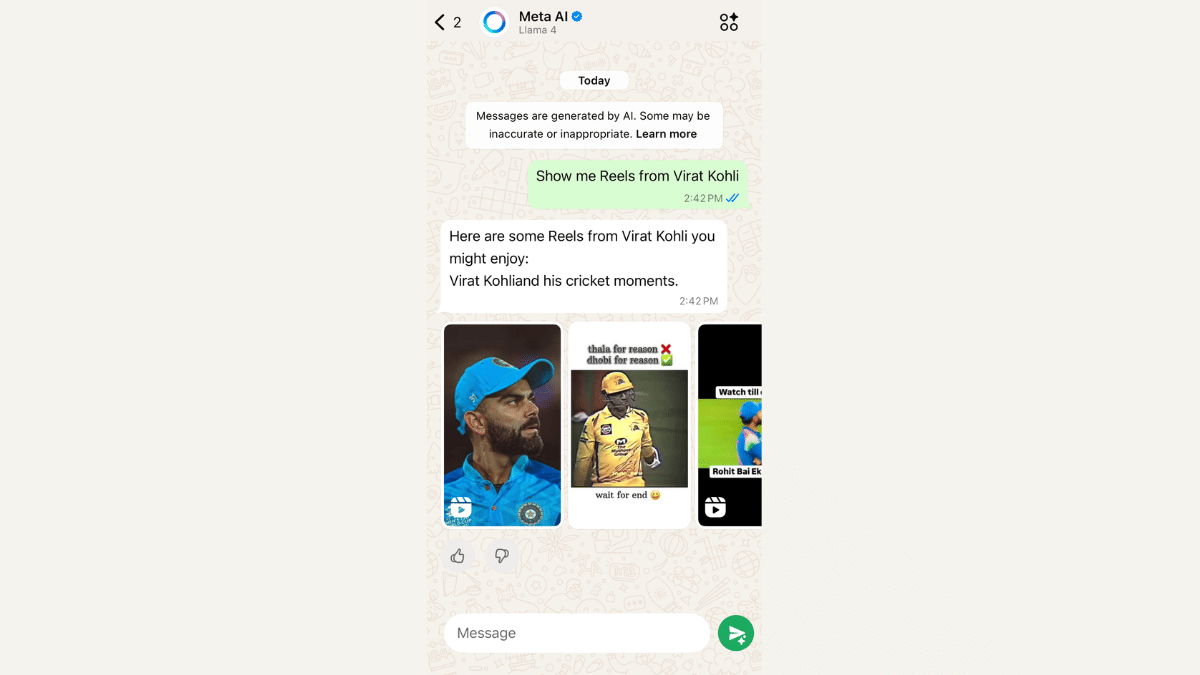
For this, you just need to type the creator’s name in the prompt. For example, “Show me Reels from Virat Kohli”, and Meta AI will try to fetch the latest or trending Reels from that account.
Also Read | Want To Stand Out On Instagram As A Car Enthusiast? Check Out These 100+ Ideas
Important Note Before You Start
To access this feature, users must agree to Meta’s terms for chatting with businesses and bots on WhatsApp. Without that, Meta AI won’t work, and you won’t be able to access Reels.
For the tech geeks, stay updated with the latest cutting-edge gadgets in the market, exclusive tech updates, gadget reviews, and more right on your phone’s screen. Join Giznext’s WhatsApp channel and receive the industry-first tech updates.