Categories
Featured Info TV

Amazon Great Indian Festival Sale 2022: Get Exciting Offers On Smart TVs

During the Great Indian Festival, Amazon India is hosting a special sale named “Scream for Screen” for Smart TVs. The e-commerce site will offer televisions with screens as large as 32, 43, and 50 (inches) under this promotion from manufacturers including Samsung, Redmi, Xiaomi, LG, and OnePlus. In addition to this, during the sale, the usual bank offers will continue to be offered. On their SBI Credit & Debit Cards & EMI Transactions, customers can receive bank discounts.

The following latest televisions are available on Amazon.in with incentives and discounts from merchants during the Amazon Great Indian Festival 2022:

OnePlus Y Series 32-inch HD Ready LED Smart Android TV

The OnePlus 32-inch Y Series HD Ready LED Smart Android TV also has an HD-Ready display. For improved sound transmission, it has Dolby Audio and 20W box speakers. Additionally, it has a bezel-free design, several ports, Android TV, and compatibility with OnePlus connect app. The OnePlus smart TV will cost you Rs. 11,499.

Samsung 43-inch Crystal 4K Neo Series

Featuring a 4K display, the Samsung Crystal 4K Series is a mid-range premium TV. A greater variety of colors can be seen on TV thanks to PurColor technology. In order to improve the sound based on the viewing environment, it also supports adaptive sound technology. You can get the Samsung 43-inch Crystal 4K Neo Series TV for as low as Rs. 30,980.

Sony Bravia 65-inch 4K Ultra HD Smart LED Google TV

The Sony Bravia 65-inch 4K Ultra HD Smart LED Google TV has a resolution of 4K Ultra HD and a refresh rate of 60Hz. Along with two USB ports for connecting hard drives and other USB devices, it also has three HDMI ports for connecting the set-top box, Blu-ray players, and game consoles. It has an Open Baffle Speaker with Dolby Audio and a 20W sound output. You can buy the Sony Bravia Smart TV for as low as Rs. 80,000.

Redmi 50-inch 4K Ultra HD Android Smart LED TV

The Redmi 50-inch 4K Ultra HD Android Smart LED TV has more than 8 million pixels and 4K HDR. The 15W X 2 Speakers provide a 30W output with a stereo sound. With the Language Universe feature, you can access content in more than 16 languages across more than 25 OTT apps. This TV can be purchased for as low as Rs. 27,990.

Categories
Apps Featured How To

WhatsApp Call Link Feature: How To Create And Send Cal Links Using WhatsApp On Android, iOS

WhatsApp has evolved over the years from just being a simple messaging app and has integrated services for voice as well as video calling. The Meta-owned messaging platform is also rapidly evolving with the technology and offering numerous features for a better messaging and calling experience. Of course, the end-to-end encryption service is the added perk that you get while using WhatsApp messaging app on Android and iOS.

Meta has been spotted testing multiple new features for WhatsApp including the option to create a personalized sticker avatar and the Call Links feature. The latter has been released for the masses allowing them to share links to other contacts to join any group call with a single tap. The Call Link feature is somewhat similar to what you get on the popular online conferencing apps available on the Play Store or the App Store including Google Meet, Microsoft Teams, and also Zoom.

With the WhatsApp Call Link feature, group admins and members will get the option to create a virtual call link and share it with the users who aren’t added to the group. The respective receivers of the WhatsApp Call link would just need to click on the link to join the online conference call.

Notably, the Call Link feature can be used for both voice and video calls. Also, the maximum limit that WhatsApp has set for members joining the  But what are the exact steps to create a new WhatsApp Call Link and share it with any user? We have shared the steps below. Read on:

How To Use WhatsApp Call Link Feature To Invite Users For Voice/ Video Calls

In order to use the call link feature, you would have to first check if it has been added to your WhatsApp. You might have to update the app in order to use all the latest features including the Call Link feature. If this new tool is already present, just follow the steps below:

Step 1: Launch the WhatsApp application and from the home page go to the Call section,

Step 2: An option will be present on the top of the call logs page stating “Create call link”. Click on it.

Step 3: Once the link is created, you can directly share it with groups or solo contacts. Otherwise, simply copy-paste it on the desired window. You can also share it via other messaging applications. The same link will allow users to join both voice and video calls.

Categories
Featured Info Smart Watch

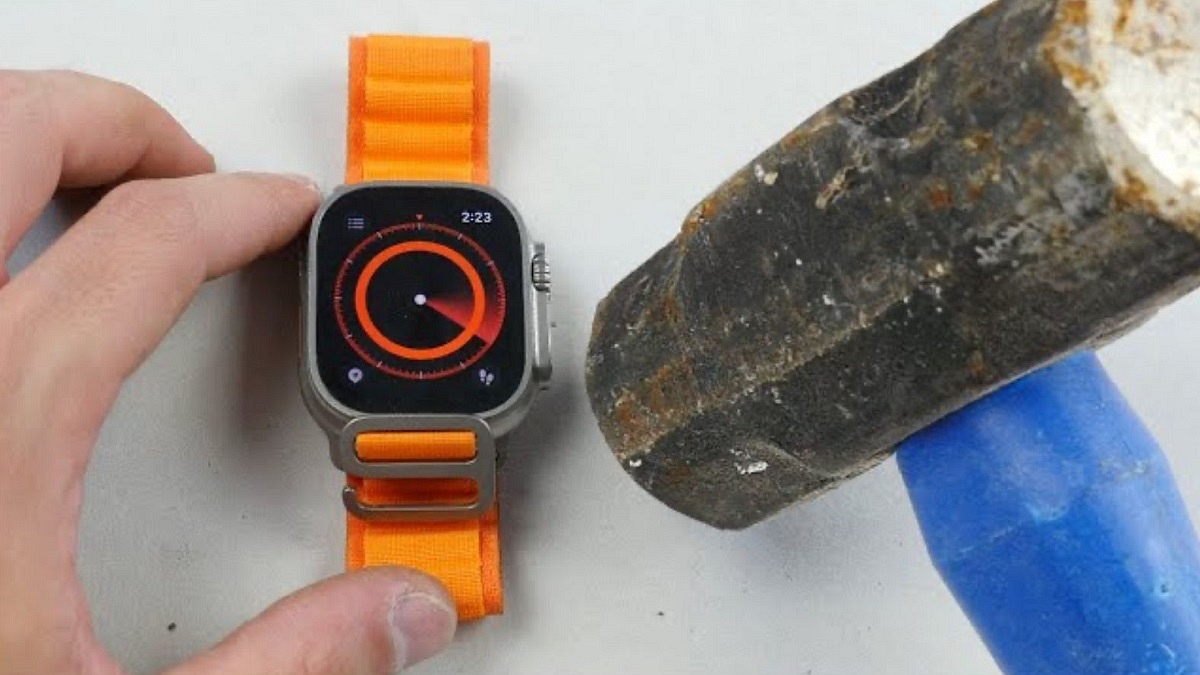
YouTuber Tests The Durability Of Apple Watch Ultra With Hammer: Details Inside

Key Highlights

  • YouTuber performs durability test on Apple Watch Ultra
  • The hammer test is performed by TechRax
  • Apple Watch Ultra is the most rugged watch

Since its release, the Apple Watch Ultra has generated significant buzz. Apple presented three new smartwatches at the launch event for the iPhone 14 series: the Apple Watch Series 8, the second-generation Apple Watch SE, which is reasonably priced, and the Apple Watch Ultra, which is the most durable Apple Watch ever. It is claimed that the Apple Watch Ultra is so durable that it can withstand the most demanding activities that athletes engage in, such as swimming, hiking, running, and everything else.

Now, a YouTuber has put the Apple smartwatch‘s durability to the test. Surprisingly, throughout the test, the Watch Ultra was able to withstand many blows from a hammer.

Apple Watch Ultra: Durability Test

YouTuber TechRax performed the test in three steps, starting with dropping the watch from a height of four meters. It didn’t leave any obvious dings or scratches on the sapphire crystal glass or the watch’s case.

He next attempted to boost the ante by shaking the Watch Ultra ferociously in a box of nails, but to no avail. The Apple Watch Ultra was unharmed in the process.

In the third and last test, TechRax repeatedly pounded the watch with a hammer. The Watch Ultra ultimately broke after several blows. However, before the smart wearable’s screen cracked, the table on which TechRax was conducting these testing collapsed.

Despite receiving repeated hits from a hammer, the Watch Ultra’s screen didn’t break; it just failed to turn on. It is therefore safe to assume that the hardware sustained some damage during the durability test. The Watch Ultra has proven to be the most durable Apple Watch to date by withstanding substantial damage before breaking.

Currently, the Apple Watch Ultra costs $799 in the US and Rs. 89,900 in India. It offers first-in-industry features like emergency Satellite SOS, EN13319 diving certification, and dive computer replacement. However, similar to the iPhone 14 Pro, the Apple Watch Ultra is now being offered in India at a so-called “premium” above MRP because there is a limited supply of stocks from Apple.

Categories
Featured Leaks mobile

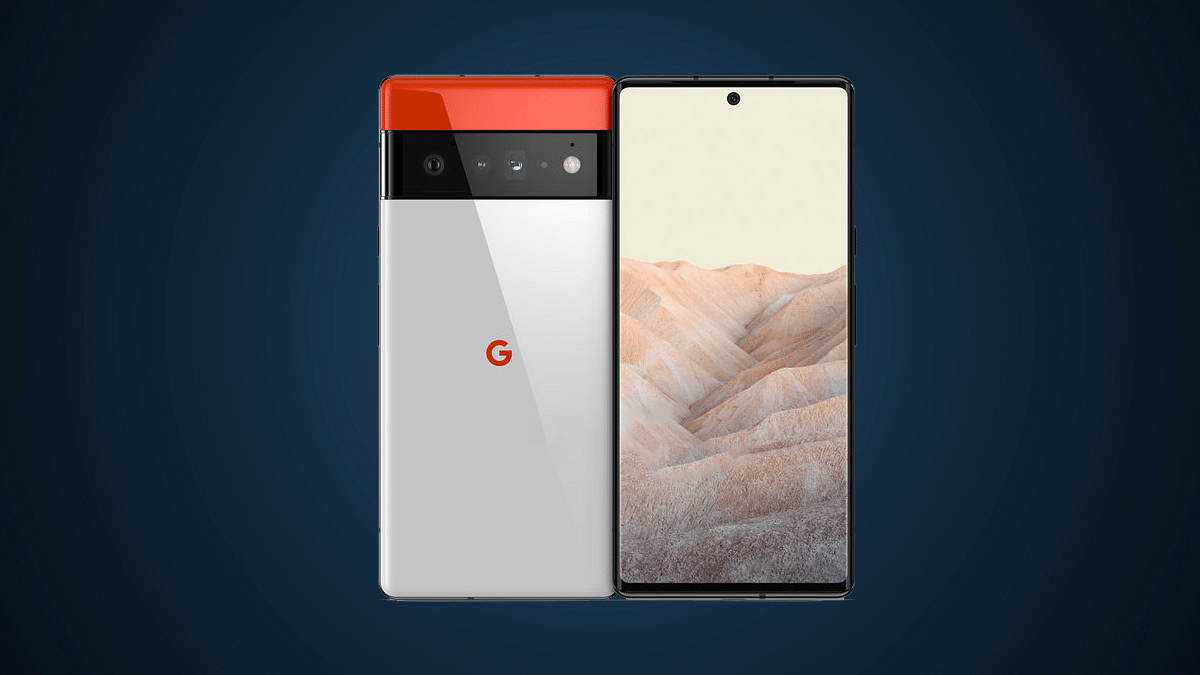
Google Launching Pixel 7 With Similar Hardware As The Pixel 6? Know All Developments Here

Google I/O 2022 developer conference is just round the corner and the search giant is all set to refresh Pixel series smartphones with the launch of Pixel 7, Pixel 7 Pro, and the Pixel 7a. Google will be hosting the event on October 6, unwrapping the successor to the Pixel 6 series. The Pixel 7 series leaks have been pouring in consistently over the web. A fresh leak detailing the full spec sheet of the Pixel 7 has now surfaced suggesting minimal upgrades over the previous-generation model. Is the Pixel 7 eventually a Pixel 6 with a new chipset? Let’s find out:

Google Pixel 7 Doesn’t Bring Major Hardware Upgrades Over The Pixel 6: Details

The Google Pixel 7’s latest hardware leak comes from tipster Yogesh Brar. The leaked spec sheet suggests we won’t get to see any major hardware upgrade on the Pixel 7 compared to the Pixel 6. The only primary upgrade that the Pixel 7 is said to bring over the last-generation model is the chipset. The remaining features including the display, camera, and battery would be more or less the same as its successor.


That said, the Pixel 7 will be announced with the Tensor G2 chipset. The new-generation custom Google chipset will be bringing some improvements in the overall CPU and GPU performance compared to the first-gen Tensor processor used with the Pixel 6 series. The device is leaked with a solo 8GB RAM and dual 128GB/256Gb storage configuration. It will boot on Android 13 OS which is another prominent upgrade compared to the previous generation model.


Now moving on to similar hardware features, the display size would be 6.3-inches on the Pixel 7 which is slightly smaller compared to the Pixel 6. The latter shipped with a 6.4-inch screen. The panel type, specifications, and refresh rate would be similar to the last generation model. The Pixel 7 will also flaunt an OLED screen with an FHD+ resolution and 90Hz refresh rate. The panel will be integrating a fingerprint scanner for biometrics.

The optics wouldn’t differ as well. The Pixel 7’s imaging hardware is said to comprise a 50MP main camera at the rear along with a 12MP ultrawide sensor. While the primary camera module remains identical to its precursor, the selfie snapper will see a slight upgrade. Instead of an 8MP camera, the Pixel 7 will be equipped with an 11MP selfie lens. The battery capacity is also similar to the last generation model with the handset featuring a 4,700 mAh battery instead of a 4,614 mAh battery unit. The fast charging capacity is still 30W.

Categories
Accessories Featured Info

Sony India Diwali Sale: Attractive Offers On Audio Products

Sony India announced amazing promotional deals on a variety of personal audio products on the occasion of the Diwali festival season. These incredible offers which come with wonderful financing options like instant cashback and six months of low-cost EMIs are designed especially for music lovers, working professionals, and students who want to purchase high-end or new audio devices for their entertainment, work from home, and educational needs. The offer is available through a variety of online and offline channels and is valid through October 5, 2022.

WH-1000XM5 Wireless Noise Cancelling Headphones

More high- and mid-frequency sounds are blocked out than ever by the noise-canceling WH-1000XM5 wireless headphones. Additionally, noise canceling is automatically improved with Auto NC Optimizer based on your wearing circumstances and surroundings. It comes with up to 30-hour battery life with quick charging. You can get the WH-1000XM5 wireless headphones for Rs. 26,990 during the sale.

Sony WF-1000XM4 Wireless Earbuds

The WF-1000XM4 truly wireless headphones raise the bar for audio quality and noise cancellation, both of which are now industry-leading. It delivers the highest level of noise cancellation in the industry while using less power thanks to improved noise-canceling capabilities and Bluetooth “System on Chip” technology. During the sale, you can buy the Sony WF-1000XM4 wireless earbuds for Rs. 16,990.

WH-CH510 Headphones

The Sony WH-CH510 headphones are lightweight and compact. Its swivel ear cups provide for simple portability. With the microphone, it offers simple speech commands for the voice assistant and hands-free calling. Additionally, the headphones have a battery life of up to 35 hours for all-day use and easy charging. The Sony headphone is available for Rs. 2,299.

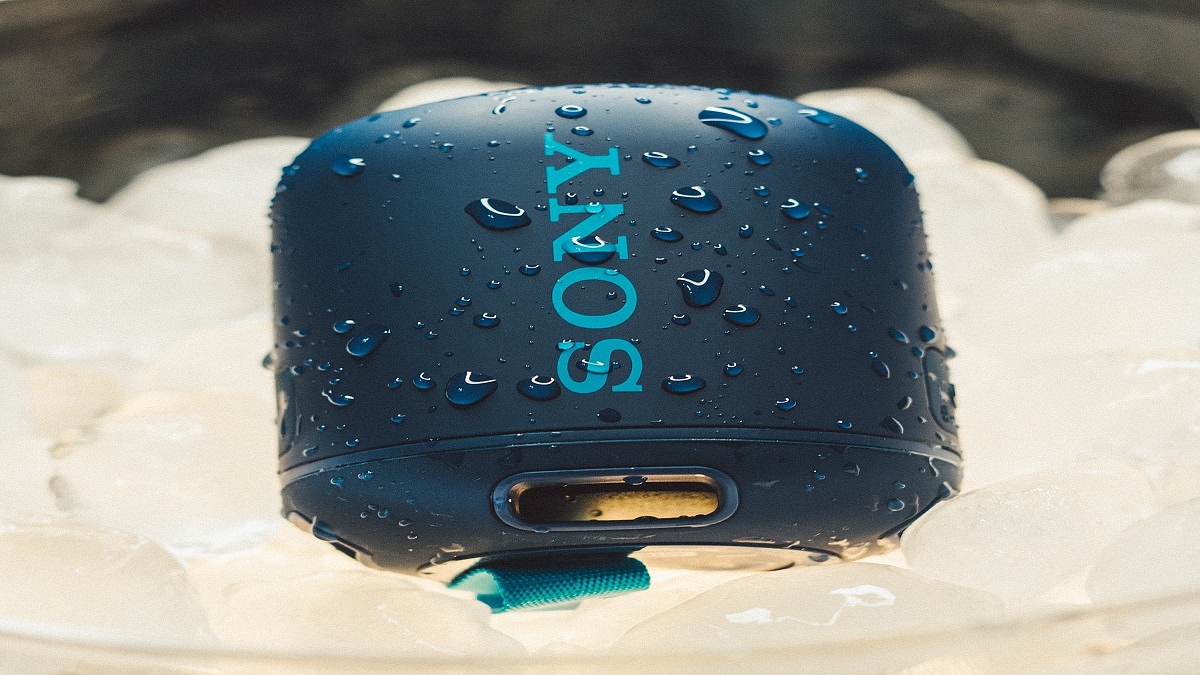
SRS-XB13 Bluetooth Speaker

The Sony SRS-XB13 Bluetooth Speaker provides extra bass for a deep, punchy sound. It is IP67 rated which keeps it waterproof and dustproof. The Bluetooth speaker comes with up to 16 hours of battery life with an indicator. The built-in mic lets you enjoy hands-free calling straight through your speaker. The Sony SRS-XB13 Bluetooth Speaker will cost you Rs. 3,299.

TypeModel NameMRP (In Rs.)Offer Price (In Rs.)Cashback Details
Wireless HeadphonesWH-CH710N14,9905,990 
Wireless HeadphonesWH-1000XM429,99019,990Inclusive of Rs. 2,000 Cashback
Wireless HeadphonesWH-XB910N19,99010,990Inclusive of Rs. 2,000 Cashback
Wireless EarbudsWF-C5008,9904,499Inclusive of Rs. 1,500 Cashback
Wireless EarbudsWF-1000XM319,9907,990 
Wireless EarbudsWF-XB70011,9905,990 
Wireless EarbudsWF-L90019,99012,990 
HeadphonesWI-XB4004,9902,499 
HeadphonesWI-C1002,7901,399 
HeadphonesWI-C3103,2901,799 
HeadphonesWI-C2002,9901,699 
Gaming HeadphonesInzone H721,99015,990 
Gaming HeadphonesInzone H39,9906,990 
Gaming HeadphonesInzone H927,99021,990 
Bluetooth SpeakerSRS-XE20024,99019,990 
Bluetooth SpeakerSA-RA300029,99014,990 
Bluetooth SpeakerSRS-XE30015,99012,990 
Bluetooth SpeakerSRS-XG50039,99026,990 
SoundbarHT-S20R23,99015,990 
SoundbarHT-S40R34,99024,990 
SoundbarHT-A7000  Up to Rs. 54,990 off on purchase of HT-A7000+Subwoffer and Rear Speakers with BRAVIA 108 cm (43) and above
Categories
Comparison Featured mobile

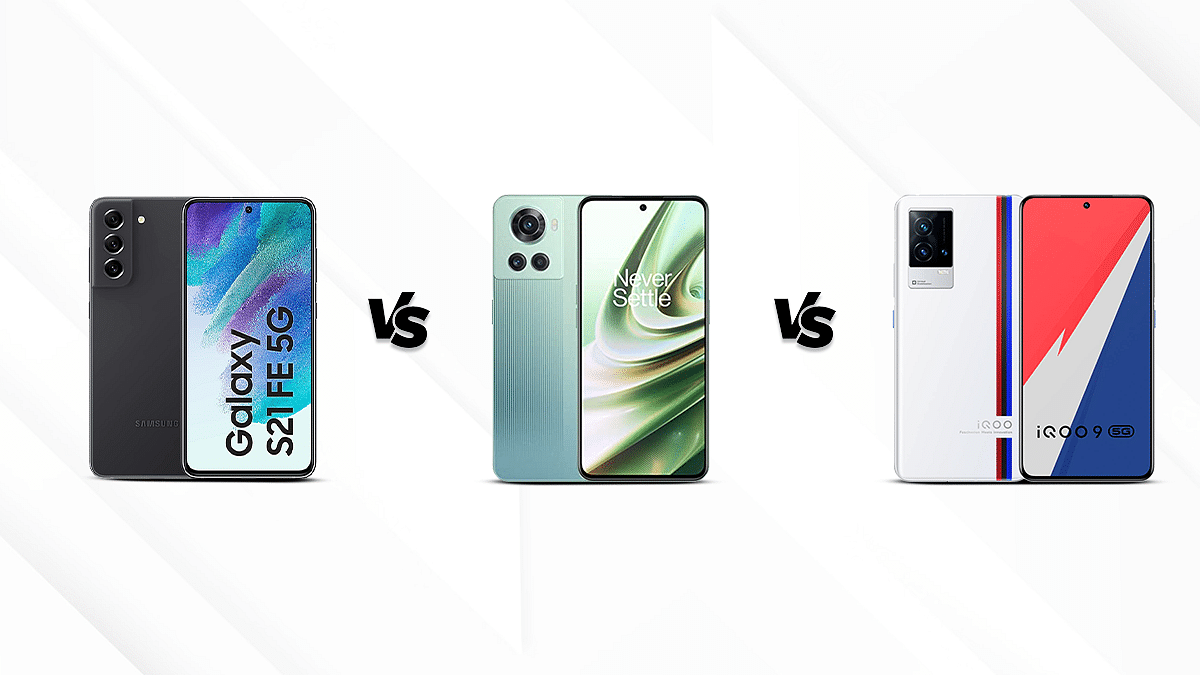
Samsung Galaxy S21 FE Vs OnePlus 10R Vs iQOO 9:Best Premium Gaming phone under Rs.35,000 in India

iQOO despite being a relatively new brand has gained massive popularity amongst the audience for its premium gaming smartphones. The brand has gradually crawled up the ladder and is giving the existing players a stiff competition. Samsung and OnePlus are amongst the top rivals of iQOO in the premium smartphone market. The iQOO 9 is one of the latest gaming handsets that you can buy in India under Rs. 35,000 price mark that goes up against the likes of the Galaxy S21 FE and the OnePlus 10R. But what if you have to buy any one of this model? You can read on this comparison article to be sure of your next buy amongst these three models. Take a look:

Display Specifications

The Galaxy S21 FE comes loaded with a 6.4-inch Dynamic AMOLED display protected by Corning Gorilla Glass Victus layer on top. The panel offers an aspect ratio of 19.5:9 and an FHD+ resolution of 1080 x 2340 pixels. The bezel-less panel sports a punch-hole design for the selfie camera. The panel further supports a 403ppi pixel density besides a refresh rate of 120Hz.

You can get absolute clarity with the OnePlus 10R’s 6.7-inch AMOLED display. This handset definitely offers one of the most vivid and beautiful screens in its league. The QHD+ resolution along with 120Hz refesh rate, and a pixel density of 394ppi makes it suitable for high resolution video playback.

The iQOO 9 features 6.56-inch AMOLED display with a resolution of 1080 x 2376 pixels. For a responsive touch, it offers a refresh rate of 120Hz.  A Corning Gorilla Glass 5 protection layer covers the display on this iQOO phone.

The OnePlus 10R offers a better panel compared to the remaining two specifically if your preference is higher resolution.

Camera Specifications

The Samsung Galaxy S21 FE has a triple camera setup on the back with a 12MP f/1.8 primary camera, an 8MP f/2.4 telephoto shooter, and a 12MP f/2.2 ultra-wide angle lens. The capabilities that are accessible with this configuration includes Dual Pixel autofocus, Phase Detection autofocus, LED flash, ISO Control, Exposure adjustment, Continuous Shooting, HDR mode, Auto Flash, and Face detection. Located on the front is a 32MP sensor with an f/2.2 selfie shooter.

The OnePlus 10R’s rear panel houses a 50MP f/1.8 wide-angle camera, which is supported by an 8MP f/2.2 ultra-wide angle lens and a 2MP f/2.4 macro sensor. A 16MP f/2.4 Wide Angle Camera has been installed on the front of the device by OnePlus, allowing for on-the-go, detailed selfies.

The iQOO 9 is packed with a 48MP f/1.79 primary camera with gimbal stabilization. Aiding the main sensor is a 13MP f/2.2 ultra-wide angle camera, and a 13MP f/2.46 telephoto lens. The front of the device has a 16MP f/2.45 primary camera for taking decent selfies.

Configuration and Battery

The Samsung Galaxy S21 FE draws its power from the Exynos 2100 CPU combined with upto  8GB of RAM. The finest experience is guaranteed with this premium in-house Samsung octa-core chipset. The whole graphics experience is handled by the Mali-G78 MP14 GPU. The 4500mAh Li-ion battery within the Samsung Galaxy S21 FE is strong and it supports 25W fast charging and wireless charging.

The MediaTek Dimensity 8100 Max chipset and 8GB RAM are installed in the OnePlus 10R. The device’s controls all the activities with this high-end Octa-core CPU with a Cortex A78 and Cortex A55 configuration that runs at 2.85GHz. The company has also included a Mali-G610 MC6 GPU, which guarantees a fantastic visual experience. The smartphone has a built-in 5000mAh Li-Polymer battery for power delivery. Additionally, it includes support for an 80W Super VOOC Charging system.

The Qualcomm Snapdragon 888 Plus CPU and a potent 8GB RAM are included in the iQOO 9. Additional features include an Adreno 660 GPU that provide a high-end gaming experience. The smartphone is equipped with a 4350mAh Li-ion battery to enable extended usage. The phone may be fully charged in just 18 minutes thanks to the 120W Flash Charging system.

Storage and Connectivity

There is a huge upto 256GB internal storage capacity on the Samsung Galaxy S21 FE, which is ample for storing photos and videos. It is compatible with A-GPS, 4G VoLTE, 5G, Bluetooth v5.0, Wi-Fi, USB Type-C, Mobile Hotspot, and other connectivity options.

The inbuilt storage on the OnePlus 10R is non-expandable and is upto 256GB. For communication purposes, this handset supports both 4G and 5G VoLTE network connections. Other connectivity options included are Wi-Fi 802.11, b/g/n, Mobile Hotspot, Bluetooth v5.2, USB Type-C, and A-GPS with Glonass.

The iQOO 9 ships with upto 256GB of internal storage. Mobile Hotspot, Wi-Fi, Bluetooth v5.2, NFC, and 5G and 4GVoLTE networks are among the other connectivity choices that are included.

All three phones in this list offer a flagship grade performance under Rs. 35,000 price tag in India. However, The iQOO 9 offers a better gaming experience.


Categories
Featured Info Laptop

Windows 11 Warns From Writing Down Your Password: All Details

Key Highlights

  • Windows 11 will now warn you about entering passwords in an unsecured place
  • This feature is only available in the latest Windows 11 update

Now your passwords will be much more secure thanks to this new feature called “enhanced phishing protection” that you must activate right now in your Windows 11.

Although the environment that provides us with Windows 11 may be the most popular operating system, the truth is that it never stops adding new features to protect it from cybercriminals. The most recent update comes to protect us from those passwords that we reuse and that we write down in places where we shouldn’t, like Notepad or Excel.

And as a result of the most recent update to the Windows 11 operating system, we will now see a warning each time we enter a password in a location where we shouldn’t, like Notepad or Excel, a practice that is not recommended at all and cybercriminals know that very well.

Additionally, we now have the “enhanced phishing protection” feature thanks to the Windows 11 22H2 upgrade. When users enter their Windows password into unsecure apps or websites, it alerts users. This was primarily made for users who want to save their login information in word processors, text editors, and spreadsheets, but thankfully Windows will now alert us when this happens.

In some cases, an attacker can steal your password simply by entering it into a phishing login form and not submitting it. To combat this behavior, Microsoft introduced a new feature called ‘Enhanced Phishing Protection’ that warns users when they enter their Windows password on a website or enter it into an insecure application.

This new feature is only available in the latest Windows 11 updates and is enabled by default. So, it remains to be seen if it will reach Windows 10 users as well.

Categories
Apps Featured Info

WhatsApp Personalised Avatar Feature Update: How To Create Your Own Avatar And Share As Sticker Packs On WhatsApp

Key Highlights

WhatsApp bringing new Avatar feature

Users will be able to create personised avatars

Stable update is yet to be released

WhatsApp has been rapidly evolving its mobile messaging application with the addition of new features and services. Android and iOS versions of WhatsApp are being updated with the same set of advanced messaging features to deliver an improved and secure platform for texting. WhatsApp’s end-to-end encryption service for both chats and backups has also created a secure environment for voice and video calling. This is what majorly defines WhatsApp’s wider popularity amongst the audience not just in India, but globally.

Animated sticker packs and GIFs have been released to make texting a fun processor on WhatsApp. But now, the company is ready to take another flight with the avatar feature for video calling. You can currently customize stickers as your personal avatars. However, for video calling, you either are visible directly or have to turn off the camera if you wish to avoid facing the caller. The upcoming WhatsApp video avatar feature is coming to the rescue in such scenarios. Below is the entire development on the same.

WhatsApp Video Call Avatar Feature Releasing

WhatsApp has been rumored to be working on the avatar feature for its Android and iOS mobile applications. A fresh report by WaBetaInfo reveals this development. According to the report, WhatsApp will let users create their own avatars and use them as stickers. The publication has also shared screenshots of this new self-avatar stickers feature which is being released for all the users in the coming weeks.

A similar feature is already present with Facebook and is apparently making its way to WhatsApp as well. Users will not only be able to create their avatars and share them as stickers but also use them as their profile pictures. This is again identical to Facebook Avatars.

How To Create Personalised WhatsApp Avatars And Use As Stickers

Since this feature is currently in the testing phase, the exact steps to create a personal avatar and use them as stickers are yet to be confirmed by WhatsApp. But going by the leaked screenshots, this new feature will be added alongside the GIF, emojis, and sticker options in the app itself. Users will need to tap on the Avatar sticker feature and then they will get the option to create their own avatar.

Once the avatar has been created, users will be able to share it with their contacts in form of stickers. Also, WhatsApp will create sticker packs of the personalized avatars along with several expressions such as love, confusion, crying, mid-blowing, and others. Once the stickers pack are created using the avatar, users can share them with the desired contacts.

Categories
Comparison Featured Tablet

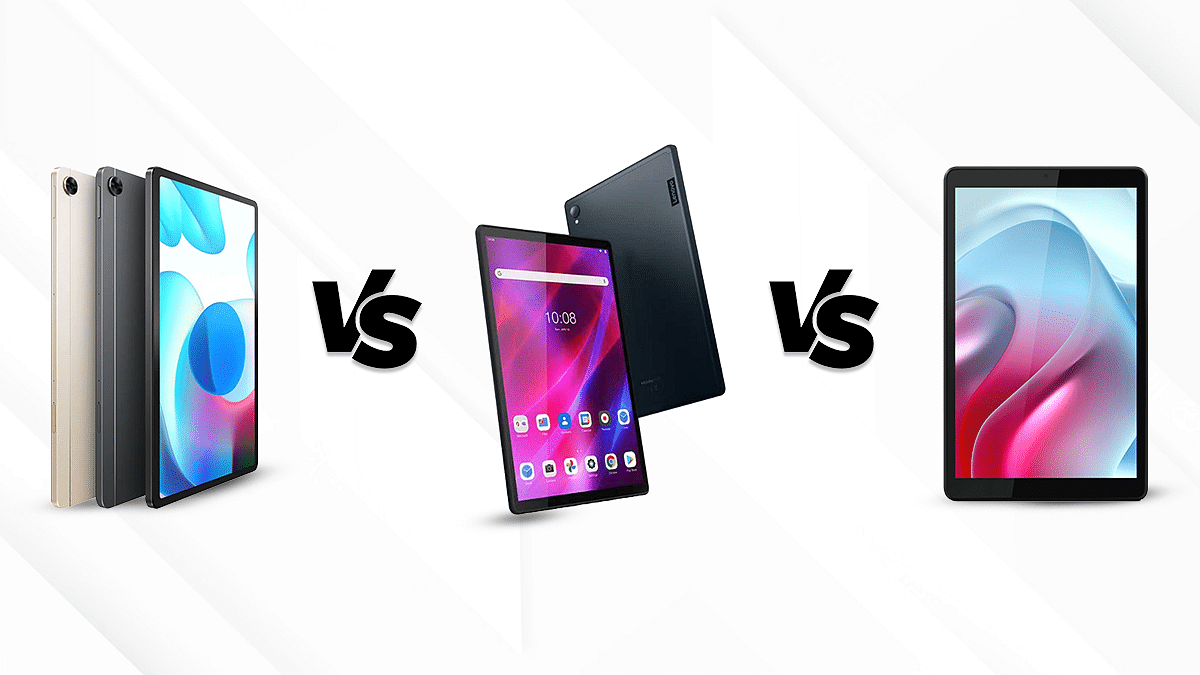
Realme Pad Vs Lenovo Tab K10 Vs Moto Tab G20: Budget-Friendly Tablet You Should Consider

The tablet industry has been throbbing with the incursion of new entry-level tablets into the market. Multiple cost-effective and all-rounder tablets have been launched by the tech behemoths including smartphone OEMs. Lenovo has gained its reputation in the market with its wide range of affordable and flagship tablets and laptops. Similarly, Realme and Motorola have also emerged as the top contenders in the smartphone and tablet industry. Therefore, today we are going to carry out a comparison between Realme Pad, Lenovo Tab K10, and Moto Tab G20 to help you select the best buy

Display Specifications 

The Realme Pad features a 10.4 inches screen with a screen-to-body ratio of 80.2 percent. It is an IPS LCD screen that operates on 1200 x 2000 pixels screen resolution, which ensures an immersive picture quality with video playback. Moreover, it has a brightness of 360nits that allows for average sunlight visibility.

The Motorola Tab G20 features an 8.0 inches IPS LCD display. It has a screen-to-body ratio of 76.5 percent and a resolution of 800 x 1280 pixels that allows for a decent viewing experience on the go. The Moto Tab G20 has a brightness of 350 nits, which ensures a decent output under direct sunlight. 

The Lenovo Tab K10 has a massive display of 10.3 inches which is also an IPS LCD panel similar to the Realme Pad and the Moto Tab G20. This Lenovo budget tablet has a resolution of 1200 x 1920 pixels and a brightness of 330nits which is also identical to that of the Realme Pad. You will get a similar level of viewing experience with the Realme Pad and the Lenovo Tab K10.

Overall, the Realme Pad comes out to offer the best display The Lenovo Tab K10 offers very close competition to it. 

Chipset Comparison 

The Realme Pad operates on the MediaTek Helio G80 chipset that is based on a 12nm fabrication and an octa-core CPU cluster. It is available in three variants, 3GB RAM and 32GB storage, 4GB RAM with 64GB storage, and 6GB RAM along with 128GB native storage capacity. It allows an expandable memory of up to 1TB via a shared SIM card slot. 

The Moto Tab G20 has 3GB RAM and 32GB of ROM. It operates on MediaTek Helio P22T which is also an octa-core chipset for entry-level tablets. However, this processor is slightly less powerful compared to the Helio G80 used on the Realme Pad tablet.

The Lenovo Tab K10 also operates on a MediaTek Helio P22T octa-core chipset similar to the Moto Tab G20. It has a dedicated microSD card slot. It is available in three different variants to choose from including a 3GB RAM and 32GB storage model, 4GB RAM/64GB ROM, and 4GB RAM+128GB ROM. 

Overall, the Realme Pad offers impressive delay-free performance and operates on a more efficient chipset than the other two. 

Camera Features 

The Realme Pad features an 8MP camera, both upfront and at the rear. Moreover, it lets you record 1080p videos@30fps.

The Moto Tab G20 has a 5MP Autofocus rear camera and a 2MP front camera. It also allows video recording of 1080P and 720P at 30 fps respectively. 

On the other hand, the Lenovo K10 is equipped with an 8MP rear camera and a 5MP front camera which supports flash. It also allows video recording of 1080P at 30fps. 

Overall, the Realme Pad offers a higher megapixel camera which is suitable for general photography. However, the overall imaging experience will be quite similar on the Realme Pad and the Lenovo Tab K10 tablets.

Battery and Fast Charging 

The Realme Pad houses a massive 7100mAh battery which is accompanied by an 18W fast charging setup. It takes about three hours to completely charge the tablet and you can expect up to 12 hours of video playback on a single charge. 

The Moto Tab G20 features a 5100mAh battery which can be recharged with the 10W charger. The battery life is about 12 hours with this tablet. On the contrary, the Lenovo Tab K10 brings in a 7700mAh battery that can charge fully within two hours. Moreover, it also can allow 12 hours of video playback like the remaining tablets in this list. 

On comparing all three tablets, we come to the conclusion that all of them offer fairly the same battery backup. However, the Realme Pad has outperformed its competitors in terms of fast charging. 

Final Verdict: Which one should you choose 

After comparing all the key aspects of the three tablets, we arrive at the conclusion that the Realme Pad would be the best choice for the users, which is both affordable and resourceful. The Lenovo Tab K10 has also offered equally tough competition to the former. 

Categories
Apps Featured How To

You Can Now Upload Longer 60-Second Stories On Instagram: Here’s How

Key Highlights

  • Instagram users can now post 60-second Stories
  • Until now, there was a time limit of 15-seconds
  • Here’s how you can upload a 60-second Instagram Story

If you sometimes post videos to Instagram Stories, you’ve probably encountered the 15-second restriction. This implies that Instagram will automatically trim the video you upload to your story to a maximum duration of 15 seconds, regardless of its length. Users had to split shorter Stories into 15-second chunks if they wished to upload them because there was a time limit of 15-seconds.

But now, a new feature that will let users publish longer uninterrupted Stories has finally been rolled out globally on the Meta-owned app. A Story that you publish won’t be divided into portions if it is under 60 seconds long. Late last year, the company started testing the modification with select users and has now rolled it out to all users worldwide.

How To Upload The Longer 60-Second Stories On Instagram?

Make sure your Instagram version is updated. Even if you have the auto-update feature enabled on your phone, please check the Instagram app on your Android or iPhone‘s Play Store or App Store, respectively. Following is the step-by-step guide that you can follow to upload a 60-second video on your Instagram Story:

Step 1: Open Instagram on your mobile phone.

Step 2: Now, swipe right to access the camera or click on the Plus sign (+) icon and scroll to Story.

Step 3: To start a video recording, simply tap and hold the circle and record a 60-second video.

Step 4: To add doodles, text, filters, or stickers, use the tools at the top.

Step 5: To post the video to your Story, tap Your Story (or Your Stories) at the bottom of the screen.

Step 6: To view your post, hit ‘Your Story’ at the top of your feed. Tap ‘Highlight’ next to your Story if you wish to keep it after 24 hours.

Additionally, Instagram users don’t have to keep tapping to watch a longer video they don’t want to watch. Now that users have two options for sharing a 60-second video, they can easily share both Stories and Reels.