Categories
Apps Featured How To

Lost Your Snapchat Streak? Here’s How To Restore It With These Steps

Key Highlights

  • Snapstreak is used to share fun snaps everyday
  • If you miss to send a snap, it will disappear
  • Here’s how you can get it back on Snapchat

Snapchat is a popular and fun messaging app that lets you chat with friends, explore, learn, and view worldwide stories. Users of the app can share and exchange snaps (pictures or videos) that vanish after being viewed. A snap can also be reloaded once per 24 hours.

Snapstreaks are created by sharing common photos with your friends that have fun and cool filters, lenses, or other effects applied. Even though Snapchat does offer a warning icon in the shape of an hourglass indicator on the chat reminding you to share a snap, it can disappear if you forgot to send a Snap for 24 hours.

Also Read | Google Maps ‘Explore’ : How To Find Hidden Gems En-route Your Journey

For those who have been routinely sharing images with their friends for hundreds of days, losing the Snapstreak might be very heartbreaking. Contacting Snapchat support may help you regain your Snapstreak if you believe it has ended despite the fact that you didn’t miss any days. A step-by-step tutorial for recovering a lost Snapchat snapstreak is provided below:

Steps To Restore A Lost Snapstreak On Mobile

Step 1: On your mobile phone, open the Snapchat app and click on your profile in the top left corner.

Step 2: Next, select “Settings” from the menu in the top right corner.

Step 3: Select the “I Need Help” option from the “Support” list by scrolling down.

Step 4: Then, select Snapstreaks option.

Step 5: Scroll down and click the “let us know” link (it will be highlighted in blue color).

Step 6: From the list of options, select “I Lost My Snapstreak.”

Step 7: Scroll down now and complete the form.

Step 8: Once finished, choose “Send.”

Also Read | Traveling To India? Here’s How To Pay Like A Local Using UPI One World

Steps To Restore A Lost Snapstreak On PC

Step 1: On your laptop, go to the Snapchat Support Page.

Step 2: Tap on the option ‘Contact Us.’

Step 3: After that, choose the ‘I lost my Snapstreak’ option.

Step 4: Next, you have to scroll down and fill up the form.

Step 5: Then, click on the ‘Send’ button. And you are all done.

For the tech geeks, stay updated with the latest cutting-edge gadgets in the market, exclusive tech updates, gadget reviews, and more right on your phone’s screen. Join Giznext’s WhatsApp channel and receive the industry-first tech updates.

Categories
Apps Featured How To

Worried About Losing Your Bags? Here’s How Apple’s New Feature Can Help

Key Highlights

  • Apple’s new feature helps track lost luggage with AirTags
  • Share a URL showing real-time AirTag location
  • Launches December 2024 with iOS 18.2 update

Losing luggage during travel is one of the most frustrating experiences for flyers. But Apple is introducing a game-changing solution. With its latest iOS 18.2 update, Apple’s Share Item Location feature will make it easier for airlines to locate lost baggage using AirTag trackers. Here’s everything you need to know.

Also Read | Want To Report Accidents And Road Closures On Google Maps? Learn How To Do It

What Is the Share Item Location Feature?

  • Generates a unique URL to share an AirTag’s location, map, and time stamp.
  • Supported airlines can use the shared link to view real-time updates on lost luggage through a web browser.

How Do AirTags Work?

  • AirTags use Bluetooth signals to locate items up to 30 feet indoors.
  • They leverage Apple’s Find My network which includes over two billion devices in order to detect and anonymously report the AirTag’s location.
  • The location is displayed on an interactive map in the Find My app.

How To Set Up Your AirTag

Step 1: Enable Bluetooth, Location Services, and iCloud Keychain on your device.

Step 2: Remove the battery tab and connect it to your iPhone, iPad, or Mac.

Step 3: Name it and add it to the Items tab in the Find My app.

How To Use Share Item Location

Step 1: Open the Find My app and tap on the AirTag name under the ‘Items’ tab.

Step 2: Tap ‘Share Item Location’ under Lost AirTag to generate a URL.

Step 3: Select ‘Share Link’ to send the link via email, text, or another app.

Step 4: Optionally, add contact details for easier identification.

Also Read | How To Download Or Transfer All Facebook Videos And Images Directly To Google Photos

Important Notes

  • The shared URL updates automatically with new location data and expires after seven days.
  • You can disable location sharing as soon as your luggage is found.

Availability

The feature is currently in beta and will officially launch with iOS 18.2 in December 2024. It is compatible with iPhone X or newer, fifth-generation iPads, and Macs with M1 chips or later.

For the tech geeks, stay updated with the latest cutting-edge gadgets in the market, exclusive tech updates, gadget reviews, and more right on your phone’s screen. Join Giznext’s WhatsApp channel and receive the industry-first tech updates.

Categories
Featured Info

OpenAI’s Browser Plans: Google Chrome To Face New Competition

Key Highlights

  • OpenAI plans to launch an AI-integrated browser
  • Google faces legal challenges over its search engine monopoly
  • OpenAI is expanding with SearchGPT and content partnerships

OpenAI is reportedly working on developing its own web browser. If launched, this browser could directly compete with Google Chrome which has long dominated the market. With advanced AI integration, the OpenAI browser promises refined results and could reshape how users browse the web.

Also Read | No Sign-Up Needed: OpenAI Enables Account-Free ChatGPT Access

OpenAI’s Browser Expected Key Features

  • The browser is expected to seamlessly integrate with OpenAI’s chatbot. This will deliver accurate and context-based answers instead of traditional search results.
  • Combining browser functionality with conversational AI could redefine the way users access information. This will focus on ease and speed.
  • OpenAI is said to have showcased its prototype to major platforms, including Conde Nast, Redfin, Eventbrite, and Priceline.

Why It Matters

  • At a time when Google is being investigated by the US Department of Justice (DOJ) for allegedly having a monopoly in the search engine business, OpenAI’s browser will compete with Google Chrome.
  • OpenAI has already entered the search market with its premium SearchGPT feature, which offers users direct answers with source citations.
  • The business has expanded its ecosystem by collaborating with Hearst to manage and produce digital content, such as newspapers and magazines.

Google Under Pressure

  • Legal Challenges: Google’s agreements with Apple and other businesses to continue being the default search engine on smartphones and tablets are being questioned by the DOJ.
  • Financial Risks: Reports suggest the DOJ could require Google to sell Chrome, valuing the product at up to $20 billion.

Also Read | ChatGPT’s Advanced Voice Mode Lands On The Web: Here’s How To Use

OpenAI’s Growing Influence

  • OpenAI, already a leader in artificial intelligence, is expected to strengthen its market presence with the introduction of this browser.
  • The integration of web search in ChatGPT further solidifies OpenAI’s stance as a challenger to traditional search engines.

For the tech geeks, stay updated with the latest cutting-edge gadgets in the market, exclusive tech updates, gadget reviews, and more right on your phone’s screen. Join Giznext’s WhatsApp channel and receive the industry-first tech updates.

Categories
Featured Info Mobile

OPPO Find X8 Series Launched In India: Check Specifications, Price And Availability

Key Highlights

  • OPPO Find X8 unveiled in India
  • Lineup include OPPO Find X8 and OPPO Find X8 Pro
  • Price starts at Rs. 69,999

The much-awaited Find X8 Series has been revealed in India by OPPO. The series redefines high-end smartphones with its flagship MediaTek Dimensity 9400 SoC, quad-camera setup, and advanced AI technologies. Starting at Rs. 69,999, these devices will be available from December 3 on major platforms and retail outlets.

Also Read | OPPO F27 5G Review: A Potent Mid-Tier Player In Town

Variants And Pricing

ModelVariantPrice
OPPO Find X8 Pro16GB + 512GBRs. 99,999
OPPO Find X812GB + 256GBRs. 69,999
OPPO Find X816GB + 512GBRs. 79,999

Design

  • Find X8 Pro has quad-curved glass, 8.24mm thin, weighs 215g. Available in Space Black and Pearl White (unique pearlescent patterns)
  • Find X8 has flat-sided design, 7.85mm thin, weighs 193g. Available in Star Grey and Space Black
  • Both models boast IP68 and IP69 certifications, Gorilla Glass 7i protection, and peak brightness of 4500 nits

Camera

  • Quad-camera setup on both models with dual telephoto lenses
  • Find X8 Pro features the LYT808 primary sensor, 50MP Triple Prism Lens 3x Telephoto, 50MP Periscope 6x Telephoto, and 50MP ultra-wide cameras
  • AI-backed Telescope Zoom offers seamless zoom up to 120x
  • Hasselblad-tuned colors and Dolby Vision video recording
  • Lightning Snap enables ultra-fast burst shots of up to 200 photos in 30 seconds

Performance

  • MediaTek Dimensity 9400 processor with 40 percent power efficiency improvement
  • AI-powered features enhance photography, productivity, and gaming

Silicon Carbide battery

  • Find X8 Pro: 5910mAh, full charge in 55 minutes (80W SUPERVOOC)
  • Find X8: 5630mAh, full charge in 58 minutes

Also Read | Oppo Reno 11 Vs Poco X6 Pro: Mid-Range Android Phone Comparison

Launch Offers

  • 10 percent cashback on select bank cards and no-cost EMI for up to 24 months
  • Pre-booking benefits: One-year extended warranty
  • Exchange bonus: Rs. 5,000 + upgrade bonus of up to Rs. 3,000 for OPPO users.

For the tech geeks, stay updated with the latest cutting-edge gadgets in the market, exclusive tech updates, gadget reviews, and more right on your phone’s screen. Join Giznext’s WhatsApp channel and receive the industry-first tech updates.

Categories
Accessories Featured Printers

Top HP Devices For Everyday Productivity: Check Out The List

Key Highlights

  • HP’s lineup includes laptops, headsets, mice, printers
  • Reliable and efficient devices for all users
  • Advanced features like AI assistants and smart sensors boost productivity

Being productive and connected is essential in today’s fast-paced world. HP provides a variety of devices made for both home and business users in the current world. From sleek laptops to innovative printers, HP’s lineup is designed to simplify your workday.

Also Read | Best Laptops Under Rs.45,000 For Online Learning

ProductPrice
HP 930 Creator Wireless MouseRs. 4,499
Poly Voyager 5200 Wireless HeadsetRs. 15,749
HP LaserJet Tank MFP 2606sdwRs. 23,999
HP Color LaserJet Pro MFP 3303sdwRs. 59,999
HP EliteBook Ultra G1QRs. 1,68,999

HP 930 Creator Wireless Mouse

  • Windows, Chrome OS, and macOS are all compatible
  • Features 7 programmable buttons and a hyper-fast scroll wheel with tilt-click
  • Connects to up to three devices via Bluetooth 5.1 or USB-A nano-dongle
  • 12-week battery life and supports USB-C charging

Poly Voyager 5200 Mono Wireless Headset

  • Professional-grade sound quality for high-quality calls anywhere
  • Features smart sensor technology and voice commands for easy call management
  • Dual connectivity options: Bluetooth and USB Type-A
  • Perfect for professionals on the move

HP LaserJet Tank MFP 2606sdw

  • Ultra-low-cost printing at just 30 paisa per page
  • Prints at speeds of 22 ppm
  • Includes automatic duplex printing and mobile printing via HP Smart app

HP Color LaserJet Pro MFP 3303sdw

  • Equipped with TerraJet toner technology for vivid colors and crisp text
  • Delivers printing speeds of up to 25 ppm
  • ENERGY STAR certified for energy efficiency

Also Read | Best Printers With Scanners Available In India

HP EliteBook Ultra G1Q

  • Designed for leaders on the go with an ultra-thin, portable build
  • Comes with the HP AI Companion for boosted creativity and productivity
  • Wolf Pro Security ensures enterprise-grade protection against cyber threats
  • Long-lasting battery life supports busy schedules

Devices from HP are made to meet the needs of modern life. HP makes sure you have dependable and effective tools for handling daily printing jobs, managing business calls, and designing innovative projects.

For the tech geeks, stay updated with the latest cutting-edge gadgets in the market, exclusive tech updates, gadget reviews, and more right on your phone’s screen. Join Giznext’s WhatsApp channel and receive the industry-first tech updates.

Categories
Featured How To

ChatGPT’s Advanced Voice Mode Lands On The Web: Here’s How To Use

Key Highlights

  • Advanced Voice Mode now on web for premium ChatGPT users
  • Enables real-time voice conversations with GPT-4 audio
  • Easy to use with voice icon and microphone controls

There’s good news for ChatGPT users from OpenAI. You can now access its Advanced Voice Mode on web. This feature, which was first introduced in iOS and Android apps, enables users to speak naturally with ChatGPT. Available exclusively for premium subscribers, this update aims to make the interactions more seamless than ever before.

Also Read | ChatGPT Canvas Is Here: Everything You Need To Know

Advanced Voice Mode: What’s New?

  • The feature is now available on web browsers as well as mobile apps.
  • Requires a subscription to ChatGPT Plus, Enterprise, Teams, or Edu plans.
  • Enables real-time voice input and spoken responses. This makes the interactions with ChatGPT feel more human-like.

Advanced Voice Mode: Features

  • Powered by GPT-4 Audio: Uses OpenAI’s latest audio capabilities for smooth voice conversations.
  • Interactive Discussions: Users can engage in discussions not just Q&A.
  • Daily Usage Limits: Voice features are limited daily for all premium users.

How To Start A Voice Conversation On The Web

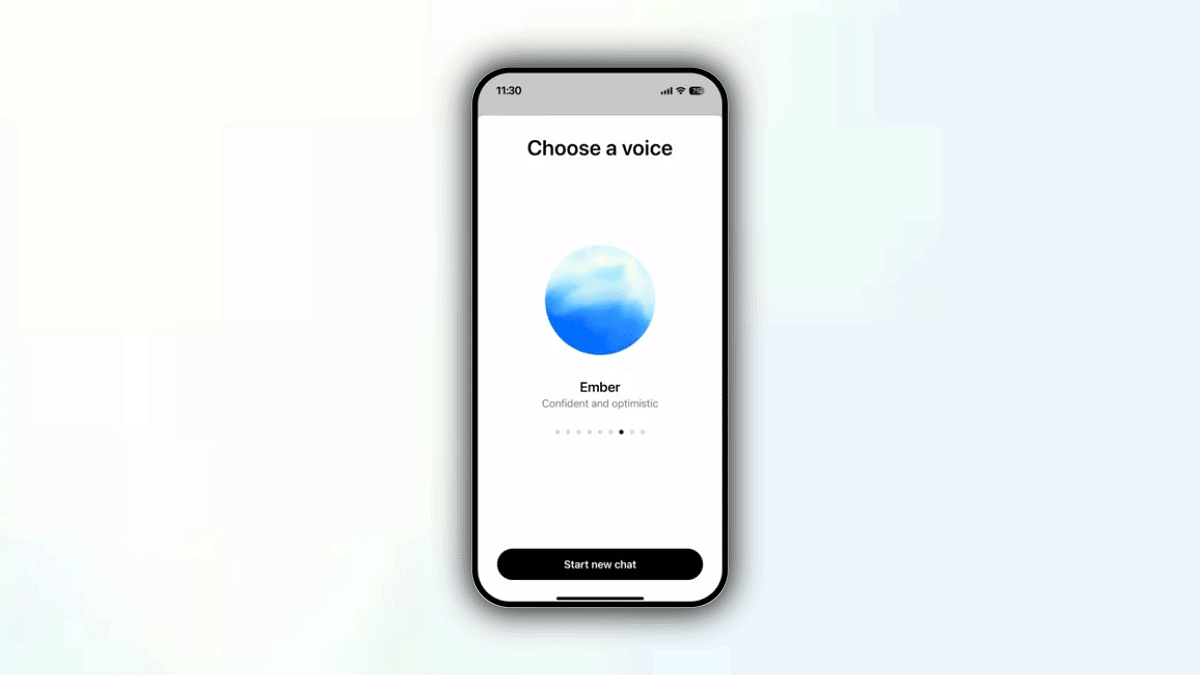
Step 1: Find the voice icon at the bottom right of the ChatGPT interface.

Step 2: Grant your browser permission to use the microphone when prompted.

Step 3: Once activated, you can see a blue circle in the center of your screen.

Step 4: If using standard voice mode, the circle will appear black instead of blue.

Step 5: Use the microphone icon on the bottom left to mute or unmute.

Step 6: Click the exit icon at the bottom right when finished.

Also Read | ChatGPT Search Quick Hacks: How To Use ChatGPT As Default Search Engine In Google Chrome

What If the Feature Isn’t Available Yet

ChatGPT

You will notice a headphone icon in place of a circle if the feature has not been rolled out to your account. As the rollout progresses, stay tuned for updates from OpenAI.

For the tech geeks, stay updated with the latest cutting-edge gadgets in the market, exclusive tech updates, gadget reviews, and more right on your phone’s screen. Join Giznext’s WhatsApp channel and receive the industry-first tech updates.

Categories
Featured How To Laptop Mobile

Zero-Day Vulnerabilities Hit Apple Users: Here’s How To Secure Your Devices

Key Highlights

  • Apple released urgent updates for security flaws
  • Hackers can exploit these to steal data
  • Update devices now to stay secure

Apple just released critical security updates for users of the iPad, iPhone, and Mac. Two serious ‘zero-day’ vulnerabilities that hackers have actively exploited are addressed by these upgrades. These vulnerabilities could allow hackers to take over your device or steal confidential information if they are not fixed. Software updates are essential for your security. What you need know about the vulnerabilities are covered in this post.

Also Read | Password Privacy: How To Create And Remember Strong Passwords

What Are Zero-Day Vulnerabilities?

These are security flaws that are discovered by attackers before the software maker, in this case, Apple. This makes them highly dangerous as they can be exploited without warning.

Who Discovered The Issues?

Google’s Threat Analysis Group, known for investigating cyberattacks, found the flaws. They noted that the vulnerabilities were being actively used in targeted attacks.

What Do The Flaws Target?

The vulnerabilities affect WebKit and JavaScriptCore, software components essential for running web content on Apple devices. WebKit, in particular, is frequently targeted by hackers.

How Could Hackers Exploit This?

By tricking users into visiting malicious websites or opening harmful content, hackers could execute malicious code on the device. This could lead to malware installation or data theft.

Which Devices Are Affected?

The security issues impact:

  • Intel-based Mac computers.
  • iPhones running iOS 17 or older versions.
  • iPads using iPadOS or older software.

Apple has rolled out fixes for all these devices, including older models.

Why Should You Update Immediately?

Delaying updates could leave your device vulnerable to cyberattacks. Here’s why updating is crucial:

  • Protects against malware and hackers.
  • Prevents unauthorized access to private data.
  • Ensures a safer browsing experience.

How To Update Your Device

Follow these steps to secure your Apple devices:

  • For iPhone or iPad: Go to Settings > General > Software Update.
  • For Mac: Open System Preferences > Software Update.
  • Install immediately to close the security gaps.

Also Read | Online Safety: Eight Essential Cybersecurity Tips For Kids

Stay Safe Online

Cyber threats are growing more advanced. However, frequent upgrades might protect your devices from possible damage. Now is a good time to upgrade your iPad, iPhone, or Mac. Don’t risk your safety. Keep your software up to date to stay one step ahead of hackers.

For the tech geeks, stay updated with the latest cutting-edge gadgets in the market, exclusive tech updates, gadget reviews, and more right on your phone’s screen. Join Giznext’s WhatsApp channel and receive the industry-first tech updates.

Categories
Featured Info Laptop Mobile

Apple Declares Older Devices Vintage And Obsolete: Full List Inside

Key Highlights

  • Apple emphasizes sustainability
  • Devices discontinued for 5-7 years are now listed as Vintage
  • Obsolete devices no longer receive hardware support

Recently, Apple has announced that a number of its older devices, such as iPhones and MacBooks, have been categorized as Vintage or Obsolete. Older models are classified as obsolete with little to no hardware support, while devices that have been discontinued for five to seven years are classified as vintage. Here’s what it means for you.

Also Read | Foldable Devices On The Horizon: What Apple Has in Store For iPhones And iPads

What Does Vintage And Obsolete Mean?

  • Vintage Devices: Products that are stopped from being distributed for 5-7 years.
  • Obsolete Devices: Products discontinued entirely with hardware service no longer available, except where required by law.

Vintage Products List

MacBook:

  • Retina, 12-inch (2017)

MacBook Air:

  • 11-inch (Early 2015)
  • Retina, 13-inch (2018)

MacBook Pro:

  • 13-inch (2017, 2 TBT3 and 4 TBT3)
  • 13-inch (2018, 4 TBT3)
  • 13-inch (2019, 4 TBT3)
  • 15-inch (2017 and 2018)
  • Retina, 15-inch (Mid 2015)

Mac Desktops:

  • iMac (21.5-inch, Early 2013)
  • Retina 4K, 21.5-inch (2017)
  • Retina 5K, 27-inch (Mid 2015 and 2017)
  • Mac mini (Late 2014)
  • Mac Pro (Mid 2012)

Vintage iPhone Models

These iPhones are considered vintage:

  • iPhone 4 (8GB)
  • iPhone 5
  • iPhone 6s Plus
  • iPhone SE
  • iPhone 8 Red and 8 Plus Red
  • iPhone X and XS Max

Obsolete iPhone Models

The following iPhones are now obsolete worldwide:

  • iPhone 3G, 3GS, and 4 models (all variants)
  • iPhone 5C
  • iPhone 5S
  • iPhone 6 and 6 Plus
  • iPhone 6s and 6s Plus (32GB)

Also Read | From New York To Tokyo: Five Best Apple Stores Around The World

Extended Repair Options

For up to 10 years following purchase, Apple provides extended battery-only repair for MacBooks. The parts’ availability depends on this. This program makes sure that devices last longer. It will promote environmental sustainability and lessen electronic waste.

For the tech geeks, stay updated with the latest cutting-edge gadgets in the market, exclusive tech updates, gadget reviews, and more right on your phone’s screen. Join Giznext’s WhatsApp channel and receive the industry-first tech updates.

Categories
Apps Info

Gmail’s Shielded Email Feature Could Soon Keep Your Inbox Spam-Free

Key Highlights

  • Google’s Shielded Email creates temporary aliases for privacy
  • Inspired by Apple’s Hide My Email
  • Adds security with Android System Key Verifier

Google is reportedly working on a new feature called Shielded Email. The feature is designed to make signing up for online services safer and more private. Users can make email aliases with it. This preserves their privacy while preventing spam from reaching their primary email accounts. It also seeks to make safe online interactions easier.

Also Read | Gmail Tips And Tricks: How To Secure Your Google Account With Two-Factor Authentication

What Is Shielded Email?

Here’s everything you need to know about Google’s upcoming Shielded Email feature:

  • Email Aliases for Privacy: Users can create one-of-a-kind, one-time use email addresses with Shielded Email. The principal email account receives messages from these aliases. This guarantees that when completing forms or registering for services, your actual email address will remain concealed.
  • Effective Spam Control: Users can reduce the risk of receiving spam and maintain a clutter-free inbox by using these one-time email aliases.

Google’s Prior Privacy Initiatives

Google previously introduced virtual card numbers for secure online payments. However, this service is currently limited to eligible U.S. cards. Shielded Email could be seen as a broader extension of Google’s commitment to online privacy.

Also Read | From Chaos To Clarity: Five Proven Methods To Keep Your Gmail Inbox Organized

Another New Security App: Android System Key Verifier

In addition to Shielded Email, Google recently launched the Android System Key Verifier app, which boosts security for messaging apps:

  • How It Works

This app allows developers to store end-to-end encryption keys securely. Users can verify these keys with QR codes, ensuring their messages are encrypted and secure.

  • Inspired by Apple Again

Similar to Apple’s iMessage Contact Key Verification, it helps confirm users are communicating with the intended contacts.

For the tech geeks, stay updated with the latest cutting-edge gadgets in the market, exclusive tech updates, gadget reviews, and more right on your phone’s screen. Join Giznext’s WhatsApp channel and receive the industry-first tech updates.

Categories
Apps Featured Gaming Info

Google Play’s Best Of 2024: Apps And Games That Stole The Spotlight

Key Highlights

  • Google Play list of 2024’s best apps and games is out
  • Partiful and AFK Journey topped the list
  • Expanded features made Google Play more engaging

As the year winds down, Google Play has unveiled its highly anticipated Best of 2024 list. It showcases the standout apps and games that made waves this year. More than a recognition, Google describes these awards as a tribute to the developers who continue to make Android a dynamic platform for creativity, entertainment, and innovation.

Also Read | Android Tips And Tricks: How To Create Your Selfie GIF And Send Via Google Messages

Top Picks Of 2024

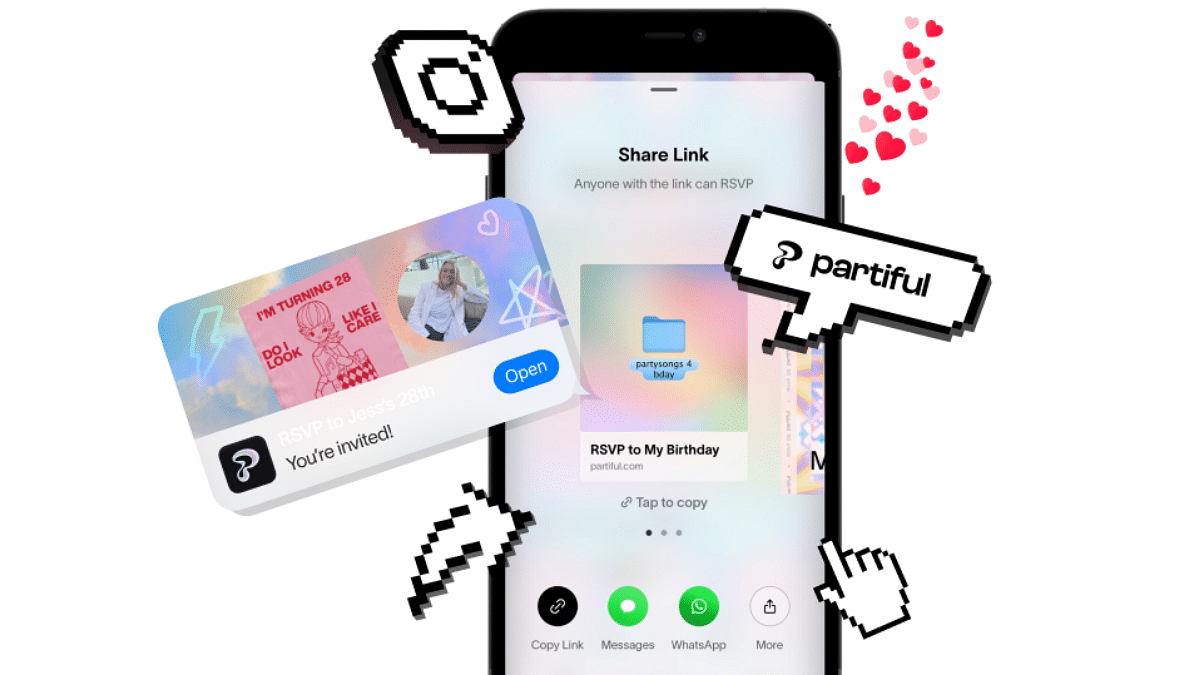
Best App: Partiful

  • An event planning platform with a sleek, intuitive design.
  • Offers a new take on creating invites that stand out.

Best Game: AFK Journey

  • A fantasy RPG game with a vast roster of characters.
  • Features a tactical battle system praised for its depth and satisfaction.

Best Multi-Device App: Max

  • A streaming platform with an extensive library of TV shows, movies, and original content.
  • Available on a wide range of devices, including smartphones, tablets, and TVs.

Best Multi-Device Game: Clash of Clans

  • A timeless multiplayer strategy game.
  • Now playable on PCs, Chromebooks, and foldable devices, in addition to smartphones.

Category Winners

Best Apps Of 2024

CategoryWinnerDescription
Best for FunMila by Camilla LorentzenActivities based on your mood
Best for Personal GrowthUpStudy – Camera Math SolverA helpful tool for students
Best Everyday EssentialMacroFactor – Macro TrackerA reliable health and nutrition tracker
Best Hidden GemTimeleftA unique app waiting to be discovered
Best for WatchesBaby Daybook – Newborn TrackerIdeal for tracking your baby’s milestones
Best for Large ScreensInfinite PainterUnleashes creativity on tablets and foldables
Best for Google TVPeacock TV: Stream TV & MoviesYour go-to entertainment app for the big screen
Best for CarsPBS KIDS VideoKeeps kids entertained during drives

Also Read | Best Action Games For Android

Best Games Of 2024

CategoryWinnerDescription
Best MultiplayerSquad BustersExciting multiplayer action game
Best Pick Up & PlayEggy PartyTrendy party game
Best IndieYes, Your GraceA creative and immersive indie title
Best StorySolo Leveling: AriseA narrative-driven gaming masterpiece
Best OngoingHonkai: Star RailContinues to thrive with engaging content
Best for FamiliesTab Time WorldA delightful game for all ages
Best on Play PassKingdom Rush 5: AllianceStrategy game available on Play Pass
Best for Google Play Games on PCCookie Run: Tower of AdventuresA cross-platform favorite

For the tech geeks, stay updated with the latest cutting-edge gadgets in the market, exclusive tech updates, gadget reviews, and more right on your phone’s screen. Join Giznext’s WhatsApp channel and receive the industry-first tech updates.