Categories
Apps How To

How To Use Missed Call Alert Feature: Check All Steps Here

Key Highlights

  • Airtel launches Missed call alerts feature.
  • Airtel Missed call alerts feature is embedded in the Thanks Application.
  • Airtel prepaid and postpaid users are allowed to use the Missed call alerts feature.

Airtel has come up with a new feature to help its users in India. The Missed call alerts feature will allow users to know about the missed call, while they are not in the coverage areas. Notably, the feature is no new as Reliance Jio is already providing the same services to its customers. However, Airtel allows you to see missed calls via call logs.

How To See Missed Call Alerts

Step 1: First, you need to log in to the Airtel Thanks application.
Step 2: Now, log in to the Airtel Thanks application from your Airtel mobile number.
Step 3: Then, you will find curated by you tab on the application and then you will see the “smart missed call alerts”.

Why This Feature Is Important?

Airtel Missed Call Feature

It is important to note that the Missed call alert feature has been launched for the -network area zone. In case you are traveling or your phone is turned off, then this feature is useful for you. However, you have to check the Airtel Thanks application for missed calls. Notably, the call log feature will not allow you to feature all calls as it will show the missed calls when the phone is not used or not in-network.

Airtel Missed Call Feature: Availability

It is worth noting that this feature is designed for prepaid and postpaid users. All you need to have Airtel mobile number and download the company’s Thanks application. Then, you need to access the missed call alerts tab and if you are unable to see the same, then you have to update the app to the latest version.
Categories
Apps Featured How To

Google Maps Now Shows Toll Fares On National Highways: How To Check Toll Charges Using Maps

Google is offering a plethora of services to Android mobile users globally. The search giant has developed dedicated apps and tools for media/ video playback, digital wallet, and for navigation as well. In fact, the modern-day masses rely on Google Maps for directions to reach any unknown destination. Google has integrated tonnes of features into the Maps and besides a design overhaul, the functionality has also improved in the last few years. Google is now making it possible for users to be aware of the toll fare being collected on the national highways in the country. Here’s how Google Map’s new feature will work:

Google Maps Toll Features Now Shows Total Fare

Google Maps is one of the most commonly used services on both Android and iOS smartphones nowadays. The company has been improving the toll data system on the Maps to help the users plan their trip’s costs well in advance. If you are one of the active Google Maps users, you must have seen the “Tolls ahead” option if you are traveling through national highways. Users can check for the tolls while searching the destination.

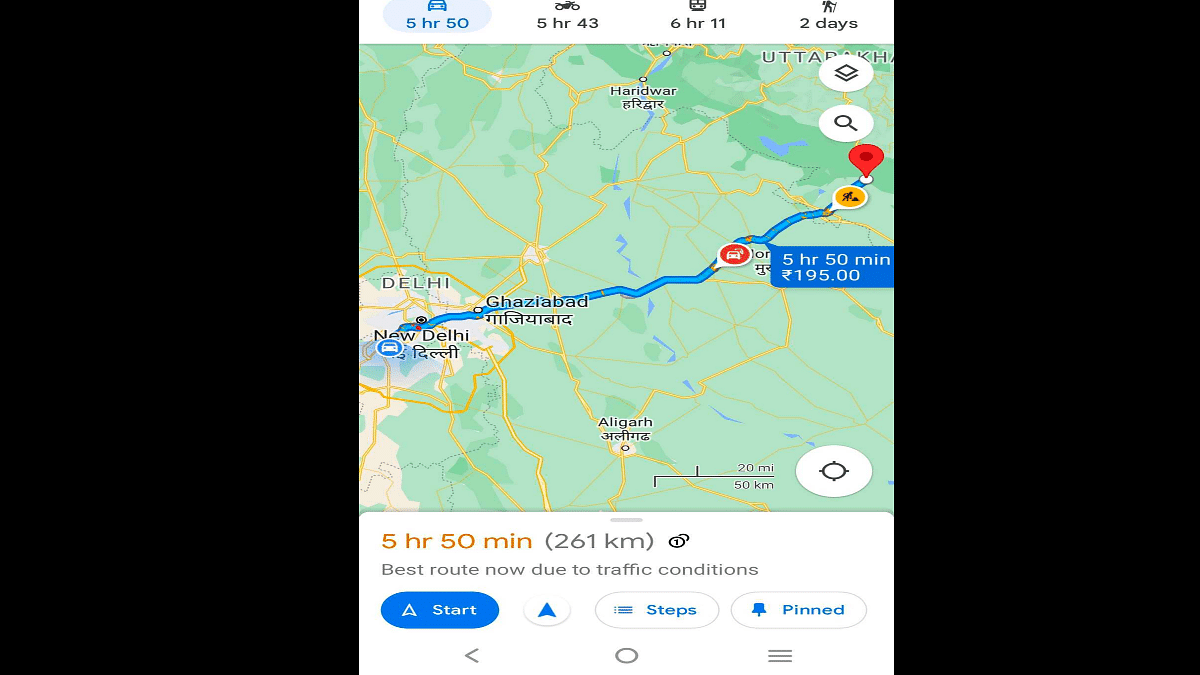
With the new update, Google Maps will now show the estimated toll fare that you will have to pay while traveling to your destination. Google via its community support forums has now confirmed the availability of this new toll feature with price calculation. It is worth mentioning that this new feature will only show the estimated toll fare of all booths collectively. It will not show which toll will charge or how much amount during the journey.

To get the correct fare details, Google has collaborated with trustful sources from local tolling authorities. The brand has also taken several factors such as toll pass, day of the week, etc., to show the estimated toll charges while crossing any booth at a specific period of time.

Google has also clarified that users will still have the option to “Avoid Tolls” and select routes accordingly. The procedure remains the same if you wish to use this feature. But how do you check the toll fare on Google Maps before starting any journey? The steps are mentioned below:

How To Check Toll Amount In Google Maps?

As mentioned above, the estimated toll fare for the entire journey is calculated and shown on Google Maps and not just for the individual toll booths.

Step 1: Open Google Maps on your respective Android and iOS smartphones.

Step 2: Enter your destination.

Step 3: Click on “Directions”.

Step 4: At the bottom of the homepage, you’ll see the ETA for the destination along with the distance and number of tolls on the entire stretch of the road. Pull up the tab and you’ll be able to see the toll fare (total amount). That’s all you need to do to check the toll fare on Google Maps.

Categories
Apps How To

YouTube Free Services: Here’s How To Get It

Key Highlights

  • YouTube Premium subscription brings several benefits over a free account
  • It is available in two prepaid options
  • YouTube is providing a plan for students of Rs. 79 per month

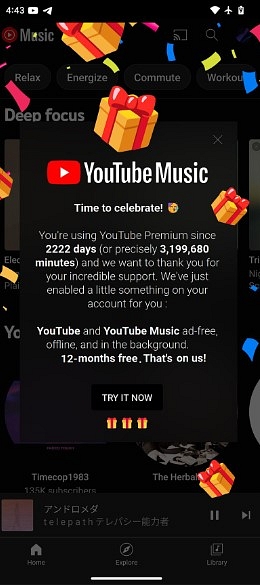
YouTube has come up with a new offer to retain its loyal customers. The video streaming platform is providing free services to users who have subscribed to its services for more than six years. According to the 9to5Google report, those users will get 12 months of free services.

This development comes after a user reported that he received the Time to celebrate prompt in YouTube Music. He states that he has received this offer after using services for 2222 days, which means long-term users are getting the same offer.

“…we want to thank you for your incredible support. We’ve just enabled a little something on your account for you. YouTube and YouTube Music ad-free, offline, and in the background. 12-months free. That’s on us.”

However, to check the YouTube Premium start date, you have to follow these steps.

Step 1: You need to open YouTube on Android and iOS devices.
Step 2: Click on the profile picture, which is in the top-right corner.
Step 3: Tap on the Premium benefits category now to see the member since the date.

Image: Reddit

YouTube Premium Subscription Plans In India: Check All Detail

Let’s start with an Rs. 139 per month plan without an auto-renewal option and if you choose the same plan, you have to pay Rs. 129 per month. Apart from this plan, the company offers three months plans, which are priced at Rs. 399; however, for a year subscription, you have to shell out Rs. 1,290.

For the unaware, YouTube is providing a plan for students of Rs. 79 per month. However, to avail of the same pack, students have to submit their ID as proof. YouTube Premium offers an ad-free viewing option and download video options so that you can watch them offline mode. Also, you will get the picture -in picture playback and background.

Also Read: YouTube Tips And Tricks: How Can You Watch Age Restricted Videos On YouTube Mobile App, Desktop Version

Categories
Apps Featured How To

iOS 16 Tips And Tricks: How To Customize iPhone Lock Screen With iOS 16

Apple is done with its annual developer conference WWDC 2022 where it unveiled the new-generation iOS 16, MacBooks, and WatchOS. The Cupertino giant has made major improvements to the iOS 16 and other products introduced during this year’s WWDC event. The iOS 16 which is the driving force for all Apple iPhones brings a whole lot of new features and tools for better performance.

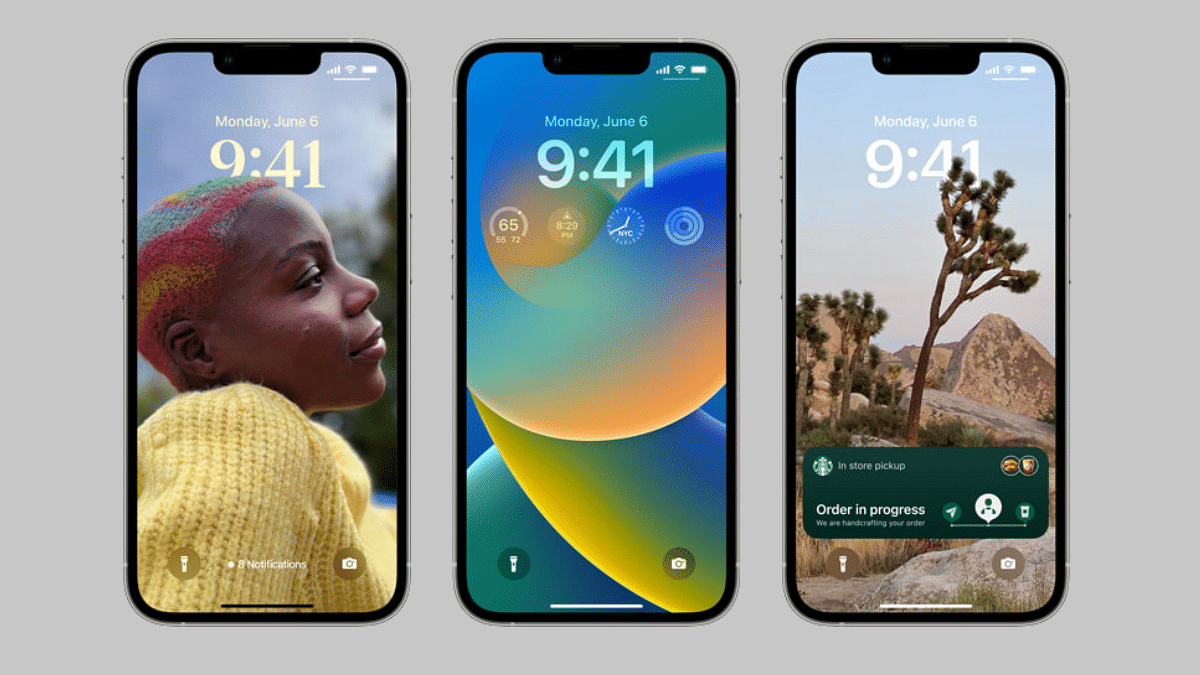
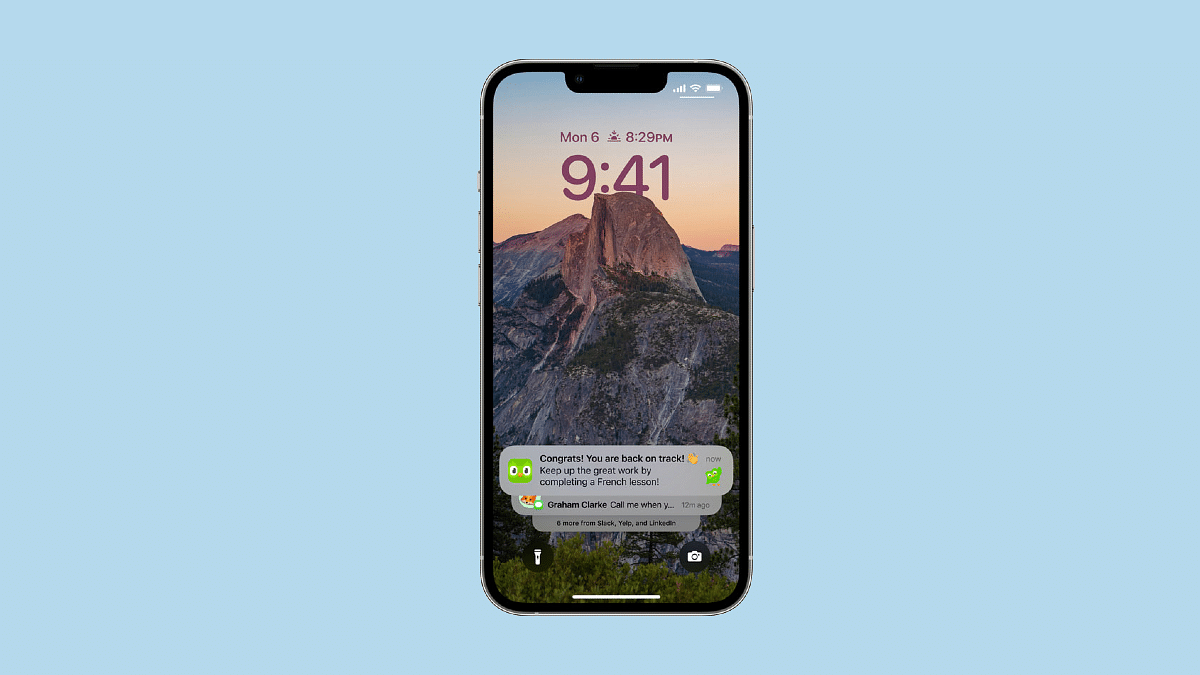
The iOS 16 brings a major overhaul to the lock screen. With the new iOS 16, Apple aims to deliver a personalized user experience to its audience. With the iOS 16 update, users will be able to add multilayer effects for photos that they can later use as wallpapers for lock screens. Also, the provision to add third-party widgets, full-screen album art, activity tracker, and more will now be shown on the lock screen as selected.

To further help with the Lock Screen customizations, the iOS 16 lets users modify the font as well as colors. Apple has also released a wide range of wallpapers, emoji backgrounds, and more with the iOS 16. But how can you create or customize the Lock Screen on iOS 16 devices? The steps for the same are mentioned below:

Steps To Customize Or Change iOS 16 Lock Screen On Apple iPhones

Before we proceed, it is worth adding that the new iOS 16 is currently available in the beta version for the eligible Apple iPhones. The stable version will be rolled out in the coming weeks. But the procedure for the Lock screen customization will be the same with the stable iOS 16 version as well. The steps are mentioned below:

Step 1: Open your respective Apple iPhones and install the iOS 16 if the update is available. You can skip this step and directly unlock the device if the iOS 16 update is already downloaded on your iPhone.

Step 2: Now, tap and hold the lock screen on your respective iPhones. You will get a new “+” option.

Step 3: Once you have completed step two, swipe left from the screen. You will now see another option “Add new”. Click on it.

Step 4: You will get multiple wallpapers from which you can select the desired image and make adjustments to the widgets. You will also get the option to add an extra set of widgets (third-party as well).

Step 5: Once you have aligned everything on the home screen, click done to complete the customizations with the Lock Screen on your iOS 16 iPhones.

Categories
Apps Featured How To

How To Track Unknown Mobile Numbers Using Truecaller

Truecaller is a popular app that lets you identify unknown numbers, block calls, and avoid scammers. The app is used by millions of people as it allows you to view the Caller ID of whoever is contacting you, even if the number isn’t saved in your phone book. It further provides information on the caller before the user answers an unfamiliar call.

Now, everyone knows how to use Truecaller to look for phone numbers. Many people, however, do not. The app keeps launching new updates to protect its users against fake and spam calls. It also simplifies simple activities such as reading long messages for crucial information. So, don’t stress over that unknown number as here you can learn how to search about them on Truecaller.

How To Search Phone Number On Truecaller?

You may often want to learn more about someone whose phone number is not saved in your phone. Truecaller allows you to look for a phone number in a few simple steps. It is your go-to app if you have a phone number and want to confirm who it belongs to before messaging it. You can simply enter the phone number into the app to locate the person. Then, you can find their names then their addresses if they have been updated. We have listed down two methods to find mobile numbers on Truecaller:

First Method:

Step 1: Open the Truecaller app and go to the Search Bar.

Step 2: Type in the number you want to search.

Step 3: Now, the details will be presented below.

Second Method:

Step 1: Open the search bar in the Truecaller app.

Step 2: In the upper right-hand corner, an icon (a camera with a magnifying glass) will appear.

Step 3: When you click the icon, Truecaller will present a prompt that says ‘Point your camera at any phone number to search in Truecaller.’

Step 4: Now, follow the prompt and wait for a few seconds. The app will run the number through its database as soon as it identifies and scans it.

Step 5: You will have the results ready in a minute or two with the details of the person to whom the number belongs.

Categories
Apps Info Mobile

Free YouTube Premium Subscription If You Buy These Xiaomi Smartphones

Highlights

  • Free YouTube premium subscription offers for Xiaomi smartphones
  • Offer valid on Redmi Note 11, Xiaomi 11, and 12 series
  • Xiaomi Pad 5 is also eligible for free YouTube Premium Access

Xiaomi smartphones are quite popular amongst consumers in the global as well as the Indian market. The Chinese tech giant is catering to all smartphone enthusiasts with its Redmi and Xiaomi-labelled devices. Xiaomi is also known for offering big discounts and other deals on its devices. The brand is back again with a lucrative deal that is definitely hard to miss. The latest offer announced by Xiaomi will give access to YouTube premium without any charges. How can you avail the offer and which devices are eligible to get free YouTube premium access? Take a look:

Free YouTube Premium Access For Xiaomi Devices: Eligible Model And Offer Details

Xiaomi India has partnered up with YouTube to offer free subscription plans on a bunch of its Redmi and Xiaomi-series smartphones. You would need to buy a new Xiaomi smartphone to avail this free YouTube premium subscription offer. As many as 10 different Xiaomi and Redmi phones have been confirmed by the brand eligible for this offer.

The Redmi smartphones with free YouTube premium access are the Redmi Note 11, Redmi Note 11T, Redmi Note 11S, Redmi Note 11 Pro, and the Redmi Note 11 Pro+.  The Xiaomi 11 series including the Xiaomi 11T Pro, Xiaomi 11i HyperCharge, and the Xiaomi 11i are also on the list. The high-end Xiaomi 12 Pro along with the Xiaomi Pad 5 tablet are also eligible for the free YouTube premium subscription offer.

Notably, this is a limited period offer that you will get on buying any of the aforementioned smartphones. If in case you are planning to buy the Redmi Note series phones or the Pad 5 tablet, the offer will be valid for the next two months. On the other hand, if you wish to purchase the Xiaomi 12 Pro or the Xiaomi 11 series phones from the list mentioned above, the offer can be availed till the next three months.

Steps To Avail Free YouTube Premium Subscription On Aforementioned Xiaomi Smartphones

There are no tricky steps to activate the free premium YouTube subscription on the Xiaomi devices from the aforementioned list. Once you have purchased the smartphone, you simply have to complete the device setup and log in to your Google account. Open the YouTube app once you have successfully logged in and completed the steps listed on the app to get the offer.

Once the premium subscription is activated on your Xiaomi smartphone, you will be able to stream ad-free videos and also have access to YouTube Music services without paying any extra charge.

Categories
Apps Featured How To

How To Lock Play Store On Your Android Phones? Ways To Enhance Privacy With Google Play Store

Key Highlights

  • Passwords on Google Play prevent accidental purchases and unauthorized access
  • Securing your account is crucial for lost or stolen devices
  • Parental controls restrict access to inappropriate apps for a safer smartphone experience

There are a lot of reasons you will want a password on the Google Play Store. For one, you don’t want your children or a family member to waste money on an app or game that you’ll never use or play. Second, you don’t want someone using your Google account to buy music, applications, or movies if your device is lost or stolen.

There are also certain 18+ apps that aren’t appropriate for kids. Despite the warning, anyone can download any app by default. If you are concerned about your child having access to a smartphone, you can create a lock to prevent these apps from being accessed or installed. All you have to do is set up parental control. How can you do that? Let’s have a look:

Also Read | How To Check Number Of Sim Cards Registered On Your Name And ID: How To Block Unauthorized SIM Cards Issued On Your Name?

Steps To Set Parental Lock On Google Play Store

Setting up Parental Controls on your device prevents users from downloading or purchasing anything from the Google Play Store. It’s secured with a password that you’ll have to create throughout the setup process. Once the password has been entered, the user will be able to install or purchase an app. To find out how to enable Parental controls, follow the steps below:

Step 1: Go to the Google Play Store application on your Android smartphone.

Step 2: Tap on the Menu option located at the top left of your screen.

Step 3: Click on the Settings option.

Step 4: In the Google Play Store Setting window, tap on the Parental Control option and turn it on.

Step 5: Once you turn it on, you will be asked to set a security pin. Enter the pin number to change the settings and then press Ok.

Step 6: Now, you have to set the restrictions for the device.

You never know when your device will get in the wrong hands and an unwanted purchase is made. Make sure you are safe and protected from unwanted purchases. By following the above-mentioned steps, you can easily set the parental lock on the Play Store to keep your important data safe.

Also Read | Google’s Latest Math Solver App ‘Photomath’ Hits Play Store: Key Features

Categories
Apps Featured Info

Apple WWDC 2022 Keynote: iOS 16 Brings Slew Of New-Age Features

Apple just concluded its WWDC 2022 event. The Cupertino tech giant introduced the latest of innovations at its annual developer conference. The company has announced iOS 16 for the new-generation Apple iPhones and iPads. The event also was the centerstage for revamped Watch OS 9, MacBook Air, and the MacBook Air Pro with the latest Silicon M2 processor. With the iOS 16, Apple has not limited itself to cosmetic changes but has added a slew of useful features. A bunch of them are mentioned below:

Which All iPhones Will Support iOS 16?

iOS 16 will be released to all the latest-gen iPhones in the iPhone 13 series. The older-gen iPhone 12, iPhone 11, and iPhone X series will also be getting the new-generation iOS. The iPhone 8 and the iPhone 8 pro are also in line to receive the iOS 16 update in future.

Apple iOS 16 Key Features To Check Out

New iOS 16 Updated Lock Screen

One of the major changes that iOS 16 brings to all iPhones and iPads is the revamped Lock Screen. Apple has enhanced the Lock Screen features with several user-friendly options. The iOS 16 is more personalized with the re-designed widgets and a multilayer effect for photos set for the lock screen. Users will now be able to add third-party widgets as well to the lock screen. Additionally, the iOS 16 will also display full-screen album art on the home screen. An updated Notification bar has also been introduced with the iOS 16. The new Notification bar integrates several functions such as live tracking of uber cabs along with activity tracking.

iOS Maps Update (iOS 16)

The Apple Maps is also on the list of revamped features that have arrived with the iOS 16. The Apple Maps gets several set of improvements such as an advanced multi-stop route feature wherein one can add up to 15 stops via Siri. iOS 16 has also added transit updates for the users that will allow users to calculate the estimated fare for a trip. Users will also be able to link their digital wallets with the transit cards on Maps and recharge directly if the balance is low.

iOS 16 iCloud Shared Photo Library Feature

iOS 16 also introduces a new iCloud Shared Photo library option which is integrated both within the device gallery and the camera app. This new option will allow users to create a separate iCloud library with up to six users to share photos seamlessly. Also, the group of shared users will have the option to add, delete, edit, or mark photos and videos favourites.

iMessages iOS 16 Update

iMessages has also been updated with the new iOS 16. The latest firmware version will allow users to edit or recover recently sent and deleted messages. SharePlay is also being added to the Messages with the iOS 16 with which users will get access to  the synced content such as songs or movies while using the app for texting.

Categories
Apps Featured How To

WhatsApp “Undo” Deleted Message Option In Works; How To Undo And Retrieve Deleted WhatsApp Messages?

WhatsApp is currently amongst the top instant messaging applications available for Android and iOS mobile users. This app is also being preferred by laptop and PC users nowadays. The Meta-owned messaging platform has introduced a plethora of features and tools for both mobile and desktop versions. Several of the features have been borrowed from Instagram and Facebook itself. One of such options has been the option to delete any sent message. The brand did bring this feature, but users have been accidentally selecting the wrong option that is now being taken care of by WhatsApp with the upcoming update.  The “undo” option for deleted messages is the feature we are speaking of. Here’s how you can undo the deleted messages on WhatsApp:

How To Undo Deleted Messages On WhatsApp?

WhatsApp currently gives three options to the users to delete any message including “Delete For Me”, “Cancel”, and “Delete for everyone”. However, there is a tendency where users tap on the “Delete for me” option instead of “Delete for everyone”. This doesn’t remove the message from the chat screen of other users. WhatsApp has acknowledged users’ complaints on the same.

The upcoming feature on which WhatsApp is now working will now enable the option to undo any deleted messages. The development has been tipped by Wabetainfo which is known for tracking all WhatsApp latest updates. The report suggests this “undo” deleted messages option is currently under testing. It is already made available for Android beta build v 2.22.13.5.

Currently, WhatsApp has not confirmed if it has any plans to release a stable update for this feature. But we would likely come across some more developments on the same in the coming weeks. This option to delete and undo the deleted texts will be available for both Android and iOS devices. We might see this feature on the desktop version going further. But the exact timeline is difficult to guess just yet.

As for the procedure, the exact steps will only be confirmed when this feature is released. But going by the reports, we can expect the “undo” tab to pop up as soon as any of the messages is being deleted.

Step 1: Open any chat window on WhatsApp.

Step 2: Select the message that you want to delete.

Step 3: Once you click on the “delete for me” or delete for “everyone” option, you will can another option, i.e, “Undo”. Select it to retrieve the deleted message and then perform the right action.

Categories
Apps How To Tech News

How To Avail Gold Loan From Airtel Payment Bank: See Steps Here

Airtel has come up with a new offer for its customers. The payment bank of the telecom operator has joined hands with Muthoot Finance to offer credits to its customers. The Airtel Payment Bank customers will be allowed to get a gold loan from Muthoot Finance via the company’s app.

Under this partnership, Airtel Payment Bank customers will not have to pay any processing fees to avail of the free gold loans from Muthoot Finance. Notably, this partnership will allow customers to get 75 percent of the pledged gold value in the form of a loan. However, to avail the loan Airtel Payment users have to follow these steps.

How To Apply Gold Loan From Airtel Payment Bank

Step 1:  First, login into the Airtel Thanks application. Now, go to the banking section.

Step 2:  Tap on the Gold Loan icon. Enter location, tenure of the loan, and the exact amount.

Step 3: Now, give the required permissions and share details with the Muthoot Finance team.

Step 4: After that, the Muthoot Finance team will give you a call or connect with the Airtel Payment Bank customer to process the application.

Airtel Payment Bank And Gold Loan Offer

It is worth noting that the loan can be availed by anyone by pledging gold jewelry. Once the customer will be paid off, the gold will be given or returned to the same person. It said that customers can avail of small loans from a starting price of Rs. 3,000 for seven days. 

In addition, the flexible payment option to complete payments before the end date or maturity date without no extra charges. The company allows visiting 500,000 banking points for Airtel Payments Bank.

“Gold Loans are secured loans that can be availed to cater to a variety of needs, from personal to professional. We are delighted to partner with Muthoot Finance to offer easy access to Gold Loans through Airtel Thanks App. The flexible pay-back facility offered by Muthoot Finance makes it a great solution for customers who are looking for either short or long-term loans. We are positive that our customers will benefit from the same,” Ganesh Ananthanarayanan – Chief Operating Officer, Airtel Payments Bank.