Categories
How To Info Tech News

How to Remove Profile Picture from Google Account (Gmail, YouTube, Google Meet)

Key Highlights

  • Adding a profile picture to the Google account is an option with Android devices
  • A Google profile pic is visible across all services including Gmail, YouTube, Google Meet
  • Removing Google profile pic is an easy process via desktop, Android, and iOS devices

Profile Pictures are a great way to express oneself, personalize one’s Google account, and make oneself noticeable online. A person’s Google profile picture is viewable throughout all the services provided by Google, whether it be Gmail, YouTube, Google Meet, Google Play Store, Google Hangouts, etc. Thus, it is safe to say that one’s Google profile pic is pretty much public and can be viewed by many people. So, in this article, we tell you How to Remove a Profile picture from your Google Account.

Thus, there can be times when one decides to go incognito and remove one’s Google profile pic. This helps one in maintaining one’s online privacy and safeguard personal information while still being able to access Google and related resources and websites without restrictions. Following are the ways in which one can do the same and remove one’s profile picture on different platforms like Personal Computers (PC), Android, and Apple (iOS).

How to Remove Profile Picture from Google Account:

On Computer (Web)

This is the easiest, fastest, and foolproof method to remove one’s Google profile picture. This method can be used by anyone with a computer and a working internet connection. Following are the steps to remove the profile picture of your Google account:

  1. Open your web browser, preferably Google Chrome.
  2. Login to your Google account by visiting accounts.google.com on your web browser.
  3. Choose the ‘Personal info’ option on the web page.
  4. Now, click on the profile picture, which appears with a small camera icon on top of it.
  5. Here, in the window that pops up, press the ‘Remove’ button.
  6. Confirm the remove option by clicking ‘Remove’ in the final pop-up box that appears.
  7. Voila! The profile picture will be removed.

Also Read: Best Apps To Detect Hidden Camera For Android And iOS

On Android
In an Android device, you can either follow the aforementioned steps by visiting your phone’s browser and choosing the ‘Desktop site’ option or follow through the given steps:

  1. Go to your phone’s ‘Settings’.
  2. Scroll down and select ‘Google’ under the ‘Personal’ tab.
  3. Click on the ‘Manage your Google Account option.
  4. Now, choose ‘Get Started’ and go to the ‘Personal info’ tab.
  5. Scroll down and choose ‘Go To About me’ option.
  6. Tap the profile picture icon and select the ‘No Photo’ option.

Also Read: Best Matrimonial Apps To Download In India: List Inside

On iOS (iPhone/iPad)
Removing one’s Google profile picture using an Apple device can be a bit tricky, and one would recommend using the above options, but if an iOS is the only option available, you can follow the steps given below:

  1. In an Apple device, open any web browser, preferably Safari or Google Chrome.
  2. Type https://myaccount.google.com in the search box and visit the website.
  3. Sign in to your Google account.
  4. Now, under the ‘Personal info & privacy’ header, tap on the ‘Your personal info’ button.
  5. Here, select the ‘About me’ option.
  6. Tap on the ‘Pencil Icon’ beside your profile picture on the top-right corner of the screen.
  7. Here, you can click on the camera icon on top of your profile picture to change/remove it.
  8. Finally, click on the ‘No Photo’ option to remove the profile picture from your Google Account.

One can use any of the following methods given above to remove one’s Google profile picture, and in case of any further confusion, it is always advisable to visit Google’s Help Center.

Also Read: What is ‘App Install Optimization’ in Google Play Store?

Categories
Info Tech News

Best Apps to Watch Live TV on Android

With the advent of widespread and faster internet speed, many people are now turning towards media they can access remotely via mobile phones, smart TVs, and personal computers. Watching Live TV on Android is becoming a common phenomenon, and thus, it is important to know the best apps that one can use for watching Live TV right on their Android devices. So, here are the Best Apps to Watch Live TV on Android.

Best Apps to Watch Live TV on Android

  1. Airtel Xstream

If one already has an Airtel DTH connection or uses an Airtel sim or broadband, then Airtel Xstream might be the best choice. Along with Live TV, Airtel Xstream gives access to other TV shows, Originals, News, and Movies. 

This app provides access to more than 350 Live TV channels in around 13 languages, including Kannada, Malayalam, Bhojpuri, Bengali, and many more. It offers a plethora of channels like Zee, Sony, Colors, Cartoon Network, etc., and a range of programmes, including News, Sports, and Daily Soaps.

  1. nexGTv HD

nexGTv HD or nexGTv HD: Mobile TV, Live TV is an app that allows one to watch Live TV on android mobile devices. The app can be downloaded for free from the Google Play Store, but one has to pay a subscription fee to be able to access live TV shows. 

This app includes channels for News, Music, Hindi and English movies, etc., and Live TV can be easily accessed through it with a smooth working 3G, 4G, or Wi-Fi network. Some channels accessible through nexGTv HD are BigFlix (Hindi & English Movies), India TV, B4U Music & Movies, News 24, News 24, Bollywood Masala, etc.

  1. JioTV

It is one of the most used and diverse Live TV apps presently. Jio TV provides instant access to a range of TV programmes at one’s fingertips. But before opting for JioTV, one needs to make sure that one is using a Jio SIM card as the app is exclusively accessible to Jio SIM users.

It provides over 650 TV channels (including 100+ HD channels) that can be watched live on your Android device, be it a tablet or a mobile phone. It provides a range of TV channels belonging to genres like News, Cricket, Educational, Infotainment, Entertainment, Movies, Religious shows, etc., in more than 15 languages. It also allows for a 7-day catch-up of all prime shows.

  1. YuppTV

YuppTV is a Live TV app specifically made for watching Indian TV shows and movies. It allows access to over 200 Live TV Channels, including regional channels. Alongside this, it also provides a 7-day catch-up option. It enables the user to watch IPL 2021, News, Other Live Sports, TV soaps, Devotional channels, and Movies & Music channels. 

Some of the most popular channels on YuppTV are – Aaj Tak, Star Plus, Colors, Sony, 9XM, etc. But, it is important to note that channels like Zee and Star channels and VIVO IPL 2021 Live streaming is not available for watching in India.

  1. Hotstar

Hotstar is another popular app in the market for watching Live TV. It is ranked #4 top free in entertainment on Google Play Store, which provides access to Live TV, Sports, and Movies in various languages. It also exclusively streams Live Cricket matches like VIVO IPL 2021 and T20 World Cup in India.

Also Read: [GizNext Exclusive] Samsung Galaxy Z Fold 3 5G Revealed In Full Glory: Official Brochure & Features

Hotstar provides various streaming options for free and subscriptions that can be enjoyed by viewers according to their liking. It also offers international movies dubbed in Indian languages, which makes it a great app for the Indian audience.

Categories
How To Info Tech News

How to Prevent Battery Degradation and Check Your Android Phone’s Battery Health?

Most of the smartphones we are currently using run on lithium batteries. As lithium batteries degrade pretty quickly, the efficiency of the recharge cycle and charge capacity decreases over time. Although Android phones come with a guide that educates the user about battery usage, there is hardly anything mentioned about battery degradation and how to check it. Now, let us explore some easy ways as to How to Prevent Battery Degradation and examine the health of your Android phone’s battery.

  1. Using dial pad codes:

Some Android phones have hidden menus or codes to check your battery health. The common code for all Android phones is believed to be *#*#4636#*#*, and it may be different too. Dial this code, and it returns the battery condition of your phone with a pop-up. If your battery condition is healthy, it shows ”good,” else it shows badly.

The battery’s normal temperature is considered to be 30 to 40 degrees Celsius for a phone kept at room temperature. The same code also displays the battery temperature that helps you analyze your battery temperature.

  1. Using Accubattery:

The dialing code may not be accurate. Even if it is correct, you may not always receive accurate results. Hence, third-party apps that deliver accurate results are considered to be good to check your battery health. Accubattery is one such app that gives accurate results on your battery health.

  • How does Accubattery work?

Accubattery constantly analyzes your phone’s software and hardware usage and battery capacity to assess the health of your battery. 

It also records the charging as well as discharging speeds, battery’s temperature, the wear and tear of your battery, and charging as well as discharging history of your battery.

  • Is it accurate?

Accubattery is just an app, unlike manual testing. It may be correct to some extent, but it is better to consider a 5% margin due to any errors. In that case, Accubattery can be at least 80 – 90% accurate.

  1. Tips to prevent Android phone’s battery degradation:

Battery degradation may not happen in the initial few days, but it is inevitable and will happen eventually no matter how much you try. But you can follow these tips to ensure good battery health:

  • Don’tDon’t charge or discharge to extreme levels.
  • Until and unless you are in a hurry, do not fast charge and avoid it as much as possible.
  • Avoid using your phone while it is charging.
  • Do not expose your phone to extreme temperatures like too hot or too cold. Try to keep it at room temperature.
  • Do not use third-party chargers. Use original and branded ones only.
  • Avoid overnight charging or charging beyond 100%. This may damage the battery’s health.
  • Avoid using your phone when the battery is heated up. 
  • Do not use your phone continuously and clear the background apps after using your phone that unnecessarily consumes energy and discharges the phone.
Also Read: [GizNext Exclusive] Samsung Galaxy Z Fold 3 5G Revealed In Full Glory: Official Brochure & Features

Following these tips and frequent cleaning of your storage can help you in maintaining good battery health and slow battery degradation. However, degradation is inevitable, and it happens. You can only delay it but not stop it.

Categories
Info Mobile Tech News

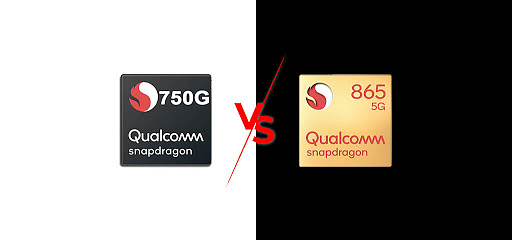
Snapdragon 865 vs 750G – Detailed Comparison; Which One is Better?

Introduction

Snapdragon 865 was the 2020 best smartphone processor for applications by Qualcomm, whereas Snapdragon 750G comes with day-to-day tasks apps and just works fine. So, today in this article, we have shared with you a detailed comparison of the Snapdragon 865 vs the Snapdragon 750G to let you know which one is better.

Snapdragon 865 vs Snapdragon 750G

Performance Comparison:

Snapdragon 865 CPU has 29% higher clock speed (2840 vs. 2200 MHz), whereas Qualcomm Snapdragon 750G was announced 10 months later and comes with better instructions set architecture and much higher speed.

Graphics:

Qualcomm Snapdragon 865 supports 159% of higher memory bandwidth and comes with a smaller size transistor than Qualcomm Snapdragon 750G processor. Both support integrated graphics, which means you don’t need to have an external graphic card, and high HD games can be played easily, and both have a 64-bit operating system. 

The graphics processing unit (GPU) in Qualcomm Snapdragon 865 has a lower speed which is of 587MHz than compared to Qualcomm Snapdragon 750G, which is of 950MHz.

Graphics (GPU) used in Qualcomm Snapdragon 750G processor phones are Adreno 619 with Adreno 600 architecture, whereas the graphics (GPU) used in Qualcomm Snapdragon 865 processor is Adreno 650 with Adreno 600 architecture. 

Size of the semiconductor:

Qualcomm Snapdragon 750G processor has 8nm of semiconductor as compared to Qualcomm Snapdragon 865 processor, which comes with 7nm of semiconductor size. The small size of the semiconductor gives better performance and also reduces the power. 

AnTuTu Benchmark score:

The AnTuTu Benchmark measures the GPU, CPU, RAM, and I/O performance of the mobile in which Snapdragon 865 scored 600315 whereas Qualcomm Snapdragon 750G scored 330023 based on the CPU, GPU, and Memory comparison.

5G support:

Both the Snapdragon 865 and Snapdragon 750G come with 5G support that is made to deliver higher fifth-generation speed at lower latency.

Gaming:

Snapdragon 865 have 60 to 61 FPS when playing PUBG mobile (60 FPS ultra) or Call of Duty: Mobile (61 FPS ultra), while Snapdragon 750G gives on an average 58 FPS to 37 FPS while playing PUBG (58 FPS high) and Call of Duty: Mobile (37 FPS high), etc.

Other Features:

The Qualcomm Snapdragon 750G processor does not use Heterogeneous multi-processing (HMP), which is an advanced version of big LITTLE technology, whereas Qualcomm Snapdragon 865 uses HMP technology. The HMP technology helps in providing powerful performance to the chip and is sometimes also seen to increase the battery life of the phone.

CPU Threads:

In both Qualcomm Snapdragon 865 and Qualcomm Snapdragon 750G, there 8 ratings provided for CPU Threads. CPU Threads actually result in better multitasking and faster performance of the processor.

Performance of CPU speed:

Qualcomm Snapdragon 750G comes with 2 x 2.2GHz and 1.8GHx CPU speed, while Qualcomm Snapdragon 865 processor comes with 1 x 2.84GHz and 2.4GHz and 1.8GHz processing speed. These are the processing speed of the CPU depending upon cycles per second which can be executed by the CPU. It is calculated by adding multi-core clock rates of each group of the cores.

Also Read: Best Snapdragon 865 Phones Price List

Connectivity:

Both Qualcomm Snapdragon 750G and Qualcomm Snapdragon 865 supports 4G and 5G connectivity with 5.1 Bluetooth support and both phones have type 6 Wifi because of which the connectivity is high and both the phones are having both processors is seemingly smooth.

Why is the Snapdragon 750G better than the Qualcomm Snapdragon 865?

Because the Qualcomm Snapdragon 750 has 363 MHX faster GPU speed than the Qualcomm Snapdragon 865 and comes with integrated LTE support.

Announcement:

Qualcomm Snapdragon 865 processor was announced in December 2019. Qualcomm Snapdragon 750G processor was announced in September 2020, 10 months after Snapdragon 865 processor.

Also Read: Best Wireless Charging Phones Price List

So, this our detailed comparison between the Snapdragon 865 vs the Snapdragon 750G. Which one seems better to you? Do feel free to share with all of us in the comments section below. You can also join our GizNext Tech Enthusiast Telegram group (click via mobile to join) curated exclusively for the tech geeks.

Categories
How To Tech News

How to Fix “Can’t Connect to the Camera” Issue in an Android Phone – Explained

Everyone loves using the camera feature on their mobile phones and with time it has become a necessity for them. Users find it convenient to take snapshots of their favourite destinations, an important document or in an emergency situation. And all this can be easily done, thanks to the camera present in smartphones!

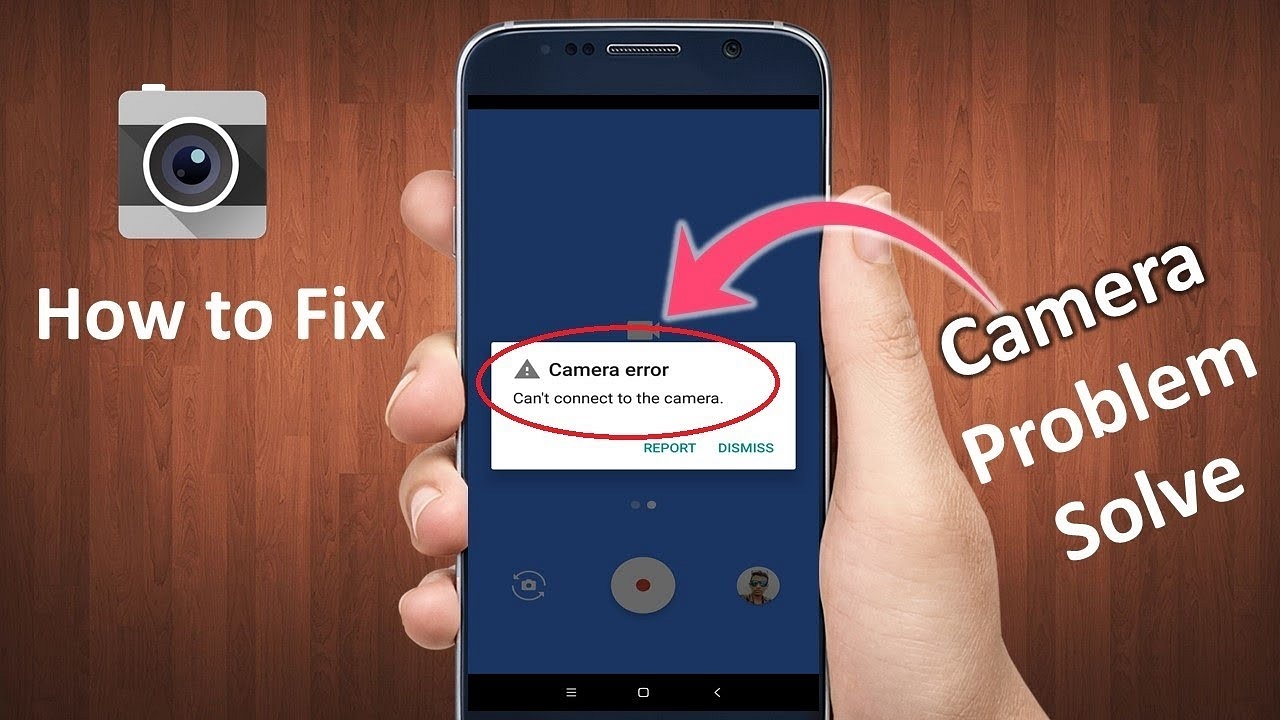
But what if one day that important part of the phone that you depended on so much, suddenly stopped working? What if you are in the middle of getting your favourite moments together and suddenly your camera crashes? Although this may not be frequent, many might have faced the “Can’t Connect to the Camera” issue. So, in this article, we tell you How to Fix the “Can’t Connect to the Camera” Issue in an Android Phone.

Reasons for the error occurring on your device 

This problem can arise due to various reasons and can seriously hamper your mood and time. Some common reasons identified to cause the problem are highlighted below.

  • If the android phone’s hardware has been damaged somehow and broken the internal hardware responsible for the functioning of the camera.
  • If the user has utilized the storage space completely and there is no space left for another photo or video.
  • When the Android phone is running on low RAM.
  • Software issues might arise when too many third-party apps are given unauthorized permission to take charge of the phone.
  • If the Android device has a couple of corrupt files or faces a virus threat, it is often not able to detect the camera.
  • When the device has not been updated or upgraded to the latest version, this problem might occur.

How to Fix “Can’t Connect to the Camera” Issue in an Android Phone – Solutions

A few solutions that might work on your Android smartphone and help you get rid of the error are listed below.

  • The best and instant solution that solves almost all errors in an android phone is restarting the device. Switch off your Android smartphone and wait for a couple of minutes before turning it back on. Do this three to four times and check whether your camera is working or not. It is a quick fix that is most commonly used to ward off errors.
  • If the previous solution doesn’t work, try switching your device to the safe mode. For that, you have to tap to hold the power off button for a couple of seconds when switching off the device. This will open a pop-up box and allow you to choose the “Reboot to Safe Mode” option. After that, you can open your camera app and try taking pictures in the Safe Mode. If it is possible, it means third-party apps need to be uninstalled from the device. After uninstalling them, your camera will work just fine.
  • Another simple trick can be to wipe off the cache and data present in the Camera app to remove the extra baggage that your app might be carrying and fix the error.
  • You can also opt for closing the Camera app forcefully by opening its Settings and tapping on “Force Stop”. Then close the settings and reopen the app after a few minutes. It will easily fix the error without much hassle.
Also Read: Jio Fiber Plans in Delhi: Availability and How to Apply?

So, now you know How you can Fix the “Can’t Connect to the Camera” Issue in an Android Phone. In case you have any queries or suggestions regarding the same, do feel free to share your thoughts with all of us in the comments section below. You can also join our GizNext Tech Enthusiast Telegram group (click via mobile to join) curated exclusively for the tech geeks.

Categories
Tech Gadgets Tech News

Redmi to reveal its affordable smartwatch on May 13

News says Redmi is about to reveal the most amazing products they have been working on next on May 13th, along with Redmi Note 10S. It is the most budgeted smartwatch. This shows that the company is now expanding its businesses in every field they can. The name of the watch is still not revealed, but the good news is that we all know how it looks. This wearable is a sub-brand from the companion of the redmi smart band released last year.

Released Date

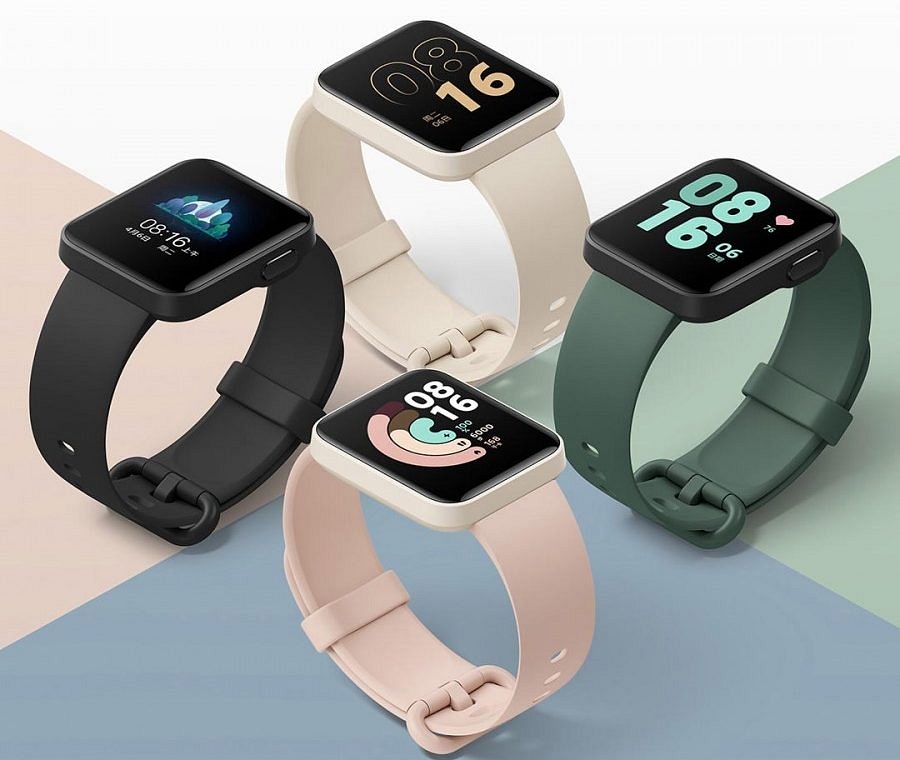
The company has officially released the teaser via a tweet on its official Twitter handle of the smartwatch, which shows it quite looks like Xiaomi Mi watch lite. The watch, along with the smartphone Redmi Note 10S, will be released virtually in India as the nation is experiencing lockdown.

The smartwatch version will be seen having some changes in Indian variants based on the reports revealed by the company.

Activities Redmi Watch will have:

The watch will be helpful in various things, such as tracking the fitness of an individual. It will have various workout modes like freestyle, cricket, cycling, running, walking, and swimming. Breathing exercises can also be monitored with continuous heart rate and sleep tracking, which seems good at an affordable price.

The company also claims that this new smartwatch wearable will have over 200 watch faces that can be customizable and a built-in GPS to track the process of workouts, which means if you feel your phone heavy and hectic to carry while running, feel free to leave it at your desk and go with a watch on a morning walk. All data will be synchronized using the built-in GPS inside the watch with the smartphone.

Display of Smart Watch

Now we can talk about the display of this wearable. It will have a 1.4-inch large square-shaped color display with the support of touch input and will be giving 320*320 pixels resolutions with 323 PPI pixel density. The display will be protected with a 2.5D tempered glass and will be light in weight which is also a benefit for the users who do not want a heavy ring-like thing on hand.

Pricing of Smart Watch

Last year in November, the watch was launched in China for CNY 299, which is around 3,400 in Indian rupees. 

The watch was made available in three colors in china in November 2020, which are Ivory White, Ink Blue, and Elegant Black, and these color variants are only expected to be made available on the launch date, which is May 13th. The watch will also be supporting NFC features to pay with additional six sensors such as ambient light sensor and geomagnetic sensor.

Battery of Smartwatch

Now about the smartwatch battery. The company confirms that the watch will work for seven days on battery in normal mode, which is powered by 230mAh battery life, and for around 12 days on long battery life mode, which is also something good as you don’t need to look for a charger to charge the battery on an everyday basis.

Categories
Featured Gaming

PubG Mobile India launch date and New Name

Recent leaks revealed that the wait is over, and the relaunch of PUBG Mobile India will be released in India with its new name. Some news sources confirmed that the name change was the idea of the game developers.

In a poster recently came, there can be seen a player landing on Miramar and looking at its new title. PUBG India has been distributed by Krafton Inc., and the sources confirm that the game would retain its original quality better than before this time, and users will experience the best quality gameplay experience from PUBG mobile.

Krafton has already registered themselves in a new domain of website named “battlegroundmobileindia.in”. This registration was made on the 7th of April. 

Some recent leak about PUBG mobile India has come from GemWire, but the experts maintain a legitimate regarding the leaked information as they say that it has been copied from the website of PUBG Mobile India.

There was an official teaser video leaked as “India Recall Campaign Motion_v02.mp4” on the website, and the poster was found embedded in a link via a video came on Vimeo, which was released before Diwali 2020 saying “Diwali Coming Soon creative.” The post of GGWire’s Instagram page also says to have another private video collection on Vimeo with the above-mentioned thumbnail.

PubG Mobile Renamed

A new suggestion says that the PUBG Indian version mobile will come with a different name. The renaming has been done as “Battlegrounds Mobile India.” It now seems that the company is willingly trying to change the name of the game for the relaunch in India and there is no denying that Krafton is trying to take all measures and steps and is all set to launch the game. 

PUBG developers are still making it wait to officially announce the launch date of PUBG mobile India, as there is still documentation left with the government. It may be noted that the PUBG mobile India was banned by the Government of India due to some privacy concerns. It can be relaunched anytime soon. 

The return of PUBG can also be seen closed because of the continuous job listing by them on its LinkedIn profile which tells that company is hiring continuously that increases the release expected anytime soon.

People around the country are playing PUBG by downloading it through google apk. But still, many await the official launch of the game so that they can download the game from their App Store or Play Store. Recently PUBG Mobile India has accidentally uploaded an official game tease on its YouTube channel with the caption of “all-new PUBG Mobile coming to India.” This made it look like the release of the game is not so far away, and PUBG fans since then are waiting on a daily basis for the launch date to be revealed. It can be announced anytime soon as with the new name, which the game developers are planning to release for Indian PUBG users.

Categories
Info Mobile Tech News

MIUI 12: Features, Compatible Phones List, and how to download it?

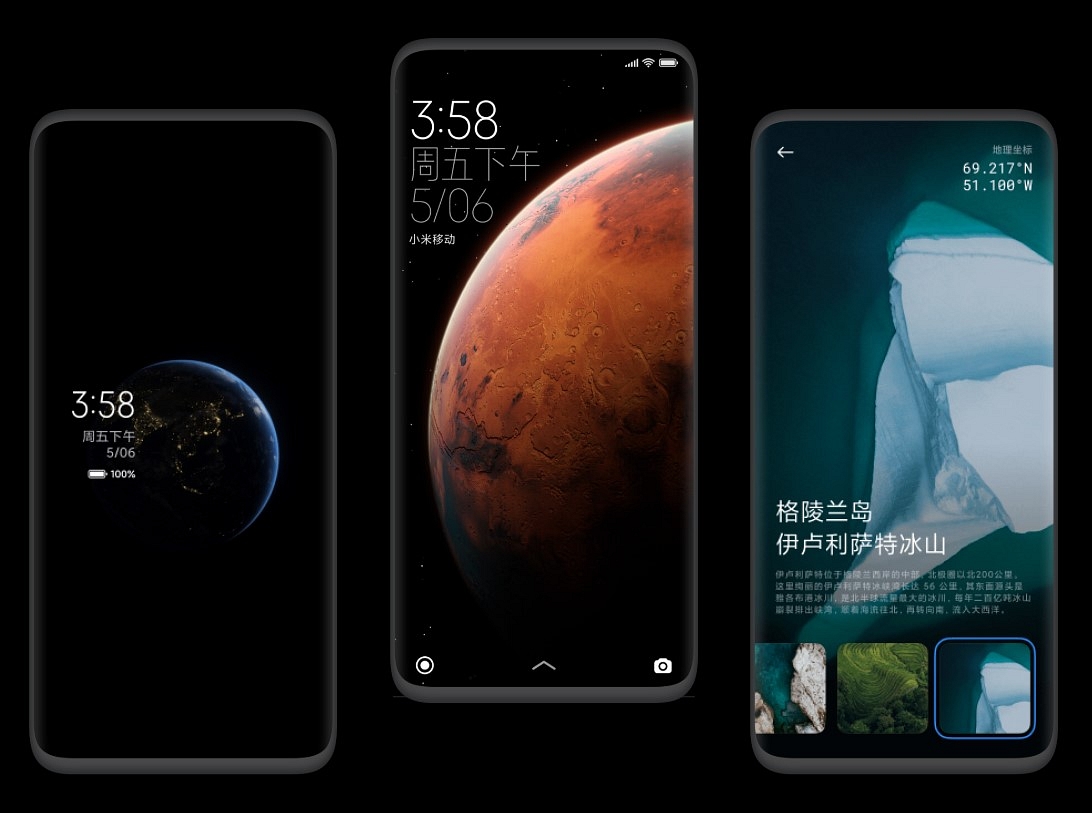
MIUI 12 is the latest skin available for Xiaomi phone users. It has many new features with new wallpapers and wider space between text and images. It is available for download for many Xiaomi devices.

New Features Of MIUI 12

With this update, there come several new features such as dark mode for third-party apps, all-new camera modes, floating window, cleaner UI interface than before. The font adjustment and wallpaper dimming also seem to be a seamlessly good experience. Totally MIUI 12 is made user-friendly interface with more easy-to-use and access apps and settings.

1. All new control panel with Dark Mode 2.0

The Control Panel looks like iOS in this new update. And if you are a person who uses a phone in low light, then all-new Dark Mode 2.0 has made a lot of progress in dimming all lights out of apps, and now you can schedule Dark mode according to day and night with automatic dark mode feature at sunset too.

2. New Design

MIUI 12 has shown a new user interface that displays data of battery capacity and storage available and new visuals and graphs. Isn’t it more pleasing and cool?

3. Focus mode, Ultra battery saver mode

The focus mode helps you analyze the phone usage and gives the overview to break down the daily usage. You can set daily screen time limits for notifications so that you can only focus on the required app during working and remain uninterrupted from useless apps and their notifications. 

Ultra battery saver mode is the new feature added in MIUI 12. Before, it came in Samsung. It increases the battery use for five more hours in case of emergency. You can also select six of your apps to be available in Ultra battery saver mode with Phone, Contacts, and Messages.

4. New Animations

MIUI 12 comes with a real-time weather display and also an animation of apps icons that generate real-time feedback according to your gestures. 

5. Delete the screenshot after sharing

People complain about how their phone storage gets full in MIUI old updates as maximum photos were screenshots which were one-time used. Now In MIUI 12 update, the company solved the problem as you can delete the screenshot once shared with a particular person or on a particular platform. Photos sharing has also become safer with improved camera quality in the app. Xiaomi also says that the apps that do not clarify the need for permission of particular things will not be given the “Always Allow” option, which makes this update safer for phones.

List of compatible devices with MIUI 12

  • Redmi K20 Pro
  • Redmi K20
  • Poco X2
  • Mi 10
  • Redmi Note 9
  • Redmi Note 9 Pro
  • Redmi Note 8
  • Redmi Note 8 Pro
  • Redmi Note 7
  • Redmi Note 7 Pro
  • Poco M2 Pro
  • Poco F1
  • Redmi Note 7S
  • Redmi 8
  • Redmi 8A
  • Redmi 7A
  • Redmi 6 Pro
  • Redmi Note 5
  • Redmi Note 5 Pro
  • Redmi Note 6 Pro

How can you download MIUI 12

MIUI 12 has been rolled through OTA (over the air). So if your device is compatible, it will show a notification in the notification panel regarding the update. But in case if you missed the notification, you can tap on the ‘Settings’-> ‘Software Update’ page and download MIUI 12 update.

MIUI 12 live wallpapers

The all-new MIUI 12 comes with new wallpapers. These wallpapers are live images of the Earth or Mars; whichever you want, you can apply that on the screen. These static wallpapers are divided into the following six categories: Black & White, Mars, Minimalist Scenery, Dynamic Nebula, Geometry, Natural Texture.

Categories
Mobile Tech News

Samsung Galaxy M42 5G Launched

These days, while all smartphone companies are in the race of launching 5G supported devices in the user market, Samsung not only launches mobiles but offers budget phones that are compatible enough to take over other famous company’s models like OnePlus Nord and Moto G 5G.

As we all know, Samsung had launched Galaxy M42 5G on 28 April, with an online live streaming launching event instead of scheduling offline. The Galaxy M42 will arrive as one of the economical 5G network-supported devices in the country. As mentioned in the launching event, let’s talk about the features and specs of the Samsung Galaxy M42.

Specification of Galaxy M42

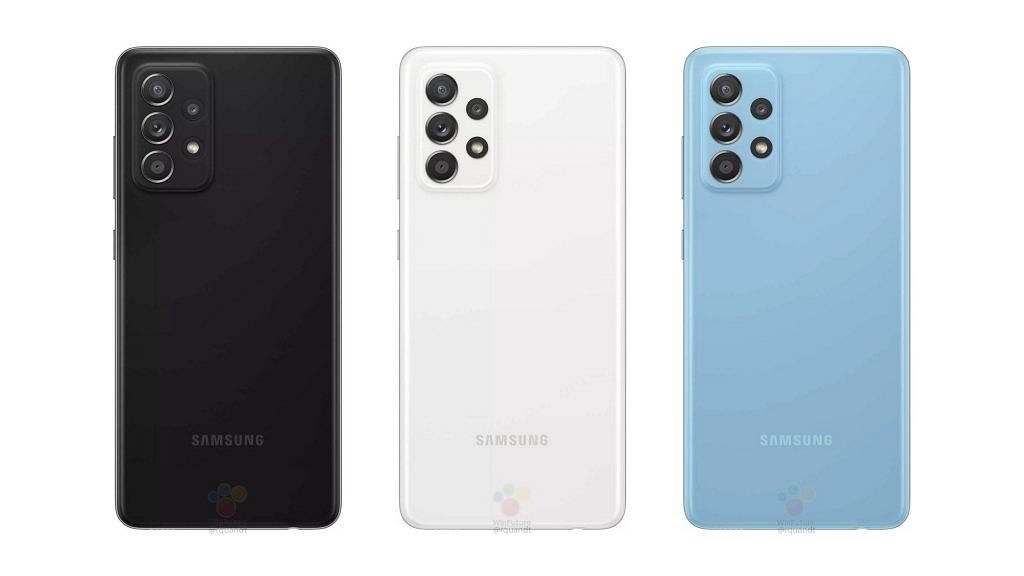
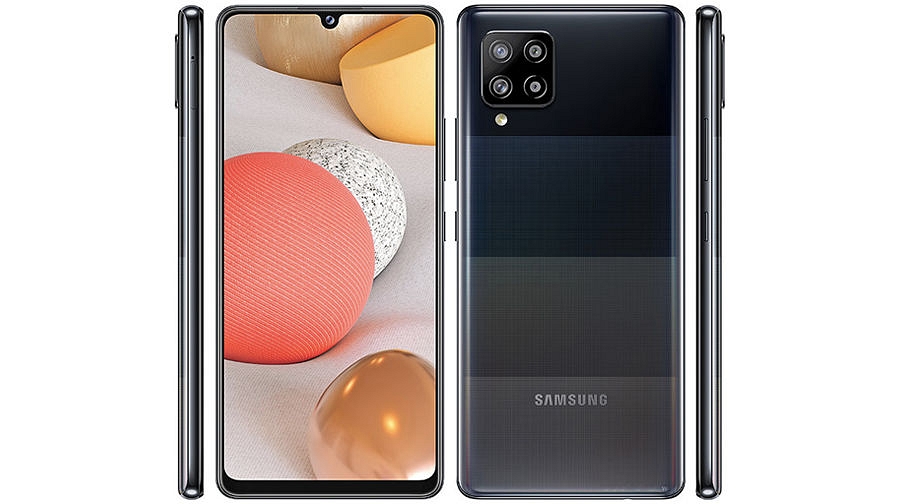
As per the announced report, it is said that the handset of M42 will be rebranded Galaxy A42, which launched in the previous year. The significant part for all selfie lovers as it will contain a Waterdrop notch selfie snapper with a square camera module. 

The display of M42 will be 6.6 inches long with Super AMOLED HD+ Infinity-U. The screen with Infinity-U looks like it has a notch that seems similar to the alphabet U. Galaxy M42 flaunts a screen resolution of 720 x 1600 pixels and has 266ppi pixel density. Moreover, a 750 SoC Qualcomm Snapdragon processor will power the device. There will be an in-display fingerprint scanner with the statement to improve user security. 

The device will have a super giant 6000 mAh battery that is later charged by a 15W fast charging feature and powered by Android 11 OS run on OneUI 3.1 with a custom skin on the top. Galaxy M42 will have only one variant of 6GB of LPDDR4x Blazing fast RAM and 128GB of memory storage that can be later expandable. It will come with the dimensions 75.9mm x 164.4mm x 8.6mm and only 190 grams of weight.

As far as other features are concerned, Galaxy M42 can have a primary Quad camera of 48MP at the back, ultra-wide 8MP lens, and 5MP depth and macro sensor, respectively. For selfie shooters, it has a 20MP snapper front camera. Interestingly, the company claims that they are worried about user privacy and security, so instead of providing a fingerprint sensor at the back, they offer an in-display scanner.

Talking about network and connectivity configurations, as the name suggests, it will have 5G support with 4G LTE, 5.0 Bluetooth version, dual-band WiFi, and GPS service. The device will be charged and data synced by a Type-C port.

Price of Galaxy M42 5G

The launching event has revealed the cost of a device, the price of Galaxy M42 in India in the range between 25 to 29 thousand.

Categories
Mobile Tablet Tech News

Sаmsung Gаlаxy Tаb А7 suрроrt раge live, 3GB RАM Exрeсted

Tablets are gradually becoming quite popular in the gadget market due to their massive screen size and range of unique features. Graphic designers and doodle makers prefer working on tablets rather than any other device to create masterpieces. Smartphone brands are continuously developing such devices that can be a budget-friendly option for the mid-range segment of the population. One such brand is Samsung which offers a number of tablet options to the customers catering to the needs of high range as well as the medium-range segment.

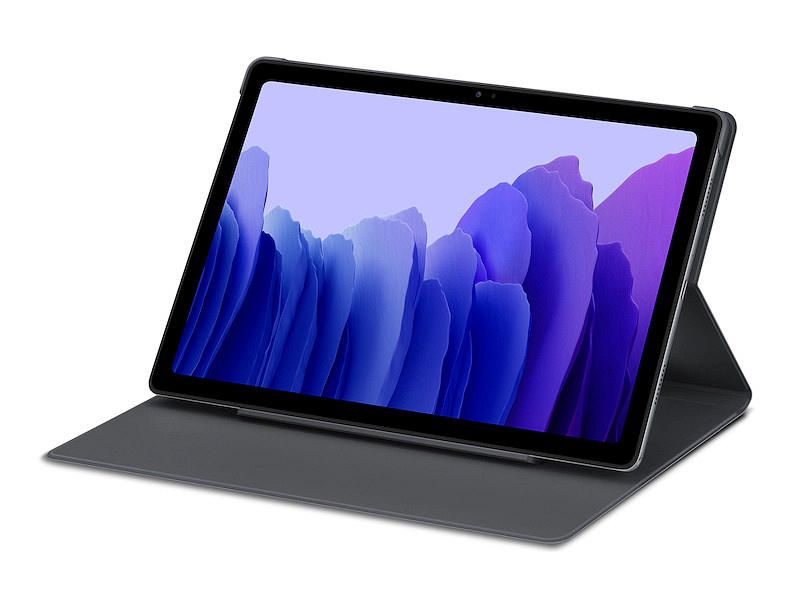
The company came up with a new tablet last year, the Samsung Galaxy Tab A7, which offers the user a host of features like premium design, good battery backup, and an impressive display. The user’s everyday needs are fulfilled with the basic set of specifications it provides, that too, on a budget.

Recently, the support page of Samsung Galaxy Tab A7 has gone live on its website to benefit the European market. The SM-T225 model is offered to Samsung’s regional websites of Germany, Belgium, Spain, Russia, and Denmark. However, the features and specifications have not yet been disclosed on the websites. 

It is being speculated that the company will launch the Lite version of the Samsung Galaxy A7 Tab this year. Although the announcement is not yet official, it will presumably be made anytime soon. As users have come across the features in this tablet, it is not hard to guess what the Lite version will hold for all of us.

A number of mobile authentication platforms like Bluetooth SIG and FCC have certified the new Samsung Galaxy A7 Lite Tab. When it was showcased on Geekbench, some features were also revealed. Details regarding the RAM, processor, and benchmark ranking were discussed.

The MediaTek Helio P22T chipset, the power-packed processor that gives outstanding connectivity performance, will give life to the tablet. The octa-core processor will be backed by 3 gigabytes of RAM. Even though the storage capacity has not yet been defined, users can expect two storage variants, 32 gigabytes and 64 gigabytes. These variants will differ from each other for a few thousand bucks in the price range.

According to the database of Geekbench, the Tab will operate on Android 11. The benchmark scores showed a ranking of 840 in single-core and 3348 in its multi-core tests. The screen size that has been revealed shows an LCD panel with an 8.4-inch display. No information is available for the specifications of the camera.

Features

Several other features have been disclosed, among which an important part is the battery performance of the tablet. It is shared that a battery of 5,100 mAh will power the Samsung Galaxy A7 Lite Tab and can be charged using the Type C USB port. It will work on fast charging technology of 15W. Uncertainty regarding the release date of the Tab is still revolving around, but most probably, the product will be made available in the market by June this year. The support page that is now official is likely to hint to the consumers and gadget enthusiasts that the launch will be preponed.