Categories
Apps Featured How To

iOS Tips And Tricks: How To Setup Medical ID And Make Emergency Calls From Lock Screen

Key Highlights

  • iOS offers health and emergency features like Medical ID for iPhone users
  • Medical ID shares critical info from the Lock screen without needing a password
  • Emergency contacts can view medical data like blood type and allergies easily

Apple iOS undeniably offers a premium user experience. Apple has been ensuring all iPhone and iPad buyers get the best-in-class user experience with the iOS firmware. The latest generation iOS versions specifically iOS 15 and 16 are packed with some of the best user-oriented features. Apple has also been adding health monitoring and wellness features so that iPhone and iPad users get emergency medical services without any delays.

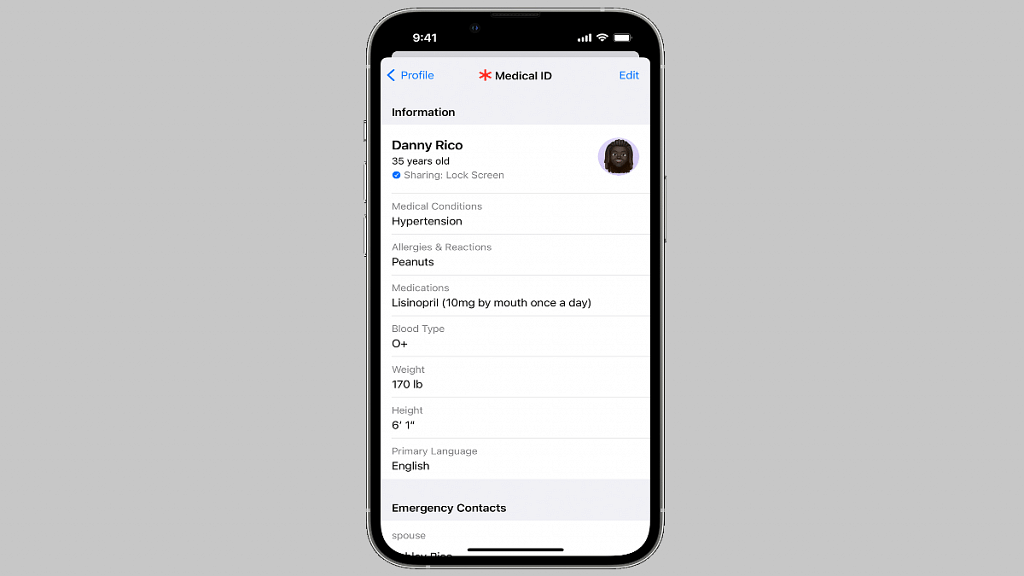
Setting up a medical ID and making emergency calls even when iPhone is locked is one such crucial health feature offered by iOS. The Medical ID in iOS shares critical medical information with the saved emergency contacts directly from the Lock screen. It doesn’t require the users to enter the lock screen password in such scenarios.

Also Read | iOS Tips And Tricks: How To Manage Automatic ETA Sharing Using iPhone, iPads In Apple Maps

Also, if someone else is making emergency calls to your saved contacts, they can see your important medical data such as date of birth, blood group, and also if you have certain types of allergies that you might have mentioned while setting up the Medical ID. Setting it up is a fairly simple process, we have mentioned the method below.

How To Setup Medical ID In iOS On iPhones and iPads

Step 1: On your respective iPhones and iPads, launch the Health App.

Step 2: Click on the Summary tab.

Step 3: Tap on the profile picture option which you can locate in the upper-right corner.

Step 4: You will see the Medical ID option. Tap on it.

Step 5: Select the Edit option from the top right.

Step 6: Enable the “Show when locked” option to use the Medical ID feature from the Lock screen.

Step 7: Toggle on Share During Emergency Call to share the emergency updates with the saved contacts.

Step 8: Edit and enter your health information such as blood group, anu known allergies, and date of birth.

Step 9: Select Done.

Step 10: When the Medical ID setup is complete and you make a call or text during emergencies, the details will be shared with the emergency services and the saved contacts.

Also Read | iOS Tips And Tricks: How To Setup And Use AutoFill For Contact Cards And Credit Cards In Safari On iPhones And iPads

Medical ID helps first responders access your critical medical information from the Lock screen, without needing your passcode. They can see information like allergies and medical conditions as well as who to contact in case of an emergency. 

For the tech geeks, stay updated with the latest cutting-edge gadgets in the market, exclusive tech updates, gadget reviews, and more right on your phone’s screen. Join Giznext’s WhatsApp channel and receive the industry-first tech updates.
Categories
Featured How To Printers

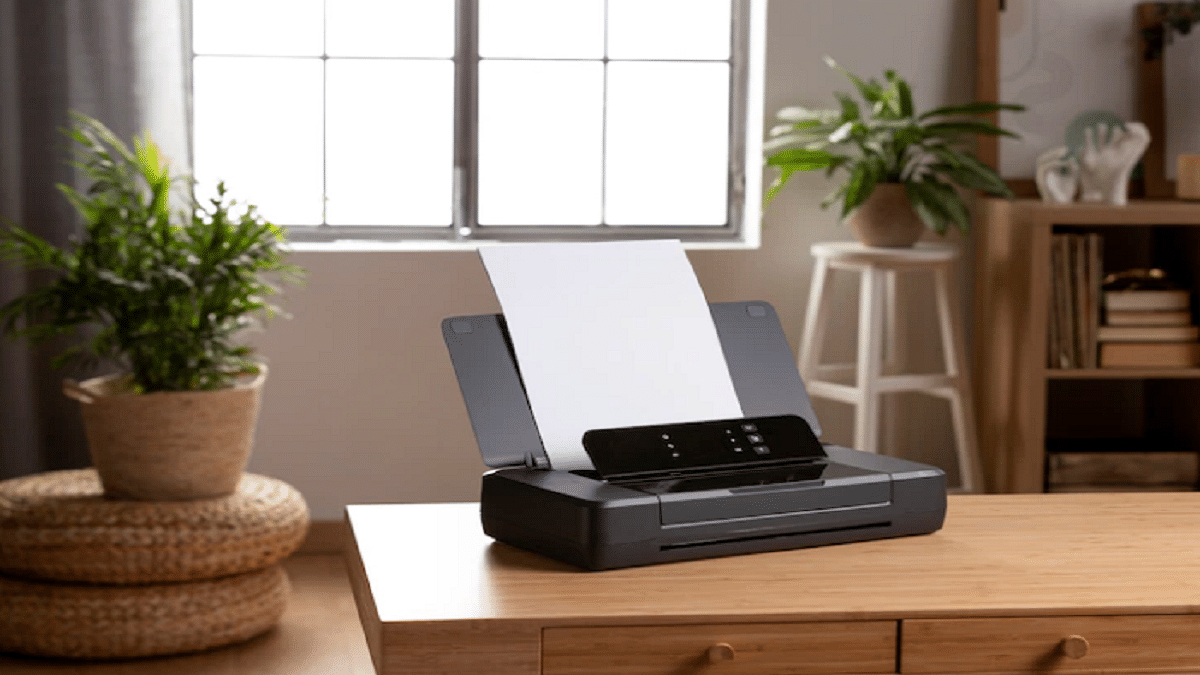
How To Print Borderless Images Using Modern Printers: Steps Guide

Printers like other electronic gadgets have evolved with the latest technological innovations. India is also one of the largest markets for printers with brands introducing all ranges of products such as all-in-one printers, monochrome, laser/inkjets, etc. Tech advancements have not just made it possible to print multiple pages quickly but also use other services such as document scan and fax alongside.

Also, you aren’t now restricted to print your required documents on A4 sheets (for general prints). Modern printers can give prints on various paper formats and support printing beyond simple texts. Clicking borderless images is also a possibility with new-age printers. If you own one such printer that is capable of printing on various paper formats and different content types, you can also print images without any borders. What all steps are required to do so? Read on here:

How Can You Print Borderless Images

In order to give a command for borderless image print, you should ensure that your printer supports this feature. The default settings might not be toggled on and you would need to make the changes to the required settings manually. In general scenarios, most printers can easily print borderless images on A4 paper type.

However, some advanced printers are capable of printing borderless images on any type of paper. Also, if your laptop or PC with which you are giving this print command is running the latest version of Windows OS, you can make the required settings modification using the control panel itself. Otherwise, you would need to make the changes according with the printer settings. For HP printers, the steps are listed below:

Step 1: On your Windows laptop or PC, go to the Control Panel.

Step 2: Select the Printers and Fax option and select the printer model.

Step 3: Go to the General tab settings and select Printing Preferences.

Step 4: Now, click on the Photo printing-borderless option and select the apt paper size for borderless print, and set the print orientation. You can select either landscape or portrait paper type.

Step 5: Once the desired print settings are set, clock on OK to give the print command.

Categories
Chipset Comparison Featured

Qualcomm Snapdragon 778G Vs MediaTek Helio G88 Chipset: Which Mid-Range Mobile Processor Wins?

Smartphone OEMs are majorly targeting mid and premium mid-range smartphone buyers in India. We have multiple brands competing in this league with their value-for-money deals. All noted smartphone companies including Xiaomi, OPPO, Vivo, Realme, Poco, iQOO, and others have been quite proactive in the premium mid-range Android smartphone race with their 5G-ready handsets.

Qualcomm and MediaTek are the first preference for both smartphone companies and general audiences when we speak of mobile chipsets. Both these mobile chipset brands have launched numerous new options in the last few years in India. Both Qualcomm and MediaTek have created a dedicated mobile chipset lineup for gaming phones. And not just the flagship but the mid-range category also has some of the best options to consider.

From Qualcomm, it’s the Snapdragon 778G game-centric processor unleashing prowess with premium mid-tier Android phones. Whereas, MediaTek competes in this race with multiple of its chipsets. However, the Helio G88 is one of the best gaming chipsets by the company for the affordable range of Android phones. Which of the two has the best processing speeds, CPU, and GPU performance? Read on here:

Qualcomm Snapdragon 778G Vs Helio G88 Processor: CPU Comparison

The Qualcomm Snapdragon 778G is more powerful compared to the Helio G88. While both these processors have an octa-core CPU cluster, the Qualcomm SD 778G has a thinner fabrication processor. It is designed using 6nm fabrication compared to the 12nm process used by the Helio G88 chipset.

Qualcomm has used a single 2.4GHz Cortex-A78 core, three Cortex-A78 cores with 2.2GHz clock speed, and four Cortex-A55 cores with 1.9GHz clock speed, while the Helio G88 has two Cortex-A75 cores with 2GHz clock speed and six Cortex-A55 cores with 1.8GHz. The frequency range is higher with the Snapdragon 778G processor, i.e., 2400MHz. The Helio G88 offers a lower frequency range of 2000MHz.

Snapdragon 778G Vs Helio G88: GPU Comparison

The GPU integrated with the Qualcomm Snapdragon 778G is the Adreno 642L which offers around 490MHz of GPU frequency. On the other hand, the Helio G88 features the Mali G52 MC2 GPU which offers a higher 1000MHz. The execution unit is 2 with both chipsets, Vulkan Version is 1.1, the OpenCL version is 2.0, and the DirectX version is 12.

Snapdragon 778G Vs Helio G88: Memory, Multimedia (ISP) Compatibility

The Qualcomm Snapdragon 778G chipset features LPDDR5 RAM compatibility, while the Helio G88 is integrated with LPDDR4X RAM support. The memory frequency is higher with the Snapdragon 778G at 3200MHz and 1800MHz with the Helio G88.

The Snapdragon 778G processor supports a maximum 16GB memory size, while the Helio G88 has 8GB RAM maximum memory compatibility. The storage compatibility is UFS 2.1, UFS 2.2, and UFS 3.3, and UFS 3.1 with the Snapdragon 778G processor. Whereas, the Helio G88 has only eMMC 5.1 storage support.

Speaking of the display and camera resolution, the Snapdragon 778G ships with 1080 x 2520 pixels resolution and 1x 192MP, 2X36MP respectively. The Helio G88 offers the same display resolution of 1080 x 2520 pixels but a different 1x64MP, 2x 16MP max camera resolution. The video recording and playback support is 4K@30fps with the SD 778G and 2k@30fps with the Helio G88.

Final Verdict: Which One Is Better

The Qualcomm Snapdragon 778G is a better performer in terms of CPU and GPU performance. Overall performance and speed reliability are also good with the Snapdragon 778G processor compared to the Helio G88. A thinner fabrication makes it more premium compared to the MediaTek processor.

Categories
Accessories Featured How To

How To Find Or Track Lost Apple AirPods Easily: Step By Step Guide

Apple iPhones are amongst the most premium available smartphone range. However, the Cupertino tech giant is also known for its other product lineups including iPads (tablets), Macbooks (laptops), and more. Apple AirPods are a popular range of audio accessories for the modern masses demanding a premium user experience with wireless music listening.

Apple started the era of truly wireless earbuds with the launch of AirPods which later got adapted by most of the tech behemoths including smartphone OEMs that are active in the audio accessories industry. Apple AirPods like its other product range are tech advanced and utilize the latest hardware and software innovations to deliver the best-in-class experience with music listening.

Apple has refreshed the AirPods lineup with the launch of the new-gen model at the Far Out 2022 event alongside the Apple iPhone 14 series. One of the handiest features of all generations of AirPods is the “Find My” that helps users locate their lost or stolen AirPods. If you have accidentally misplaced your AirPods, the Find My option will come to your rescue. But how can you find your lost Apple AirPods using this Find My option? Well, the steps are listed below:

How To Find Lost Or Stolen AirPods

Step 1: You would first need to activate the Find My security feature using the iPhone or iPad you have handy. Once this feature is enabled, you’ll be able to find your AirPods on Maps.

Step 2: Launch the Find My app option.

Step 3: Tap on the Devices section and select your AirPods from the list.

Step 4: You will be able to see the location of the AirPods once you perform Step 4. If in case your AirPods are offline, you won’t be able to see the location on Maps. You would need to perform the steps below in that case.

How To Find AirPods If Offline Or Out Of Range

Suppose your AirPods are out of range, possibilities are they might have run out of batteries. In such scenarios, you might be able to see its last location or “No Location found”, or “Offline” message.

Try playing the audio using the Find My app. If no response, you might have a lower chance of tracking them if you somehow don’t recall where you kept them last. But, the location will be updated as soon as they come online. This is the case that comes in handy if the AirPods are stolen.

How To Track Lost Or Stolen AirPods Using Find My Network Feature

Another useful feature using which you can find or track your lost or stolen AirPods is the Find My Network. This feature will help you locate your lost AirPods Pro, AirPods Pro 2nd Gen, and AirPods Max despite your respective iPhones or iPads not being connected to Wi-Fi or any cellular network.

Step 1: Go to the Settings app on your respective iPhone or iPad.

Step 2: Tap on your name and then select the Find My option.

Step 3: Toggle on the Find My [device] option and then activate the “Find My Network” option.

Categories
Apps Featured How To

How Can You Make Or Join Video Calls Using Gmail On Laptop And PC

Amongst the multiple services provided by Google is Gmail. The email service by the search giant is one of the biggest and is commonly used by the audience in India and other global regions. Google has made several advancements to Gmail like its other user-oriented apps. Over the years, Google has expanded Gmail services to mobile users, making it easier for Android and iPhone users to send or access essential emails on the go.

Gmail doesn’t restrict a user by offering only text email services. With the latest version of the Gmail application, users also get the provision to make video calls. Gmail users on laptops and PC can use this option for video calling using Gmail. It is one nifty feature that lets users go ahead with online conferencing without downloading or installing any third-party PC or mobile application.

You can integrate Google Meet services with Gmail to start with video calling. The Google Meet services need to be activated from the Admin console in order to make video calls using Gmail. So, how can you start or join a video call using Gmail on any laptop, PC, or mobile application? The steps are listed below:

How To Start Video Call In Gmail

Step 1: Launch any web browser such as Google Chrome or Firefox.

Step 2: Now, go to Gmail and log in using your registered email ID.

Step 3: Go to the Meet section.

Step 4: Tap on New Meeting.

Step 5: You can send the video call meeting link or email by tapping on the Send invite. Copy the meeting invite details and share the invite link or email.

Step 6: Tap on the Join now option to join the meeting. Make sure you have given access to both camera and microphone before you initiate the video call.  

Step 7: Tap on the Leave call option once done.

How To Directly Join A Video Call Using Gmail App

Step 1: Launch the Gmail application on your smartphones or laptops/ PCs.

Step 2: You can locate the My Meetings option placed at the bottom left of the app’s homepage. This would be for the upcoming video calls scheduled on the calendar.

Step 3: Tap on Join. Notably, you can directly join any video call if it’s added in your Google Calendar. Otherwise, you would need to enter the meeting code and the nickname.

Step 4: Once you have given permission access to the microphone and camera, tap on join to continue with the video call on Gmail.

Categories
Apps Featured Leaks

WhatsApp Security Update: No More Screenshots Allowed With View Once Photos And Videos On WhatsApp

Key Highlights

WhatsApp new security update in works

View Once screenshots to be banned soon

Feature being tested with beta build

WhatsApp has been fortifying its platform with added security. Numerous users already prefer the Meta-owned instant messaging application across the globe and in India for its secure and advanced platform for texting. The app has expanded its services beyond texting and also lets users make voice and video calls on the go for Android and iPhone users. Despite offering a secure end-to-end encryption platform, WhatsApp is consistent with new security upgrades.

Recently, WhatsApp released the view once photo and video option for the users. However, this feature came with one major flaw. Any recipient of the view once message has the leverage to capture screenshots. This has been one of the biggest security concerns with the users sending view once photos with the notion of added security. But seems like WhatsApp is now working on a fix for this. Users will now be barred from capturing screenshots of the view once photos. Details are below:

WhatsApp Banning View Once Screenshots For Added Security

A fresh report shared by WaBetaInfo, WhatsApp has started testing the new security feature that will restrict all the users from capturing screenshots of the view once media files including images and videos. Currently, WhatsApp s testing this new security update with the beta version.

While there is no word on the release of the stable version, it should be around the corner. WhatsApp should announce the development via its official blog.  To recap, WhatsApp released the View Once feature earlier this year to improve privacy with personal and professional chats.

The photos and videos sent using the view once option comes with a self-destruct timer that helps users maintain privacy with the data. This also puts a break on message forwarding which most of you would wish to avoid with private content.

It is still not clear if WhatsApp will notify the sender if any screenshot has been taken of the view once photo/video similar to Instagram or will ban users completely from grabbing screens. Since the feature is still under the testing phase, it would be difficult to anticipate its functionality.

Nevertheless, WhatsApp acknowledging this issue is a relief for all users who are concerned about privacy while using WhatsApp as their primary mode of online communication.

Categories
Chipset Comparison Featured

Qualcomm Snapdragon 778G Vs MediaTek Dimensity 810 Chipset: Best Mid-Range 5G Mobile Processor

Qualcomm and MediaTek mobile chipsets are the powerhouses of modern days smartphones. Both these brands have been consistently showing their expertise with mobile processors and are fabricating the thinnest and most premium offerings for Android phones. For the affordable 5G phones, Qualcomm has the Snapdragon 778G as one of the strongest contenders, while MediaTek competes in this race with the Dimensity 810 chipset. The comparison between both these two processors are listed below:

Qualcomm Snapdragon 778G Vs MediaTek Dimensity 810 Processor: CPU Architecture

Qualcomm is fabricating most of the latest premium and mid-range chipsets with a thinner process. The Qualcomm Snapdragon 778G chipset is fabricated using a 6nm process and features an octa-core CPU cluster. The cores cluster comprises a single Cortex A78 cores clocked at 2.4GHz, three Cortex-A78 cores clocked at 2.2GHz, and four Cortex-A55 cores with 1.9GHz clock speed.

Likewise, MediaTek has also designed the Dimensity 810 chipset with a 6nm process. This affordable 5G processor also features an octa-core CPU cluster with two Cortex-A76 cores clocked at 2.4GHz and six Cortex-A55 cores with 2GHz clock speed. The frequency range is 2400MHz with both these chipsets. Both these processors have good CPU performance and compete fairly against each other.

Snapdragon 778G Vs Dimensity 810: GPU Architecture

The GPU integration with the Snapdragon 778G chipset is Adreno 642L GPU, while the Dimensity 810 chipset has Mali-G57 MC2 GPU support. The GPU architecture that Qualcomm has used is 600, whereas, the Dimensity 800’s GPU is based on Valhall architecture. The GPU frequency is 490MHz with the Snapdragon 778G processor and 850MHz with Dimesity 810 5G chipset. Both these processors have two execution units, 1.1 Vulkan version, 2.0 OpenCL version, and 12 DirectX version. The GPU performance is also good with both these mobile processors, but the Snapdragon chipset is slightly better with rendering extensive graphics.

Snapdragon 778G Chipset Vs Dimensity 810: Memory, Multimedia (ISP)

The memory type supported by the Qualcomm Snapdragon 778G chipset is LPDDR5 RAM, while the Dimensity 810 chipset comes with LPDDR4X RAM support. The memory frequency is higher at 3200MHz with the Snapdragon 778G chipset. However, it is lower at 2133MHz with LPDDR4X with the MediaTek Dimensity 810 chipset.

Both these chipsets support up to 16GB maximum memory type. As for storage compatibility, Qualcomm has added support for UFS 2.1, UFS 2.2, UFS 3.0, and UFS 3.1. On the other hand, the Dimensity 810 has just the UFS 2.2 storage support.

Both Snapdragon 778G and the Dimensity 810 chipset offer a max display resolution of 1080 x 2520. The camera resolution is better with the Snapdragon 778G chipset, i.e.,  1 x 192MP and 2x 36MP. Whereas, the Dimensity 810 chipset has 1 x 64MP and 2x16MP support. The video recording and capture support is 4K@30fps with the Snapdragon 778G and 2K@30fps with the Dimensity 810.

Which One Is Better

Out of these two chipsets, the Snapdragon 778G offers a faster and more reliable performance in the CPU and GPU departments. The memory and multimedia compatibility is also good with the Snapdragon 778G chipset. But the MediaTek Dimensity 810 processor isn’t lagging far behind from the SD 778G in terms of performance.

Categories
Comparison Featured Mobile

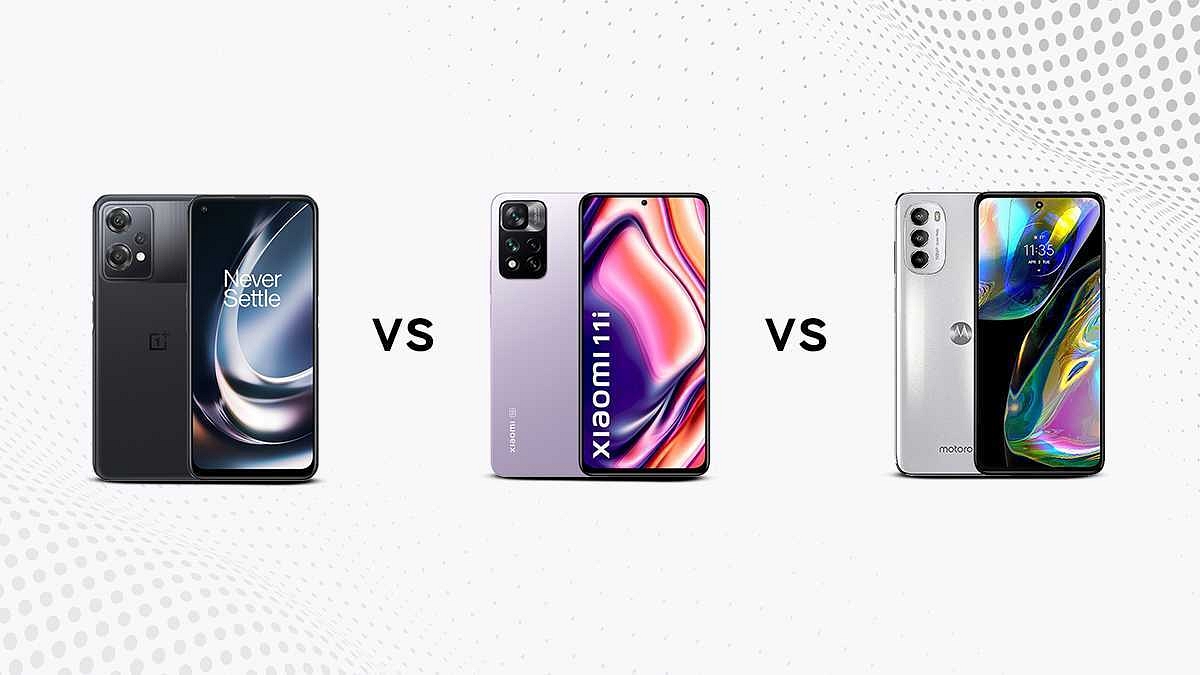
OnePlus Nord CE 2 Vs Xiaomi 11i Vs Moto G82: Top Premium Mid-Range Phone Comparison

Xiaomi has introduced a number of smartphones in India in recent years. The Xiaomi 11i 5G is one of the country’s most popular premium mid-range phones.  The OnePlus Nord CE 2 with 5G connectivity is another trending phone in the country in the sub-25K segment. Regarding specs and functionality, the Nord CE 2 is an improvement over the previous model. The G82 is unquestionably the new sweet spot of the Moto G line, and it serves as a nice reminder that Motorola is adept at producing high-end smartphones at reasonable prices. This smartphone checks several boxes, but is it worthwhile to purchase? Let’s investigate.

Display

The OnePlus Nord CE 2 is equipped with a pixel density of 409ppi, a 20:9 aspect ratio, and a resolution of 1080 x 2400 pixels, the bezel-free punch-hole display. Additionally, the smartphone has a 6.43 display and fluid AMOLED display type.

The Xiaomi 11i has a 6.67-inch AMOLED Dot display with a bezel-less resolution of 1080 x 2400. Along with the highest-in-class 395ppi pixel density, Xiaomi has added a Corning Gorilla Glass v5 layer, a 120Hz refresh rate, and a 20:9 aspect ratio.

The Moto G82 comes with a bezel-free, 6.6-inch P-OLED display with a resolution of 1080 x 2400 pixels and a pixel density of 399ppi. It delivers a seamless viewing experience thanks to its 120Hz refresh rate. Additionally, the display has a 20:9 aspect ratio and a punch hole in the top center.

Camera

The OnePlus Nord CE 2 has a triple camera setup, supported by an LED Flash. In addition to an 8MP f/2.2 ultra-wide angle lens and a 2MP f/2.4 macro camera, the main camera is a 64MP f/1.79 primary camera. The entire back camera setup is fairly well-equipped, with capabilities like HDR mode, ISO adjustment, digital zoom, and Touch to Focus among them. A second 16MP f/2.4 selfie camera is mounted on the front.

The Xiaomi 11i comes with a triple camera setup a 108MP f/1.89 wide-angle primary camera, an 8MP f/2.2 wide-angle camera, and a 2MP f/2.4 macro shooter makes up the smartphone’s triple camera setup on the rear. The front of the device is equipped with a 16MP f/2.45 wide-angle primary selfie camera.

The Moto G82 has a 50MP f/1.8 wide-angle main camera, A 2MP f/2.4 macro camera, and an 8MP f/2.2 ultra-wide angle camera. Along with digital zoom, HDR mode, and other capabilities, this triple-camera configuration has an LED flash as well. The smartphone’s front features a potent 16MP f/2.2 Wide-Angle Main Shooter.

Configuration and Battery

In terms of the operational segment, The OnePlus Nord CE 2 has the LPDDR4X type 6GB RAM, MediaTek Dimensity 900 MT6877 chipset, and Mali-G68 MC4 GPU. Also guiding the same is an octa-core Cortex A55 and A78 configuration. The internal battery’s capacity is 4500mAh and is of the Li-ion variety, while, Using 65W Super VOOC technology, rapid charging is promised.

The Xiaomi 11i has 6GB LPDDR4X RAM and MediaTek Dimensity 920 MT6877T processor. An Octa-core (Dual-core, 2.5GHz, Cortex A78 + Hexa-core, 2GHz, Cortex A55) CPU and Mali-G68 MC4 GPU combination ensure lag-free performance. The smartphone comes with a 5160mAh Li-Polymer battery and supports 67W Turbo Charging. The cell is naturally non-removable and charges to 50% in 13 minutes.

The Moto G82 simulates a twin Kryo 660 configuration and is equipped with a Qualcomm Snapdragon 695 chipset. With the aid of its 6GB of RAM and Adreno 619 GPU, it also guarantees lightning-fast speed and an immersive visual experience. The smartphone has a 5000 mAh power the Moto G82. It is a Li-Polymer battery with 30W Turbo Power Charging capability.

Storage and Connectivity

The OnePlus Nord CE 2 comes with 128GB of internal storage space which supports up to 1TB of external storage. Mobile Hotspot, Bluetooth v5.2, A-GPS Glonass, NFC, 4G VoLTE, 5G, and USB Type-C are among the connectivity options available to customers.

The Xiaomi Mi 11i has a sizable UFS 2.2 type 128GB internal storage that can be expanded to 1TB. There are several built-in connectivity choices, including Wi-Fi, Mobile Hotspot, Bluetooth v5.2, A-GPS Glonass, USB Type-C charging, and 5G & 4G VoLTE networks.

The Moto G82’s internal storage capacity is 128GB. The option to expand by up to 1TB is also available to users. Along with A-GPS with Glonass, Bluetooth v5.1, Wi-Fi, USB Type-C, and 4G VoLTE, the smartphone supports 5G and 4G network connections.

Final Verdict

All three phones pack ample punch to be a good daily driver. The price range of all three phones is under Rs. 25,000 which doesn’t burn a hole in your pockets. You can consider an of the models, but if faster charging is your preference, the Xiaomi Mi 11i is a perfect choice.

Categories
Featured Leaks mobile

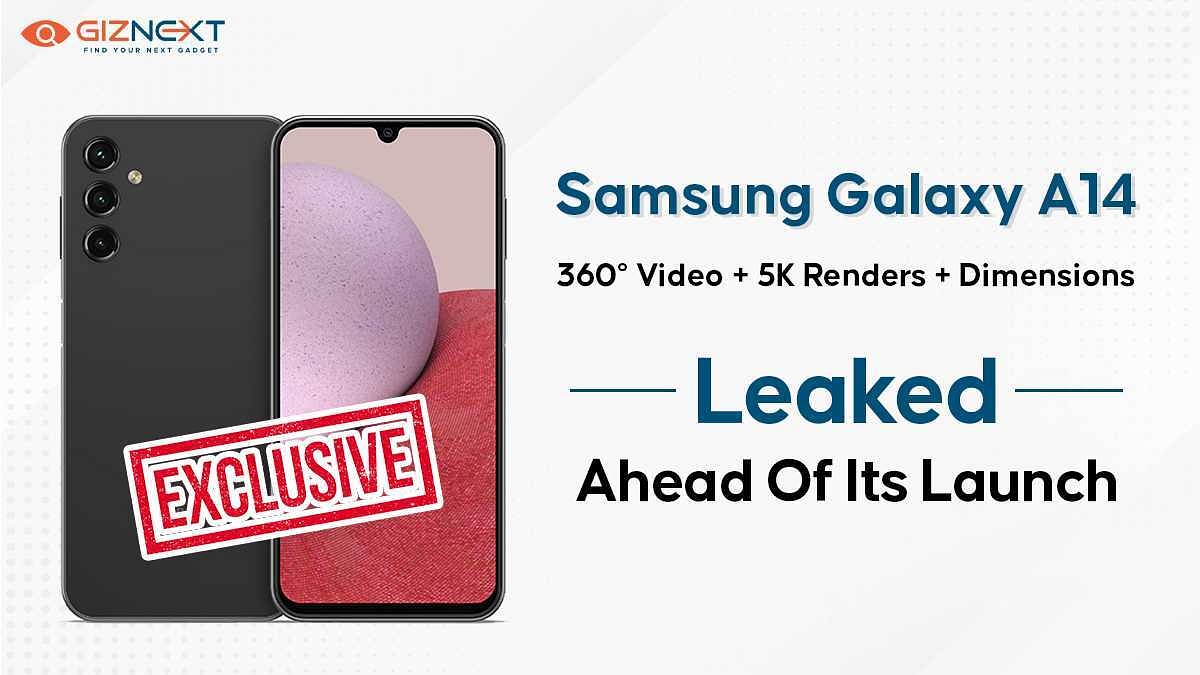
[Giznext Exclusive]: Samsung Galaxy A14 Leaked 5K Renders, Video Reveals Design In Full Glory: Here’s The First Look

Key Highlights

Almost flat frame design

To sport Infinity-U display

Larger 6.8-inch FHD+ display

Triple rear camera setup

Side-mounted fingerprint scanner

USB Type-C Port, 3.5mm headphone jack

Samsung has earned its share of fame in the budget segment with the Galaxy A and the Galaxy M series smartphones. The South Korean tech behemoth added multiple models to these lineups in 2022. A recent leak suggested Samsung has already started testing a bunch of new Galaxy A series phones that will be debuting in 2023. The Galaxy A53, Galaxy A34, and Galaxy A14 have entered the testing phase. Adding on to the latest set of leaks are the exclusive 5K renders and video of the Galaxy A14 that Giznext has managed to source from one of the popular leakster.

Samsung Galaxy A14 Official 5K Renders Out

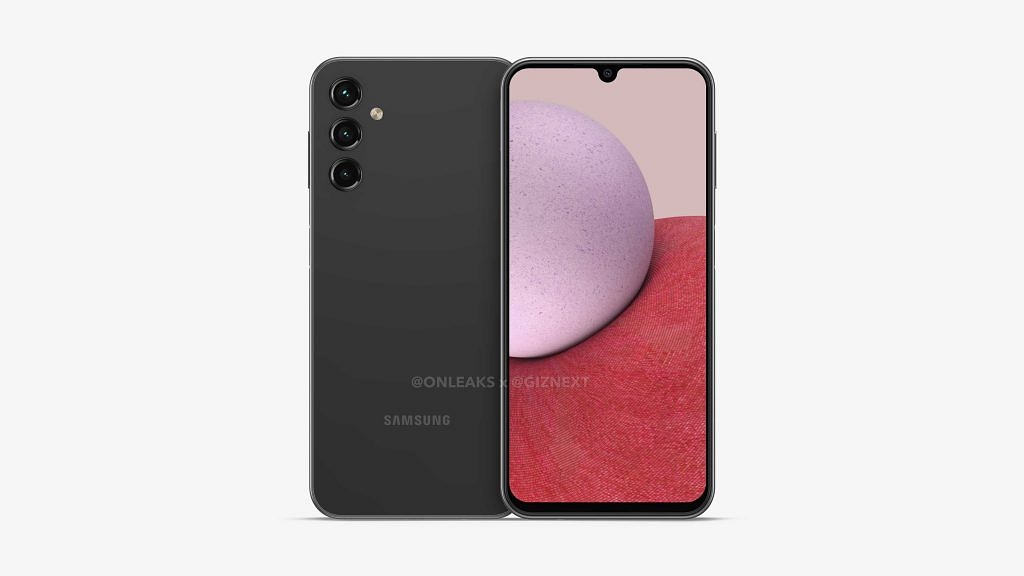
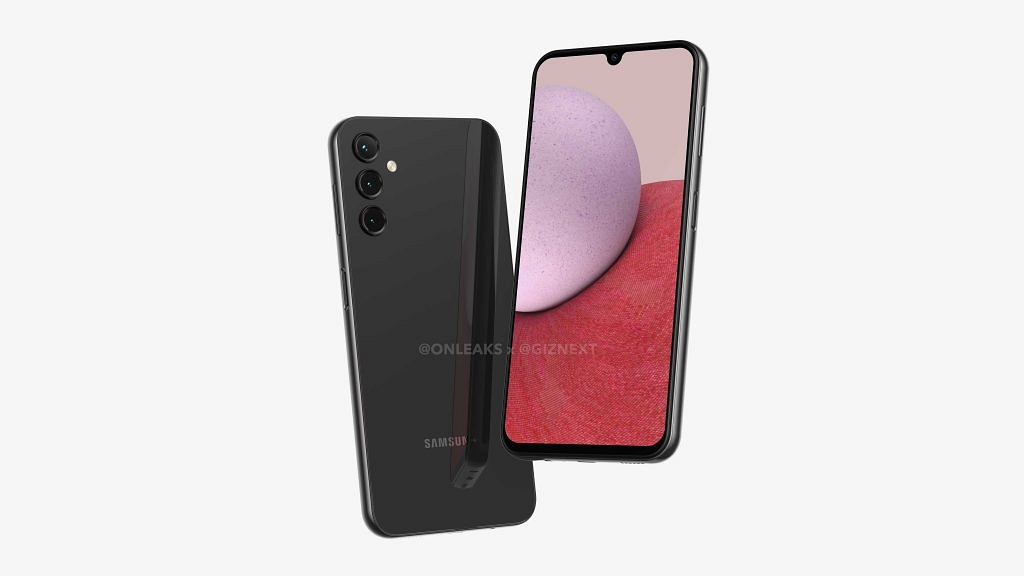
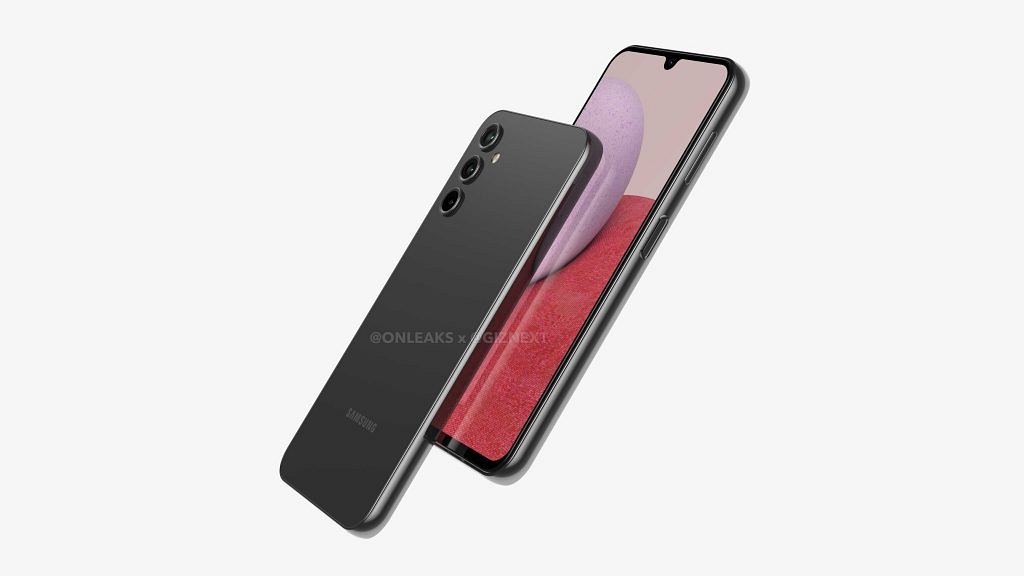
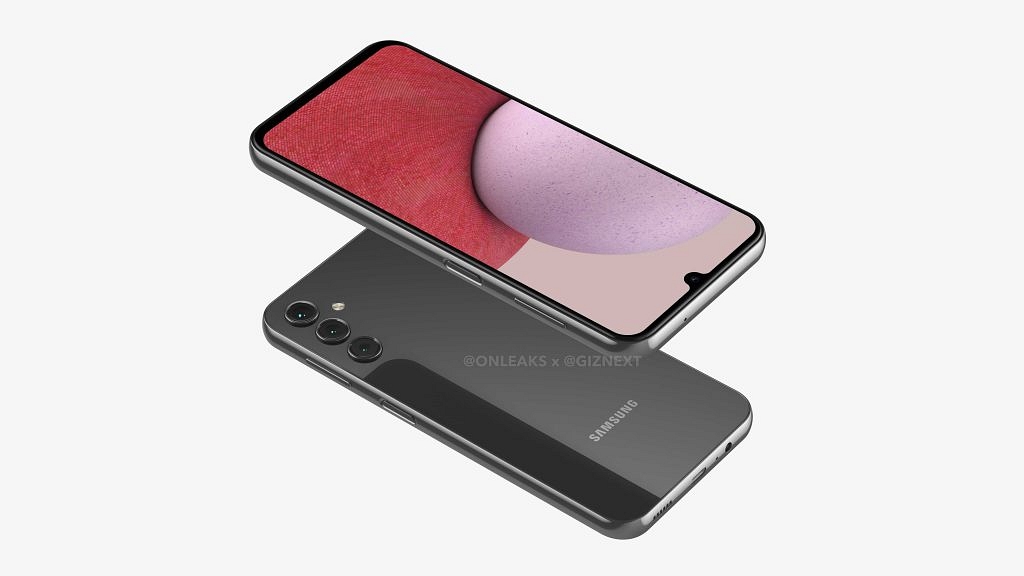
Giznext has once again collaborated with noted tipster @OnLeaks to bring you the exclusive 5K renders of Samsung’s upcoming budget handset, i.e., the Galaxy A14. The leaked renders give a clear view of the entire design of the Galaxy A13’s successor.

https://newsimg.giznext.com/mobile/production/news/wp-content/uploads/2022/10/01104014/SAMSUNG-GALAXY-A14.mp4

According to the images, the Samsung Galaxy A14 will be slightly similar to its precursor in terms of design. Only minor differences are noticeable. The primary design change is the Infinity-U display upfront instead of the Infinity-V panel used by the Galaxy A13.

Seems like Samsung will refrain from using a punch-hole camera design on this next-gen Galaxy A series phone. Now, this is an upgrade we all have been expecting. Besides, the frame design (almost flat) is also identical to the previous gen model and also the camera module.

However, the Galaxy A14 will have a triple rear camera setup unlike the quad-camera module offered by the Galaxy A13. We aren’t sure why Samsung is chucking out the extra sensor. But we expect an upgrade in the camera hardware, specifically, a larger main camera sensor.

The back panel appears to flaunt a plain gradient design. We have received only the black color variant’s images, but are sure Samsung will add some more colors to the lot. The Galaxy A14 render images have also confirmed the presence of a side-mounted fingerprint scanner for added privacy.

The remaining design aspects are also the same including the positioning of the power key-integrated fingerprint scanner and the volume rockers on the right spine. The bottom edge can be seen housing the 3.5mm headphone jack, a USB Type-C port, and the speaker grille.

Samsung Galaxy A14 Expected Specifications

As of now, the details related to the Galaxy A14 hardware are minimal. Our source has tipped a larger screen size of 6.8-inches compared to the 6.6-inch panel on the Galaxy A13. The Galaxy A14 could also feature the same LCD screen as its precursor along with an FHD+ screen resolution.

The dimensions of the handset could be 167.7 x 78.7 x 9.3mm. This is an estimated figure and the exact data could differ. We aren’t also sure if Samsung will launch the Galaxy A14 with 5G network support as its predecessor, but are expecting the rumor mill to confirm this in the coming months.

It would be interesting to see what all hardware upgrades Samsung will add to the Galaxy A14 compared to the last gen model and when precisely the brand plans its launch for the global market including India.

Wrap Up

  • Samsung Galaxy A14 5K renders and video leaked ahead of launch
  • Will feature a 6.8-inch Infinity-U display with an FHD+ resolution
  • Side-mounted fingering scanner for security
  • Almost flat frame design
  • USB type C, 3.55 mm headphone jack
  • Launch likely next year
Categories
Chipset Comparison Featured

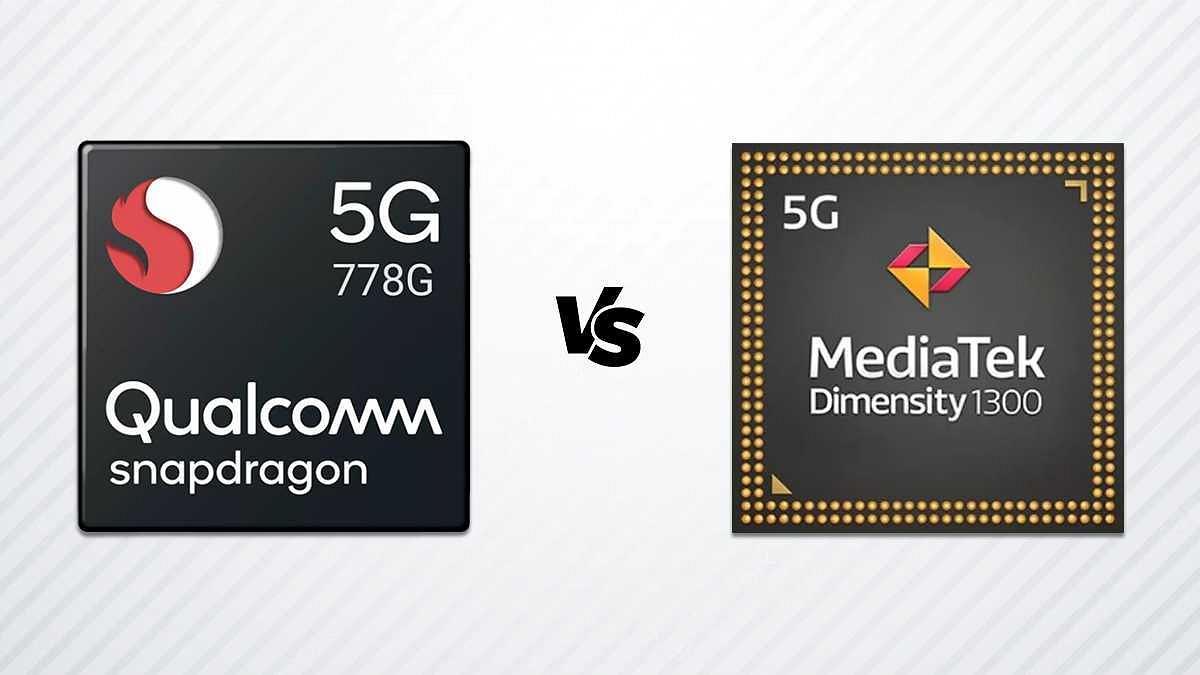
Qualcomm Snapdragon 778G Vs MediaTek Dimensity 1300 Chipset: Quick Comparison

Key Highlights

  • The Snapdragon 778G is based on the 6 nm fabrication process, while the Dimensity 1300 is also fabricated on a 6 nm processor.
  • The Snapdragon 778G has better memory compatibility with LPDDR5 RAM and UFS 3.

Qualcomm ventured into the mobile chipset space long ago and has been bringing in some of the best options for smartphone OEMs. The Snapdragon mobile processors have been used by numerous smartphone brands as a powerhouse for their offerings. Likewise, MediaTek has also been present in the mobile chipset industry for a while and has seen a massive surge in its demand. Both these chipset OEMs are meeting the demands of general and high-end users with their powerful chipset ranges.

The latest mobile chipsets from these brands are thinner despite integrated modem support for 5G connectivity. Qualcomm even has released a dedicated gaming chipset series. The Snapdragon 778G gaming processor is one of the best game-centric mobile chipsets used by some of the best latest Android phones including the Vivo T1 Pro 5G, iQOO Z6 Pro 5G, and others.

Similarly, MediaTek’s Dimensity 1300 chipset is one of the best examples of a premium mid-tier mobile chipset used by popular devices like the OnePlus Nord 2T, Vivo V25 Pro, OPPO Reno8 Pro 5G, and others.  The Qualcomm Snapdragon 778G battle and the Dimensity 1300 is quite stiff. Which one out of the two has a better CPU and GPU performance? Read on to know:

Also Read: Qualcomm Snapdragon 8 Gen 2 Vs MediaTek Dimensity 9200 Chipset Comparison: Most Advanced 5G Flagship Mobile Processor?

Qualcomm Snapdragon 778G Vs MediaTek Dimensity 1300 Processor: CPU Architecture And Performance

The Qualcomm Snapdragon 778G is an octa-core chipset with the CPU cluster featuring one 2.4GHz Cortex-A78 core, three Cortex-A78 cores with 2.2GHz clock speed, and four Cortex-A55 cores clocked at 1.9GHz. This chipset offers around 2400MHz of the frequency with its ARMv8.4-A instruction set. Qualcomm has used a 6nm fabrication which is used by MediaTek as well to design the Dimensity 1300 chipset.

MediaTek has also used an octa-core CPU cluster with ARMv8.2-A Instruction set and a 3200MHz frequency range. The cores included are one Cortex-A78 core with 3GHz clock speed, three Cortex A-78 cores clocked at 2.6GHz clock speed, and four Cortex-A55 cores clocked at 2GHz. Both SD 778G and the Dimensity 1300 have a solid CPU architecture and the performance delivery is also good.

Snapdragon 778G Vs Dimensity 1300 Chipset: GPU Hardware

Starting with the Snapdragon 778G processor, Qualcomm has used an Adreno 642L GPU which has around 490MHz GPU frequency. On the other hand, MediaTek has integrated the Mali-G77 MC9 GPU with the Dimensity 1300 chipset which offers around 850MHz. Execution units are 2 and 9, while the shading units are 384 and 144 with the Snapdragon 778G and the Dimensity 1300 respectively. Both these processors ship with the same 1.1 Vukan, 2.0 OpenCL, and 12 DirectX versions. You can expect a lag-free graphic rendering with both these premium mid-range processors but the Snapdragon 778G has a slightly better GPU performance.

Also Read: MediaTek Dimensity 9200 Processor Vs Qualcomm Snapdragon 8 Gen 1 Chipset: High-End Mobile Chipset Comparison

Snapdragon 778G Vs Dimensity 1300 SoC: Memory, Multimedia (ISP)

Memory compatibility is where the game changes and the Qualcomm chipset takes the lead. The Snapdragon 778G processor has LPDDR5 RAM support, while the Dimensity 1300 features LPDDR4X RAM. The memory frequency is 3200MHz with the SD 778G and 4266 with the Dimensity 1300. Both these processors have up to 16GB max memory support. As for the storage, UFS 2.1, UFS 2.2, UFS 3.0, and UFS 3.1 with the Snapdragon 778G and UFS 3.1 with the Dimensity 1300. Again, the Snapdragon processor is better with multiple storage support.

If we talk of multimedia support, the Snapdragon 778G has a 1080 x 2520 pixels max display and 1x192MP, and 2x36MP max camera resolution respectively. The MediaTek Dimensity ships with the same max display resolution by only 1x 200MP max camera resolution which is higher than the Snapdragon chipset. While the Snapdragon 778G can record and playback 4K@30fps videos, the Dimensity 1300 can record and playback 4K@60fps videos. The Dimensity 1300 offers better multimedia support.

Also Read: Qualcomm Snapdragon 750G Vs Snapdragon 732G: Premium Mid-Tier Gaming Chipset Comparison