As the Assistant Editor, Sandeep is generating tech-oriented content and also monitoring the content published on the website. He has over six years of experience in tech journalism and has expertise in product reviews, news articles, listicles, and media campaigns.
Instagram is getting popularity as one of the best social media platforms for mobile and desktop users in the global market. Since Meta acquired this photo-sharing app, we have seen some major overhauls with the UI and features. Instagram has been rapidly working to improve the user experience and has added a myriad of features in a bid to offer the same.
Instagram has evolved from being just a photo-sharing app and now lets users share short videos and stories. The company has also added the Direct messaging feature which allows the users to chat without leaving the app. The company has made it an end-to-end platform for a secure messaging experience and has also added support for direct calling (both voice and video).
Also, there aren’t many limitations with the direct messaging feature and you can also make use of the group chatting feature to talk to multiple of your friends simultaneously. You would need to create a group in order to initiate a group chat, video, or voice call. If you are unaware of the steps to start a group chat on Instagram, this step-by-step guide article is what you need to go through. Read on here:
Steps To Initiate Group Chat On Instagram
Step 1: You can start a group chat using the Instagram mobile app for Android and iOS devices. Launch the app on your respective smartphones and move to step 2.
Step 2: Go to the direct messaging section. Click on the messenger option from the top left corner.
Step 3: Now, select the square with a pencil icon which is for adding group chat members.
Step 4: Tap the users’ profile with whom you would want to initiate the group chat.
Step 5: Once you perform these steps, the group chat window will be created.
Step 6: You can now start chatting with your group and send photos and videos from your gallery or Instagram feed.
Step 7: You can also take care of your privacy by selecting the View once and Allow replay option. Tap on send once done.
How To Add More Members To Instagram Group Chat
Step 1: Go to the Direct Messaging option on the Instagram app.
Step 2: Now, open the group chat where you want to add the additional members.
Step 3: Right next to the Members tab, you’ll see the Add people option. Tap on it.
Step 4: Now, scroll to the users you want to add to the group chat.
Step 5: Tap on Next and the new users will be added to the group.
Qualcomm Snapdragon 778G seems to be the favourite mobile chipset for smartphone OEMs. iQOO, Vivo, OPPO, and other major smartphone giants have released several models powered by the SD 778G chipset in recent times. But the Snapdragon 865 is also getting its share of popularity amongst smartphone manufacturers for premium mid-range offerings. Continuing our series of chipset comparisons, we have added the Snapdragon 865 and the Snapdragon 778G processors to the list.
Qualcomm Snapdragon 778G Chipset Vs Snapdragon 865 Chipset: CPU Architecture Comparison
The Snapdragon 778G is comparatively older than the Snapdragon 865 chipset and is designed using 6nm fabrication. The SD 865 has been fabricated using a 7nm fabrication process. The instruction is ARMv8.2-A on the Snapdragon 865 and ARMv8.4-A on the Snapdragon 778G. Speaking of the core architecture, both these premium mobile processors have octa-cores. The SD 865 features one 2.84GHz Cortex-A77 core, three Cortex-A77 cores with 2.42GHz clock speed, and four Cortex A-55 cores clocked at 1.8GHz.
The Snapdragon 778G processor CPU cluster comprised a Cortex-A78 core clocked at 2.4GHz, three Cortex-A78 cores clocked at 2.2GHz, and four Cortex-A55 cores with 1.9GHz clock speed. This chipset offers improved CPU performance compared to the SD 778G SoC.
Snapdragon 865 Vs Snapdragon 778G Chipset: GPU Performance
Both Qualcomm Snapdragon 865 and the Snapdragon 778G processor feature the same Adreno 600 series GPU architecture. However, the former embeds the Adreno 650 GPU, whereas, the latter has the Adreno 642L GPU. The GPU frequency range is 580MHz with the SD 865 chipset and 490MHz with the Snapdragon 778G processor. Both chipsets offers two execution units, 1.1 Vulkan Version, 2.0 OpenCL version, and 12 DirectX version. Similar to the CPU architecture, the GPU performance is also good with the SD 865 compared to the SD 778G processor.
Snapdragon 865 Chipset Vs Snapdragon 778G Processor: Memory, Multimedia (ISP)
Qualcomm Snapdragon 778G processor and the Snapdragon 865 processor integrate the same LPDDR5 memory type, but the memory frequency range is different on both phones. The former chipset has a 2,750MHz frequency range, whereas, the latter comes with a 3200MHz memory frequency. The maximum memory support is 16GB with both these Qualcomm premium processors.
In terms of storage compatibility, the Snapdragon 865 processor has the UFS 3.0 and UFS 3.1 storage support and the Snapdragon 778G chipset comes with UFS 2.1, UFS 2.2, UFS 3.0, and UFS 3.1 storage type compatibility. Speaking of multimedia compatibility, the Snapdragon 865 processor offers 2160 x 3840 pixels max display resolution, whereas the max camera resolution type is 1 x 200MP and 2 x 25MP resolution.
The Snapdragon 778G chipset comes with 1080 x 2520 pixels max camera resolution support and 1 x 192MP, 2 x 36MP max camera resolution support. The video playback and recording compatibility is 8K@30fps and 4K@120fps with the SD 865. On the other hand, this is just 4k@30fps with the SD 778G processor. The Snapdragon 865 once again offers better multimedia performance.
Qualcomm and MediaTek mobile chipsets are undeniably the driving force for every other Android smartphone and tablet available in the market. While there are a couple of other players in this market, both these brands have got a stronghold. The Snapdragon 870 is a premium range Qualcomm chipset that offers reliable performance along with 5G network support and has been used by multiple popular premium Android phones. MediaTek has been competing Qualcomm’s high-range Snapdragon 800 series chipsets.
The Dimensity 9000 is one of the latest flagship MediaTek chipset that is giving some tough competition to the new-generation Snapdragon 800 series processors including the Snapdragon 870 SoC. We have compared both these mobile chipsets to see which one offers a better spec-sheet.
Qualcomm Snapdragon 870 Vs Dimensity 9000 Chipset: CPU Architecture
Qualcomm’s Snapdragon 870 is a 7nm chipset that has octa-cores comprising a single 3.2GHz Cortex-A77 core, three Cortex-A77 cores clocked at 2.42GHz, and four Cortex A-55 cores clocked at 1.8GHz. The instruction set is ARMv8.2A and the frequency range is 3200MHz. The MediaTek has used an altered ARMv9-A instruction set for the Dimensity 9000 chipset which is designed on a thinner 4nm fabrication process.
The Dimensity 9000 chipset has a single Cortex-X2 core clocked at 3.05GHz, three 2.85GHz Cortex-A710 cores, and four Cortex-A510 cores clocked at 1.8GHz. The overall frequency range is 3050MHz. Out of both, the Dimensity 9000 processor has a better CPU architecture compared to the Snapdragon 870. However, the Qualcomm chipset doesn’t fall behind much.
Dimensity 9000 Vs Snapdragon 870 Processor: GPU Hardware
The MediaTek Dimensity 9000 chipset ships with an integrated Mali-G710 GPU support which has the Valhall 3 architecture. The Qualcomm Snapdragon 870 chipset embeds the Adreno 600 GPU architecture based Adreno 650 GPU. The Snapdragon 870 processor has a 675Mz of GPU frequency with two execution and 512 shading units.
Whereas, the Dimensity 9000 processor comes with 850MHz GPU frequency and 10 execution, 512 shading units. The Dimensity 9000 processor has 1.1 Vulkan version, 2.0 OpenCL, and 12 DirectX version. The figures are same with the SD 870. The GPU performance is slightly better with the Dimensity chipset.
Qualcomm Snapdragon 870 Vs Dimensity 9000 SoC: Memory, Multimedia (ISP)
The Qualcomm Snapdragon 870 chipset has the LPDDR5 memory integrated, while the Dimensity 9000 processor has the advanced LPDDR5X RAM support. The former chipset comes offers a 2750MHz frequency, while the latter has a higher 3750MHz memory frequency. Qualcomm has integrated support for UFS 3.0 and UFS 3.1 storage, whereas MediaTek has opted for the higher UFS 3.1 storage support only.
The maximum display resolution supported by the Snapdragon 870 chipset is 2160 x 3840 pixels resolution. This is lower on the Dimensity 9000 at 1440 x 2960 pixels. The max camera resolution compatibility with SD 870 is 1 x 200MP and 2 x 25MP. The Dimensity 9000 chipset takes a lead here with 1 x 320MP and 3x32MP camera resolution support. Qualcomm SD 870 can record and playback up to 8K@30fps and the Dimensity 9000 processor can only record and playback up to 4K@30fps videos.
Users will be able to send up to 20 videos and images simultaneously
Mass update rollout awaited
Google is one of the biggest providers of mobile services and apps. The brand is making our lives easier with its services and tools covering most aspects such as multimedia, navigation, lifestyle, and health. Google has also tried its hand in the social media space and messaging. For the latter, it offers Google Chat which is an improved app dedicated to messaging. Going forward, Google plans to replace Hangouts with Chats. In the meanwhile, Google has updated the Chat app with new features. Below are the details:
Google Chat Getting Updated With This New Features
A new report by 9To5Google has revealed Google Chat’s upcoming update rollout. Going by the information shared by the publication, Google will be adding support to share multiple images as well as videos to the Chats app. The company currently allows users to send a single image or video to any contact.
However, the latest update is now letting users easily send more than one image or video to their contacts. Therefore, it was quite a task to send multiple photos or videos at once using Google Chat. This is one of the primary reason why Google Chat is still not as popular as WhatsApp and similar popular instant messaging applications.
Since Google is shutting down Hangouts and improving the messaging experience with Google Chat, we are expecting this app to become more successful in the coming years. The report also mentions Google has started releasing this update to the Chat app for Android users. However, the company is dishing out this update in a phased manner and will possibly be done with the mass rollout going forward.
How Can You Send Multiple Images And Videos Using Google Chat?
You don’t have to perform any special steps to send multiple images or videos using Google Chat. Rather, the method is similar to how you would send a single video or image. Just open the chat window and go to the media option, and select the images that you want to send to the contact. Similarly, you can select multiple videos simultaneously and share them with the desired contacts. It is worth adding that Google has added support to send up to 20 images and videos simultaneously from the gallery.
WhatsApp messaging is the modern way of communication. The end-to-end encryption platform offers a secure environment for sharing texts, media, and even voice/video calling has been driving the user base from across the globe to WhatsApp. The company has also been proactively adding useful features to enhance the entire messaging experience. Earlier WhatsApp released the much-awaited message delete feature and now is testing another such option. WhatsApp will now finally roll out the option to edit sent messages to any contact. Here are the latest developments:
WhatsApp Edit Message Option Coming Soon
WaBetaInfo which has been consistent with sharing upcoming WhatsApp features has shared a new report suggesting the arrival of the Edit message option. According to the report, WhatsApp is now testing the feature that will let users edit sent messages. This upcoming editing option will be of great use for professional communications by correcting typos. This otherwise is not possible with WhatsApp messages.
The WaBetaInfo report further suggests WhatsApp has already sent this feature in the development phase. WhatsApp is said to be testing this new messaging feature with v2.22.20.12. However, the company is yet to roll out a beta update for this new feature. The stable versions availability remains uncertain until then. We can this new Whatsapp feature to be available for both Android and iPhone users.
Any Timeline For Editing Sent Messages?
One of the biggest questions that come to the mind is whether WhatsApp will set any timeframe for the sent messages to be edited. Since this update is in the development phase, it would be difficult to anticipate. WhatsApp had imposed a minimum time limit previously to delete a sent message. But later extended the timeframe.
There could be a possibility that the same limitations could be present with the edit message feature. However, we would have to wait for a while and see how WhatsApp works around this. Nevertheless, the screenshot shared in the report suggests the users will be notified if the message received is edited. This is the same as the delete message notification. This means, that even if you make some corrections the recipient of the message would be aware if any changes have been made to the text.
Amazon is just a few days away from hosting its biggest festive season sale this year in India. The e-commerce giant has announced the Great Indian Festival season sale which will be live starting September 23 in the country. Amazon has been teasing deals and offers on popular smartphones, digital accessories, and other consumer durables and goods. But as is the case each year, smartphones and accessories are the most sought-after products during the festive season sales.
During the Amazon Great Indian Festival sale 2022, buyers will be able to grab some of the best deals on popular mobile from brands including Xiaomi, OPPO, OnePlus, Tecno, and Samsung. If you have been waiting all this while to upgrade your older smartphone, the Amazon Great Indian Festival 2022 sale would be a perfect time. We have compiled the list of best affordable and premium range Android phones that you can buy with massive discounts and other offers during the Great Indian Festival sale 2022. Take a look:
List Of Popular Smartphones Selling With Discount Offers During Amazon Great Indian Festival Sale 2022
Premium Smartphones At Sale On Amazon
OnePlus 10T 5G Flagship Android Phone
The OnePlus 10T is one of the most premium Android phones in India that is available at cheaper rates on Amazon during the Great Indian Festival sale 2022. This flagship OnePlus 10 series phone is amongst the few Snapdragon 8+ Gen 1 chipset-powered smartphones in India. This phone flaunts a 6.7-inch display with an FHD+ screen resolution and 120Hz refresh rate. It has a 50MP triple rear camera module and a 4,800 mAh batter with 150W SuperVOOC flash charging support. You can buy the OnePlus 10T for as low as Rs. 49,999 from Amazon as a part of the Great Indian Festival sale 2022.
Xiaomi 12 Pro Premium Android Phone On Discount
Another flagship Android smartphone that you can buy at cheaper rates from Amazon during the ongoing festive season sale is the Xiaomi 12 Pro. The high-end Xiaomi 12 series model has been launched this year in India with Qualcomm’s flagship Snapdragon 8 Gen 1 chipset fabricated using a 4nm process. The Xiaomi 12 Pro also features a liquid cooling vapour chamber for improved gaming experience. One of the biggest highlights of the Xiaomi 12 Pro is the 120W HyperCharge technology which as per the brand can refuel the handset completely within 18 minutes. The Xiaomi 12 Pro can be purchased at Rs. 62,999 via Amazon during the sale.
Samsung Galaxy S22 5G Premium Android Smartphone At Sale
The flagship smartphone list is incomplete without any Galaxy S series model. Samsung released the Galaxy S22 series this year as its top-of-the-line Android phone with the best-in-class camera and other hardware features. The Galaxy S22 5G ships with a dynamic AMOLED 2X display surrounded by armor aluminum frame. The handset is backed by the Exynos 2200 chipset fabricated using a 4nm process. This premium Samsung Galaxy S22 series model also features a 3,700 mAh battery unit along with fast charging support. It is currently retailing at around Rs. 62,999 with discount offers and deals on Amazon.
Affordable And Mid-Range Smartphone Deals On Amazon
Xiaomi 11 Lite NE 5G Premium Mid-Range Android Phone Offers
The Xiaomi 11 Lite NE 5G is also being sold with discounts during the Amazon Great Indian Festival sale 2022. This handset gets its power from the Qualcomm Snapdragon 778G chipset which has octa-cores and is combined with up to 8GB RAM and 128GB storage. The Xiaomi 11 Lite NE 5G offers a 64MP main camera and can be purchased at Rs. 25,999 during the ongoing Amazon sale.
OPPO F21s Pro Latest Mid-Range Phone On Offers
The OPPO F21s Pro is the latest mid-range Android phone from the Chinese tech giant. Withing just a few weks of launch, the OPPO F21s Pro will be available with lower rates on Amazon during the Great Indian Festival sale 2022. The key features of this OPPO F21 series phone includes a 6.43-inch FHD+ AMOLED display, a 64MP triple rear camera setup, and a 4,500 mAh battery unit. The price of the OPPO F21s Pro after the discount is around Rs. 22,999.
Tecno Pop 5 LTE Offers On Amazon
Tecno is comparatively a new player in the mobile industry but has strengthened its portfolio with budget phones. The Tecno Pop 5 LTE is one of the most popular affordable Android phones that features a 6.52-inch HD+ display and an 8MP dual rear camera setup. With the offers and discounts, the Tecno POP 5 LTE can be purchased at just Rs. 6,099 via Amazon.
Google has released multiple apps and tools for smartphone and PC/laptop users. The brand has introduced services ranging from entertainment to health, lifestyle, and more. Amongst the most commonly used services from Google is Maps. With Google Maps, our lives have become easier with navigation. Traveling to unknown destinations isn’t a hassle or time-consuming process as you don’t have to frequently ask for directions.
Google Maps has also got several facelifts in the last few years and besides an updated UI, the navigation app has also got several new features for an easier commute. And with the Google Maps integration with messaging apps, sharing locations with our family and or friends has also been simplified.
Sharing a location using Google Maps has been made possible via WhatsApp and other messaging applications. With the instant messaging applications, you can share not just share the current but also the live location. Google had recently refined the location sharing feature and now lets users notify their contacts of their arrival and departure details. This advanced location-sharing feature has been released a couple of months back and is compatible with both mobile as well desktop versions of Google Maps.
With this new Location Sharing notification feature, the selected contacts would know of your arrival and departure from specific locations. You can also easily stop these location-sharing notifications once you are at the designated location. But how exactly can you just send notifications for your arrival or departure from the select destination using Google Maps? Read on here for the steps:
How To Setup Or Turn On Location Sharing Notification On Google Maps
Step 1: On your respective Android/ iOS smartphone or tablet launch the Google Maps application.
Step 2: Click on the profile option.
Step 3: Select the Location sharing option.
Step 4: Now, click on the profile of the contact with whom you wish to share the location alert.
Step 5: Tap on the “Notifications” option.
Step 6: Click on Add notification icon.
Step 7: Now, select the “Choose a location” option and then select the address. You can also manually add the location details by clicking on the “+” option.
Step 8: Set the location by dragging the maps and tap on Done.
Step 9: Now, select the duration as to when you want to receive the notification. You will get to select from “Every time they arrive” and “Every time they depart”. Once done, tap on save. It is worth adding that up to five location sharing notification is allowed for each contact who shares the location with you.
Apple has been delivering a premium user experience for smartphone users with its iPhone series. The Cupertino tech behemoth just released the latest generation iPhone 14 series laced with top-notch hardware and the latest iOS 16 firmware. Apple had shown the vast possibilities with the iOS 16 and introduced a plethora of new features. Not just the iOS 16, the iOS 15 also came with numerous user-friendly features.
Apple also made multiple upgrades with Safari which is the dedicated web browser for all Apple devices including iPhones, iPads, Mac laptops, and desktops. With the new-generation iOS versions, Apple allowed users to customize the Safari browser as per their requirements. Changing the background in the Safari browser is one of the features that you can now use with iPhones.
You can change the Safari browser’s background by following a few simple steps on the iPhones that are running on iOS 13 and above version. So, all the iPhones running on iOS 13, iOS 14, iOS 15, and iOS 16 will have this option to change and customize the background in Safari. The iPhone X, iPhone 11, iPhone 12, and iPhone 13 models will let you customize the background in the Safari web browser. Even if you have upgraded to the new-generation iPhone 14 series, you’ll get to use these customization features with the dedicated Apple web browser.
How To Change Or Set Custom Background In Safari
Step 1: Unlock your iPhones and tap on the Safari web browser app.
Step 2: From the bottom left of the Safari browser’s home page, click on the double square icon.
Step 3: You will now see the add button “+” icon at the bottom left, tap on it.
Step 4: You will see the Customization page where a bunch of options will be listed along with the Background image option.
Step 5: You can either select from the bunch of pre-loaded background themes or add any other image from the gallery.
Step 6: Once you select the desired image, it will be set as the background on the Safari web browser on your iPhones. You can follow the same steps again to change the background later.
India is one of the biggest markets for tech brands; specifically Chinese OEMs that have been targeting the budget audience with smartphones, digital accessories, and other IoT-enabled consumer durables. OPPO is one of the country’s most popular tech brands with one of the biggest product catalogs. While OPPO is ruling the Android phone industry with multiple of its smartphone lineups, it also has been showing its expertise with audio accessories.
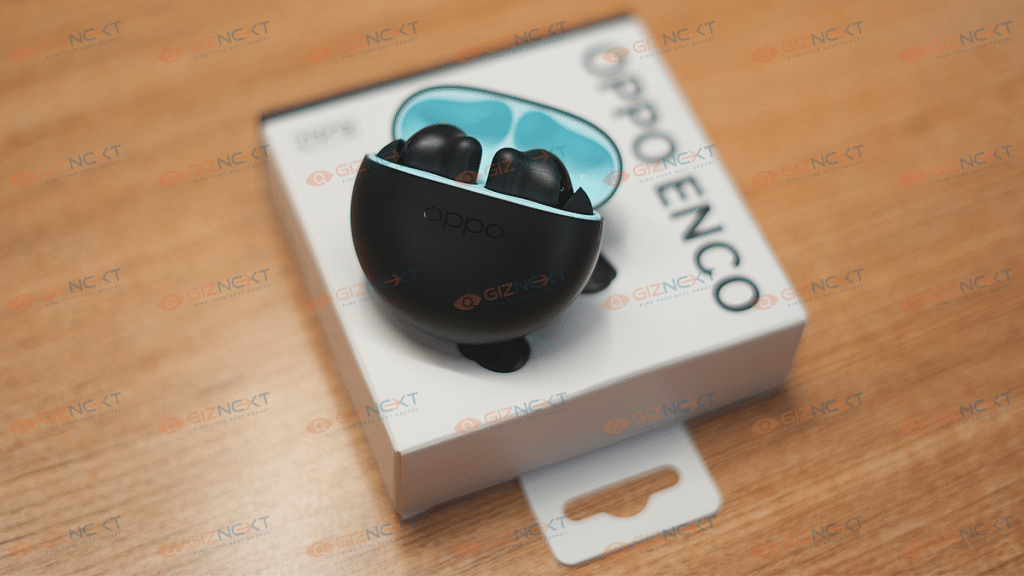
OPPO has been filling in for the audio enthusiasts with its Enco series of TWS earbuds and neckbands. OPPO recently launched new options in both budgets as well as the premium TWS earbuds segment. The OPPO Enco Buds2and the Enco X2 have been announced in the aforementioned category respectively. Giznext has got its hand on both the latest TWS earbuds from OPPO.
In one of our previous articles, we shared a detailed review of the OPPO Enco X2 premium ANC TWs earbuds. In this one, we are doing a comprehensive review of the budget variant, i.e., the Enco Buds 2. With a reasonable price tag of Rs. 1,799, the OPPO Enco Buds2delivers the promise of a practical design and good audio listening experience. But does it really lives up to the expectations? We have shared our feedback here:
OPPO Enco Buds2 Design Overview: Modern And Practical
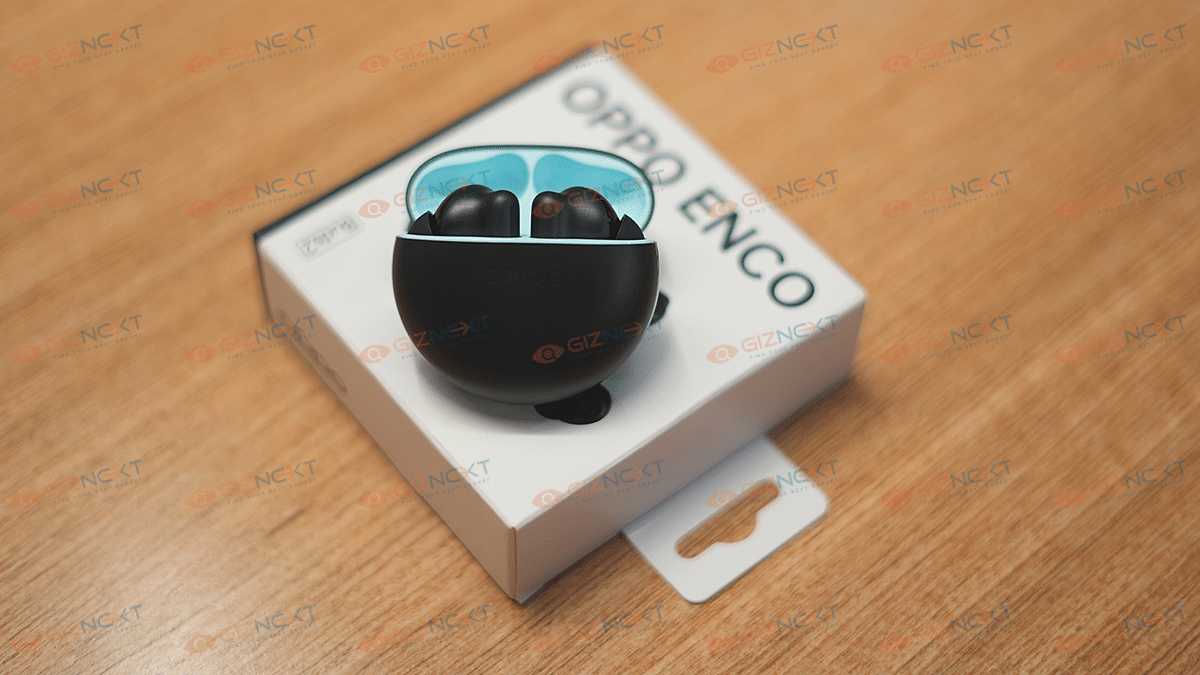
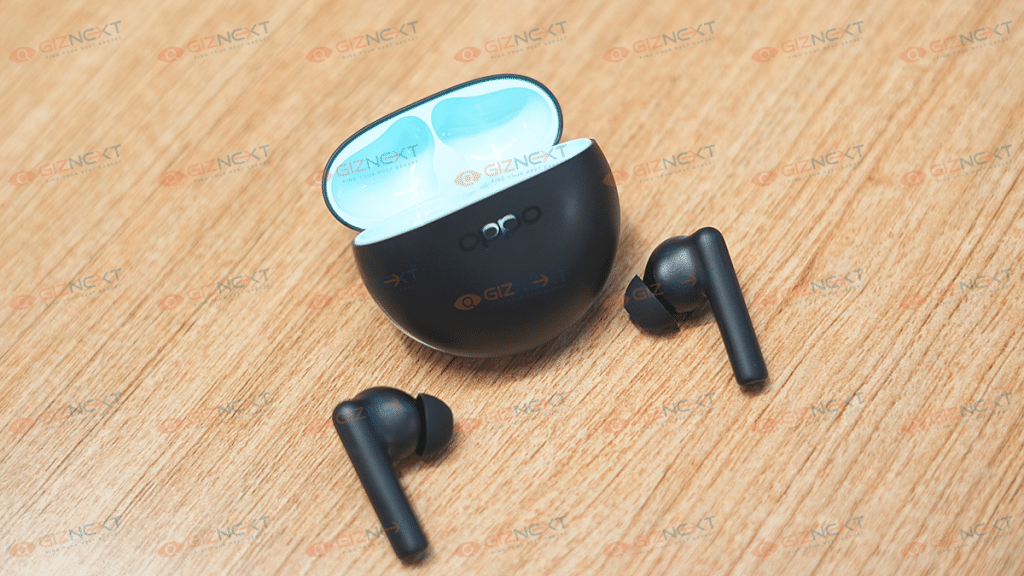
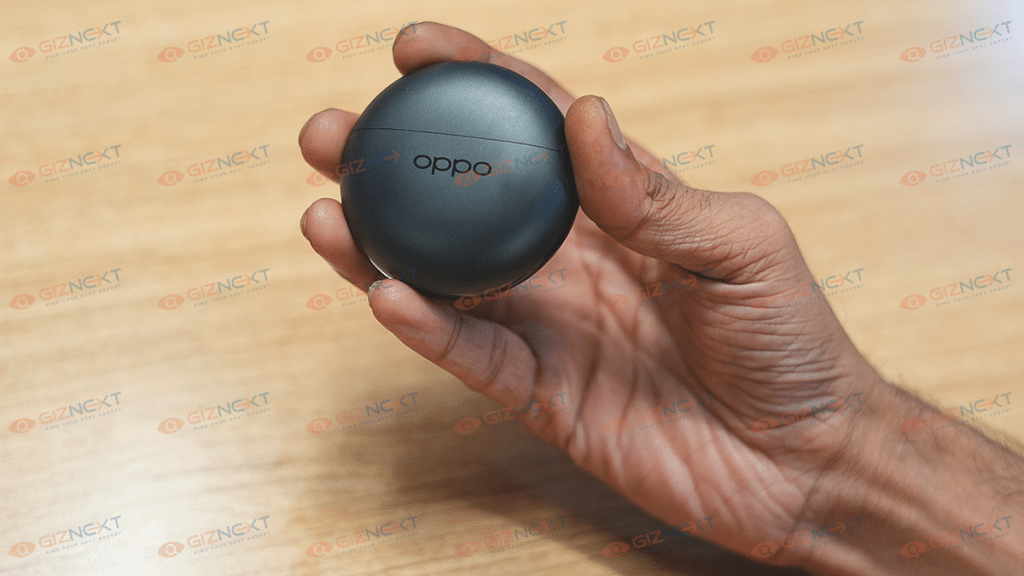
OPPO has redesigned the Enco Buds2. Unlike the previous-generation Enco Buds TWS that offered a pill-shaped design, the latest model has a circular charging case. OPPO hasn’t used any cheap material to design the Enco Buds2 rather has opted for a good quality plastic. The matte texture of the case along with the glossy strip wrapping the sides makes the TWS earbuds all appealing.
OPPO has launched the Enco Buds2 in a single black color option with the inner compartment painted in light blue. Now, this dual-tone finish when you open the charging case adds to the visual appeal of this pair. This updated design language would be a respite for users who avoid shimmering or gradient-designed gadgets as dust and fingerprint accumulation is higher and keeping the clean is a task. With the Enco Buds2, you wouldn’t face any such cleaning issues.
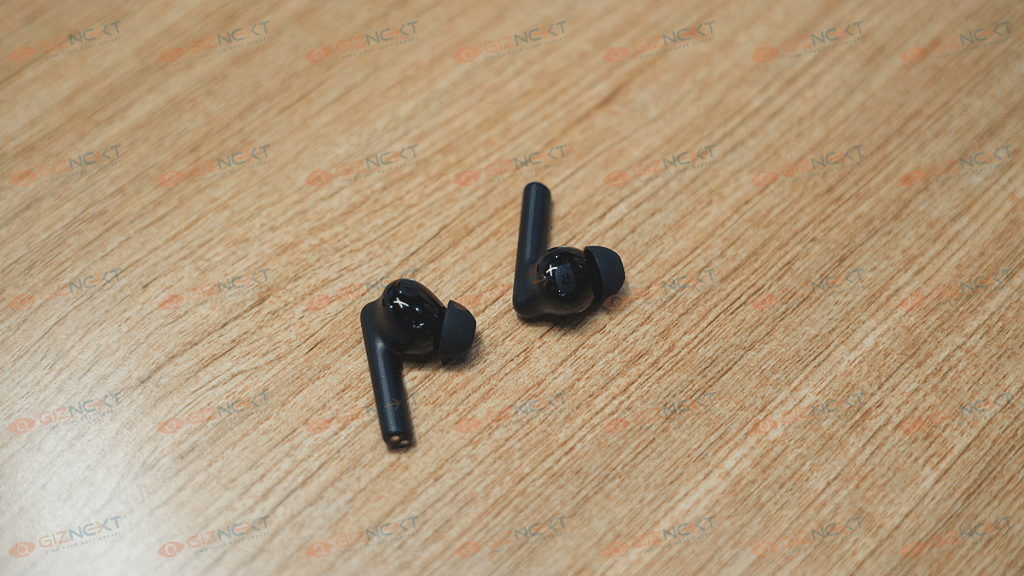
The earbuds are also re-designed. The Enco Buds2 earbuds feature a long stem design that offers a comfortable and snug fit. The default eartips fit well, however, you can change them depending on your requirements. Thankfully, you can control volume levels and media playback using the earbuds itself.
OPPO has added touch controls on the Enco Buds2 which offer a swift and nimble experience with audio playback controls. You can double tap or triple tap to play the next or previous song respectively. A single tap and hold on either earbud lets you control the audio levels. The earbuds and the charging case are lightweight, so you don’t have to worry about the portability factor.
As for the fit, the earbuds are comfortable to wear for prolonged usage. The design is a snug fit and you wouldn’t have any difficulties using them for outdoor activities. The earbuds also have an IPX4 certification that adds dust and water resistance.
Better And Soundstage
The OPPO Enco Buds2 delivers a powerful sound output for a budget price point. These tiny earbuds employ 10mm dynamic drivers that have a 101db of driver sensitivity and 20Hz- 20KHz frequency range. The output is loud; specifically, if you turn up the volume levels to the max. The pair passively blocks surrounding noises with the loud audio levels and a snug-fit in-ear design. You wouldn’t majorly miss the presence of ANC if you are listening to the audio at the highest levels.
The OPPO Enco Buds2 audio delivery is at par with the competition. In fact, we would say it’s better than what its counterparts offer. The audio clarity is high with the music and the pair produces balanced lows, mids, and highs. No audio muffling or distortion is noticed even with the peak audio levels. Now, this is a big respite for audio enthusiasts. The vocals and instruments don’t overlap and you rather can hear all the aspects clearly.
Coming on to bass performance for which most of you must have been waiting; the bass performance. The Enco Buds2 will live up to our expectations with the hefty bass. These budget earbuds pack ample thump to get you grooving to your favorite electronic or dubstep track. The bass doesn’t get muddy when you play the audio at the highest settings which is impressive for a TWS earbud under Rs. 2,000. It wouldn’t be wrong to say the OPPO Buds2 offers a better soundstage which is wide and rich compared to the competition in the budget segment.
Pairing And Calling Experience, Battery Backup
The OPPO Enco Buds2 ships with the Bluetooth v5.2 wireless connectivity option with which you can easily pair smartphones, tablets, laptops, and PCs. You can also connect this Enco Buds2 with compatible smart TVs. You don’t need to perform any special steps to pair this earbud with smartphones and compatibility.
Just take out the earbuds from the charging case and open the Bluetooth settings on your respective devices and complete the connection process. These budget TWS earbuds come with dual Bluetooth codecs including AAC and SBC for improved lossless transmission.
The connectivity range is standard at 10m. There isn’t any audio breakage issue if the earbuds and the connected device are within 10 meters of range. Connection issues arise if the distance increases. Calling experience is also good with this pair with us being able to hear the caller’s voice clearly.
The OPPO Buds2 TWS earbuds feature a 40mah battery (the earbuds), while the charging case has a 460mAh battery unit. The earbuds last for around five to six hours with moderate audio levels. The charging case holds additional 28 hours of fuel. However, you might get a lower battery backup if the audio is being played at the maximum levels.
OPPO Enco Buds2 Final Verdict: Worth An Upgrade?
Well, OPPO has never failed to impress the audience with its affordable product lineups. The Enco Buds series can be termed a true delight for audiophiles. Specifically for the audiences who are on a tight budget yet don’t wish to compromise anyhow with the audio and the build quality.
You get a good response with both these aspects. The OPPO Enco Buds TWS earbuds is definitely worth an upgrade from your old and cheap TWS earbuds if you want a premium listening experience without burning a hole in your pockets.
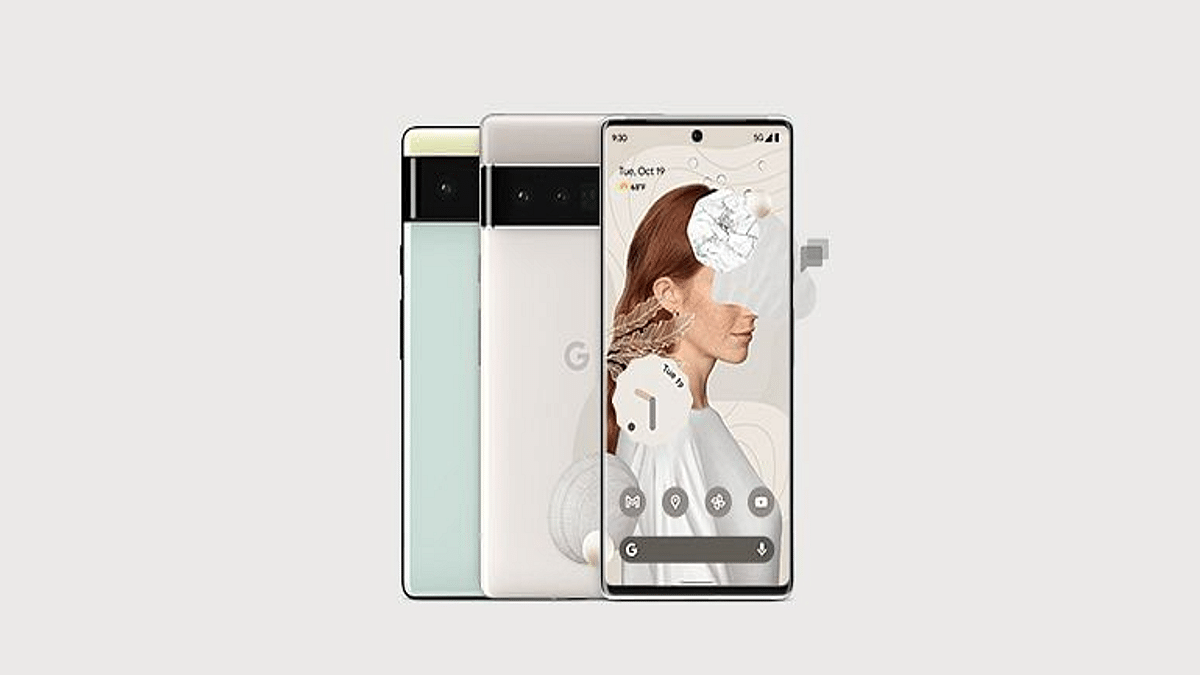
Google’s premium Pixel smartphone series is getting refreshed soon with the launch of the Pixel 7 series. The vanilla Pixel 7 and the Pixel 7 XL’s development have been confirmed by multiple leaks and rumors. Now, the affordable Pixel 7a has also started popping up via leaks. The Pixel 7a is expected to be a compact variant similar to the previous models.
Google Pixel 7a Launching Alongside Pixel 7, Pixel 7 Pro
The Google Pixel 7a has been leaked with the codename Neila. Popular tipster Digital Char Station has leaked the Pixel 7a’s development details. The upcoming phone will be an affordable version of the Pixel 7 and the Pixel 7 XL. Google is expected to introduce the Pixel 7a alongside the remaining two models during the annual I/O event in 2023.
Just for reference, the Google I/O 2023 event is scheduled for October 6, 2023, where the search giant will be taking the wraps off the latest Pixel 7 series including the Pixel 7a. And this time, Google is likely refreshing the design majorly with the Pixel 7a. It will feature a more compact design compared to its older siblings.
According to the tipster, the Pixel 7a will be launched with a 6.1-inch display. The screen size is almost similar to the previous-generation model, i.e, the Pixel 6a. The exact panel type and screen resolution details are yet to be revealed. But we can expect Google to use an OLED panel as the previous models.
Google is also likely to make additional hardware upgrades with the Pixel 7 series models including the Pixel 7a. We will possibly see the second-generation custom Tensor chipset under the hood. The new-generation Tensor processor will possibly bring improved GPU and CPU efficiency for a better overall user experience.
The Pixel 7a hardware details are limited. We only know of the screen size and the firmware version. Google is likely to use the newest Android 13 OS for the Pixel 7a. Similar to all Pixel phones, the Pixel 7 series will also offer a stock Android UI.
Google might also improve the camera hardware with the Pixel 7 series. The latest generation Pixel 7 phones are expected to feature a larger 50MP main camera for photography. We will keep you updated with the Pixel 7 series’ future developments including its availability, pricing, and internal hardware features.