Say hello to Shweta, a tech fan who's hooked on keeping up with all things tech. When she's not exploring the latest gadgets, she's diving into a good book, clicking photos as an amateur photographer, or enjoying classic movies and music. With her love for both tech and creativity, Shweta adds her own touch to tech news in a way that's easy to understand and enjoy.
Google ensured that it works well even on big screens
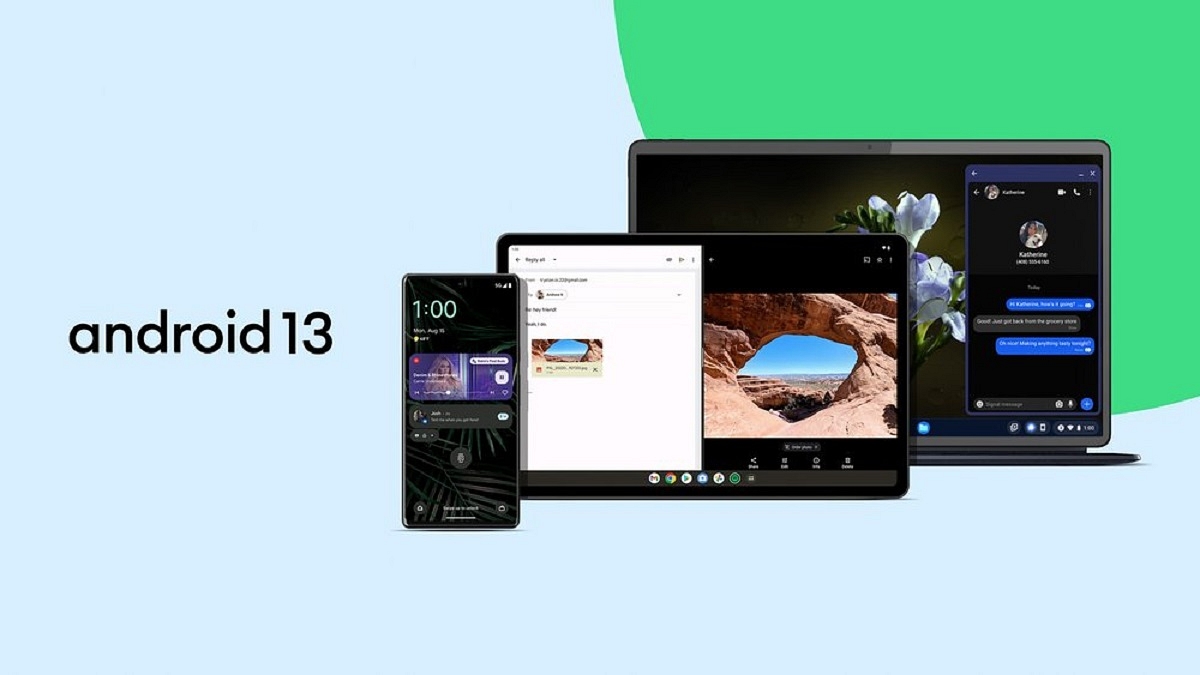
Google has finally started rolling out Android 13 to mobile devices months after introducing it to the public some months ago. Additionally, the tech behemoth released a list of mobile phones that will be compatible with the new Android 13 operating system.
For Android phones and tablets, the new operating system will have new features. These features range from enhanced privacy controls to the ability to copy text and media from one Android device and paste it to another with a single click, as well as the expansion of app color theming to even more apps.
Android 13: Eligible Device
Google stated that its own range of smartphones, including the Pixel 4, Pixel 4 XL, Pixel 4a, Pixel 4a(5G), Pixel 5, and 5a, Pixel 6, 6 Pro, and 6a, will be the first to receive the all-new Android 13.
The tech giant also said that more smartphone manufacturers will begin receiving Android 13 in the upcoming months. These companies include Xiaomi, Samsung, Vivo, OnePlus, Motorola, Asus, Nokia, Realme, Sony, and Samsung.
Android 13: Key Features
Personalization
Customizations based on Material You are available with Android 13. The home screen’s elements, including non-Google icons, the notification panel, the wallpaper, the theme, the color, and more, can all be customized by users.
Notifications & Permissions
The new OS will require apps to request the user’s consent before sending notifications. It can be useful for people who avoid receiving a lot of notifications. This feature is similar to what is found on Apple devices.
More Language Options
Users will be able to select a different language for each application on Android 13. The feature is perfect for multilingual users who enjoy different applications in different languages, according to the company.
Multitasking
With Android 13 OS, you will be able to copy content such as a picture, URL, text, or video from their Android smartphones and paste it onto their tablets or vice versa.
Almost everyone uses WhatsApp, one of the most popular instant messaging services in the world, on a regular basis. Users can instantaneously communicate through messages, photographs, and videos. But occasionally, we need to send a message at a specified time, perhaps to wish someone a happy birthday or to convey greetings or a reminder.
Unfortunately, WhatsApp does not have a feature to schedule any message within the app. Having said that, a number of third-party apps are available on the Google Play Store that allows users to plan any message for delivery at a specific time and date.
You can schedule text messages, photographs, and videos using apps like WhatsApp Scheduler, SKEDit, Do It Later, and many others. These applications are easy to use and provide a limited number of functions in their free or basic versions.
How To Schedule WhatsApp Messages On Android
All you need to do to schedule a WhatsApp message on an Android phone is to follow these easy steps:
Step 1: Download and install any WhatsApp scheduler app you find in the Google Play Store or by downloading the apk file from any website.
Step 2: Once the installation is done, open the app.
Step 3: From the bottom right, click on the’+’ icon.
Step 4: Then, select a WhatsApp contact or any WhatsApp group.
Step 5: Now, set the time and day.
Step 6: Select the frequency and type of your message.
Step 7: From the top-right corner, tap on ‘create’ button to schedule.
How To Schedule WhatsApp Messages On iPhone
For iOS users, there is no such third-party app. Don’t worry, though. We also have a solution for that. All you have to do is open Siri on your iPhone after downloading it. Now, follow these steps:
Step 1: Go to the Automation tab.
Step 2: Create personal automation by tapping the Plus symbol.
Step 3: Choose a time of day when you want your automation to run. Choose a date and time here.
Step 4: Then tap Add Action and type text from the list of actions into the search bar.
Step 5: Then, below the text area, tap the Plus icon to seek WhatsApp and input the message that you wish to schedule.
Step 6: Select the recipient, tap Next, and then click Done. Your message was scheduled successfully.
WhatsApp is one of the most popular instant messaging platforms available to users worldwide. More than 400 million users hold private discussions in India alone.
The Meta-owned app is aware of how crucial it is to protect its users’ privacy and keep them secure online in today’s world. WhatsApp believes in being there for its users at every stage, whether that be empowering them with the right features to take their safety into their own hands, offering precautionary safeguards for them online, or giving them access to the resources to educate them.
To help users get the most out of their WhatsApp experience and not succumb to online risks, the app has continuously driven initiatives to safeguard them by educating users on how to safeguard their online safety. In this article, we are highlighting a few ways WhatsApp has worked to actively protect its users’ safety:
End-to-End Encryption
The privacy of its users is WhatsApp’s top priority, which is why end-to-end encryption is enabled by default in the app. It makes sure that nobody, not even WhatsApp, can read or listen to what is sent, only the user and the person with whom the user is conversing. This makes sure that none of the user’s calls, status updates, images, videos, voice messages, or other content can get up into the wrong hands.
Product Features
Within the desktop and mobile apps, WhatsApp offers a number of security safeguards that users may use to protect themselves from unsolicited communication and online scams. While the Indian population is familiar with some of the typical ones like ‘deleted messages’ and restricted access to accounts, the Meta-owned platform has special features for WhatsApp web and advanced message level reporting.
Preventative Actions
WhatsApp continuously pursues proactive steps to identify rogue actors and takes required action against harmful/suspicious accounts based on user reports and activities, along with unencrypted information. Among other things, WhatsApp’s monthly user safety report that complies with the IT Rules 2021 is a testament to the fact.
In addition to this, WhatsApp offers a number of other initiatives to protect users from online risks, including a ‘Safety in India’ reference hub, India grievance officer, and collaborations with third-party fact-checkers. Also, the app is aggressively combating the issue of the spread of false information and establishing a secure environment for its users.
Furthermore, WhatsApp continues to collaborate extensively with law enforcement agencies, carefully reviewing all requests from these agencies in accordance with the law and its policies.
Tecno Camon 19’s design is one of its strong suits as it has a sleek build that feels good in the hand
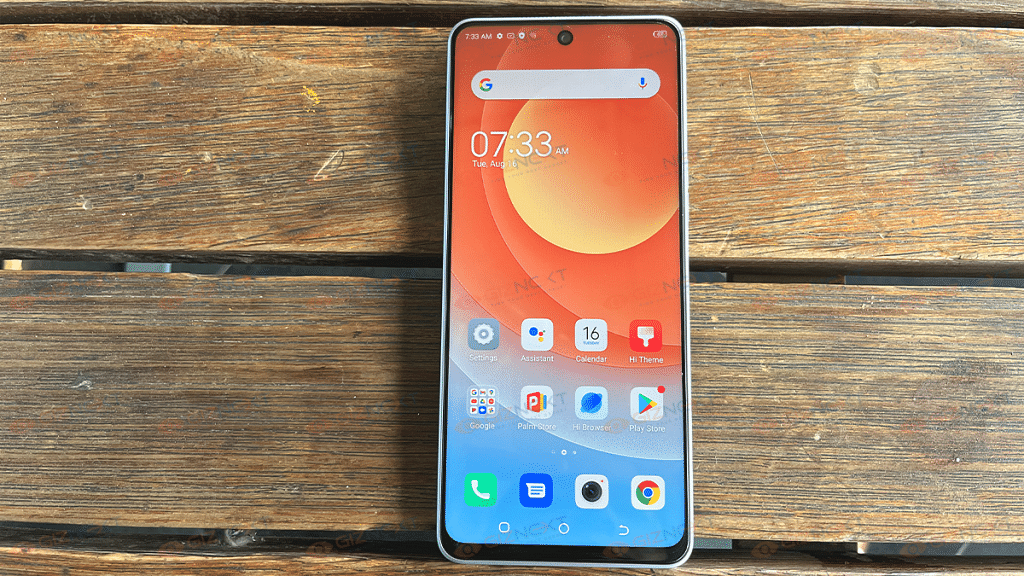
Features a 6.53-inch HD+ display with a dewdrop notch
It comes with a 3,750mAh battery with reverse charging
PROS
CONS
Good Camera
No AMOLED display
Good battery life
18W Power Adapter
Large storage capacity
60Hz low refresh rate
Lately, Tecno has been dominating the competition in the mid-range market. With an emphasis on selfie cameras and large screens, the Shenzhen-based phone maker established a recognizable brand over time by releasing affordable smartphones. The Camon 19, the latest smartphone by the brand, follows the same path. In India, the phone is available for Rs. 14,999. Also Read | Tecno Camon 19 Pro Mondrian Edition Full Review: Unique Color Changing Design, Powerful Cameras Steal The Show
Since we have been testing the product for the past week, it is difficult to find many faults at this pricing point. The Camon series places a lot of attention on the camera, but there has also been a definite advance in design, battery life, and display. Let’s get to know if the phone justifies its price tag or not:
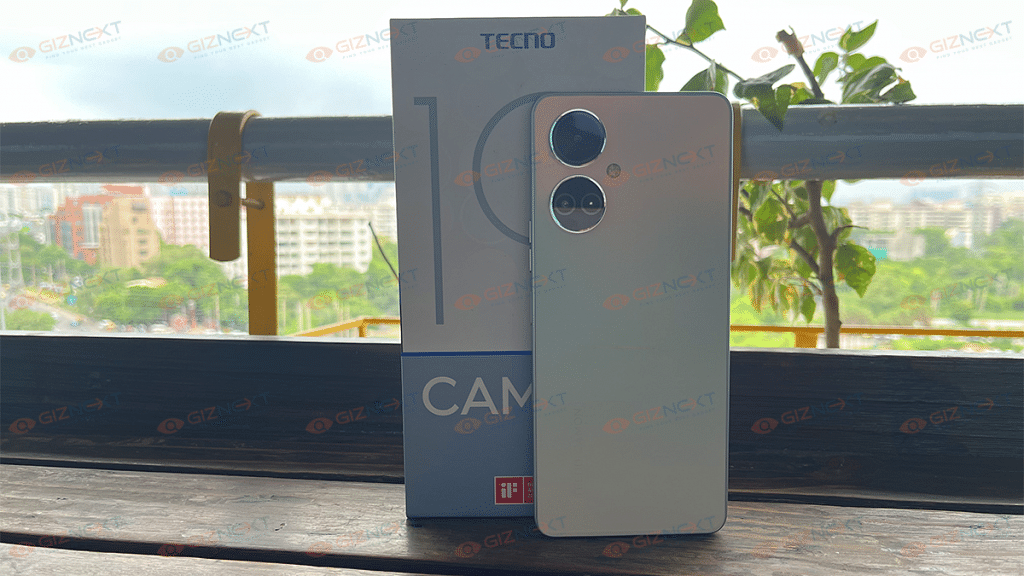
What’s Inside The Box?
Tecno Camon 19 handset (main unit)
18W Power adapter
USB Type-C cable
SIM ejection tool
Protective case
Warranty card
User guide
Design
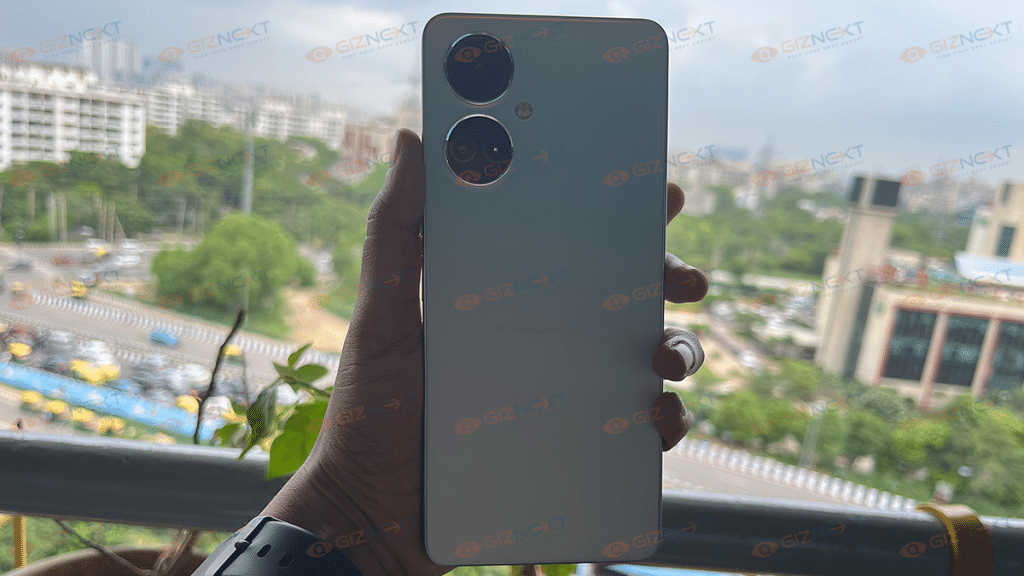
The Tecno Camon 19 has a beautiful design. It has a boxy shape with a matte-like finish with a twin camera setup at the back. The device has a solid body and is made of polycarbonate. The phone is comfortable to carry in the hand despite having a huge display. Most likely because it isn’t overly tall and wide – just the correct size for operating it single-handedly.
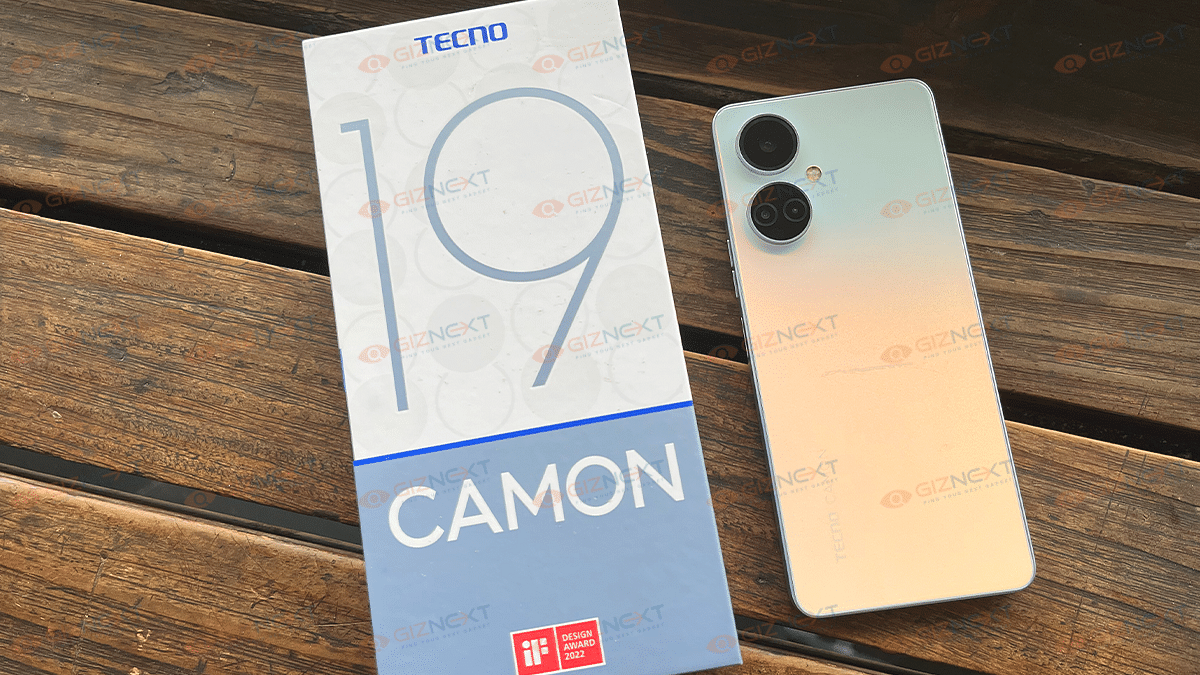
The Camon 19 is available in Eco Black, Sea Salt White, and Digital Green color options. The Sea Salt White variant is what we’re using. A combination of thin frames and a small camera cutout in the top center of the screen – is a classic design choice for the market.
On the right, there is the volume rocker and a side-mounted fingerprint scanner which also doubles as the power button. It seems like the new trend in rear-mounted is side mounting. It is there on every smartphone manufactured today. The fingerprint reader is significantly simpler to use and, during our time there, always worked quickly and accurately.
The dual nano-SIM card tray sits on the left while you have the USB C charging port, headphone jack, speaker grill, and dual microphones at the top and bottom. The stereo effect produced by the phones using the earpiece and a downward-firing speaker is suitable for casual listening.
Coming to the back, the circular holes with cameras are present in the upper left corner and the flash is situated between them, somewhat to the right of the center. It’s wonderful that they don’t detract from the aesthetic because you can only see the vertical glossy inscription TECNO CAMON in the lower left corner. Overall, we found the design of the Tecno Camon 19 quite impressive.
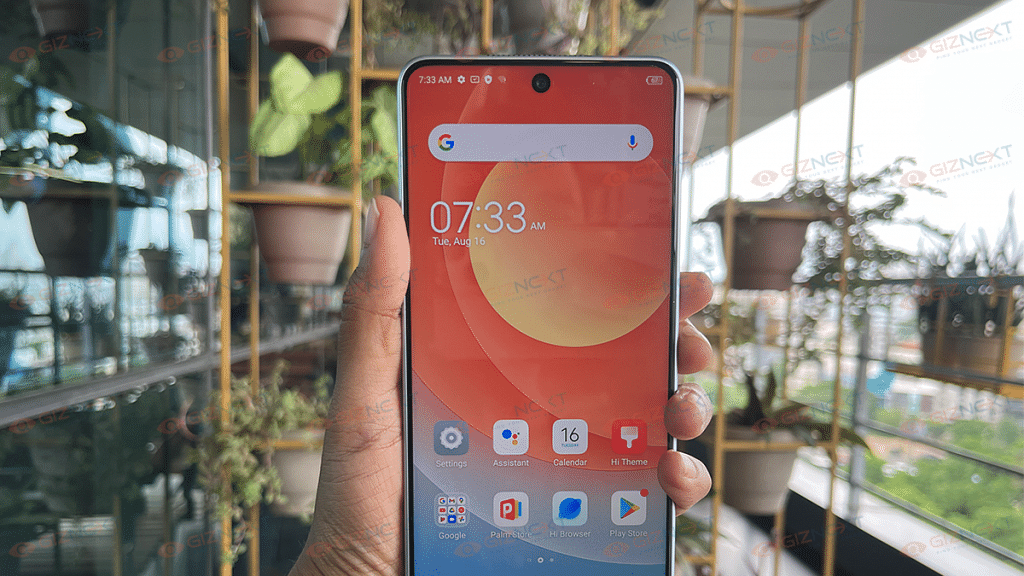
The Tecno Camon 19 sports a large 6.8-inch IPS LCD with Full HD+ resolution. The aspect ratio is 20.5:9, which is a little out of the ordinary, and the pixel density is roughly 395 PPI. At the same time, the refresh rate is typically 60Hz. The screen is also certified by TÜV Rheinland, which indicates that it emits less blue light, which is good for the user’s eyes.
Even while the smartphone’s display doesn’t have any distinct features, such as a fast refresh rate, it still has a decent display. The display has rich colors and adequate contrast, especially for an IPS panel. Those who appreciate vivid colors will be catered to by the screen.
Although the maximum brightness cannot be described as outstanding, it is sufficient to use the smartphone on a bright day outside. In most cases, it will be sufficient, however, it could be higher. Normal viewing angles result in slightly warmer colors with linear deviations and slightly less contrast for dark tones, which is typical for IPS, with diagonal deviations.
The screen provided a large canvas for multimedia content consumption, including playing games, browsing websites, and watching movies. The Tecno Camon 19 certainly looked the part of a high-end smartphone and was a pleasure to use.
Processor
The Tecno Camon 19 is a decent performer. Under the hood, the phone comes equipped with MediaTek’s Helio G85 processor and Mali-G52 GPU paired with 6GB of RAM and 128GB of storage. You also get up to 3GB of virtual RAM with MemFusion tech.
We achieve the usual average level of performance in tandem with the Mali-G52 MC2 video accelerator. The Tecno Camon 19 in 6GB / 128 GB configuration performs decently in everyday use. The smartphone responds to all user demands quickly and apps launch swiftly.
You get HiOS 8.6.0 and Android 12 on the phone. HiOS 8.6.0 carries on the Tecno brand’s ethereal, fluid, and smart brand aesthetics with new features and an improved user interface.
In everyday use, the device is smooth and runs decently. For common apps and games, the performance is more than adequate. It chugged along just fine without any hiccups; you just need to crank down the graphic settings while playing demanding games. Besides, the bloatware is pointless and you can easily disable or uninstall most of the apps.
Tecno always does its best to bring a phone with good cameras. The Camon 19 has three rear cameras: a wide-angle module, a bokeh depth sensor, and an AI module. The phone comes equipped with dual 64MP primary rear cameras.
Photos in standard resolution seem nicer on a clear, sunny day because of enhanced clarity and detail. The scenario will be different in a room with poor lighting, though. The images are crisp and have a nearly identical amount of digital noise at full resolution. Under any ambient conditions, there is essentially no difference in how the two modes depict colors.
With the right level of lighting, the phone is capable of taking good quality pictures with correct colors and a normal level of detail. In complex scenes, Auto HDR works and extracts more information from different areas, but it’s hit and miss. In some cases, this makes the image look unnatural.
If there is a need for shooting at night, then you can turn the night mode on. It will also cope better with light and add more details.
Coming to the selfie camera, the device has a 16MP sensor on the front. The color rendition is normal and natural. Besides, video is recorded at a maximum resolution of 2K at 30fps. On the other side, there is no jelly effect during swift movements.
Apart from the usual modes such as beauty, Portrait, and super night – you also get a new fun AR Shot that lets you create memoji and animoji characters and share them with friends.
Battery
The Tecno Camon 19 has a 5,000mAh battery which is quite normal by today’s standards. Considering the general specifications, you can have at least one day of active usage here. However, it can last a day and a half to two days on a single charge in gentler usage modes. As always, it all depends on the specific application scenario.
The smartphone comes with an 18W power adapter that supports fast charging. However, in practice, the loading speeds are unimpressive, to say the least. According to our measurements, charging from 20 percent to 100 percent took over two hours. Not so fast charging, we would even say slow, by modern standards.
The Tecno Camon 19 is a mid-range smartphone with a stylish and elegant design. In addition to its unique appearance, it has a good IPS display, decent performance for daily use, a lot of memory, a good camera, and huge battery life.
However, there are a few areas where the maker of this smartphone could make improvements. Like the charging can be done more quickly because many manufacturers are currently focusing on 25W and stronger chargers, although the 18W we have here is not that quick. Overall, you will be receiving a lot of value for your money.
Creators risk infringement when using copyrighted music
Copyright owners can restrict videos or claim revenue
Removing claimed content allows monetization without major impact
In this digital era, the aim of content creators is to reach as many people as possible with interesting, helpful content. However, when they include copyrighted music in their video, whether on purpose or accidentally, they frequently run into infringement issues.
Giving the copyright owner limited control since they can either decide to restrict your video globally or in select areas, or they can decide to keep all of the money that was made from the video. You wouldn’t want that to happen to your video, right?
In order to monetize the content posted, the most popular video sharing platform allows its users to delete the claimed portion of the content from their videos. This is beneficial because, in many cases, only a little amount of the video may be subject to a claim. Therefore, eliminating that tiny portion of content might not have a significant impact on the video’s overall message.
Here’s How To Remove Claimed Content From Videos
There can be limitations on the video’s availability or whether it can be made monetizable if a copyright claim has been made against it.
Step 2: Search for the video with the claimed copyrighted content by tapping the ‘Videos’ tab.
Step 3: Here, click on the ‘Copyright claim’ notice of the video and then tap on ‘See Details’.
Step 4: Now click on ‘Select action’.
Step 5: Decide whether to Mute the song, Replace the song, or Trim out the part.
Trim Out Segment
This section lets you edit out the piece of your video that got the copyright claim.
Step 1: Edit the start as well as end time of the section you are removing.
Step 2: Tap on ‘Continue’. Then ‘Trim’.
Step 3: Be patient and wait for the video to be processed. Depending on the video, this can take up to a few hours.
Replace Song:
You can replace any claimed music in your video with tracks from the YouTube Audio Library using this option.
Step 1: To find a new audio track, use the search filters. Tap on ‘Play’ to preview tracks.
Step 2: Click ‘Add’ when you find a song you like. It will appear in the editor in a blue box.
Step 3: To change when the song should start, click and drag the box.
Step 4: Then, to change the amount of the song that plays, drag the edges of the box.
Step 5: For more precise adjustments, use the zoom options.
Step 6: Click ‘Save’ and then ‘Replace’.
Step 7: Once the claimed audio is replaced, any restrictions on your video will be cleared.
Mute Song:
You can mute the claimed audio in your video with this option. You can decide whether to mute just the music or the entire video’s audio.
Step 1: Choose how you would like to mute: ‘Mute all sound when song plays’ or ‘Mute song only (beta)’.
Mute all sound when song plays: In the section of the video with the claimed audio, this option mutes all audio.
Mute song only (beta): This option mutes just the specified music. No other audio will be muted, such as dialogue or sound effects. If the song is challenging to delete, this edit will likely take longer and may not be successful.
Step 2: Edit the start and end time of the audio mute.
Step 3: If some of the claimed songs stay in your video, the claim won’t be released.
Step 4: In the video player, preview the edit.
Step 5: Tap on ‘Continue’ and then ‘Mute’. The edit will start processing.
Any limitations on your video will be lifted if it is possible to muffle the audio that is allegedly protected by copyright.
For the tech geeks, stay updated with the latest cutting-edge gadgets in the market, exclusive tech updates, gadget reviews, and more right on your phone’s screen. Join Giznext’s WhatsApp channel and receive the industry-first tech updates.
Trying to get off the Internet? Wondering how to completely remove all of your digital footprints from everywhere? Well, it’s not just you. In this day of massive data theft and privacy breaches, many have thought about doing the same.
However, it is not impossible to remember everything you have ever done online and delete it. Online reputation can be a burden for certain people, despite the fact that it can excite many people on the one hand.
Your whole online presence, including all of the data, posts, photos, and other items you upload, whether on purpose or not, is your digital footprint. The more information you post online, the more people can discover about you. This could be a problem. Fortunately, deleting your digital footprint just requires a few easy steps, so get started now.
Delete/Deactivate Your Shopping, Social Media, And Web Service Accounts
Deleting or deactivating your accounts is the first step you can take to completely remove your online identity. To get rid of them, go to these websites’ Account Settings, and look for options to deactivate, remove, or close an account. Oftentimes, you find these options under Privacy & Security or something similar.
Delete Yourself from Data Collection Sites
The majority of IT Services that secure their clients from data breaches agree that third-party data gathering sites are the largest source of privacy infringement issues. You should emphasize your online demolition mission at this point.
Data brokers like Spokeo, Whitepages.com, and PeopleFinder gather your personal data and sell it to other parties. So that they may saturate you with ads and sell stuff. You might now expressly visit these sites and request the removal of your name. But it can take forever to complete this process. You could also employ services to speed up this process.
Submit Google Listing Removal Requests
Simply go to the EU Privacy Removal page and fill in all the fields to have your personal information removed from these services. If you have discovered that your sensitive information, such as medical data or bank account information, is stored somewhere online, it may take some time, but it is definitely worthwhile.
Enable Do Not Track Apps & Programs
Numerous Anti-Virus Guards and Privacy Software are available that can stop web browsers and unaffiliated websites from tracking your internet behavior. By using these security technologies, you can prevent any online service or website from collecting or storing any of your personal information, hence eradicating Digital Footprints.
Unsubscribe Yourself From Mailing Lists
It goes without saying that you cannot recall every newsletter you have ever subscribed to. However, there is a more effective and simple approach to unsubscribing from all of them in one go. There are many tools available online that would help you to see the list of all your subscription emails. You can use them and then easily unsubscribe from each service without any hassles.
Although a gaming mouse is essential for players to perform at their peak, they frequently overlook the value of a good keyboard as well. The right gaming keyboard can make or break your gaming experience, as any gamer would know. This justifies spending money on a nice gaming keyboard to ensure you have the advantage when it comes to gaming, whether it is competitive or not.
There are countless options available in the market if you’re shopping for a new gaming keyboard. Here, we have compiled a list of some of the best ones to make things simpler for you. Check it out:
Redgear Shadow Blade
The Redgear Shadow Blade is one of the most economical mechanical gaming keyboards with Blue switches that provide tactile feedback. A braided cable, a detachable wrist rest, and a knob in the upper right corner of this full-size keyboard allow you to handle media functions like play/pause and volume. Furthermore, RGB backlighting with up to 22 modes is available. You can purchase the Redgear Shadow Blade at Rs. 2,349 in India.
Asus TUF K1
The Asus TUF K1 is a feature-packed keyboard. It has eight fully-programmable keys, a volume control, additional side lighting in addition to the key illumination, and a removable wrist rest. This gaming keyboard comes with support for the Aura Sync and Armoury Crate software. It is also spill-resistant and features 19-key rollover as well as on-the-go macros. The Asus TUF K1 is available for sale in India at Rs. 3,996 on Amazon.
SteelSeries Apex Pro TKL
The SteelSeries Apex Pro TKL comes with the best set of OmniPoint Adjustable Mechanical Switches. This ensures that during the game, over 100 million keys will be pressed. Additionally, this keyboard has an OLED Smart Display that displays game information, profile information, Discord messages, and other crucial gaming data. Additionally, it offers unparalleled flexibility with 16.8 million illumination colors per key and the ability to alter it based on gameplay. It will cost you Rs. 8,999.
Gamdias Hermes M5
The Gamdias Hermes M5 is a full-size gaming keyboard. It comes with white and blue keycaps with ice-blue lighting. The keyboard has a 32-bit ARM Cortex processor that provides minimal lag and can save up to five profiles, along with blue clicky key switches that provide anti-ghosting and N-Key rollover. Additionally, it has a stable front, an aluminum bezel, and a tough finish. You can buy the Gamdias Hermes M5 for Rs. 3,999.
Amazon is one of the major e-commerce platforms in the world. In addition to offering a large range of goods, Amazon India also offers incredible discounts and deals that are not typically found anywhere else. But sometimes customers don’t receive their invoice until after their order has been delivered.
An invoice is a bill for the products you have purchased. Therefore, this article will assist you if you haven’t received your invoice after purchasing an item from Amazon. We’ll help you know how you can download the invoices for the product you ordered on Amazon.
How To Download Invoice From Amazon App?
Users can easily download the product invoice from the Amazon India app. You can use the app to get the invoice for any order you’ve ever made on the online store. You must perform the following actions in order to do that:
Step 1: Launch the Amazon app on your iOS or Android device.
Step 2: Go to the Orders section by clicking the Hamburger menu.
Step 3: Now, search for the order that you wish to get the invoice for right now.
Step 4: Once done, tap on the ordered item and you will land on a different page.
Step 5: Under the Order Info tab, you will find the option to Download Invoice.
Step 6: Simply tap on it to obtain your order’s duplicate or new invoice.
How To Download Invoice Via Amazon website?
Step 1: Log in to the Amazon website using your email address and password on your PC/laptop.
Step 2: On the homepage, in the top right corner, select the return and order option.
Step 3: Find the order for which you wish to download the invoice at this point.
Step 4: You will see an option to view the invoice next to your view order information option, besides your order. Just click it.
Step 5: Amazon will provide you with a number of choices here, like invoice one, requesting an invoice, printed purchase summary, and more.
Step 6: Your new invoice will now be downloaded when you choose the invoice one option from the list provided. And you are all done!
WhatsApp enabling screenshot blocking for View Once messages
The platform lets you leave the group silently
It will let you choose who can see that you’re active
WhatsApp never fails to impress its users, particularly with its privacy features. This time, the social media site owned by Meta has added a few more privacy measures.
A new feature that prevents users from taking screenshots of ‘View Once Messages’ is being rolled out by the platform. The fundamental goal of this is to provide more privacy and security while also retaining users on the site.
‘View once messages,’ which self-destruct once the recipient views them, have been introduced by WhatsApp. Users are able to send photographs, videos, and other messages, simply once. The message automatically vanishes after the recipient has read it. Because they could still capture screenshots of messages that were disappearing, some users nevertheless believe the feature to be useless.
In addition to blocking screenshots, WhatsApp is now testing the option to control who can see your online status. You can now select who can see your activity, enabling you to log into the app anonymously without anyone else knowing. Users can pick between contacts, everyone, or nobody using this recently discovered feature. Additionally, you have the option of selecting a blacklist of contacts from which to hide your status.
To add to that, Meta founder and CEO Mark Zuckerberg announced new privacy features that allow users to exit a group conversation secretly and choose who can see their online presence.
Users will be able to leave a group in private without having to inform everyone thanks to the silent leaving of group function. This feature has begun to roll out to all users and will progressively become available to all users this month. Only the admins will be notified when a member leaves the group. This will make it much simpler to end conversations without running the risk of receiving too many inquiries from other people.
With the release of iOS 14, Apple added the feature to set up sleep routines in the Health app. You can use the feature to determine how many hours of sleep you should get each night and then plan your wake-up time accordingly. Although this feature is widely accessible, few people are aware of it. Nonetheless, once you start using it, there is no turning back.
Through the Clock app, you can set up a one-time alarm that wakes you up every day. The main benefit of choosing a sleep schedule feature is that it enables users to set clear objectives and monitor their sleeping patterns.
In this post, we will take a look at how we can turn on and use the Sleep Schedule feature on iOS. But before we start, note that the feature will only work on iOS 14 and above.
How To Turn On Sleep Schedule On Your iPhone?
Step 1: On your iPhone, navigate to the ‘Health’ app.
Step 2: Click on the ‘Browse’ tab at the bottom right of the screen.
Step 3: Now, scroll down till you see the ‘Sleep’ option and click on it.
Step 4: Then, you will see the option ‘Set Up Sleep’, below that tap the blue ‘Get Started’ button. Hit Next on the following information screen.
Step 5: To set your desired sleep time in hours and minutes, use the ‘+’ and ‘–‘ buttons. Then tap Next.
Step 6: Now, set up your first sleep schedule. You can also set multiple schedules according to your sleep patterns. Click on the day symbols to add or subtract them from your initial schedule.
Step 7: Here, you can easily schedule your bedtime and wake-up time. You can press and hold the scroll wheel to set the desired time. The number of sleep hours is displayed according to the set timing. If your times don’t match up with the Sleep Goal you set at Step 5, the dial will turn yellow.
Step 8: After setting the time, scroll down to find the ‘Alarm’ option. Under that, you can set a wake-up alarm if you want. You can also set the alarm sound and vibration pattern and enable or disable the snooze option.
Step 9: Tap ‘Done’ once you are finished with the process. That’s all.
By following these simple steps, you can easily plan your sleep cycle on your Apple iPhone. This feature helps you stay disciplined by notifying you 30 minutes before bedtime. This allows you to interrupt whatever you’re doing and prioritize sleep.