Categories
Apps Featured Info

Learning On Spotify? This Music Streaming App Testing Video-based Courses

Key Highlights

  • Spotify to add video courses beyond music
  • Partnerships with BBC Maestro, Skillshare, etc.
  • Testing starts in the UK, merging with music/podcasts

Spotify, known for its music and podcasts, is now venturing into education. This move aims to transform Spotify from solely a music platform to a destination for learning as well. Let’s explore how this transformation is taking shape. Also Read | Want To Download Songs On Spotify For Offline Playback? Here’s How

Partnerships For Educational Content

To kickstart this educational journey, Spotify has teamed up with educational technology companies like BBC Maestro, PLAYvirtuoso, Skillshare, and Thinkific. Together, they aim to deliver video-based courses directly to Spotify users.

Initial Testing In The UK

Initially, Spotify is testing these video-based courses in the UK. This means users in the UK will be among the first to access and experience this new educational content.

Also Read | Are You A Music Lover? Here’s The Best Music Apps In India

Integration With Music And Podcasts

Users will discover these video courses alongside their favorite music, podcasts, and audiobooks, seamlessly integrating learning into their Spotify experience.

Diverse Content Themes

Spotify’s educational content will cover a wide array of topics, grouped into four main themes: making music, fostering creativity, business skills, and promoting healthy living.

Spotify’s Vision

Babar Zafar, Spotify’s VP of Product Development, expressed the company’s commitment to exploring new offerings for both creators and users. They aim to leverage their expertise in personalizing music and podcasts to enhance the potential of video-based learning.

Expanding Creator Opportunities

Spotify sees video-based courses as an opportunity to introduce educational creators to a new audience while enriching its own content library.

User Engagement, Premium Benefits

About half of Spotify Premium subscribers have already shown interest in education or self-help-themed podcasts. To encourage engagement, both Free users and Premium subscribers in the UK can access at least two lessons per course for free before deciding to purchase additional content.

Conclusion

Spotify’s foray into education marks an exciting evolution for the platform. By offering diverse educational content alongside its music and podcasts, Spotify aims to become a comprehensive destination for both entertainment and learning.

Also Read | Spotify Tips & Tricks: How To Tune Into Podcasts In Your Native Language

Categories
Apps Featured Info

Centre Shuts Down 18 OTT Platforms Over Vulgar Content: All Details

Key Highlights

  • Indian government blocks 18 OTT platforms for obscene content
  • Decision made under Information Technology Act, 2000
  • Ban follows consultation with various ministries and domain experts

The Indian government has taken a strong stance against the proliferation of obscene, vulgar, and even pornographic content on various digital platforms. In a move coordinated by the Ministry of Information & Broadcasting (I&B) with the help of intermediaries, a total of 18 OTT platforms, 19 websites, 10 apps, and 57 social media handles have been blocked. Also Read | Gone But Not Forgotten: Five Defunct Social Media Platforms In India

Legal Basis

This action is in accordance with the provisions of the Information Technology Act, 2000. The decision came after thorough consultation with other ministries and domain experts specializing in media and entertainment, women’s rights, and child rights.

Platforms Under Ban

Among the banned OTT platforms are:

  • Dreams Films
  • Voovi
  • Yessma
  • Uncut Adda
  • Tri Flicks
  • X Prime
  • Neon X VIP
  • Besharams
  • Hunters
  • Rabbit
  • Xtramood
  • Nuefliks
  • MoodX
  • Mojflix
  • Hot Shots VIP
  • Fugi
  • Chikooflix
  • Prime Play

Also Read | Netflix For Fitness Enthusiast: Collaborates With Nike To Stream Workout Videos On Its OTT App

Content Critique

The government has expressed concern over the nature of content hosted on these platforms. A significant portion was found to be demeaning towards women, with depictions of nudity, sexual acts, and inappropriate relationships such as those between teachers and students or within families.

Popular yet Problematic

Despite the ban, some of these platforms had gained significant popularity. One app alone had over 1 crore downloads, while two others surpassed 50 lakh downloads on the Google Play Store. These platforms often used social media to attract audiences by sharing trailers, scenes, and external links. Collectively, their social media accounts had over 32 lakh followers.

Conclusion

The government’s decisive action reflects its commitment to combatting the spread of objectionable content online. By targeting both the platforms and their associated social media channels, authorities aim to create a safer digital environment for all users, particularly vulnerable groups like women and children.

Also Read | Hotstar vs Netflix vs Amazon Prime Video: The Best OTT Platform?

Categories
Apps Featured Info

Elon Musk’s X Introduces Long-Form Writing Feature, But With A Catch

Key Highlights

  • Elon Musk’s X enables long-form articles
  • New formatting tools and media embedding enhance article creation
  • Feature exclusive to Premium+ subscribers and Verified Organizations

Elon Musk’s platform, X (formerly Twitter), has introduced a new feature allowing users to create and share long-form articles with their followers. This significant addition brings a basic interface to X, enabling users to compose articles through the ‘Article Composer’ functionality, conveniently located in the sidebar on the left side of the interface. Also Read | Twitter Direct Message Feature Removed For Android, iOS Users: What Will Be The Impact?

Enhanced Formatting Options And Media Embedding

In addition to the ability to write and publish long-form articles, X now offers basic formatting options, including Bold, Italic, Strikethrough, Bullet Points, and Numbered Lists. Users can also enhance their articles by embedding images and videos, enriching the content experience.

Article Publication And Visibility

Once an article is published, it will be showcased on the user’s profile under a new ‘Articles’ tab and will appear in their followers’ timelines, similar to regular X posts. To ensure long-form content stands out, articles will be distinguished by a unique icon and layout.

Also Read | Planning To Leave Twitter? Here Are The Best Twitter Alternatives To Download

Eligibility For Publishing Long-Form Articles

Notably, not all users can publish long-form articles on X. This feature is exclusively available to Premium+ subscribers and Verified Organizations, as confirmed by X.

Subscription Details

Previously, X offered Basic and Premium tiers to subscribers. However, a new Premium Plus tier was introduced last year, offering additional features at a higher price. The monthly subscription for Premium Plus costs Rs. 1,300 for the web, while the yearly plan is priced at Rs. 13,600. In comparison, the monthly Premium tier for the web is priced at Rs. 650, with the yearly plan costing Rs. 6,800.

Conclusion

After Elon Musk’s initial announcement in July 2023, X has finally rolled out the long-awaited feature, allowing users to create comprehensive articles with mixed media content. This development marks a significant step forward in X’s evolution, catering to diverse content creation needs while introducing new subscription tiers for enhanced user experiences.

Also Read | Elon Musk’s Twitter: Genuine Followers Or Fakes Dominating the 153 Million?

Categories
Apps Featured

Facebook, Instagram Massive Outage Logging Users Out Of Account : Servers Hacked Or Service Outage?

Key Highlights

  • Facebook, Instagram massive outage
  • Users logged out of accounts abruptly
  • Issue reported globally

Social media giant Meta reportedly has witnessed the biggest outage this year. Thousands of users globally including India are facing issues with Facebook mobile app. Instagram users are also citing similar outage from different parts of the globe. Here’s what’s happening:

Also Read: The Insta-Famous Five: Check Top Five Most-Followed Instagram Accounts

Facebook, Instagram Outage: What Just Happened?

Meta-owned social media platforms Facebook and Instagram are down for users across the globe. Concerned users have flooded the microblogging platform X reporting the outage they have been experiencing on both these apps.

Downdetector, the platform to track all the outages with several service providers have also confirmed the ongoing Facebook and Instagram issue which has affected numerous users in India and the remaining globe. As per the platform. over 3 lakh users on both Facebook and Instagram have been affected with the outage. The outage seems to have started around 7 PM IST and is still ongoing.

Also Read: Facebook Multiple User Account: How To Create Multiple Facebook Profile For Single User

How Is The Outage Affecting Facebook, Instagram Services?

The common issue which the Facebook and Instagram users are reporting with the ongoing outage is the abrupt “Session time out” error. Most of the users accessing the Facebook app have been logged out of their accounts.

On the other hand, Instagram users are reportedly unable to refresh their home feed. That’s not it, post the Session time out or log out on Facebook, users are being asked to log in again. Changing the password with an OTA being sent on WhatsApp is also being asked.

Also Read: How To Create Stickers On Instagram With Cutouts

What Does Meta Say Regarding The Outage?

Meta has been silent till now. No official comment is released by the social media giant on any of its handles. We are also not sure how soon the company will make give clarifications as to what caused such a massive outage on affecting its user base globally.

Also Read: Want To Hide Your Online Status From Friends On Facebook? Here’s How

Should You Change Your Passwords?

Since the majority of users are getting logged out of their accounts, the first instinct one gets is to log in. But that’s what you should refrain from. Waiting for an official statement from Meta would be a wise move rather than attempting to log-in again. That’s will make sure our accounts remains safe if in case there is any breach on the company’s servers.

Categories
Apps Featured Info

Flipkart Rolls Out Its Own UPI Service: Details Inside

Key Highlights

  • Flipkart launches UPI for its 500M+ users, offering seamless transactions
  • Flipkart UPI provides convenience, security, and rewards like Supercoins
  • Initial setup via Axis Bank, more partnerships expected for wider access

Flipkart has introduced its Unified Payments Interface (UPI) service, aiming to uplift the digital payment experience for its vast customer base. This initiative, launched on Sunday, is set to benefit all Flipkart users, exceeding a staggering 500 million individuals. With Flipkart UPI, customers gain access to a personalized UPI handle, simplifying seamless transactions both within and beyond the Flipkart ecosystem. Here are all the details you need to know. Also Read | Flipkart SuperCoins: How To Earn And Use

What Is Flipkart UPI?

Flipkart UPI serves as your personal identifier for various transactions, offering versatility across the Flipkart platform and external merchants. Key functionalities include payment for Flipkart purchases, merchant transactions via Scan and Pay, phone recharges, and bill payments.

Flipkart UPI Benefits

Flipkart UPI offers a streamlined transaction experience, removing the hassle of switching between multiple apps. By using Flipkart UPI, users can simplify their payment processes, enhancing convenience. Moreover, accessing Flipkart’s loyalty benefits, such as Supercoins and Cashback, enriches the shopping experience, providing additional rewards. The platform prioritizes customer safety, ensuring a secure payment environment, thus nurturing trust and confidence among users. Additionally, Flipkart UPI facilitates efficient financial management with its one-click payment feature, enabling instant recharges and bill settlements, ultimately streamlining users’ tasks.

Also Read | Streamlining Transactions: How To Generate And Share UPI QR Codes For Payments

How To Get Started With Flipkart UPI

  • Initial Setup: Currently facilitated through Axis Bank, users can register for a UPI handle using the “@fkaxis” address.
  • Future Prospects: Expect more partnerships in the pipeline, promising expanded options for users.
  • Accessibility: Access Flipkart UPI seamlessly within the Flipkart app, while PhonePe remains operational as an independent entity.

Dheeraj Aneja, Senior Vice President – Fintech and Payments Group at Flipkart, emphasized the significance of Flipkart UPI in adapting to the evolving digital landscape. He stated, “Recognising the dynamic digital landscape, the launch of Flipkart UPI seamlessly merges the convenience and cost-effectiveness of UPI with the trusted efficiency customers expect from us. At Flipkart, we are committed to delivering the best-in-class commerce experience to customers by offering safe and convenient payment options along with a wide array of rewards and benefits such as Supercoins, Brand Vouchers, and others.”

Also Read | Flipkart SuperCoins (2023): Learn How To Earn, Use And Enjoy Exciting Rewards

Categories
Apps Featured Info

WhatsApp Plans To Allow Cross-Messaging On Telegram And Other Apps

Key Highlights

  • WhatsApp integrates third-party apps to comply with EU law
  • Beta versions reveal how Telegram and Signal will be integrated
  • Initial options include managing third-party chats within WhatsApp

Meta owned platform WhatsApp is reportedly in the process of mixing third-party messaging apps into its service. This move aims to ease seamless communication between different messaging platforms. However, the initiative is not solely driven by the company’s preference but rather a requirement imposed by the European Commission’s Digital Markets Act (DMA). The DMA, slated to be enforced by March 6, 2024, mandates WhatsApp, recognized as a gatekeeper, to enable interoperability through the development of designated tools. Here are all the details. Also Read | WhatsApp Tips And Tricks: How To View Someone’s Status Secretly

Beta Versions Preview Integration

According to reports from WABetaInfo, the latest beta releases of WhatsApp (versions 2.24.5.20 and 2.24.6.2) offer insights into the integration process with third-party services like Telegram and Signal. WhatsApp appears to be taking a strategic approach to ensure compliance with the European Commission’s regulations. Screenshots from the report reveal a new section within WhatsApp dedicated to managing third-party chats.

Also Read | WhatsApp Tips And Tricks: Easy Ways To Record WhatsApp Video Calls

Features Overview

Initial observations suggest two primary options for users: ‘Turn off’ and ‘Selected apps.’ This feature grants users the autonomy to decide which third-party apps they wish to engage with within the WhatsApp platform. Additionally, users have the option to completely disable third-party chats. Notably, a screenshot depicts a third-party chat interface, with Instagram mentioned as an example. However, it’s clarified that this is merely illustrative.

Rollout And Regional Limitations

WhatsApp has not provided a specific timeline for the availability of interoperability to users. Nevertheless, with the awaiting enforcement of the EU’s landmark legislation, the wait shouldn’t be prolonged. Notably, in addition to Android, WhatsApp is actively working on incorporating third-party chats into its iPhone application. However, it’s crucial to note that WhatsApp has stated in a recent notice that third-party chats will initially be accessible within the “European Region” only. This implies that unless other jurisdictions enforce similar regulations, third-party chat support will not extend to markets outside the EU.

Also Read | WhatsApp Tips & Tricks: How To Unblock Yourself And Regain Access

Categories
Apps Featured Info Tech Gadgets

Google Chrome Unveils Three New Features: What’s In Store?

Key Highlights

  • Google Chrome introduces enhanced search suggestions for mobile and desktop
  • Users get better search capabilities, personalized suggestions, and more image options
  • Updates aim to enrich the browsing experience with relevant results on all platforms

Google Chrome is introducing three new features aimed at enhancing user experience and providing more relevant search suggestions. These features cater to both mobile and desktop users, offering improved functionality and accessibility. Also Read | Gmail Tips And Tricks: How To Secure Your Google Account With Two-Factor Authentication

Enhanced Search Capability On Mobile

Chrome on mobile devices, including Android and iOS, now allows users to receive search suggestions even in areas with poor internet connectivity. Leveraging enhanced on-device capabilities, Chrome ensures users can access helpful suggestions regardless of network reliability. This update extends to Incognito mode, ensuring privacy while still providing valuable search assistance.

Tailored Suggestions Based On User Behavior

On desktops, Chrome will now display search suggestions based on what others are looking for. When signed into Chrome and opening a new tab, users will receive suggestions related to their search queries. For example, searching for a specific Korean dish may prompt suggestions for similar Korean dishes others have recently searched for.

Also Read | Google Sheets Tips And Tricks: How To Add ChatGPT Extension To Google Sheets

Expanded Image Suggestions For Shopping

Chrome’s image search suggestions in the address bar have been enhanced to be more comprehensive. They now offer images of related products beyond specific items. For example, searching for a particular Bohemian table may also display images of other Bohemian-inspired products such as tablecloths and runners. This feature enriches the browsing experience by providing broader shopping categories based on simpler search terms.

Conclusion

Google Chrome has introduced new features to enhance user experience. These enhancements aim to deliver more relevant and useful search suggestions across mobile and desktop platforms. They include improved search capabilities, personalized suggestions, and expanded image options. These updates are designed to enrich users’ browsing experience with Chrome.

Also Read | Google Maps Tips & Tricks: How To Use Fuel-Efficient Routing In India

Categories
Apps Info

Discover Nearby Connections: Instagram’s ‘Friend Map’ Feature In The Works

Key Highlights

  • Instagram’s Friend Map: Shows friends’ locations on a map
  • Privacy and Security: Encrypted location data, Ghost mode available
  • Like Snapchat’s Snap Map: Track friends’ locations

Instagram has gained a reputation for taking inspiration from Snapchat, and its latest endeavor, the ‘Friend Map’ feature, suggests that the company is continuing in this vein. This feature promises to allow users to track the locations of their friends directly on a map interface, suggestive of Snapchat’s Snap Map functionality. Also Read | Instagram Tips And Tricks: How To Reply To Any Reel Comment With Another Reel Video On Android, iOS

Friend Map Feature

  • Instagram is currently in the testing phase for its ‘Friend Map’ feature, which offers users a comprehensive world map displaying the locations of all their friends
  • This upcoming addition to the platform was first uncovered by Alessandro Paluzzi, a well-known leaker who frequently reveals upcoming Instagram features
  • The core concept of the Friend Map is simple: users will have the option to view the whereabouts of their Instagram friends. Importantly, this feature is opt-in, affording users control over which friends can view their location on the Friend Map

Also Read | Instagram Tips And Tricks: How To Remix Instagram Reels With Videos And Photos

Privacy and Security Measures

  • Instagram assures users that their location data is fully encrypted end-to-end, with updates occurring only when the app is accessed. Additionally, a ‘Ghost mode’ will enable users to conceal their last active location
  • Users will also have the ability to append notes to their location markers on the map, and any content shared with location tags will be visible on the map interface

Comparison With Snap Map

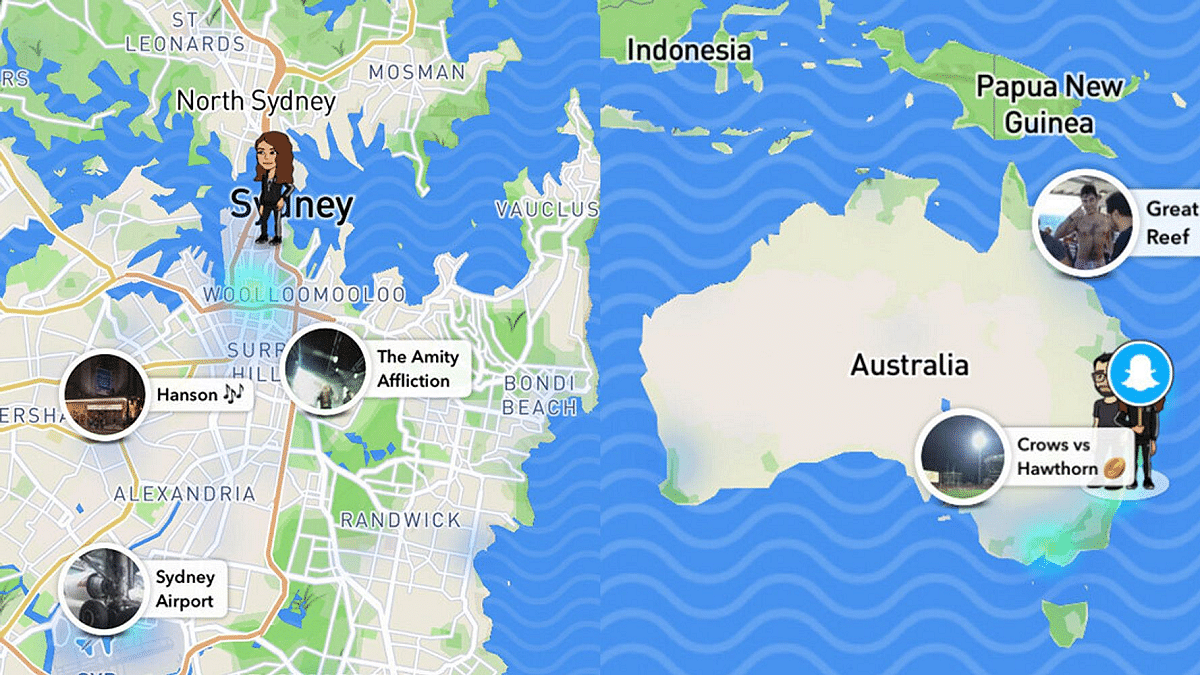
Instagram’s upcoming Friend Map feature bears a notable resemblance to Snapchat’s Snap Map functionality, which similarly allows users to track the locations of their friends on a map interface.

On Snapchat, friends’ locations are displayed alongside their Bitmoji avatars, offering users a visual representation of their friends’ whereabouts.

Future Prospects

As of now, Instagram has not provided any concrete details regarding the release date or official status of the Friend Map feature. However, given the platform’s propensity for experimentation with new features, it’s conceivable that the Friend Map could make its debut on Instagram soon.

Also Read | Instagram Tips To Create The Best Bio For Boys

Categories
Apps Featured How To

X Introduces Audio And Video Calling To Non-Paying Users: Check How To Use

Key Highlights

  • X rolls out free voice and video calling for all users
  • Users gain the ability to call anyone on the platform
  • A concise guide explains how to make and manage calls in the X app

After much anticipation, X, formerly known as Twitter, has announced a significant update to its platform, enabling all users to make voice and video calls directly from the app. This long-awaited feature was initially introduced last October but was limited to premium subscribers. Now, in a move to democratize communication, the Elon Musk-owned company is extending this feature to non-paying subscribers as well. Also Read | Twitter Direct Message Feature Removed For Android, iOS Users: What Will Be The Impact?

Breaking Down The Announcement

Enrique Barragan, an engineer at X, shared the news via a post on the platform, revealing that the rollout of voice and video calling to non-premium users has started. While not everyone may have immediate access, Barragan assured users that the feature will be available to all within the coming days.

Expanded Calling Options

In addition to making calls available to all users, X has expanded the reach of its calling feature. Previously restricted to premium users, everyone on the platform can now start calls with any other user. This update underscores X’s commitment to inclusivity and enhancing user experience.

Also Read | Planning To Leave Twitter? Here Are The Best Twitter Alternatives To Download

How To Use Voice And Video Calling On X

For those unfamiliar with the process, here’s a step-by-step guide to making audio and video calls on X:

Making Calls On X: A Step-by-Step Guide

Step 1: Open the X app on your smartphone.

Step 2: Tap the envelope icon to access the Messages section.

Step 3: Select an existing DM conversation or start a new one.

Step 4: Tap the phone icon and choose between audio or video call options.

Manage Your Calls

Once you’re on a call, here’s how to manage your audio and video settings:

Audio Call Management

Step 1: Tap the speaker icon to switch to speaker mode.

Step 2: Toggle the microphone icon to mute or unmute your microphone.

Video Call Management

Step 1: Switch between front and back-facing cameras using the flip camera icon.

Step 2: Adjust audio settings by tapping the audio icon.

Step 3: Turn off your camera with the camera icon.

Step 4: Mute or unmute your microphone using the microphone icon.

Conclusion

With the rollout of voice and video calling to all users, X is ushering in a new era of communication on its platform. Whether it’s connecting with friends, family, or colleagues, users can now enjoy enhanced accessibility and convenience in their conversations.

Also Read | Instagram Threads: What Is It And How To Use Meta’s Twitter Alternative

Categories
Apps Auto Tech Featured How To

Android Auto Quick Tips And Tricks: Steps For Hassle Free Calling Experience

Key Highlights

  • Android Auto’s host of features include calling support too
  • Making or answering calls on-the-go is made hassle free
  • One can give voice commands for calling a contact

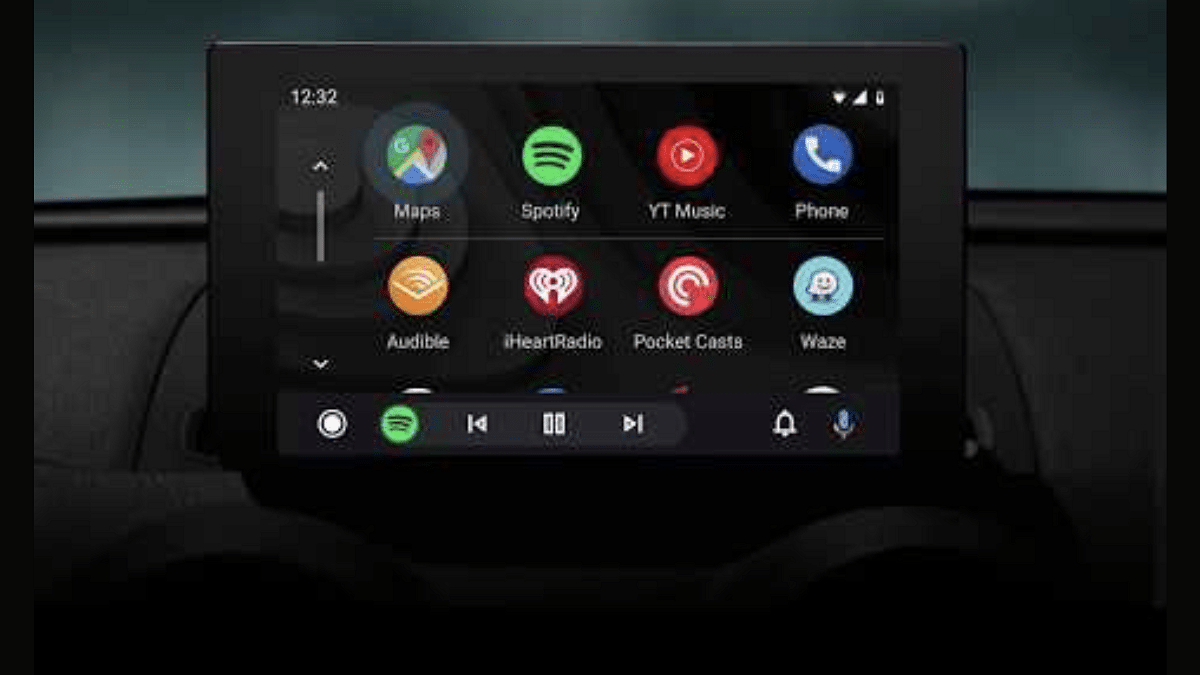
Android Auto and Apple Car Play are amongst those modern tech that are shaping up the future for smart connected car ecosystem. You can access a whole range of advanced mobile features and apps directly on the car’s digital infotainment screen using these services. Navigational and calling support are amongst the most common and essential features one can use with Android Auto. For hassle free calling experience during commutes, you can use Android Auto services inside the cabin while keeping your hands-free. Here’s How:

Also Read: Android For Cars: New AutoTech Announcements From CES 2024

Steps To Make A Call Using Android Auto By Giving Voice Commands

Step 1: Before you proceed, make sure your Android device is connected to the Android Auto in your car

Step 2: Summon the Google Assistant by giving “Hey Google” voice command

Step 3: You can also tap on the microphone icon to initiate the digital assistant

Step 4: Now, give the voice command for making any call. You can use phrases like “call ‘X’ contact” or “Call home”.

Step 5: You can also give a command to call a number which is not saved in your contacts list. You’ll have to speak out the numbers in this case to make the call.

Also Read: Volkswagen Confirms ID.4 Electric SUV India Launch In 2024

How To Make Calls In Android Auto Using Car’s Dashboard Display

Notably, you can also make a call manually using the car’s digital display which is compatible with Android Auto. Look for the steps listed below:

Step 1: Launch the dialer app by tapping on the “phone” icon

Step 2: You need to select from the list of options on screen including ‘Favorites’, ‘Recents’, and ‘Contacts’

Step 3: Now, select the contact whom you wish to call

Step 4: For unsaved contacts, you also have the option to dial a number. Simply tap on the keypad icon and enter the number whom you wish to call.