Categories
Apps Featured Info

Hacked Instagram Account? Don’t Worry! Instagram To Help Regain Hacked Account Access Easily

Key Highlights

  • Instagram adds new ways for users to recover hacked accounts
  • Regaining access to hacked accounts has long been a problem
  • Users can report and resolve account access issues at Instagram.com/hacked

Instagram users who have had their accounts hacked now have a new method to attempt to recover them. Today, the company unveiled Instagram.com/hacked, a new tool for reporting and attempting to fix account access issues.

The new platform provides a one-stop solution for account assistance. Users can report impersonator accounts, seek assistance in restoring compromised accounts or receive assistance if they’ve forgotten their passwords. The most urgent problem for many people is probably finding help after an account has been hacked. In the past, users have had difficulty doing so. Also Read | Instagram Stylish Name And Bio: How To Write Instagram Profile Name And Bio With Stylish And Cool Fonts


Instagram revealed earlier this year that it was testing account recovery tools, such as the ability to request a user’s friends’ endorsements in order to reclaim control of their account. The company announced today that the feature is now available to everyone. Users locked out of their accounts can choose two friends who can help verify their identity.

The company also says it’s working on ways to stop account hacks before they happen including sending alerts about suspicious accounts impersonating others.

Also Read | No More Threads: Here’s How To Delete Your Instagram Threads Account

How Instagram Will Help Regain Account Access?

If users are unable to log into their accounts, they need to go to Instagram.com/hacked on a desktop browser or mobile phone. If they believe they have been hacked, have forgotten their password, are unable to use two-factor authentication, or have had their account disabled, they will be able to choose one of these options.

In order to help users restore access to their accounts, the platform will next lead them through a number of steps. If a person has more than one account linked to their data, they can select which one needs support.

Also Read | Instagram Tricks: Here’s How You Can Change Instagram Language Settings On Android, iPhones

Categories
Apps Featured How To

WhatsApp Video Calls PiP Mode For iPhones: What Is It? Steps To Use

Key Highlights

  • WhatsApp said that PiP for iOS is currently in beta testing
  • It shrinks the video into a small player, allowing users to continue watching while using other apps
  • This feature will be available to the users in 2023

Meta-owned instant messaging platform WhatsApp has acknowledged developing a picture-in-picture capability for iPhone video calls. While on a video call, users can use other apps thanks to this mode. In a blog post, the company detailed this year’s upgrades to WhatsApp. In a blog post, WhatsApp announced that picture-in-picture for iOS is currently in beta testing. This feature will be available to users in 2023. Also Read | WhatsApp Security Code: What Is It? How To Get WhatsApp Security Code Notification On Android, iPhones, And Laptop/ PC?

What Is Picture-In-Picture Mode?

Picture-in-picture (PiP) mode condenses a video into a tiny player, enabling users to continue watching it on their smartphone while using other apps. Because it is a floating window, you can move it across your device’s screen and place it however you like.

How To Enable Picture-In-Picture Mode On iPhone?

The mode is automatically activated once iOS 14 or 15 has been installed on your device.

Step 1: Play a Video on any supported app.

Step 2: Tapping the PiP mode icon or navigating to the home screen will immediately minimize the video.

Step 3: Hold the minimized screen and drag it where you want it.

In order to resize the Pip mode, you can pinch the frame to make it bigger or smaller depending on how much focus you want to put on both windows.

Also Read | WhatsApp Silence Unknown Caller, Privacy Checkup Security Features Released: How To Use?

Hide PiP Mode And Play Video In The Background

Swipe the thumbnail view to the side if it is blocking your view. Swipe the video screen slightly to the right or left depending on whether the PiP screen is positioned on the right or left of the screen.

The video will disappear but a tab will remain so you can access it later. You can continue to hear the audio from the video or FaceTime call.

Disable And Close PiP Mode

To return to fullscreen, click the PiP Mode symbol in the top-right corner of the minimized screen. Additionally, tap the cross on the minimized screen’s top-left corner.

Also Read | WhatsApp Polls: What Is It And How Can You Create WhatsApp Polls For Individual User Or Groups?

Categories
Apps Featured How To

Paytm Bijlee Day Discounts: How To Get 100 Cashback By Paying Electricity Bills On Paytm

Paytm is the one-stop platform for digital money transactions and online bill payments. Paytm can be downloaded on both Android and iOS smartphones and offers digital wallet services on the go. Paytm is well known for offering cashbacks when payments are made using Paytm wallet and UPI. A new offer has been announced by the brand which will get you some extra discounts on the electricity bills. Called Paytm Bijlee Days, the limited period offer brings along Rs. 2,000 cashback and other deals. Check out the details below:

Paytm Bijlee Days Sale: What Are The Offers?

The Paytm Bijlee Days sale has been announced for the Indian audience which will get extra discounts and cashbacks on electricity bills. However, there’s a catch. The Paytm Days offer will be valid each month between 10th and 15th. A cashback of up to Rs. 200 will be given to the users making an electricity bill payment for the first time using Paytm. The code ELECNEW200 can be applied for the same.

This discount offer is valid for over 70 operators including Tata Power, DHBVN, BSES Rajdhani, Torrent Power, and others. In addition to the Paytm wallets, users will also get the option to pay electricity bills for all the operators using UPI, credit, and debit cards, net banking, and also Paytm postpaid.

In addition to the first-time payment discount, Paytm will also be offering a 100 percent cashback of up to Rs. 2,000. This will be given to at least 50 users every day to the users making electricity bill payments.

Also Read: UPI Money Transaction Limit In India: Here’s The Limit Of Transactions You Can Do Via GPay, PhonePe, Paytm Daily

How To Pay Electricity Bill Easily Using Paytm App Using Android, iOS

Step 1: Launch the Paytm app on your smartphones (Android or iOS)

Step 2: On the app’s home page, scroll down to the ‘Recharges and Bill Payments’ option.

Step 3: Tap on the Electricity Bill option.

Step 4: Fill in the fields including the Customer Identification number and account number.

Step 5: Select Proceed.

Step 6: Now, select the mode of payment with which you need to pay the bills.

Step 7: You can use the ELECNEW200 code to get first time discount.

Step 8: Click on Pay.

Also Read: Paytm Live Train Running Status Feature Released; How To Check Train Status Using Paytm App

Categories
Apps Featured How To

WhatsApp Call Recording: Here’s How You Can Easily Record Call On Android And iOS

Key Highlights

  • WhatsApp does not have the option to record voice calls
  • Users can only record audio calls using third-party apps
  • You can record voice calls on both Android and iOS

There are several features available on WhatsApp. Voice calling is one of them. However, there is no legitimate way to record calls on WhatsApp. Due to its privacy policy, the company doesn’t offer an official method of call recording on WhatsApp. On the Meta-owned platform, though, there is a way to record calls. You need to use a third-party app to record WhatsApp calls. Here’s how to record WhatsApp calls on Android and iOS.

How To Record WhatsApp Video Calls On Android

You can record WhatsApp video calls using any of the numerous apps that are available in the Google Play Store. The AZ Screen Recorder is one such app. You can use the app to record WhatsApp video calls with audio. Here’s how you can record it:

Step 1: Go to the Google Play Store and search for the AZ Screen Recorder app. Install the app on your smartphone.

Also Read | WhatsApp Self Message Feature Goes Official: How To Self-Chat On WhatsApp Using Android, iOS Devices

Step 2: When you launch the app, a pop-up widget will appear on your notification panel. It’s important to remember that in order to record calls, you must first enable “Enable voice recording”.

Step 3: Open WhatsApp and dial the number of the person whose call you want to record.

Step 4: Tap the record button in the AZ Screen Recorder widget as soon as the call begins. Simply stop the recording after you’re finished, and your WhatsApp video call will be preserved.

How To Record WhatsApp Voice Calls On iPhone

It can be challenging to record a WhatsApp voice call on an iPhone. There isn’t a specific app that makes it simple to record WhatsApp voice calls. However, there is a workaround that requires a Mac and an iPhone. Here’s how you can do it:

Step 1: Connect your iPhone to your Mac using a Lightning cable. On your iPhone, click the Trust This Computer option.

Step 2: Launch the QuickTime app on your Mac. Select New Audio Recording from the File option.

Step 3: Select the iPhone option, then press the record button in QuickTime.

Step 4: Then make a WhatsApp call from your iPhone to your mobile phone. Once you are connected, click the add user icon.

Step 5: Call the person you want to record the audio with and start speaking. Simply end the call and QuickTime recording after you’re finished. Save the file to your Mac to record WhatsApp voice calls. That’s all.

Also Read | Now Use WhatsApp In Picture-In-Picture Mode: Feature Available For iOS Beta Users

Categories
Apps Featured Info

Twitter Blue India Prices: New leak Suggests It Will Be Expensive

Key Highlights

  • Twitter relaunched Twitter Blue subscription service earlier this week
  • In the US, UK, Canada, Australia, and New Zealand, Twitter Blue is accessible
  • Twitter Blue is not available in India yet

Twitter’s Twitter Blue subscription service was relaunched earlier this week. The service is currently only available in select geographies, though. The Twitter Blue membership service is currently accessible in the United States, Canada, Australia, New Zealand, and the United Kingdom, according to information provided by Twitter. The company has stated that it will soon expand the service’s availability to new nations. The price for iOS users has been posted online ahead of the launch of Twitter Blue in India.

In a tweet, tipster Mukul Sharma stated that a Twitter Blue subscription in India costs Rs. 999. He also provided a screenshot of the Twitter app’s page in the Apple App Store, showing the current India price for iOS.

Also Read | 100+ Best Twitter Username Ideas For Your Handle

The price of Android has not yet been made public. According to a recent report, the platform would charge USD 11 (about Rs. 900) per month for Twitter Blue service on iPhones, making it more expensive for iOS users. In comparison to the USD 11 global price, it appears that the Twitter Blue subscription for iOS users in India is a tad on the costly side.

The report noted that the monthly cost of the online service would be USD 7 (about Rs. 575). However, there is no confirmation of it. The decision to raise the price of Twitter for iOS is probably being made in opposition to Apple’s 30 percent cut of all payments received by iOS users through applications.

Twitter Blue’s New Verification Process

The platform has confirmed that phone verification is required to acquire a verified blue checkmark to prevent accounts from being exploited as dummy accounts. Users that choose Twitter Blue will receive a verified checkmark, just as well-known individuals, entities, or businesses. Longer audio and video-sharing options are available to Twitter Blue subscribers, and they can even edit their tweets.

Twitter Blue’s New Checkmarks

The platform claims that numerous media and commercial accounts already display the Gold checkmark, signifying businesses. Grey checkmarks, which represent the government and multilateral accounts, will soon be visible to users.

Also Read | Twitter Crashing Soon? Here’s How To Download Your Twitter Account History And Data Before App Crashes

Categories
Apps Featured How To

iOS 16.2 Tips & Tricks: How To Use Apple Music Sing Karaoke Feature

Key Highlights

  • Apple has unveiled a new Sing feature for Apple Music
  • Users can play songs in karaoke mode
  • The Apple Music Sing feature is available in the latest iOS 16.2 update

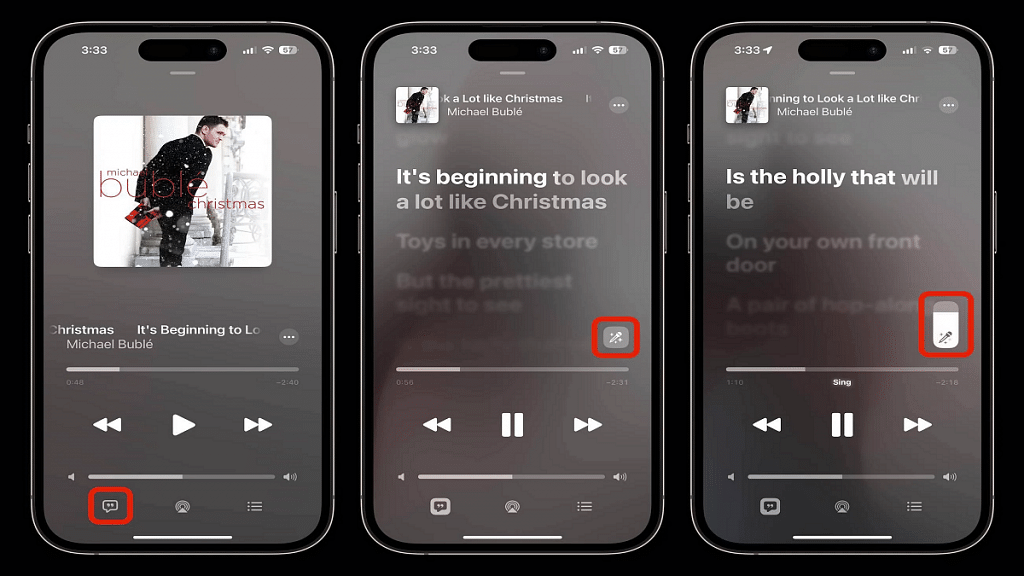
A karaoke-like feature will be added in a December over-the-air update to Apple Music, the company’s music streaming app. With a feature called Apple Music Sing, you can play a song, see the lyrics as they are being played, and even adjust the voice volume so you can perform. Remember that Spotify introduced a karaoke feature in June of last year. However, it’s more like a game experience where your voice is recorded and your performance is graded. Here is all the information you need regarding Apple Music Sing.

Also Read | Lost Your AirPods’ Charging Case? Here’s How To Charge AirPods Without A Case

Apple Music Sing: Which Devices Support It?

Apple Music Sing feature is exclusive to the subscribers of Apple Music. The feature is available in the Apple Music app on iPhones (iPhone 11 and later), iPads (including last year’s 9th generation models), and the latest Apple TV 4K. Android devices support real-time lyrics, but voice volume cannot be adjusted.

How To Use The Apple Music Sing Feature?

Step 1: Open the Apple Music app on your iPhone after updating to iOS 16.2.

Step 2: Look for music with lyrics available (the lyrics button is on the bottom left).

Step 3: If you haven’t already switched to lyrics mode while reviewing, tap the lyrics button in the bottom left to switch to lyrics mode.

Step 4: The Sing button should now be visible in the bottom right corner of the lyrics. Click on it.

Step 5: Now, lower the slider to the bottom to adjust the vocal volume, and start humming along.

You can use the Apple Music Sing feature just as easily as that. Tens of millions of songs will support the Sing feature, according to Apple. Though the specific songs that enable the functionality have not yet been identified, we think that they all include lyrics and are all accessible on Apple Music. In addition to singing songs by yourself, you can perform a duet.

Also Read | Get Apple Music Free For Four Months Via Shazam: Here’s How To Get The Deal

Categories
Apps How To

Want To Make Your Own Movie? Here’s How You Can Easily Create Movies And Animations Using

Smartphone photography has seen a major boom in the last few years. This trend has been on the rise with the smartphone OEMs bringing in some of the best camera hardware giving even professional cameras stiff competition with imaging capabilities.  But none of the new-generation smartphones enabled with a powerful camera is complete without a gallery app.

While you get different in-house and third-party mobile applications for viewing and editing photos, Google Photos is one of the most commonly found and useful tools for photos and videos. Google Photos not only works as a File manager app for photos and videos but it also doubles up as a powerful editor and sharing tool. With Google Photos you can also create animations and movies. If you wish to know this handy trick with which you can create your own movies and videos then this article will be your guide. Read the steps here:

How Can You Make A Movie Using Google Photos App

Step 1: Open your laptop/ PC and launch any web browser. Type in photos.google.com and hit enter.

Step 2: From the menu option select Utilities.

Step 3: You will see the “Create new” option. Tap on it.

Step 4: Select the New Movie option.

Step 5: Now, add the photos and videos that you wish to use as the movie footage.

Step 6: Click on the Create option from the top right corner.

Step 7: Once the movie is created tap on Save.

Also Read: Can’t Find Images In Phone’s Gallery Your Device? Here’s How To Find Lost Photos And Videos On Google Photos

How To Make A Movie On Google Photos Using A Specific Theme

Step 1: Launch photos.google.com on your laptop or PC.

Step 2: Go to the Utilities tab.

Step 3: Tap on the Movie option after selecting Create new option.

Step 4: Now, select the desired movie theme.

Step 5: Click on Get Started.

Step 6: You can now select any person or a pet from the library.

Step 7: Tap on Done.

Also Read: Want To Hide Unwanted Memories In Google Photos? Here’s The Trick

How To Create Animations Using Google Photos

Step 1: Open Google Photos on your laptop or PC and hover the mouse cursor over any photo.

Step 2: You can add up to 49 more photos while creating an animation.

Step 3: Click on the Create new option (+ symbol).

Step 4: Tap on Animation.

Also Read: Step By Step Process To Download Someone Else’s WhatsApp Status (Videos/Photos) On Your Phone

Categories
Apps Featured Info

UPI Money Transaction Limit In India: Here’s The Limit Of Transactions You Can Do Via GPay, PhonePe, Paytm Daily

Key Highlights

  • National Payments Corporation of India has set limits on daily UPI transactions
  • The money and number of UPI transaction limits also vary by bank
  • GPay, Paytm, PhonePe, and other online payment apps freeze transfers when a user exceeds the daily transfer limit

Reached your UPI transaction daily limit? However, the amount of your transaction was less than the predetermined transfer limit. UPI, which was launched by the National Payments Corporation of India a few years ago, has significantly improved our quality of life. It has made bank-to-bank money transfers simple and secure, enabling everything from purchasing veggies from roadside vendors to sending money to friends and relatives. However, the government has restricted the number of transactions per day due to accessibility. Here is all you need to know.

UPI Money Transfer Limit

A person can use their UPI app to send up to Rs. 1 lakh in a single day, under the NPCI’s rules. For smaller banks like Canara Bank, this limit may top out at Rs. 25,000 while reaching the last limit of a lakh for bigger banks like SBI.

Also Read | Want To Set Up UPI Lite In BHIM App? Here’s How To Do It

UPI Transfer Limit Per Day

There is a cap on the total amount you can transfer in a day, as well as a cap on the number of transactions you can complete each day. You are often only permitted to complete 20 transactions each day. Once you’ve reached the limit, the limit won’t be renewed for another 24 hours.

GPay UPI Transfer Limit

If you use Google Pay or GPay, you can send up to Rs. 1,000,000 in a single day with a maximum of 10 transactions. These transactions can be made on all UPI apps and bank accounts.

PhonePe UPI Transfer Limit

PhonePe also offers the same limit as GPay. That means you can send money up to Rs. 1,00,000 per day for 10 transactions. However, these limits are set at 20 and depend on your bank’s policy.

Paytm UPI Transfer Limit

Paytm UPI allows users a money transfer of up to Rs. 1 Lakh.

Amazon Pay UPI Transfer Limit

Amazon Pay has also set a limit of Rs 1,00,000 for transfers through UPI. Specifically, a user can only pay a maximum of Rs. 5,000 in the first 24 hours after registering for Amazon Pay UPI. Some banks limit the number of transactions per day to 20.

Also Read | Want To Make Paytm UPI Payments To Non-Paytm Users? Here’s The Trick

Categories
Apps Featured Info

Telegram Now Allow Users To Sign Up Without A SIM Card

Key Highlights

  • Telegram has added a new privacy feature to its app
  • Users no longer need a SIM card to use Telegram
  • Users can sign in using blockchain-powered anonymous numbers

Telegram, an instant messaging platform, has upgraded its app with a number of new features. The revised sign-up procedure is one of the significant modifications. Now, users no longer need a phone number to sign-up for using Telegram. Before, in order to create a Telegram account, users had to enter their mobile number. In addition, the update added Topics 2.0 for groups, automated message deletion for new chats, and aggressive anti-spam.

With the most recent update, users can now register for an account using blockchain-powered anonymous numbers offered by the Fragment platform, according to Telegram. Before, the app let users control who could see their number and search for them by phone number, but the procedure would still need a SIM card.

Also Read | Telegram Tips And Tricks: How To Schedule Messages On Telegram Android, iOS App

Questions Around Anonymity

Although the network guarantees users’ privacy, some critics are raising concerns about the technology. Users’ identities are compromised because there is no other way for them to purchase a number other than with Telegram’s native token, which links the entire transaction chain to their ID.

Experts also stated that in order to guarantee anonymity and prevent users from disclosing their wallet IDs to Telegram when purchasing anonymous numbers, Telegram should have let users sign up using an email ID.

Auto-delete Feature Added

The new update also added an auto-delete feature to the app, allowing users to set a global timer to automatically delete all messages in new chats. This is an update to the Self Destruct Message update released in 2013.

However, you can easily expand your auto-delete settings to any existing chats via the new menu in Settings > Privacy & Security > Auto-Delete Messages. It should be noted that the auto-delete option will not affect current chats.

Also Read | Want To Send Secret Messages On Telegram? Here’s A Step-By-Step Guide

Categories
Apps Featured Info

Kantara Hindi OTT Release In India: Wait Is Finally Over, Watch Online Here

Key Highlights

  • Kantara is one of the biggest hits of 2022 which was released on September 30
  • The streaming rights for Kantara Hindi OTT have been acquired by Netflix
  • On Amazon Prime Video, the movie is streaming in four languages: Kannada, Telugu, Tamil, and Malayalam

Kantara made its online debut a week ago. The movie has been making waves on the digital streaming platform after winning over audiences during its theatrical premiere. On Amazon Prime Videos, the movie was only made available in the languages of Tamil, Telugu, and Malayalam. But many fans, particularly in the states where Hindi is spoken, had to wait patiently for the movie’s dubbed version. However, the wait is now over. Kantara’s OTT release in Hindi will soon be available to watch. Read on to know how and where to watch this movie online.

Also Read | ‘Spider-Man: No Way Home’ OTT Release: How To Watch Tom Holland-Starrer On Netflix

Kantara Hindi: Storyline

The storyline and how it was portrayed on screen were key factors in the movie’s enormous box office success. Kantara, a Kannada blockbuster starring Rishabh Shetty and Kishore, depicts a Kambala champion who clashes with a moral forest ranger named Murali. The film is set in a fictional village called Dakshina Kannada.

Kambala is an annual race that takes place in coastal Karnataka from November to March. In this, a jockey pulls a pair of buffaloes that are tied to a plough across two parallel muddy tracks. The tribal tradition of Bhoota Kola and Shetty’s subsequent comments about it also made headlines in relation to the movie.

Kantara Cast

The movie Kantara, directed by Rishab Shetty, stars Kishore as Muralidhar, Sapthami Gowda as Leela, a Deputy Range Forest Officer, Achyuth Kumar as Devendra, and Pramod Shetty, and the director himself as the lead Kaadubettu Shiva. Produced by Vijay Kiragandur, the movie is made under the banner of Hombale Film.

Kantara Hindi: Where To Watch?

Amazon Prime Video acquired the digital streaming rights for Kantara, and as a result, it’s now streaming in four languages ​​on Prime Video. However, the OTT rights to Kantara Hindi have been bagged by Netflix.

Also Read | What Are Netflix Secret Codes: How To Watch Hidden TV Shows And Movies On Netflix Using Secret Codes