Categories
Apps Featured How To

WhatsApp Finally Bringing Option To Hide Last Seen From Specific Contacts; How To Hide Last Seen From Specific Users On WhatsApp

WhatsApp has added a slew of features to its instant messaging application on Android and iOS devices this year. The Meta-owned platform is also testing several other new features which it is expected to release in the coming months. The company is now said to be testing one of the most anticipated privacy features that users have been asking for since long. We are speaking of the option to hide the last seen option from specific contacts. When is this option being added to WhatsApp and how will you be able to use it? Read on to know:

WhatsApp New Last Seen Privacy Feature: When Is It Coming?

WhatsApp has started working on the option to let users hide their last seen from a specific contact. A fresh report via WABetaInfo hints at this latest development. Currently, the feature to hide last seen from specific contact is being tested for the iOS app. As of now, WhatsApp only lets the user hide their status from selected users on both Android and iOS apps. However, users have been asking for the option to hide their last seen as well from select contacts.

Once the stable version of this feature is released, WhatsApp users on iOS would be able to hide their last seen either from all contacts or some select users. The company should soon start testing this last seen hide option for the Android platform as well.  We might see the brand adding this option to iOS devices initially followed by Android.

It is currently not known if the brand will be releasing a stable version of this new feature in the coming months or later this year. But with the latest privacy feature being under the testing phase, it shouldn’t be long before the company brings this option to the Android and iOS platforms. We are waiting for some more developments on the same and will update you once the details are available. But if you are interested in knowing how you will be able to hide the last seen option on Android and iOS devices from select contacts or users, then below are the steps.

How To Hide Last Seen From Specific Contact/ Person On WhatsApp?

The option to hide the last seen from specific contact would be completed in just a few steps. The procedure would be identical to hiding the last seen from all users on WhatsApp or from specific contacts on WhatsApp status.

Step 1: Open the WhatsApp application. From the home page go to the settings menu (three dots on the top right).

Step 2:  Click on the ‘Account’ option.

Step 3: Now, select the privacy tab and click on “last seen”.

Step 4: Select the “My contacts except” option and add the contacts or users from whom you want to hide your last seen.

Step 5: Click on Done.

We would like to highlight that the steps mentioned above would only work once WhatsApp officially releases the stable update to hide last seen from specific contacts. If you try to perform these steps now, you only will get to select between “Everyone”, “My contacts”, and “Nobody”. Following the update, you will be able to select the “My contacts except” option to hide the last seen.

It is good to see that WhatsApp is constantly improving its privacy ecosystem on its platform. This is one of the prime reasons for its popularity amongst the users despite numerous such applications’ availability in the market. We are expecting WhatsApp to confirm the development of the same soon.

Do share your thoughts on the latest Sony smartphone. You can also follow the GizNext Tech Enthusiast Telegram group and the GizNext Tech Enthusiast WhatsApp group for more technology updates.

Categories
Apps Featured Mobile

ZestMoney App: How To Buy Smartphones On EMI

If you are looking for ways to purchase smartphones with EMI options, then several apps are providing the same benefit. Similarly, the ZestMoney app is providing EMI options that allow you to purchase the latest smartphones from Xiaomi, Motorola, Oppo, Vivo, Realme, Apple, and more.

The app offers EMI options without credit or debit cards along with zero down payment. Plus, you can use the ZestMoney EMI option on all e-commerce platforms and stores like Croma, Sangeetha, and more. For the unaware, creating an account on the ZestMoney app is very simple and it is online.

The app will provide a credit limit that you have to use to purchase the mobile phones and any other product you are looking for or want to buy. However, to access the app, you need to follow these steps.

Steps To Use Or Purchase Smartphone On EMI From Zest Money

Step 1: First, you need to verify your mobile number to signup for the ZestMoney credit limit.

Step 2: Now, submit all required KYC documents and set your repayment so that you can activate your credit limit. You also need to upload your Aadhaar card details under the KYC documents section.

Step 3: Choose a preferred partner to purchase a smartphone. You are allowed to use the credit limit on 1000+ partners.

Step 4: Now, you have to choose the EMI plan at your convenience.

Step 5: It’s done EMI plan has been approved and the order is placed. You will get the device as per the decided day.

Highlights Of Zest Money Application

ZestMoney EMI provides benefits like zero down payment, zero processing fees, zero application fee, no-cost EMI, and more. You can access the app while buying clothes, furniture, and more.

Secondly, an Aadhaar card is mandatory to avail the benefits of the ZestMoney application.

ZestMoney users don’t need credit or debit cards to purchase the EMI. This app also allows you to use EMI options on their partner stores so, that you can buy the products easily.

The app enables you to purchase products in stores like Sangeetha, Mi Mobile, and Croma.

Kindly follow the GizNext Tech Enthusiast Telegram group and the GizNext Tech Enthusiast WhatsApp group for all tech updates.

Categories
Apps Featured

WhatsApp Will Make It Hassle-Free To Text, Call Unsaved Contacts: All You Need To Know

Key Highlights

  • WhatsApp is a leading instant messaging mobile app on both Android and iOS platforms
  • It is popular among desktop and laptop users worldwide
  • WhatsApp is constantly working on adding new features, and it is currently testing a feature to facilitate easy texting with unsaved contacts

WhatsApp has become a household name in the top instant messaging mobile application race across both the Android and iOS ecosystems. The Meta-owned messaging service is also popular amongst desktop and laptop users globally. It is undoubtedly one of the most feature-rich messaging apps available for mobile and desktop users. Despite the availability of multiple features, WhatsApp is hardly seen resting and not working on additional features for its platform. This time, WhatsApp is said to testing a new feature that will help users with easy texting with unsaved contacts. Here’s how:

Also Read | WhatsApp Screen Sharing Feature For Video Calls In Works: How To Share WhatSApp Screen on Android?

How WhatsApp Plans To Simplify Texting With Unsaved Contacts?

If you have been using WhatsApp, you must be aware that you need to save a contact before you can initiate a conversation with that person. However, users have been asking for an easy workaround for this for a long. WhatsApp is already in the process of making it easy for users to send messages to any mobile number without saving it.

As per a fresh report via WABetaInfo, WhatsApp has already started working on the feature where users will no longer need to save any contact to start sending messages. The company is currently said to be testing this feature with the Android beta app. The upcoming feature has been spotted with the Android beta with 2.22.8.11 built.

Also Read | No More Switching Between Devices: WhatsApp Now Allows Account Use On Up To Four Phones

The report further explains how the upcoming WhatsApp feature will work. It suggests that users will now be able to send messages to any unsaved contact provided that person is also using WhatsApp in his/her respective device. Once you go to the bubble from the WhatsApp homepage, an in-app menu will pop up with the option to chat. In addition to chat or text, the upcoming in-app menu feature will also allow users to save or call the unsaved contact.

It is worth mentioning that this crucial WhatsApp feature that will allow users to send messages or make calls to unsaved contacts is still under the testing phase. There is currently no word from WhatsApp when it plans to release the stable version of this feature at a mass level. Nevertheless, it is possible we get to see the stable rollout for WhatsApp Android first and then the iOS version.

Update

Making calls to unsaved contacts is now an easy task for WhatsApp users. Both Android and iOS WhatsApp app now integrates the support to call unsaved contacts. In addition to this, WhatsApp has also recently released a new call link feature with which users will be able to share voice/video call links to the users who are;t added as contacts or the ones who aren’t a participant of the group. If you wish to know how the call link feature works and how it takes on Zoom, Google Meet, or other popular online conferencing apps, read on the steps here.

Also Read | WhatsApp Chat Lock Privacy Feature Released For Android, iOS: How To Lock WhatsApp Chats Using This New Feature?

Categories
Apps Featured

Instagram Brings Multiple New Features; Silent Messages, Quick Reply, Song Share, More

Instagram is rapidly expanding its user base and simultaneously improving the user experience on its platform by adding new features and services. The Meta-owned instant photo-sharing app is now a hub for social media influencers. However, the general audience is equally contributing to the app’s popularity. The company has introduced multiple new features for its platform for improved messaging experience, media playback, and more.

What All New Features Instagram Has Released?

Amongst the newly introduced Instagram features are the new revamped DM UI with a dedicated column for online contacts, quick share, and quick reply feature. Similar to the Meta (Facebook) home feed where you can see the list of friends who are online, Instagram will also show your contacts that are online at the top of the DM section.  

The Quick share feature introduced by Instagram will let users share any post with their frequent contacts. All one needs to do is press and hold on the send button which is located alongside the like and comment tab below any post. Once you tap a hold the send key, you will see the list of four contacts that you are frequent chatting with. With this option available, one wouldn’t require to scroll down the entire contact list on the Instagram direct message window.

Instagram has also added the Quick reply option that will allow users to continue conversations or reply to a message directly from the notification bar. This option comes in handy when you don’t want to pause your browsing session and have to reply as well.

One of the most interesting and useful features which Instagram has added to its platform this time is music sharing via Amazon Music and Apple Music. Users will now get the option to share up to 30 seconds of music preview on Instagram direct messages.

Currently, you will be able to share any song’s 30-second preview audio with your friends from Apple Music and Amazon Music only. Instagram will soon be bringing in support for Spotify as well. However, by when it will be available is hard to say.

The remaining new Instagram features include the option to send silent messages and create polls in any group chat. To send a silent message on Instagram without notifying the receiver, you will need to type @silent before the message and then send.

Do let us know your thoughts in the comment section below. You can also follow the GizNext Tech Enthusiast Telegram group and the GizNext Tech Enthusiast WhatsApp group to stay updated with the latest happenings around the tech world.

Categories
Apps Featured How To

Twitter Gets WhatsApp-Inspired Direct Message Search Feature; How To Use?

Twitter is a noted microblogging website accessed by millions of users globally. Like most of the modern social media platforms, Twitter is also frequent with adding new updates and features. Twitter has majorly improved services on its mobile app as well as the desktop version. We have seen a trend with social media platforms and instant messaging apps borrowing features from their rivals. Twitter is also following the same lead and has introduced a long-awaited WhatsApp-like feature for the masses. The latest feature that Twitter has announced for users will enhance the direct messaging experience on both the mobile app as well as the web version.

Here’s How Twitter Is Enhancing Direct Messaging Experience On Its Platform

Twitter has released a new update that will simplify the process to search for any specific chat in any conversation window. This feature seems to be borrowed from WhatsApp where users can easily read specific older texts in any chats by searching with a single keyword. Twitter has announced the availability of this new direct message search feature on its mobile app as well as the desktop version via its official blogsite.

It is worth adding that Twitter has been offering the direct messaging service for a while. However, it only allowed users to look for specific or multiple user names in the direct message section. But now, it will get easier for the audience to locate a particular message in any conversation window.

Twitter in a statement said, “We know you’ve been waiting for the option to search your DMs Now you can use the search bar in your inbox to find specific messages using keywords and names”.

It isn’t much of a task to use this new Twitter direct message search feature. You just have to head to the DM (direct message) section and open the required chat window. Once you are on the conversation window just click on the search option and enter the message keyword that you need to search.

Do let us know your thoughts in the comments section below. If you want to stay updated with the latest technology news, you can follow the GizNext Tech Enthusiast Telegram group and GizNext Tech Enthusiast WhatsApp group.

Categories
Apps Featured How To

Facebook Tips And Tricks: Here’s How You Can Easily Change Facebook Profile Name

Facebook, now renamed Meta is amongst the most accessed social media platforms globally. Facebook has quite a large user base and is rapidly adding more profiles with each passing year. If you have been using Facebook services, then you must have definitely created one user profile with which you access all the services. While creating a Facebook profile option, you must have entered several personal information such as name, email address, and other contact details.

It’s always advised to cross-check the details while creating a profile before the final submission. However, there are instances when you might want to change your Facebook name. That could be due to an error or a change of mind. If you are having difficulties changing your Facebook name, then you have stopped at the right place. This article is the step-by-step guide that will help you change your Facebook profile name easily. Let’s take a look:

What Are The Steps To Change Facebook Name?

Step 1: Open the Facebook app or log in to the desktop version on your respective smartphones or tablets/ PCs.

Step 2: Click on the menu option (three horizontal lines) and select the “Settings and privacy” option.

Step 3: Next, tap on the “Settings” option again.

Step 4: You will now need to select the “Personal and account information” and then click on the “Name” tab.

Step 5: Enter the new name that you want to update as your Facebook name.

Step 6: Now, click on the “Review Change” option and then select the “Save Changes”.

It is worth adding that Facebook has a certain set of guidelines that need to be followed in order to change the Facebook name or any other personal information. You can read all the Facebook guidelines for changing names and other profiles details by clicking on this link. The aforementioned steps make it easy for you to change your Facebook name easily on the mobile app as well as the desktop version.

Do share your thoughts in the comment section below. You can also follow GizNext Tech Enthusiast Telegram group and GizNext Tech Enthusiast WhatsApp group for more such tech tips and tricks.

Categories
Apps Featured

WhatsApp Multi-Device Support Finally Rolling Out To iOS, Android Devices; Here Are The Details

WhatsApp has added numerous users to its platform in the last few years. The Meta-owned instant messaging platform is preferred by the audience for its secure end-to-end encryption platform. Keeping all the security aspects at priority, WhatsApp earlier allowed using the app’s services on a single smartphone or tablet. However, with the surging demand, the company started working on enabling multi-device support options for both Android and iOS users. Now, the company has expanded this feature to a larger scale by offering support for additional devices.

WhatsApp Multi-Device Support Feature Released

WhatsApp has been testing the multi-device support for its mobile app and desktop version for a while. But now, the company has finally released the stable version of the multi-device support feature for users across. A new report via WABetainfo, WhatsApp is now releasing the option for multi-device support for iOS users.

As of now, this feature isn’t available for Android users. However, the company is said to be rolling out this multi-device support feature for Android phones in the coming weeks. With the new update, users will now be logged into a single WhatsApp account on five different devices.

Also, following the update, it wouldn’t be required for the main device to stay online so that you can access WhatsApp on other devices. This feature will also de-link the connected devices automatically if the WhatsApp account is not being used for more than 14 days.

This feature has been much awaited by users across the globe and it’s good to see that the company is keeping users’ requirements at priority. An update notification will available for iPhone users and Android users will likely get the update by next month. You can also check for updates manually via App Store and Play Store on your respective Apple or iOS devices. We will keep you posted with the availability of multi-device support for the Android version.

If you want to stay updated with all the latest updates related to the technology world, you can stay tuned to GizNext Tech Enthusiast Telegram group and GizNext Tech Enthusiast WhatsApp group.

Categories
Apps How To

YouTube Tips And Tricks: How Can You Watch Age Restricted Videos On YouTube Mobile App, Desktop Version

YouTube is the go-to platform for masses to stream free videos online. The Google-owned video watching platform has become more popular ever since the dedicated app for Android and iOS has been introduced. If you have been using YouTube, you must be aware that you can log in using a registered account to watch restricted videos; specifically, the age-restricted ones.

For the unaware, YouTube has a plethora of content/videos that might not be suitable for kids and are tagged ‘age restricted’. Such videos might have graphic content such as violence or nudity which can have a bad impact on the young audience.

But this pop-up (age-restricted video) message barring you from watching certain videos might have hampered your viewing experience on the YouTube app. Specifically, if you are an adult and yet are unable to watch the age-restricted videos. So, what can you do to remove this ‘age-restricted’ message from a YouTube video? The steps for the same are mentioned below:

Also Read: YouTube Tips And Tricks: Best Features You Must Try On Your Phone

How To Play Age Restricted Videos On YouTube?

Step 1: Use an alternate email address. This is one of the easiest and safest ways to watch age-restricted videos on YouTube. You can log in to the YouTube app on your respective Android, iOS smartphones, and tablets or use the desktop version on laptops or PCs with an entirely new email address. YouTube will then let you stream age-restricted videos if the new email address used confirms your age to be above 18.

Step 2: Making some changes to the YouTube video URL also does the trick. However, this method will only work if you use the YouTube desktop version. As for the changes, you would need to replace the “watch?v” in the YouTube browser link with “embed/”.

Step 3: If the above method doesn’t work, you can also modify the YouTube video link by adding “NSFW” just before “youtube” in the browser link. Hit enter and you are good to go.

Do share your thoughts in the comment section below. You can also follow GizNext Tech Enthusiast Telegram group and GizNext Tech Enthusiast WhatsApp group for more such tech tips and tricks.

Also Read: Remove Copyright Claim On Your YouTube Video: Here’s How

Categories
Apps Featured Gaming

Netflix Now Lets Users Play Three New Mobile Games On Android, iOS

Netflix is a well known OTT platform in India and across the world. The services offered by this platform are vast. This online platform is one of the biggest when it comes to hosting shows and movies. The company is offering services across mobile platform as well as desktop version. Netflix has been adding features across both Android and iOS smartphones and also the desktop version. The aim has been to grab more audience and provide an improved used experience.

Now, Netflix is planning to expand its platform’s services beyond video playback. The online streaming giant is adding new mobile games to its platforms that both Android and iOS users will be able to play on their respective devices. Netflix first announced mobile games on its platforms back in November last year. As many as five different games have been added to the OTT platform till now. Now, the company has announced three more mobile games for Netflix Android and iOS version.

New Netflix Mobile Games Announced

Netflix has added three new titles to the mobile game section. The company has now launched This Is A True Story, Shatter Remastered, and Into the Dead 2: Unleashed. All three new mobile games are made available for both Android and iOS users. Notably, users will be able to play latest Netflix mobile games on both smartphones and tablets.

It is worth adding that out of the three, two games are currently available for the masses to play via the Netflix app. Only the Shatter Remastered and This Is A True Story games are up and ready to play, while the Into the Dead 2: Unleased is yet to added to the mobile game section. Netflix hasn’t clearly mentioned when this third game will be available for all users. But, chances are it is released soon.

To recap, the Netflix mobile game section has five other games that were announced last year. Netflix had previously launched Starnger Things: 1984 (BonusXP), Stranger Things 3: The Game (BonusXP), Shotting Hoops (Frosty Pop), Card Blast (Amuzo & Rogue Games), and Teeter Up (Frosty Pop).

Do share your thoughts in the comment section below. You can also follow GizNext Tech Enthusiast Telegram group and GizNext Tech Enthusiast WhatsApp group for fresh technology updates.

Categories
Apps Featured How To

Facebook Protect: Here’s How To Activate On Your Account

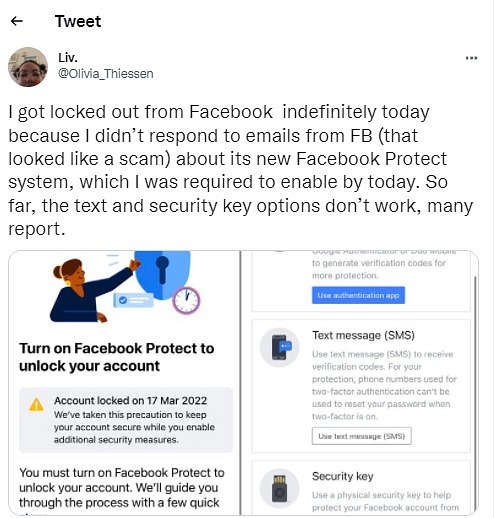
Facebook is blocking people who haven’t activated their accounts. Notably, a leading social media platform has sent an email titled Your account requires advanced security from Facebook Protect’ so that users can activate Facebook Protect in their accounts.

“As part of our ongoing improvements to security, we’re expanding Facebook Protect, a program designed for people that are likely to be highly targeted by malicious hackers, including human rights defenders, journalists, and government officials,” Facebook said.

This development comes after several users started complaining about the same. It is worth noting that Facebook has sent an email to all users whose accounts are under threat; however, users misunderstood the email and took it as spam. In fact, many users ignored the email and took it as phishing.

“These people are at the centre of critical communities for public debate. They enable democratic elections, hold governments and organizations accountable, and defend human rights around the world. Unfortunately this also means that they are highly targeted by bad actors,” the app added. But, if you are facing a similar issue, then you need to follow these steps to protect your account.

Steps To Protect Your Facebook Account

Step 1: First, you need to click on the downward-facing arrow at the corner of Facebook.
Step 2: Click on the Setting and Privacy, then you have to click on the Security and Login option.
Step 3: Now, you have to open Facebook Protect and tap get started.
Step 4: Then, on the welcome screen, you have to click on the next option.
Step 5: On the Facebook Protect benefits screen You have to click on the next option.
Step 6: After that, the company will check your account for all issues and suggest you make changes to protect your account.
Step 7: Tap on the Fix Now option and follow all instructions to protect your account.