Categories
Featured Info

Want To Translate Text With Your Voice? Meet Google’s AudioPaLM

Key Highlights

  • Google introduces AudioPaLM, a new language model
  • It enables zero-shot speech-to-text translations, voice transfer across languages, and more
  • A new feature in Google Search that incorporates diverse perspectives from real human beings

In recent times, significant progress has been made in large language models (LLM), which are artificial neural networks trained on vast amounts of text data using self-supervised or semi-supervised learning. These models, such as Google Bard and OpenAI’s ChatGPT, power innovative generative AI tools. Among them, Google researchers have introduced AudioPaLM, a multimodal architecture capable of excelling in listening, speaking, and translating tasks. Also Read | Google Bard CHatGPT Killer Goes Official? What Is It? How To Use?

AudioPaLM: A Combination Of PaLM-2 And AudioLM Models

AudioPaLM integrates the strengths of two existing models, PaLM-2 and AudioLM. PaLM-2 is a text-based language model that exhibits proficiency in understanding text-specific linguistic knowledge. On the other hand, AudioLM excels in retaining paralinguistic information like speaker identity and tone. By combining these models, AudioPaLM achieves a deeper comprehension and generation of both text and speech. It is capable of speech recognition, translation with original voices, zero-shot speech-to-text translations for various languages, and voice transfer across languages based on short prompts.

Applications And Performance Of AudioPaLM

The versatility of AudioPaLM makes it invaluable for real-world applications, especially in real-time multilingual communication. The model displays competitive performance in speech recognition tasks and has obtained impressive results in speech translation benchmarks. With its ability to handle various languages and preserve distinct voices, AudioPaLM proves to be a powerful tool for language-related applications.

Also Read | Microsoft Introduces Bing AI To Edge Sidebar: How To Use?

Introduction Of Google Search’s Perspective Filter

During the Google I/O 2023 annual developers’ conference, Google unveiled a new feature for Google Search called ‘Perspectives.’ This feature aims to provide users with a more human aspect in their search results. Traditionally, search results were influenced by algorithms considering factors such as dates, authors, ratings, and proximity. However, the new Perspective filter introduces views and suggestions from real human beings, expanding the range of perspectives available.

Rollout Of The Perspective Filter

After its announcement at Google I/O 2023, Google has begun the global rollout of the Perspective filter for all Google Search users. The company shared the news through its official social media handles, inviting users to try out the new feature. The Perspective filter is designed to enhance the search experience by including diverse perspectives from experts and everyday people, further enriching the search results.

Also Read | OpenAI ChatGPT iOS Mobile App Launched: Full Details

Categories
Featured Info Laptop

Apple’s Back-to-University Bonanza: Free AirPods And Massive Discounts On iPads, MacBooks

Key Highlights

  • Apple’s ‘Back to University’ offer provides exclusive discounts and freebies for university students
  • Eligible customers can save on iPads and MacBooks with Apple Education pricing
  • The offer includes free AirPods (Gen 2), six months of Apple Music, and Apple TV subscription

Apple Store Online in India has brought back its annual ‘Back to University’ offer, providing university students and educators with special discounts and freebies on eligible iPads and MacBooks. This exclusive scheme, known as the ‘Back to University’ program, is available across countries. Alongside the discounts, Apple is offering AirPods (Gen 2), along with six months of Apple Music and Apple TV for free as part of this sale. Let’s explore the details and benefits of this exciting offer. Also Read | Apple iPad Tricks: How Can You Use Visual Look Up Feature On iPad Running On iPadOS 15.1 And Above

Save With Apple Education Pricing And Enjoy Free AirPods

Under the ‘Back to University’ program, university students, educators, and even homeschool teachers of all classes, as well as their parents, can take advantage of Apple Education pricing. This discounted pricing enables eligible customers to save on a wide range of iPads and MacBooks. Moreover, Apple is sweetening the deal by including AirPods (Gen 2) worth Rs. 14,900, along with a complimentary six-month subscription to Apple Music and Apple TV.

Upgrade Your Purchase

Not only can eligible customers enjoy discounted prices and freebies, but they also have the option to protect their purchase with a 20 percent discount on Apple Care+. This additional offer provides peace of mind by offering extended warranty coverage for their Apple devices.

Customers who desire an upgrade can choose to enhance their audio experience by opting for AirPods Gen 3 or AirPods Pro. By paying Rs. 6,400 or Rs. 12,200 respectively, eligible customers can enjoy the advanced features and improved performance of these premium earbuds.

Also Read | Here’s How To Activate Low Power Mode In macOS

Apple Back-to-University: Details And Availability

Apple’s ‘Back to University’ offer is currently live and will run through September 2022. Now, let’s take a closer look at the discounts and freebies available on specific products:

MacBook Air (M1)

The MacBook Air (M1) is available starting at Rs. 89,900, down from its original price of Rs. 99,900. With this purchase, buyers will receive AirPods Gen 2 worth Rs. 14,900 at no additional cost. Additionally, three months of Apple Music and Apple TV+ subscriptions are included for free.

MacBook Air (M2)

The newly launched MacBook Air (M2) can be purchased for Rs. 104,900 onwards, providing a discount of Rs. 10,000 from its original price of Rs. 1,14,900. Buyers will also receive AirPods Gen 2 worth Rs. 14,900 as part of the offer. Additionally, three months of Apple Music and Apple TV+ subscriptions are included for free.

iPad Pro 12.9

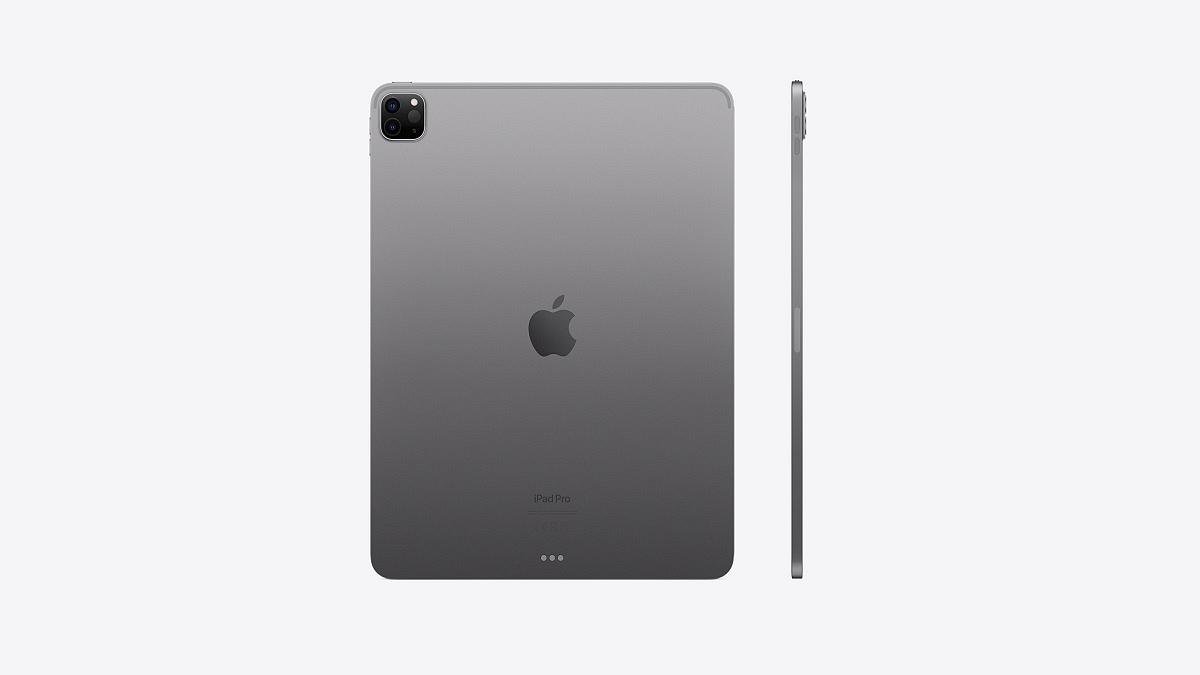
Apple iPad Pro 12.9 starts at Rs. 1,02,900, down from its original price of Rs. 1,12,900. With this purchase, buyers will receive a free Apple Pencil worth Rs. 11,900. Additionally, three months of Apple Music and Apple TV+ subscriptions are included for free.

Mac Mini

The Mac Mini, powered by the M1 chip, is currently priced starting from Rs. 49,900, reflecting a discount of Rs. 10,000 from its original price of Rs. 59,900. Along with the purchase, buyers will receive complimentary AirPods Gen 2 valued at Rs. 14,900. Furthermore, buyers will enjoy a three-month complimentary subscription to Apple Music and Apple TV+.

iMac

The iMac is available starting from Rs. 1,24,900, offering a discount of Rs. 5,000 from its original price of Rs. 1,29,900. Additionally, customers will receive AirPods Gen 2 worth Rs. 14,900 at no additional cost. Furthermore, a three-month free subscription to Apple Music and Apple TV+ is included with the purchase.

Also Read | iOS Tips And Tricks: How To Setup And Use AutoFill For Contact Cards And Credit Cards In Safari On iPhones And iPads

Categories
Apps Featured How To

Never Miss A Payment Again: Learn How To Set Up Payment Reminders On Google Pay

Key Highlights

  • Google Pay offers a range of features for convenient digital payments
  • Users can set up recurring payment reminders to avoid missing important payments
  • Currently, Google Pay requires users to manually make payments even with reminders

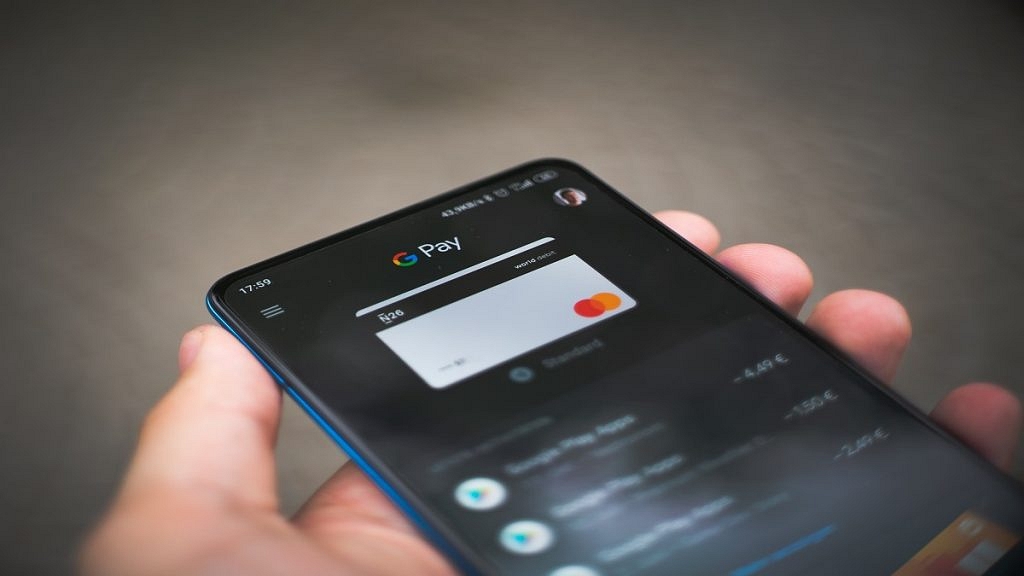
Google Pay is a versatile digital payment platform that offers a wide range of features and functionalities. In addition to sending money and making online payments, Google Pay includes a useful payment reminder feature to prevent missed payments. Also Read | How Can You Delete Google Pay Transaction History: A Step-By-Step Guide

How To Set Up Payment Reminders

To ensure you never forget important payments, Google Pay provides a recurring payment reminder feature. Follow these steps to set up recurring payment reminders:

Step 1: Open the Google Pay app on your iOS or Android smartphone.

Step 2: Navigate to the bottom and select “Regular payments.”

Step 3: Choose the appropriate category under “Payment categories.”

Step 4: Tap “View all” to see available categories and select the one that suits your requirement.

Step 5: Enter the necessary details for recurring payments: choose the payee from your contact list, select a start date, determine the frequency of payment, set the amount, and give the payment a name for easy reference.

Step 6: To view the payment reminder in your checklist, tap “Set reminder.”

Also Read | How To Pay Utility Bills Using Google Pay? Here Are The Steps

Benefits And Limitations

Google Pay’s recurring payment reminder feature is currently limited to peer payments. It does not include autopay settings, meaning payments are not automatically debited from your account at a set frequency. Instead, you will receive a reminder to make the payment manually. The payer is notified to make the payment, but the amount does not get debited automatically.

Conclusion

Google Pay offers a convenient solution for managing digital payments. By utilizing the payment reminder feature, users can set up recurring payment reminders and avoid missing important payments. Although autopay settings are not available, the reminder system ensures that users are prompted to make payments on time.

Also Read | UPI Tips And Tricks: Here’s How You Can Set UPI PIN Without Using Debit Card Details

Categories
Featured Gaming Info

Nintendo Direct June 2023: Five Biggest Reveals From The Gaming Giant

Key Highlights

  • Nintendo hosted the second edition of Nintendo Direct in June 2023
  • Major announcements included a remake of Super Mario RPG and the return of Detective Pikachu with a sequel
  • Fresh content was revealed for Pokémon Scarlet and Violet, along with the upcoming release of WarioWare: Move It! for Nintendo Switch

In February 2023, Nintendo held the first edition of Nintendo Direct 2023, where they presented a 40-minute showcase. During this event, the company unveiled several game announcements, such as Kirby’s Return to Dream Land Deluxe, Harmony: The Fall of Reverie, and Disney Illusion Island. After almost four and a half months, Nintendo organized the second edition of the event, Nintendo Direct June 2023. During this event, Nintendo revealed the release schedules for various games, including Detective Pikachu Returns, Super Mario RPG, and even Pikmin 4. If you happened to miss the Nintendo Direct June 2023, here are the five significant announcements from the event. Also Read | Capcom June 2023 Showcase: Check Out The Hottest Games Announced

Super Mario RPG Remake

In the latest Nintendo Direct event held in June 2023, one of the major announcements was the remake of the cult classic Super Mario RPG. Originally released in 1996 for the SNES, this game was a collaboration between Nintendo and Square (now Square Enix), the creator of the Final Fantasy series. The remake will feature a chibi makeover, focusing mainly on visual changes while preserving the familiar gameplay.

Detective Pikachu Returns For A Sequel

Fans of the quirky Pokémon adventure game, Detective Pikachu, were thrilled to learn about its sequel, Detective Pikachu Returns. This game, known for its plot resembling a James Bond flick, reunites the coffee-loving Tim Goodman and his hat-enthusiast partner Pikachu as they solve mysteries in Ryme City once again. With the game’s release scheduled for October 6, fans are eagerly anticipating more detective adventures.

Pokémon Scarlet And Violet: Fresh Style With New DLC

Pokémon fans can look forward to new content in the form of downloadable content (DLC) for Pokémon Scarlet and Violet. This DLC will introduce new pokémon, trainers, and clothing options, allowing players to express their unique style. While the release date for this DLC is yet to be announced, it is expected to arrive around the holiday season later this year, offering a festive treat for Pokémon enthusiasts.

Also Read | Xbox Games Showcase 2023: Starfield, Fable, And More Announced At The Event

WarioWare: Move It!

Scheduled for release on November 6, 2023, WarioWare: Move It! is the latest addition to the WarioWare series for the Nintendo Switch. With over 200 wild and hilarious microgames, this game promises an entertaining experience that will get players on their feet. Supporting up to four players, WarioWare: Move It! encourages participants to embrace the absurdity by performing actions like shaking, striking poses, and dancing, using the Joy-Con controllers.

Metal Gear Solid Collection Vol. 1 Confirmed For Nintendo Switch

During the Direct event, Nintendo confirmed the arrival of Metal Gear Solid Collection Vol. 1 on the Nintendo Switch. This collection, set to release on October 24, 2023, includes several beloved titles such as Metal Gear Solid, Metal Gear Solid 2: Sons of Liberty, Metal Gear Solid 3: Snake Eater, Metal Gear, Metal Gear 2: Solid Snake, and Snake’s Revenge. The collection includes a screenplay book with in-game text and a master book delving into the story and characters of the Metal Gear Solid universe.

Nintendo Direct June 2023 was a showcase of exciting game announcements, covering a diverse range of genres and offering something for every Nintendo fan to anticipate.

Also Read | Netflix’s TUDUM 2023 Event: Squid Game 2, Emily in Paris 4, And More Announced

Categories
Apps Featured Info

Amazon Pay’s New Rs. 2,000 Note Collection Service: Here How It Works

Key Highlights

  • Amazon Pay introduces a doorstep cash collection service for Rs. 2,000 banknotes
  • Customers can hand over Rs. 2,000 notes to delivery agents during Cash-on-Delivery orders
  • The collected amount is deposited as an Amazon Pay balance for digital transactions

Amazon Pay has launched a new service that allows customers to have their Rs. 2,000 banknotes collected from their doorstep. This initiative provides an alternative for individuals who wish to hand over these notes that will be phased out of circulation later this year. The Reserve Bank of India recently advised holders to turn in their eligible notes at banks as the bank would be withdrawing all Rs. 2,000 notes. Also Read | Want To Make Paytm UPI Payments To Non-Paytm Users? Here’s The Trick

Relief For Concerned Individuals

Following the announcement, many people rushed to banks to submit their Rs. 2,000 notes. However, some individuals resorted to using these notes for transactions, such as at petrol pumps and for online food orders. Unfortunately, due to the unprecedented influx of these banknotes, many stores refused to accept them. In response, Amazon Pay has introduced its new service to alleviate concerns regarding the disposal of Rs. 2,000 banknotes.

Cash Load At Doorstep Service

The new service, called ‘cash load at doorstep,’ allows customers to provide additional cash in the form of Rs. 2,000 banknotes to delivery agents during Cash-on-Delivery orders. The customer’s Amazon Pay balance will be credited with the amount collected, allowing them to use their notes for online purchases. The balance can be used for mobile and DTH recharges, bill payments, and shopping on the Amazon platform.

Also Read | UPI Tips And Tricks: Here’s How You Can Set UPI PIN Without Using Debit Card Details

KYC Compliance And Increased Convenience

To access this service, Amazon requires customers to comply with the KYC guidelines. In other words, customers must have a verified Amazon Pay account through the KYC system. Achieving KYC compliance involves requesting video KYC, which Amazon states can be completed in just 5 to 10 minutes. Additionally, Amazon Pay allows users to top up their account balance up to Rs. 50,000 per month, which surpasses the maximum limit that banks can accept at one time. According to RBI guidelines, individuals can submit a maximum of Rs. 20,000 in Rs. 2,000 notes during a single transaction.

Also Read | Amazon Prime Lite Annual Membership Launched In India: Costs Just Rs.999

Categories
Apps Featured How To

Want To Hide Your Online Status From Friends On Facebook? Here’s How

Key Highlights

  • Facebook users have the option to hide their active status
  • It provides them privacy and control over their online presence
  • This feature ensures flexibility and discretion for individuals using Facebook

The online status indicators on Facebook, such as the green dot, grey crescent moon, and empty grey circle, can attract unnecessary messages from friends. If you’re tired of receiving such messages every time you go online, this article will provide you with simple steps to hide your ‘Active’ status on Facebook across Android, iOS, and the web. Also Read | How To Edit Facebook Photos Via Mobile, Desktop App Directly

How To Hide Your Facebook Active Status On Web

Step 1: Visit the Facebook website and navigate to the Messenger tab located on the left side of the main page.

Step 2: Click on the three dots in the upper-right corner of the Messenger window, and then select Preferences.

Step 3: A pop-up menu will appear. Click on “Active Status: On” and disable the toggle. You can also choose your preferred method of hiding the online status from the available options.

Step 4: Once you’ve made the desired changes, click Save.

How To Hide Your Facebook Active Status On Android

Step 1: Open the Facebook app on your Android phone or tablet. In the upper-right corner, click on the Messenger button. Make sure that you have the Messenger app installed on your device.

Step 2: Inside the Messenger app, go to Chats, and then access your Messenger settings. Locate the Active Status option.

Also Read | Facebook Tips And Tricks: How To Create And Upload Facebook Reel Videos

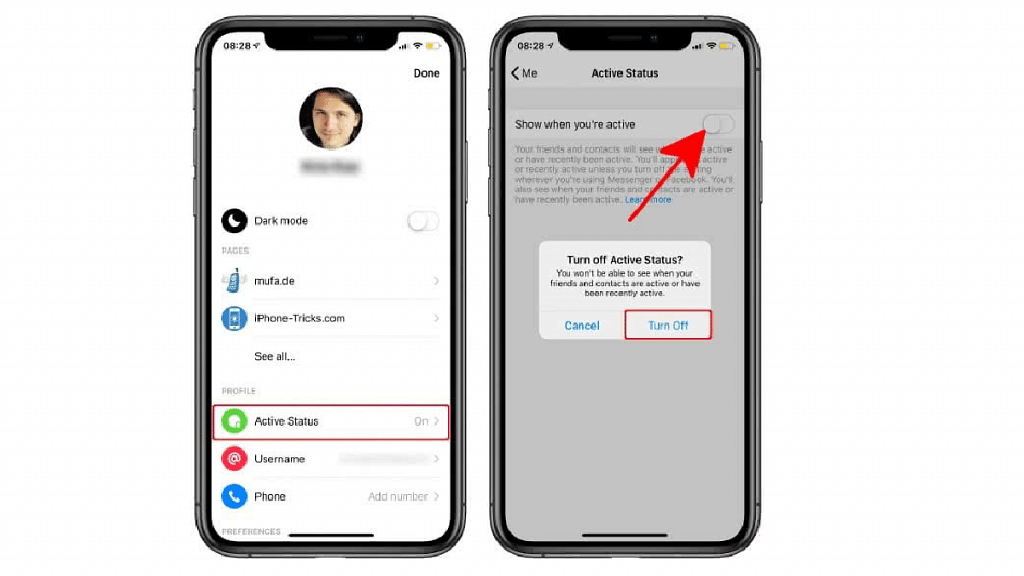
Step 3: Disable the “Show when you’re active” toggle. This will remove the green dot displayed next to your name on Facebook. When prompted, tap on Turn Off to confirm the action.

How To Hide Your Facebook Active Status On iPhone, iPad

Step 1: Open the Facebook app on your iOS device and tap on the three-line menu icon at the bottom-right of the screen.

Step 2: Navigate to the Settings and Privacy section and select Settings.

Step 3: Within the Privacy section, choose Active Status, and on the following page, toggle off the “Show when you’re active” option. Click Agree when prompted.

By following this guide, you can hide your Active status on Facebook and avoid the influx of unwanted messages from friends on the platform. If you wish to take further steps to enhance your online privacy and reduce tracking, you may even consider deleting your Facebook account.

Also Read | Want A Blue Tick On Facebook? Here’s How To Get Verified Today

Categories
Featured Info

Delhi Metro To Go Tokenless, Commuters Can Soon Use Their Mobile Phones To Travel

Key Highlights

  • According to reports, DMRC will soon introduce a ticketing system based on QR codes
  • There is no need to purchase tokens or smart cards because the QR codes will be produced on your phone
  • At the Delhi Metro gates, all you have to do is use your phone to quickly scan the QR code

Delhi Metro Rail Corporation (DMRC) is set to revolutionize the commuting experience by launching a new ticketing system that offers convenience and simplicity to its passengers. The upcoming QR code-based ticketing system will eliminate the need for physical cards or tokens, allowing commuters to enter and exit Delhi Metro stations using their smartphones. Also Read | Recharge Your Delhi Metro Card Using Airtel Thanks App: Here’s How

Delhi Metro QR Code Ticket Launch Timeline

After successful trials, DMRC is preparing to introduce the QR code ticketing system by the end of this month, as reported by Hindustan Times. Currently, there is an existing QR code ticket system; however, the inconvenience of printed QR codes, which can be easily lost, remains a concern. To address this, QR code-based tickets will be available on all lines of the Delhi Metro, with designated gates dedicated to this system.

Also Read | How To Check Metro Card Balance Offline And Online? Learn Here

How Will It Work

With the QR codes stored on their smartphones, commuters can enjoy enhanced convenience and bypass long queues. By simply placing their smartphones in front of the QR code scanner located at the gates, passengers can swiftly enter or exit the metro stations. The QR codes will be generated within the Delhi Metro Rail app, and payments can be conveniently made through the app itself. Multiple payment options, including UPI, will be available for QR code transactions within the app.

DMRC’s Extensive Trials And Launch Plans

DMRC has diligently conducted trials of the new ticketing system to ensure a smooth and glitch-free experience once the service is widely available. By the end of this month, DMRC aims to launch this feature for all commuters. It’s important to note that the QR code-based tickets will be introduced as an additional option alongside tokens and smart cards, which will still be available within the DMRC system. However, the paper-based QR codes will gradually be phased out, as mentioned in the report.

Also Read | Delhi Metro Smart Card Not Working? Follow These Steps To Get A New One Instantly

Categories
Apps Featured Info

Netflix’s TUDUM 2023 Event: Squid Game 2, Emily in Paris 4, And More Announced

Key Highlights

  • Extraction Season 3 and the new series Heart of Stone announced
  • Chris Hemsworth’s popular action thriller “Extraction” is set to return for a third season
  • Spinoff for Berlin from “Money Heist” revealed at Netflix’s TUDUM 2023 Event

Netflix’s TUDUM event showcased an array of exciting announcements, from new shows to highly anticipated seasons. Chris Hemsworth’s Extraction will return for Season 3, while Alia Bhatt, Jamie Dornan, and Gal Gadot’s Heart of Stone will captivate audiences. Additionally, Berlin from Money Heist is receiving his own spinoff, as revealed in a teaser featuring a fresh cast. The upcoming Indian teen musical drama, The Archies, offers a desi twist to Riverdale’s youthful characters. Fans were treated to a glimpse of 3 Body Problem, a new series by the Game of Thrones showrunners. Lastly, a brief teaser for Netflix’s live-action series based on Avatar: The Last Airbender was unveiled. Also Read | Netflix For Fitness Enthusiast: Collaborates With Nike To Stream Workout Videos On Its OTT App

Squid Game Season 2

Following its global success, Squid Game is returning for a second season with actors Lee Jung-jae, Lee Byung-Hun, Wi Ha-jun, and Gong Yoo reprising their roles. New cast members Yim Si-Wan, Kang Ha-Neul, Park Sung-Hoon, and Yang Dong-Geun will join them. While Netflix did not release a trailer, the announcement of the cast has heightened anticipation for the upcoming season.

Squid Game: The Challenge

Netflix is not only bringing back Squid Game for a second season but is also introducing the first reality show based on the series. The show will feature 456 participants competing in schoolyard games over 10 episodes for a prize of $4.56 million. The format will resemble the games played in Squid Game, except without the risk of elimination by death.

Extraction 3

Chris Hemsworth’s successful Extraction franchise will continue with a third movie. The announcement was made by Hemsworth and director Sam Hargrave at the TUDUM event.

Also Read | What Are Netflix Secret Codes: How To Watch Hidden TV Shows And Movies On Netflix Using Secret Codes

The Archies

Set in 1960s India, this upcoming musical drama presents a different take on the story of Archie and his friends from Riverdale. The Indian cast, including Suhana Khan, Agastya Nanda, Khushi Kapoor, Mihir Ahuja, Dot, and Vedang Raina, will bring a Desi Riverdale to life. A teaser for The Archies was released alongside a sizzle reel, offering a glimpse into the show’s vibe.

Emily In Paris Season 4

Lily Collins will reprise her role in the fourth season of the popular Netflix original series, Emily in Paris. In a teaser for the show, Emily is seen embarking on a Roman holiday. Fans are left wondering about the fates of other characters, such as Alfie’s heartbreak, Gabriel’s Michelin star aspirations, Mandy and the band’s Eurovision journey, and the longevity of Sylvie’s rekindled love. The burning question remains whether Emily and Gabriel will finally end up together.

Berlin

Berlin, a character from Money Heist/ La casa de papel, will be the focus of a new series exploring his backstory before becoming part of the Professor’s master plan. Pedro Alonso will reprise his role as Berlin, joined by a fresh cast. The series revolves around Berlin’s ambitious goal to steal €44 million in a single afternoon, as announced by Netflix.

Also Read | How To Create And Manage Multiple Netflix Profiles: Step-By-Step Guide

Categories
Apps Featured How To

Need To Save Moj Videos For Later? Learn How To Download For Free

Key Highlights

  • Moj is a highly popular short video app
  • It offers a built-in feature to download videos
  • Downloading videos from the app is easy

Moj, a highly popular short video app, is used by millions of users nationwide with its user-friendly interface and an abundance of great content. Unlike other short-video apps, Moj offers a convenient built-in feature that allows users to download videos directly from the app without relying on third-party websites or applications. In this guide, we will walk you through the step-by-step process of downloading Moj videos on your mobile phone. Also Read | Instagram Reels: How To Add Own Audio Recording, Other Creator’s Music To Insta Reels Videos

However, it’s important to note that downloading videos for commercial use without permission may lead to legal complications. It is recommended to seek permission from the original content creator before downloading Moj app videos onto your device. With that clarification, let’s proceed to the instructions for downloading Moj videos for free.

How To Download Videos From Moj

Step 1: To begin the video download process, locate and open the Moj app on your smartphone.

Step 2: Choose the video you wish to download from the Moj app’s extensive collection.

Step 3: Tap the share button, typically represented by an arrow icon, to trigger the download process.

Step 4: A ‘Share’ tab will appear, presenting various social media platforms like Instagram, WhatsApp, and Facebook. This tab also provides additional download options.

Step 5: Select the download option from the available choices in the ‘Share’ tab.

Also Read | YouTube Shorts: How To Create And Upload YouTube Short Videos On Android, iOS

Step 6: Upon selecting the download option, the app may require permission to access photos, media, and files on your device. Allow the necessary permissions to proceed.

Step 7: Once permissions are granted, the selected video will start downloading onto your smartphone.

Step 8: When the download is complete, you will receive a notification. Open your gallery app to access and enjoy the downloaded video at any time, even without an internet connection.

With Moj’s built-in functionality, downloading videos from the app is a simple process that enables you to enjoy your favorite content offline. By following these simple steps, you can easily download Moj videos and watch them repeatedly without consuming data. Remember to respect the rights of content creators and seek permission when using downloaded videos for commercial purposes. Now you can enhance your Moj experience by downloading and enjoying videos hassle-free.

Also Read | How Can You Download And Watch Instagram Reels On Android, iOS Without Installing Third-Party Apps?

Categories
Featured How To Mobile

iPhone Check-In Feature: Learn How To Use It To Notify Loved Ones Of Safe Arrival

Key Highlights

  • Check-In feature notifies chosen contacts upon your safe arrival at home
  • It shares a location if you arrive on time
  • It can also be used when you’re at home and planning to go out

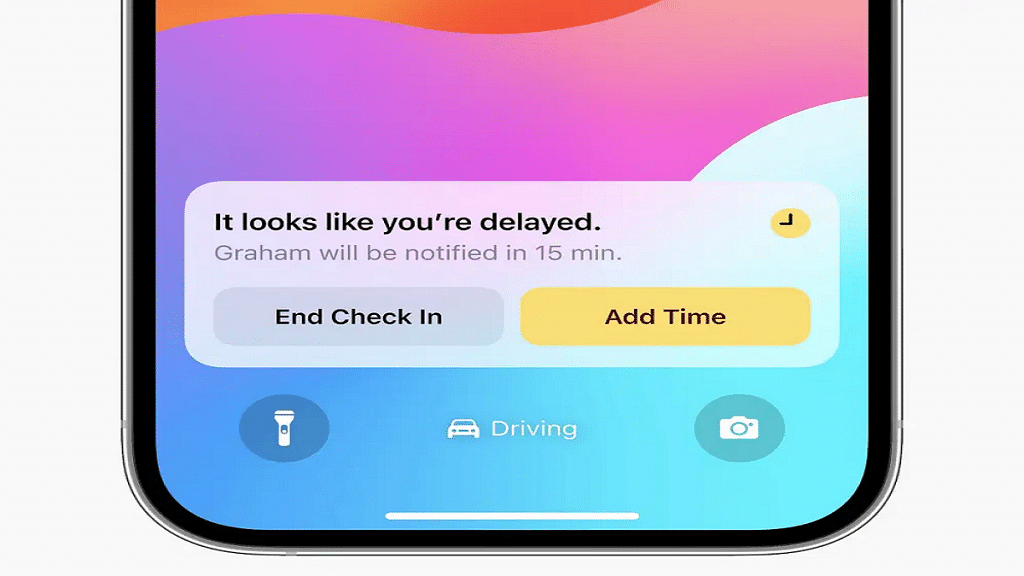
During the WWDC 2023 event, Apple introduced a new feature for iMessage that aims to keep your loved ones informed when you arrive home safely. Known as the Check-In feature, it uses estimations of your arrival time and monitors your progress. In the event that you fail to reach home within the estimated timeframe, it will first notify you and subsequently send an alert to your designated contacts. Also Read | Apple New ‘NameDrop’ Feature for iPhones: What Is It? Steps To Use

The Check-In feature also allows users to modify the estimated arrival time by using the edit button. Additionally, it can be used to notify contacts when returning from a trip to the grocery store at night. Simply set the estimated length of the trip, and the feature will automatically notify your contacts upon your return.

Step-by-Step Guide On Using Check-In Feature On iPhone

For those interested in using the Check-In feature to inform their loved ones about their safe arrival, here is a step-by-step guide:

Step 1: Open iMessage and access the conversation thread with the individual(s) you wish to alert upon your arrival home. If necessary, start a new conversation with them.

Step 2: Locate and tap the plus sign situated to the left of the text field.

Step 3: From the list of available apps, select Check-In. This will initiate the Check-In feature, enabling you to share your estimated arrival time and location with your chosen contacts.

Also Read | Magnify Anything, Anywhere: Learn How To Use Your iPhone As A Magnifying Tool

Step 4: Your iPhone will automatically determine your current location and your home address. It will then provide an estimate of the time required to reach home by walking or driving. If needed, you can modify this estimate by tapping the Edit button, allowing for adjustments to incorrect estimations or changes in your mode of transportation.

Step 5: Tap Send to share your Check In with the selected contacts. You also have the option to include a personal message or an emoji, if desired.

Step 6: To edit your estimated time of arrival or cancel the Check-In, simply reopen the Check-In app. Moreover, you can monitor the remaining time until you reach home and view the number of individuals following your Check-In. Upon your safe arrival, your contacts will receive another notification indicating your return. The Check-In will then automatically conclude, ceasing the sharing of your location. Alternatively, you can manually end your Check In by tapping the End button within the app.

Privacy And Security Precautions

While using the Check-In feature, your real-time location is not shared unless you arrive home on time. However, if you fail to reach home within the estimated duration, it will share your current location, the route you took, as well as your phone’s battery and signal levels with the designated contacts. It is important to note that this data is end-to-end encrypted, ensuring privacy and security.

Also Read | Want To Share Your iPhone Screen On FaceTime? Here’s How You Can Do It