Categories
Apps Featured How To

No Card? No Problem: Here’s How To Withdraw Cash From ATMs Via UPI

Key Highlights

  • The first UPI-based ATM was launched by NPCI in India
  • Without a card, cash can be withdrawn using a UPI ATM
  • At the Global Fintech Fest 2023, UPI ATM was on show

Hitachi Payment Services, a subsidiary of the renowned Japanese conglomerate Hitachi, has introduced a groundbreaking White Label ATM (WLA) in partnership with the National Payments Corporation of India (NPCI). This innovative creation, named the Hitachi Money Spot UPI ATM, redefines the way customers access cash, eliminating the need for traditional debit or credit cards. Also Read | Use UPI On Your Feature Phone With Ease: Here’s How

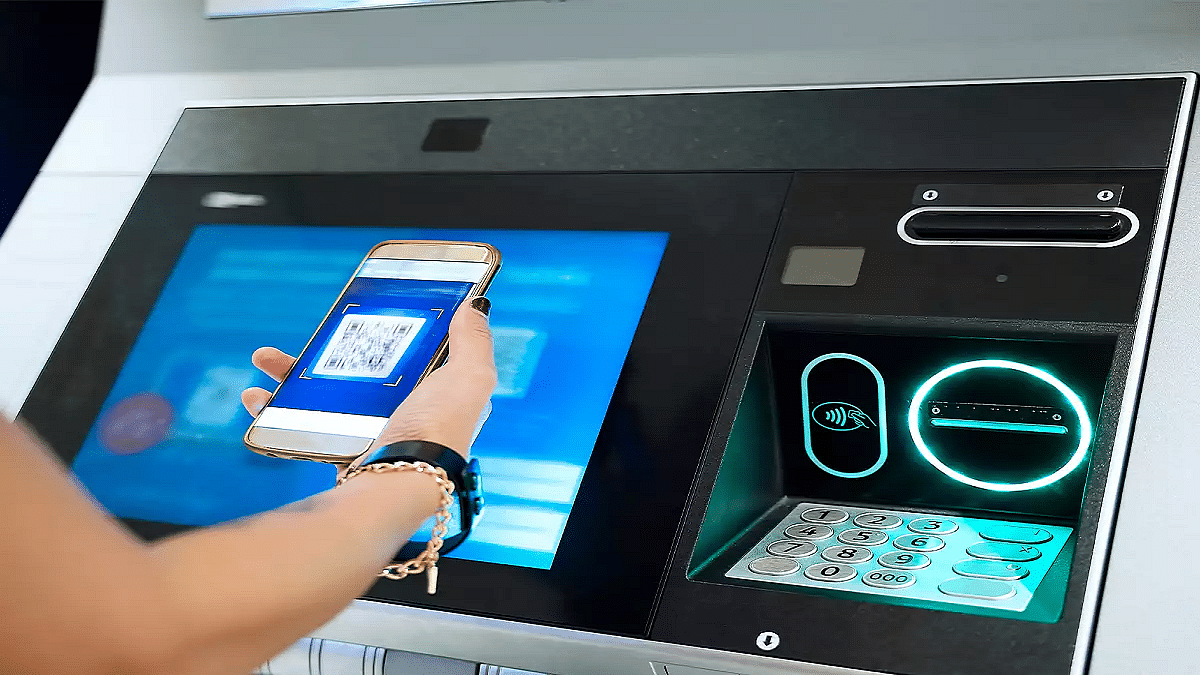
Unveiled at the Global Fintech Fest 2023 in Mumbai on September 5, 2023, the Hitachi Money Spot UPI ATM marks a pivotal moment in banking convenience. With the expansion of these UPI ATMs to various locations, the days of carrying physical cards to ATMs for cash withdrawals will soon become a thing of the past. This revolutionary concept allows individuals to withdraw cash directly from their bank accounts through UPI apps.

How To Use Hitachi Money Spot UPI ATM

Curious about how this UPI-ATM works? Sumil Vikamsey, Managing Director & CEO – Cash Business at Hitachi Payment Services, simplifies the process:

Step 1: Begin by choosing the desired withdrawal amount from the ATM.

Step 2: A QR code corresponding to your selected amount will appear on the screen.

Step 3: Use any UPI app on your mobile phone to scan the displayed QR code. Then, enter your UPI PIN to authorize the transaction.

Step 4: Once authorized, the ATM will dispense the requested cash.

Also Read | UPI Money Transaction Limit In India: Here’s The Limit Of Transactions You Can Do Via GPay, PhonePe, Paytm Daily

Who Can Benefit From UPI-ATMs?

The accessibility of UPI-ATMs is not limited to a select few. As Vikamsey explains, “Anyone with a registered UPI application on their Android or iOS device can utilize UPI-ATMs.” Furthermore, these White Label ATMs can be harnessed by Payment Service Providers (PSPs) with the necessary certification for Interoperable Cardless Cash Withdrawal (ICCW) functionality, as well as issuer banks that have adopted this feature.

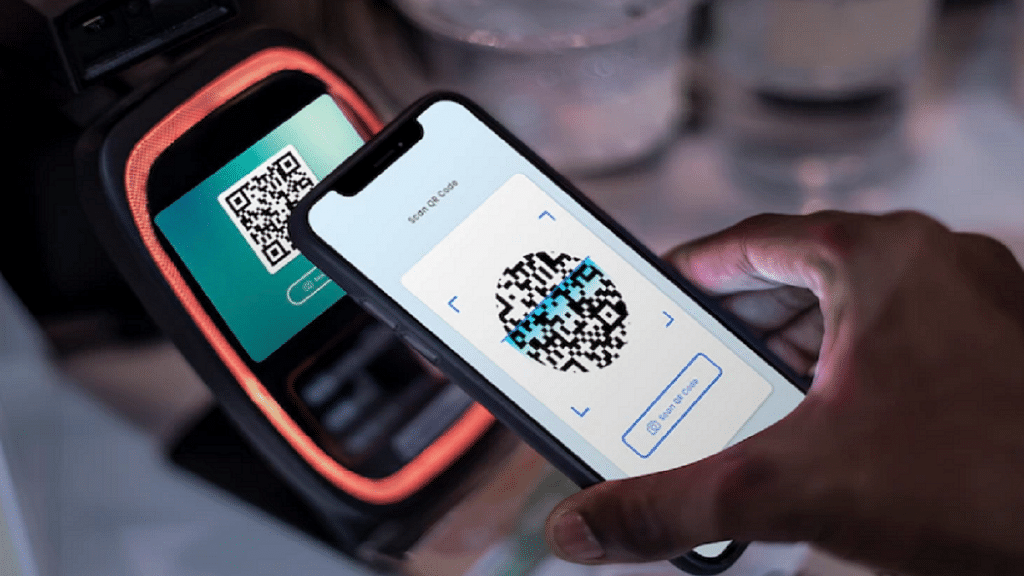
Vikamsey anticipates that more banks and UPI PSPs will join this transformative initiative in the future. While customers had the opportunity to experience it at the Global Fintech Fest 2023, full-scale deployment will commence in the coming months.

Enhancing Security And Promoting Financial Inclusion

Beyond its convenience, the UPI-ATM also addresses security concerns. It significantly reduces the risk of card skimming by fraudsters. Moreover, it is expected to bolster financial inclusion by providing easy access to banking services in areas where traditional banking infrastructure and card usage are limited—a vision championed by Hitachi Payment Services.

Also Read | UPI Tips And Tricks: Here’s How You Can Set UPI PIN Without Using Debit Card Details
Categories
Apps Featured

Duolingo Delight: Top Five Features For Effortless Language Learning

Key Highlights

  • Duolingo’s features have made it a powerhouse in the world of language learning
  • Its engaging gamification keeps users motivated
  • Duolingo offers a wide range of languages

In an increasingly interconnected world, the ability to communicate in multiple languages is a valuable skill. Whether you’re a globetrotter looking to converse with locals, a student seeking academic excellence, or a professional striving for career advancement, Duolingo has emerged as a powerful tool to help you master new languages. This article delves into the top five features that make Duolingo a standout language-learning platform. Also Read | Mastering A New Tongue? Here Are The Best Mobile Apps For Learning A New Language

Gamified Learning Experience

Duolingo sets itself apart with its engaging and gamified approach to language learning. It employs a system of rewards, experience points, and streaks, making the learning process feel like a delightful game. Users can earn virtual currency, called “lingots,” for completing lessons and maintaining daily streaks. This gamification not only motivates learners but also makes the experience addictively fun.

Accessibility Across Devices

One of Duolingo’s key strengths lies in its accessibility. Whether you prefer learning on your smartphone, tablet, or desktop computer, Duolingo offers a consistent user experience across platforms. This flexibility allows users to seamlessly transition between devices, making it easy to fit language learning into their daily routines.

Comprehensive Language Selection

Duolingo boasts an extensive range of languages to choose from, with options spanning from widely spoken languages like Spanish and French to lesser-known ones like Esperanto and Navajo. Furthermore, they continually expand their offerings, ensuring that learners can explore a diverse array of languages, including fictional ones like Klingon and High Valyrian.

Also Read | Never Get Lost Again: Four Best Navigation Apps For Travelers

Adaptive Learning

Duolingo employs an adaptive learning algorithm that tailors lessons to the individual user’s proficiency level. This means that beginners and advanced learners alike can find value in the platform. If you’re just starting, Duolingo introduces basic vocabulary and grammar, gradually increasing complexity as you progress. Conversely, if you have prior language knowledge, you can take a placement test to skip ahead to more advanced content.

Community & Social Features

Learning a new language can be a solitary endeavor, but Duolingo recognizes the value of community and social interaction in the learning process. Users can join clubs, compete with friends on leaderboards, and participate in forums to discuss language learning tips and strategies. Additionally, the Duolingo community contributes to course development by volunteering to create and improve language courses for others to benefit from.

Also Read | Government Exam Preparation: Four Best Educational Apps To Stay Ahead

Categories
Apps Featured Info

MapMyIndia Takes Center Stage At G20 Summit India, Challenging Google Maps

Key Highlights

  • Today marked the opening of the G20 Summit, which will go till September 10.
  • As a result of the worldwide event, many locations in Delhi are closed.
  • This interactive map should make it easier for you to navigate the city.

The G20 Summit, scheduled for September 8 to 10 in New Delhi, has drawn global attention to the Indian capital. However, it has presented significant challenges for Delhi’s residents, including traffic disruptions and movement restrictions due to heightened security. Also Read | Never Get Lost Again: Four Best Navigation Apps For Travelers

Navigating Delhi’s Summit Chaos With MapMyIndia

To aid commuters in navigating the city smoothly during this event, the Delhi Police has recommended the use of Mappl’s MapMyIndia app, a satellite-based navigation tool offering real-time traffic updates and road closure information.

MapMyIndia’s G20 Summit Features

Mappl, an India-based company known for its comprehensive navigation services and maps, has introduced special features tailored for the G20 Summit. These features include real-time tracking of road closures and turn restrictions, achieved through collaboration with the Delhi Police and data integration into the app.

Real-time Updates And Alternative Routes

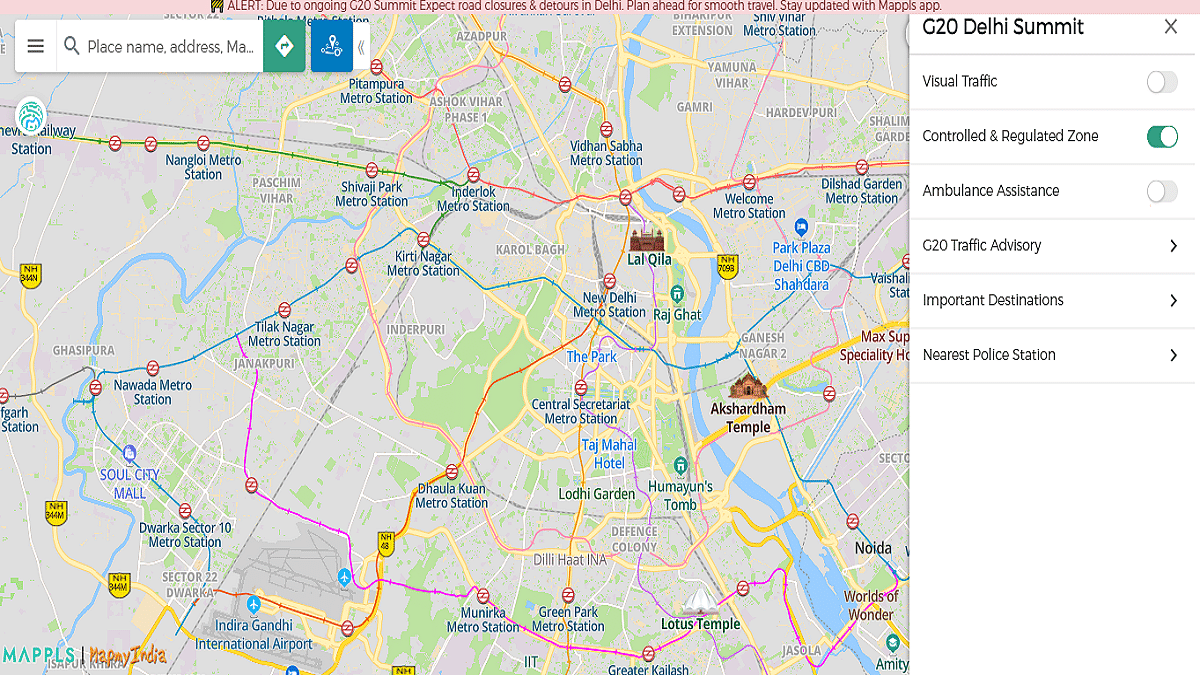
Within the app, users can easily identify affected roads marked in red on the map and receive alternative route suggestions to navigate around disruptions. Additionally, the map highlights officially designated Regulated and Controlled Zones to help users plan their routes accordingly.

Also Read | Google Maps Immersive View For Routes Shows Live Route Traffic, Weather, And More: How To Use?

Accessible And Versatile App

MapMyIndia app is readily available for download on the Google Play Store and Apple App Store. Beyond G20-specific features, the app offers satellite, terrain, and 360-degree views, along with a default map view. Users can utilize the app to search for locations, obtain directions, share their whereabouts, and report issues.

Mappl CEO’s Perspective

Rohan Verma, CEO of Mappl, emphasized, “Residents and visitors can use the Mappls app to navigate smoothly and accurately in Delhi during the summit, through our partnership and coordination with Delhi Police wherein Mappls app is ingesting the traffic advisories and suggesting routes which follow the traffic restrictions.”

A Boost For ‘Made in India’ Products

This endorsement for MapMyIndia aligns with the government’s growing emphasis on ‘Made in India’ products. The G20 Summit is poised to host leaders from 19 countries, the European Union, and representatives from esteemed international organizations such as the United Nations, the World Bank, and the International Monetary Fund.

Also Read | Want To Report Accidents And Road Closures On Google Maps? Learn How To Do It

Categories
Apps Featured How To

ICC Cricket World Cup 2023: How To Buy Tickets For India vs. Pakistan And Other Matches

Key Highlights

  • For the first time, India will serve as the sole host nation for an ODI World Cup.
  • The date of India vs. Pakistan is set for October 14.
  • Online and offline ticket purchases are simple to book.

In response to the tremendous demand and passion among cricket enthusiasts to witness the ICC World Cup 2023 matches live from the stadiums, the BCCI has unveiled a fresh batch of 400,000 tickets. These tickets will be available for purchase starting September 8 at 8:00 PM through BookMyShow, catering to the excitement surrounding matches, including the highly awaited India vs. Pakistan clash.

If you’re eager to be part of the World Cup’s electrifying atmosphere, here’s a comprehensive guide to securing your tickets, including online and offline booking procedures, ticket availability timelines, pricing details, venue information, and more. Also Read | Last-Minute Travel Plans? Here’s How To Book Tatkal Train Tickets Online

India vs. Pakistan Cricket World Cup 2023: Match Date, India Time, Venue

DateOctober 14, 2023
Time2:00 PM (IST)
VenueNarendra Modi Stadium, Ahmedabad

ICC Cricket World Cup 2023: Ticket Price

The ticket prices for ICC Cricket World Cup 2023 vary based on the venue and seating, spanning from Rs. 499 to Rs. 12,500. These tickets will be allocated on a first-come, first-served basis. To secure prime seating in the stadium, it’s advised to make your reservations early.

How To Book Ticket Online Via BookMyShow

BookMyShow stands as the official online ticket booking partner for the ICC Men’s Cricket World Cup 2023 in India. Once your booking is successful and payment is made, physical tickets will be dispatched to your address. Here’s a step-by-step guide to booking match tickets online:

Step 1: Visit the BookMyShow website or download the app from the Play Store or App Store.

Step 2: Navigate to the ICC World Cup 2023 section.

Step 3: Choose your preferred search method, either by team or venue.

Step 4: Browse through the list of matches along with their fixture dates.

Step 5: Select your desired match and click “Book.”

Also Read | Here’s How To Download Videos From Netflix, Amazon Prime, And Disney+ Hotstar

Step 7: Choose the number of seats (maximum of two per booking).

Step 8: Opt for your preferred stand based on seat availability, with ticket pricing details provided.

Step 9: Select your seats by zooming in on the stand.

Step 10: Confirm your selection by clicking “Book.”

Step 11: Enter your PIN-code and delivery address for the physical ticket shipment.

Step 12: Proceed with the payment, and your tickets will be dispatched to you 2 to 7 days before the match.

Cricket World Cup 2023: How To Book Ticket Offline

For those who prefer the traditional route, offline ticket bookings can be made by visiting the ticket counters at the respective stadium venues closer to the match days. Specifically for the India vs. Pakistan match, fans can purchase tickets at Narendra Modi Stadium, Ahmedabad, several days in advance of the matchday to secure their spots in the stadium’s stands.

Also Read | How To Book Your Uber Ride 90 Days In Advance: A Step-by-Step Guide

Categories
Apps Featured Gaming

Sony PlayStation Plus Subscription Costs Increased In India

Key Highlights

  • Sony has increased PlayStation Plus prices
  • Now starts at Rs. 3,949
  • Prices hiked for all three PlayStation Plus plans

Sony has been offering cloud gaming service in the form of PlayStation Plus. Users can play a variety of games on PlayStation Plus but need subscription to the services. Effective September 6, 2023, Sony has announced new prices for the PlayStation Plus services in India. As Sony revealed earlier, all three PlayStation Plus services now cost higher. Below are the new rates:

Sony PlayStation Plus New Increased Pried In India

Sony has announced new PlayStation Plus prices in the Indian market. With the latest price hike the PlayStation Plus 2023 services can now be purchased starting at Rs. 3,949. Previously, the rates for the PlayStation Plus services were available starting at Rs. 2,999 in the country. Currently, Sony is offering three different subscription plans for the PlayStation Plus services and the aforementioned prices are of the base plan.

Notably, the new rates will be applicable to the already subscribed members who opt for any new add on service. The new prices won’t be effective for the existing customers even if the subscription is renewed in the next cycle, i.e., November 6, 2023. Below is the list of all Sony PlayStation Plus subscription plans along with the offers one can avail in each plan. The new rates are also mentioned below.

PlayStation Plus Essential Subscription Plan And New Prices

This is the base plan for the PlayStation Plus services. In the essential plan, users get access to all the basic services including two games for two months and multiplayer online gameplay access. In this base plan, PlayStation Plus users will also get multiple discount offers along with cloud storage option for saved files. After the price hike, the PlayStation Plus Essential price will be available for purchase at Rs. 3,949.

Also Read: Best Games On Xbox Game Pass That Are Worth Playing

PlayStation Plus Extra Subscription Plan

This is the second PlayStation Plus which offers the same services as the Essential subscription including two months free for two games and multiplayer, etc. However, it additionally allow users to download up to 400 different PS4 and PS5 games. After the new price hike, the Extra subscription plan will cost Rs. 6,699. Previously, it was available at Rs. 5,749.

Also Read: Best Action Games For Android In 2023

PlayStation Plus Deluxe Subscription Plan

This is the most premium subscription plan in India which includes all the aforementioned services in addition to some of the most popular PS1, PS2, PS3, and PSP gaming titles. This subscription of PlayStation Plus Deluxe is now priced at Rs. 7,599 instead of Rs. 5,749 older price label.

Also Read: Best GTA SAN Andreas Cheat Codes For Laptops And PCs: List And How To Use

Categories
Apps Featured

New WhatsApp User Interface In Works: When Will Is It Coming?

Key Highlights

  • WhatsApp new UI coming soon
  • Leaked screenshots surface online
  • Will bring along new chat filters

WhatsApp has been consistently launching new features for its Android and iOS messaging app. Recently WhatsApp has made it simple for the masses to share high quality photos and videos. While Meta has released several new user-centric features to the messaging app, it hasn’t given any major design overhaul to WhatsApp’s design and layout since long. But now, it seems that Meta has started working on a new design interface for WhatsApp which will be released soon.

New WhatsApp Design Coming Soon?

WABetaInfo which is known for releasing WhatsApp related updates has now revealed a new design for WhatsApp is in works. The publication has shared a report that suggests a new WhatsApp interface is being tested and has been spotted with an Android beta build. The report has also shared a screenshot of the new WhatsApp UI which is expected to be released for the stable version in the coming month.

Also Read: WhatsApp Finally Allows Sending HD Photos: How To Send High Quality Photos On WhatsApp

Notably, this is one of the biggest design overhaul that WhatsApp is set to release in the last few years. The new UI will primarily bring along a new look for the main message box (chat window). It will also include a re-worked status bar with a new white paint job. The screenshot shared is of the WhatsApp’s new design in the standard light mode of Android. We still need to see how the WhatsApp design overhaul appears with the dark mode.

In addition to the re-designed notification bar, WhatsApp re-designed UI will feature dedicated tabs for different chats. The new UI for WhatsApp will come with All, Unread, Personal, and Business chat tabs which is missing for the current version of the mobile app. A new button layout will also be added that will help users to toggle through the different char tabs.

The latest WhatsApp UI overhaul has been spotted being tested with the WhatsApp beta version 23.17.177 for iOS. WhatsApp is expected to get a design overhaul for Android version too. But we might have to wait for a while to see the new WhatsApp UI with revamped notification bar, icons, and chat window.

Also Read: WhatsApp Video Calling App For MacOS Launched: How To Use?

Categories
Apps Featured

X (Twitter) To Soon Allow Video, Audio Calling Without Any Phone Number

Key Highlights

  • X (formerly Twitter) audio and video calling feature arriving soon
  • Wouldn’t require phone numbers
  • Will be available for Android, iOS, Mac, and Windows

Ever since Elon Musk took over Twitter it has been quite a roller coaster ride for the microblogging platform. Musk took some of the toughest calls and has also renamed Twitter to X with an aim to turn it into an “everything app”. X has already been getting updated with new features and layouts and more new updates are expected to be added going forward. Elon Musk has just announced the arrival a new feature that will surely make X a biggest WhatsApp, Telegram rival. Here is the latest development:

X Video, Audio Calling Feature: When It Is Coming?

Elon Musk officially made an announcement that confirms the upcoming feature on X for audio and video calling. Musk took to an X post announcing the new video and audio calling feature. According to Musk, X will be an effective global address book with the release of the new feature. While Musk didn’t reveal when exactly the brand will release this new video/audio calling feature on X, we expect some developments to be confirmed around the same soon.

What will make the audio and video calling on X (previously Twitter) a unique experience is the option to use this feature without any phone number. Just for reference, popular instant messaging applications such as WhatsApp and Telegram require users to add a phone number before proceeding with audio and video calling.

Also Read: Four Best Fitness Apps To Download On Android, iOS

Now, X (formerly Twitter) allowing this possibility without using the phone number will definitely set new standard in the mobile instant messaging space. The X post shared by Musk confirms the compatible OS for audio and video calling feature. Both mobile and PC users will be able to make/receive calls on X app. The feature will be released for both Android and iOS mobile platforms and also Mac, Windows laptops/PCs.

It is not known if the audio and video calling on X (formerly Twitter) will be end-to-end encrypted for added security. It would only be confirmed once the feature is officially made available to all the compatible devices. That said, the new and unique features being added to X will surely enhance the overall using experience.

Also Read: Best Apps And Tools To Download High Quality Instagram Status On Any Phone

Categories
Apps Featured Gaming

Top Upcoming Netflix Games 2023: Lego Legacy, Cut The Rope Down Daily, And More

Key Highlights

  • New Netflix games being added to the platform
  • List updated soon on official app
  • Four new game titles added

Netflix has been one stop destination for watching movies and TV shows since long. However, the brand started offering games for non stop entertainment on its platform. Netflix has been proactively adding on new gaming titles on its streaming app. Now, four additional games have been added to the list. Let’s take a look:

Cut The Rope Daily

  • A new version of the popular Cut the Rope mobile game
  • Developed by ZeptoLab
  • Is a puzzle game where gamers can access various in-game areas
  • Integrated game calendar for tracking total number of puzzles solved
  • New costumes will be unlocked after completing different levels

Also Read: Best Games On Xbox Game Pass That Are Worth Playing

Lego Legacy: Heroes Unboxed

  • Arriving as a new version of the popular Lego Legacy game
  • Classic LEGO designing game developed by Gameloft
  • Players get to create new buildings and also commute to new destinations (in-game)
  • Multiple minifigures in game including Ghostbusters, Hot Dog Man, and Chicken Suit Guy, etc

Also Read: Best Game Settings For BGMI, PUBG For A Premium Gaming Experience On Android, iOS

Samurai Showdown

  • This one will please the action game lovers
  • Is a classic action fighting game recreating the original version
  • One-on-one battle between players
  • Players will get to choose from a range of legendary warriors to compete in the gameplay

Also Read: 4 Best Spider-Man Games Of All-Time

WrestleQuest

  • Another action adventure game added to the list of Netflix games
  • Developed and published by Skybound Games and Mega Cat Studios respectively
  • Multiple new levels
  • Players get to werstle for pro-wrestling championships

Also Read: Poki games: The best four online games to play for free

Categories
Apps Featured

WhatsApp Video Calling App For MacOS Launched: How To Use?

Key Highlights

  • New dedicated WhatsApp released for MacOS
  • Allows Video calling
  • Audio calling also supported

WhatsApp has been improving the messaging experience by adding different set of features to its Android and iOS mobile app. The Meta-owned messaging platform has also been serving Windows and Mac users the same level of premium messaging experience as the mobile version. Both WhatsApp web (Windows and Mac) and mobile version offer almost identical tools and features for messaging. Going a step forward, Meta has now released a new dedicated video/audio calling app for MacOS. Read on to know the functionality of the new WhatsApp Mac app and steps to use:

WhatsApp Video/Audio Calling App For MacOS: What Is It? How To Use?

Meta CEO, Mark Zuckerberg has officially announced the arrival of new native app for Mac OS that will allow direct video and audio calling. This new app for MacOS has been redesigned as per the brand and will be allowing easy and a better audio and video calling experience on a large screen. Notably, WhatsApp video calling is one of the most popular feature that is accessed daily by numerous Android/iOS users globally.

Also Read: WhatsApp Finally Allows Sending HD Photos: How To Send High Quality Photos On WhatsApp

Off late, WhatsApp has been working on delivering the same rich user experience to the web users. The new video/audio calling app seems like a move towards the same. Besides standard one-on-one video chats, the new WhatsApp app for Mac will also allow users to make video calls tp groups. However, there is a limit to the number of users one can add to a group video call. Only up to eight users can be added each time for a group video call while using the native WhatsApp app for Mac.

As for the audio calls, the new app will allow users to make group audio call as well. The limit set for the audio calls is up to 32 people. The remaining functionality remains the same as the mobile version. Using the native WhatsApp Mac app, users will get the option to view the entire call log for both video/audio calls. This intuitive app is expected to enhance the video/audio calling experience for Mac PC/laptop ussers.

Also Read: WhatsApp HD Photo Sharing On iPhone Finally Available: Steps To Share High Quality WhatsApp Photos

Categories
Apps Featured How To

Your Guide To Free YouTube Movies: How To Watch On Mobile And PC

Key Highlights

  • YouTube’s feature offers users the chance to enjoy a collection of free movies
  • It mainly comprises classic titles from Hollywood giants such as MGM, Lionsgate, Sony Pictures, and Warner Bros
  • YouTube Premium emerges as a solution, offering an ad-free experience

YouTube offers a great feature allowing users to access free movies accompanied by advertisements. This collection primarily features classic titles from prominent Hollywood studios, including MGM, Lionsgate, Sony Pictures, and Warner Bros.

Diving into the treasure trove of free movies, users can find iconic films like The Terminator, Rocky, Legally Blonde, The Hunger Games, and The Karate Kid. These films are supported by ads, akin to the experience of watching regular YouTube videos. Also Read | YouTube Channel Naming Ideas: 100+ Best Names For YouTube Educational Channels

Limitations And Solutions

Despite the allure of free movies, certain challenges may arise during the viewing experience. Some movies might not be accessible in specific regions due to licensing constraints. Moreover, age restrictions or the necessity to log in to a YouTube account for age verification could present hurdles. Additionally, there’s an inclination among some users to enjoy movies devoid of ads and in higher quality.

For those desiring enhanced choices and features, YouTube has the option of YouTube Premium. This subscription service provides an ad-free viewing experience and permits video downloads for offline enjoyment.

How To Watch Free YouTube Movies On Mobile

Step 1: Launch the YouTube app on your device. If not installed, download it from the Google Play Store or the App Store.

Step 2: Tap the Explore icon situated at the top alongside categories, then access Films.

Step 3: Scroll down to Free Primetime Movies and select View All. A collection of free movies with accompanying ads will be showcased.

Step 4: Choose the movie of your choice and tap to commence playback on your device. Adjust video quality, activate captions, and manipulate controls based on your preferences.

Also Read | YouTube Music: How To Enable Auto-Add Songs To Your Last Playlist

How To Watch Free YouTube Movies On PC

Step 1: Access youtube.com and log in if required.

Step 2: Click on the Hamburger icon located at the top, then proceed to Movies under the Explore sidebar.

Step 3: Navigate to Free Primetime movies and select View All. A compilation of movies available for free with ads will be displayed.

Step 4: Pick the desired movie and click to initiate playback on your PC. Customize video quality, enable captions, and use controls as preferred.

Also Read | How To Remix With Collab In YouTube Shorts