Categories
Apps Featured Info

Is Google Deleting Your Gmail Account Next Month? Here’s The Truth

Key Highlights

  • Google deleting inactive Gmail accounts in December.
  • Security measure to protect users’ data.
  • Active users need not worry.

If you’re a Gmail user, you may have heard rumors that Google is deleting inactive Gmail accounts next month. Let’s get to the bottom of this and understand what’s really happening.

Also Read: Google Pixel 8 Series Launched: Top Highlights, Price

What’s Going On?

Google has recently announced a change in its policy, stating that it will begin deleting inactive Gmail accounts from December 2023 onwards. This move is aimed at enhancing security. Inactive accounts are more susceptible to cyber threats, and Google wants to protect its users from potential security breaches.

Also Read: Google Introduces Emoji Reactions To Gmail For Android: Here’s How To Use It

The Policy Details

According to Google’s new policy, accounts that have been inactive for two years will be deleted. But don’t worry, this doesn’t affect accounts that are regularly used. If you frequently use Gmail, Docs, Calendar, or Photos, your account is safe. This policy only targets accounts that have not been used for a significant period.

Also Read: Google Tensor Vs Exynos 2200 Chipset Comparison

Why Is This Happening?
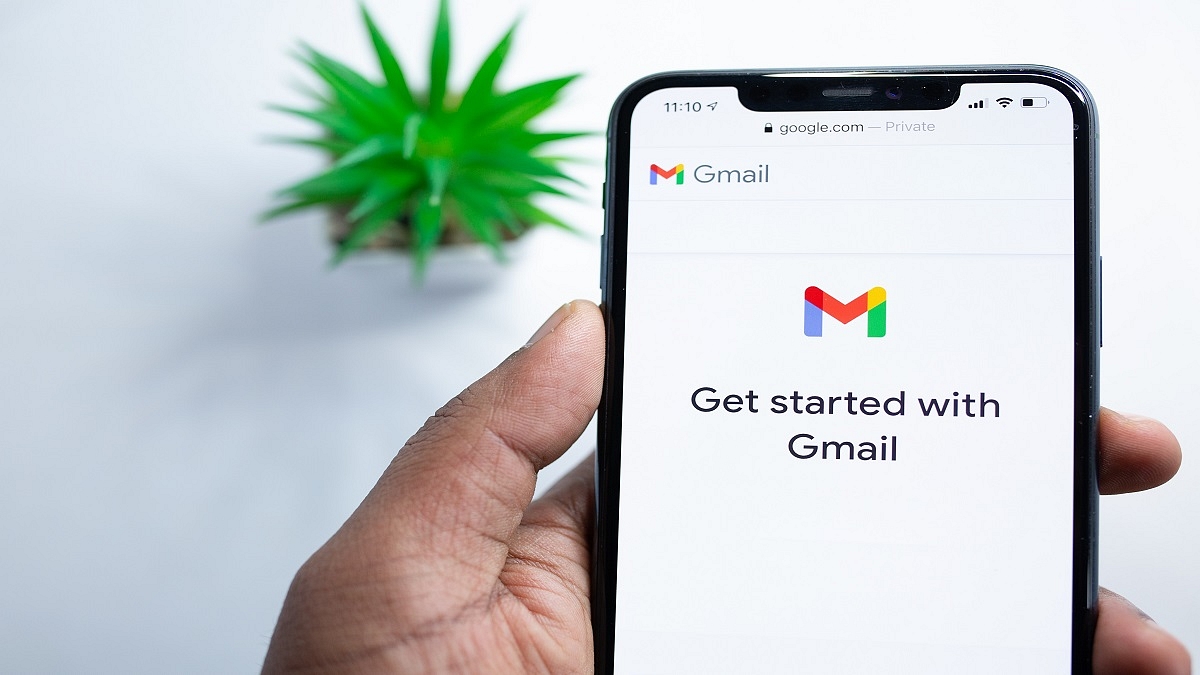
Google’s primary motivation is to boost security. Inactive accounts often have outdated or reused passwords, lack two-factor authentication, and receive fewer security checks. These factors make them easy targets for cybercriminals. Google stated, “If a Google Account has not been used or signed into for at least 2 years, we may delete the account and its contents.” This includes data within Google Workspace, which encompasses Gmail, Docs, Drive, Meet, Calendar, and Google Photos.

Also Read: Google For India 2023: A Recap Of Key Announcements

How To Keep Your Account Safe

To ensure your Gmail account doesn’t get deleted, you should take a few simple steps. Google will send multiple notifications to both your account email address and the recovery email you provided before deleting your account. This gives you ample time to take action and prevent your account from being deleted.

Also Read: Google Pixel Car Crash Detection Comes To India: How To Use?

The Final Word

In a nutshell, Google’s decision to delete inactive Gmail accounts is a security measure to protect its users. If you’re an active user, there’s no need to worry. Just keep using your Gmail account, and you’ll be safe. However, if you haven’t logged in for a while, it’s time to do so to prevent any unwanted surprises. Your data and privacy are important, and Google is taking steps to safeguard them.

Also Read: Google Chrome’s New Feature: You Can Easily Monitor Tab RAM Usage Now

Categories
Apps Featured Info

Google Chrome’s New Feature: You Can Easily Monitor Tab RAM Usage Now

Key Highlights

  • Chrome Update: See Tab Memory Usage Instantly Now
  • Google promises smoother browsing with Chrome’s New RAM Monitoring
  • It easily manages RAM for Open Tabs in Chrome

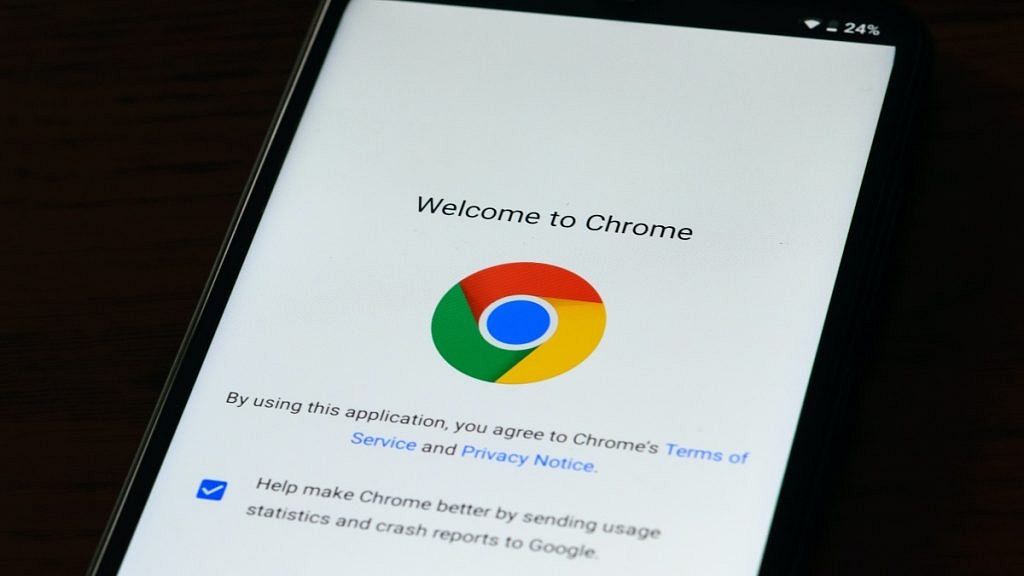
Google Chrome has introduced a new feature that allows users to monitor the memory consumption of individual tabs in real time. This feature, reported by 9to5Google, aims to offer users clear information about how much system memory their open tabs are using.

For seamless access to this feature, users can navigate to Chrome’s settings, specifically under the ‘Performance’ section. Here, they can activate both Memory and Energy Saver modes. Furthermore, users have the option to designate specific sites to remain continually active, ensuring critical pages don’t reload each time they are accessed.

Also Read: BenQ Introduces India’s First Google EDLA-Certified Smart Boards With Integrated Google Mobile Services

This feature streamlines the process of identifying tabs that may be using an excessive amount of system resources. By merely hovering over a tab, users can quickly check real-time memory usage. This feature can be a valuable resource, particularly for those who frequently work with numerous open tabs, seeking to maintain optimal computer performance.

While Chrome had previously introduced a “Memory Saver” mode, this latest update takes it a step further by providing on-the-fly memory usage data. It eliminates the need for users to navigate through intricate settings to determine the system resources used by their open web pages.

The update is already available on the stable Chrome 119 channel and is expected to roll out to all users soon. For those who prefer not to wait, there’s a manual way to enable it via Chrome’s experimental settings.

Also Read: Google Launches 3 Chromebooks For Cloud Gaming: See Here For Specifictions, Availability, And More

Categories
Apps How To

Samsung Bixby Text Call Comes To India: What Is It? How To Use?

Key Highlights

  • Samsung brings Bixby Text Call feature for Galaxy handsets
  • Is an automated voice call feature
  • English language now available

Samsung has its self-developed virtual assistant tool called Bixby for Galaxy devices. In early 2023, Samsung launched Bixby Text Call automated voice call feature in its home country. Now, the company has released this feature for Galaxy smartphone/ tablet users in the Indian market too. What is this Bixby Text Call feature and how can you use it?

Samsung Bixby Text Call Feature: Functionality Explained

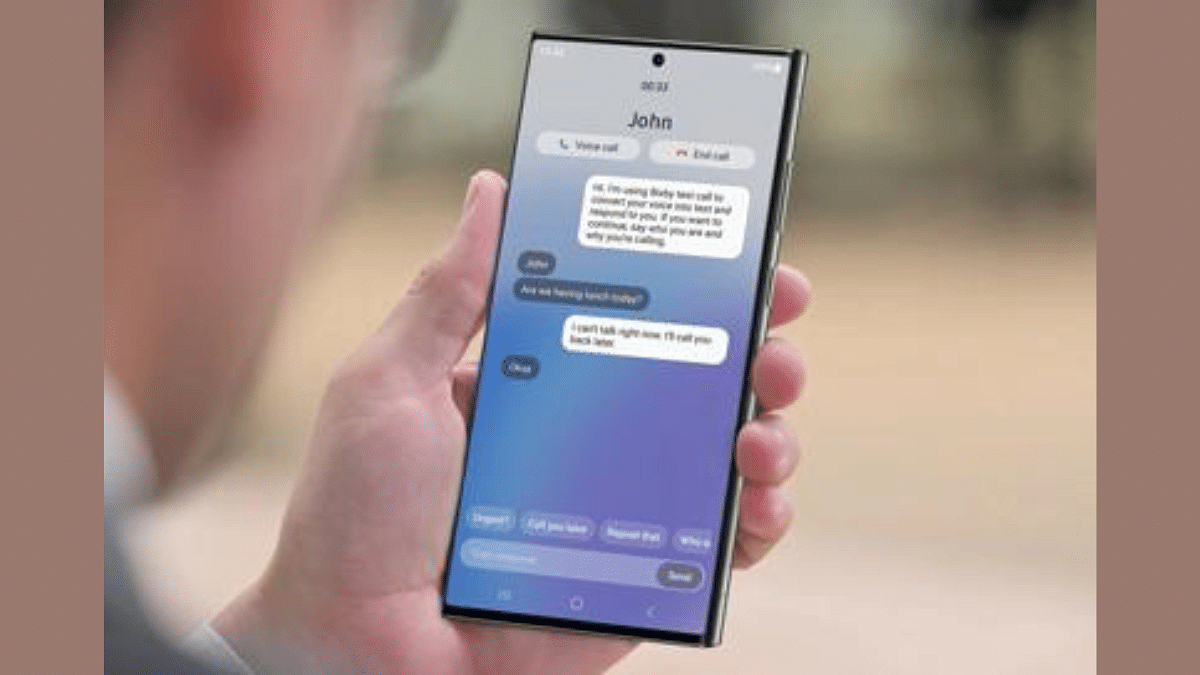
Samsung’s Bixby Text Call as mentioned is an automated voice call feature. With this tool, users will be able to answer any call without actually speaking. This AI automated voice tool will not only pick up any incoming call but will also respond to the caller and even ask the reason for the call. While setting up this feature, Bixby users can easily select from the pre-set responses and also manually type-in any message that they wish to send as a response to the caller.

Furthermore, after the Bixby text call feature is activated and it is in use, the call recipient will get to read the responses or the conversation done by Bixby and caller. They can proceed with text replies which will allow for a smoother conversation experience with the automated tool.

Samsung Bixby Text Call Feature: Steps To Activate And Use

Before you proceed with using the Bixby Text Call feature, you need to ensure you have a compatible Samsung Galaxy device. We will be mentioning the list below. If you have the supported Samsung phone, you can follow the steps below:

Step 1: On your Galaxy smartphone, go to the Settings menu

Step 2: Scroll to the Bixby Text Call feature

Step 3: Toggle on the Bixby Text Call option

Step 4: Now, you will be able to go ahead with the customizations that can be done with the voice/ audio feature

Step 5: You can edit the pre-set responses and add new replies

Also Read: Best Smartphones With Dolby Atmos To Buy In India

List Of Samsung Devices That Support Bixby Text Call Feature

  • Samsung Galaxy Fold 5
  • Samsung Galaxy Fold 4
  • Samsung Galaxy Fold 3
  • Samsung Galaxy Fold 2
  • Samsung Galaxy Fold
  • Samsung Galaxy Z Flip 5
  • Samsung Galaxy Z Flip 4
  • Samsung Galaxy Z Flip 3
  • Samsung Galaxy Z Flip
  • Samsung Galaxy S23 series (all models)
  • Samsung Galaxy S22 series (all models)
  • Samsung Galaxy S21 series (all models)
  • Samsung Galaxy S20 series (all variants)
  • Samsung Galaxy Note 20 series

Also Read: Car Troubles? Your iPhone Has The Solution: Here’s How To Use Visual Lookup

Categories
Apps Featured Info

Major Crackdown On Online Betting: Mahadev App And 21 Others Banned Amid Money Laundering Probe

Key Highlights

  • GoI banned 22 online betting apps, including Mahadev Book
  • Accused individuals, including a constable from the Chhattisgarh Police, are in custody
  • The banned Mahadev app was involved in illegal gambling on various games

Amidst ongoing investigations by the Enforcement Directorate (ED) into the illegal betting app Mahadev Online Book, the Indian government has taken action against the app and 21 others. The Ministry of Electronics and Information Technology (MeitY) issued blocking orders against these apps and websites, including Mahadev Book and Reddyannaprestopro. Let’s get into the details of this significant development. Also Read | Apple Lockdown Mode: What Is This Security Feature? How To Use?

Blocking Orders Issued

On Sunday, the government imposed blocking orders against 22 illegal betting apps and websites, among them Mahadev Book Online and Reddyannaprestopro. The Ministry’s decision follows the ED’s probe into an illegal betting app syndicate connected to the Mahadev app case. The government’s actions were prompted by the unlawful operations discovered during investigations and raids on Mahadev Book in Chhattisgarh.

Arrests And Legal Proceedings

Accused individuals Bhim Singh Yadav, a constable in the Chhattisgarh Police, and Asim Das are currently in custody, facing charges under the Prevention of Money Laundering Act (PMLA). The owners of Mahadev Book have also been arrested under Section 19 of PMLA, facing charges for money laundering offenses.

Allegations And Illegal Operations

The ED alleged that the Mahadev app operated by franchising “panel/branches” to known associates, with a 70-30 profit-sharing ratio. The app was used to join new users, create IDs, and launder money through a complex network of Benami bank accounts. This operation reportedly generated a shocking daily revenue of Rs. 200 crore.

The Mahadev app scandal revolved around an online betting platform enabling illegal gambling on various games, including poker, card games, badminton, tennis, football, and cricket. The app was run by Saurabh Chandrakar, based in Dubai, and his accomplice Ravi Uppal, both hailing from Chhattisgarh. Chandrakar’s journey from a former juice seller to an app operator adds another layer of intrigue to the story.

Also Read | No More Lines And Cards: Learn How To Book Delhi Metro Tickets On WhatsApp

Categories
Apps Featured How To

No More Lines And Cards: Learn How To Book Delhi Metro Tickets On WhatsApp

Key Highlights

  • DMRC launched a WhatsApp-based metro ticketing system
  • The features cover all Metro lines across the Delhi-NCR
  • The service is also available for Gurugram Rapid Metro

If you’re looking for a convenient way to book Delhi Metro tickets without the hassle of long queues or a smart Metro recharge card, WhatsApp has you covered. Here’s a step-by-step guide to help you book your Metro train ticket right from your mobile phone. Also Read | How to Use Multiple WhatsApp Accounts On A Single Mobile Device: A Step-by-Step Guide

How To Book Metro Tickets Via WhatsApp

  • Step 1: Save the WhatsApp Number

Begin by saving the mobile number 9650855800 in your contacts, or send this number to yourself on WhatsApp to initiate a chat without adding it.

  • Step 2: Starting the Conversation

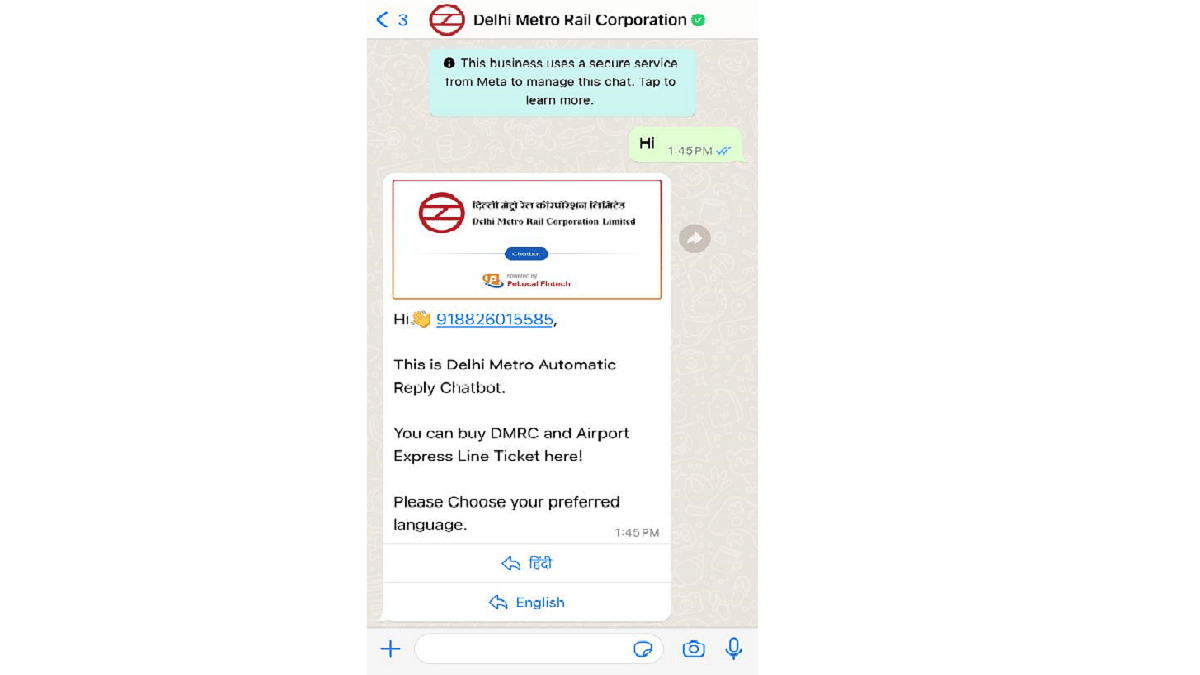
Open the chat and send a simple ‘Hi’ to get things started.

  • Step 3: Select Your Preferred Language

You can choose your preferred language between Hindi and English.

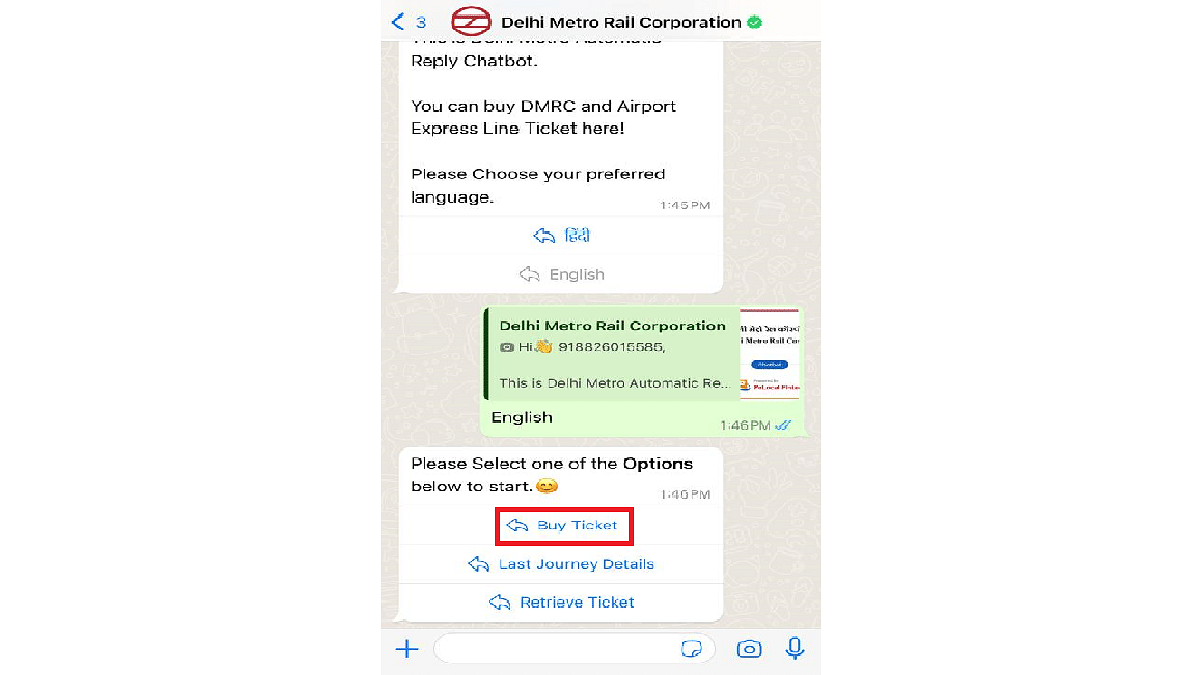
  • Step 4: Initiate the Ticket Purchase

Tap on “Buy Ticket” from the available options.

  • Step 5: Opening the Booking Page

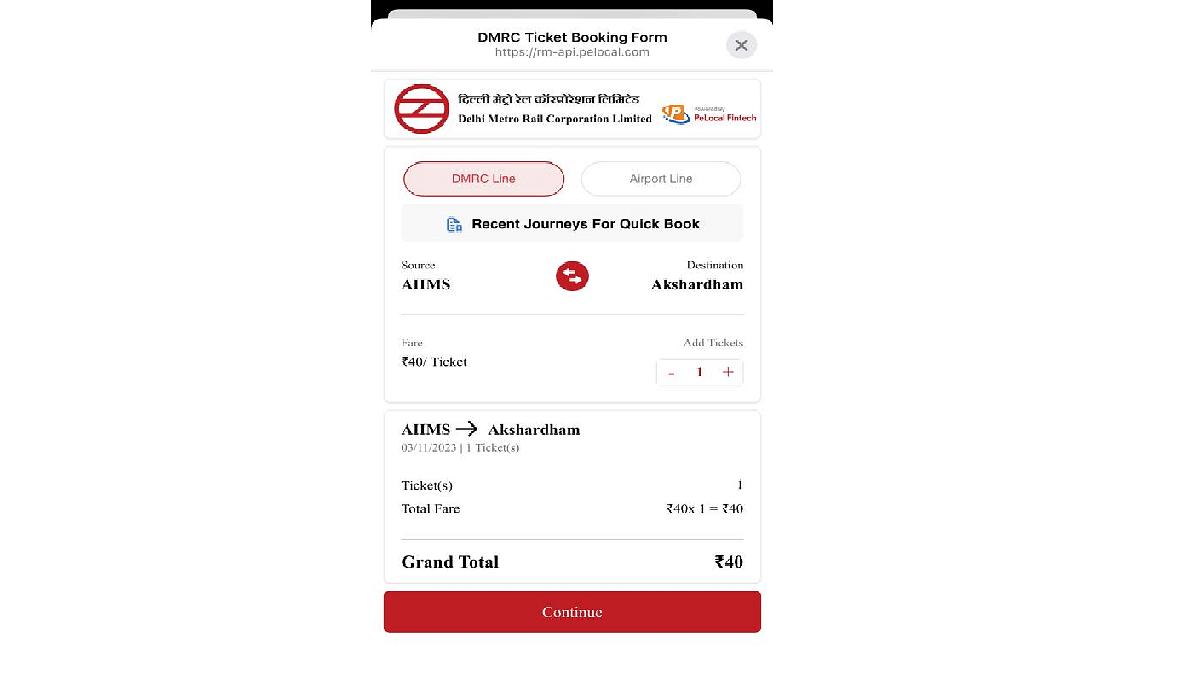
The next screen will prompt you to click “Click Here,” opening a webpage within WhatsApp.

Also Read | Top Methods And Apps For Downloading WhatsApp Status In High Quality

  • Step 6: Select Stations and Ticket Quantity

On the webpage, select your starting and destination stations and indicate the number of tickets you wish to purchase.

  • Step 7: Review Your Journey

After providing this information, click ‘Continue’ to proceed.

  • Step 8: Review and Payment

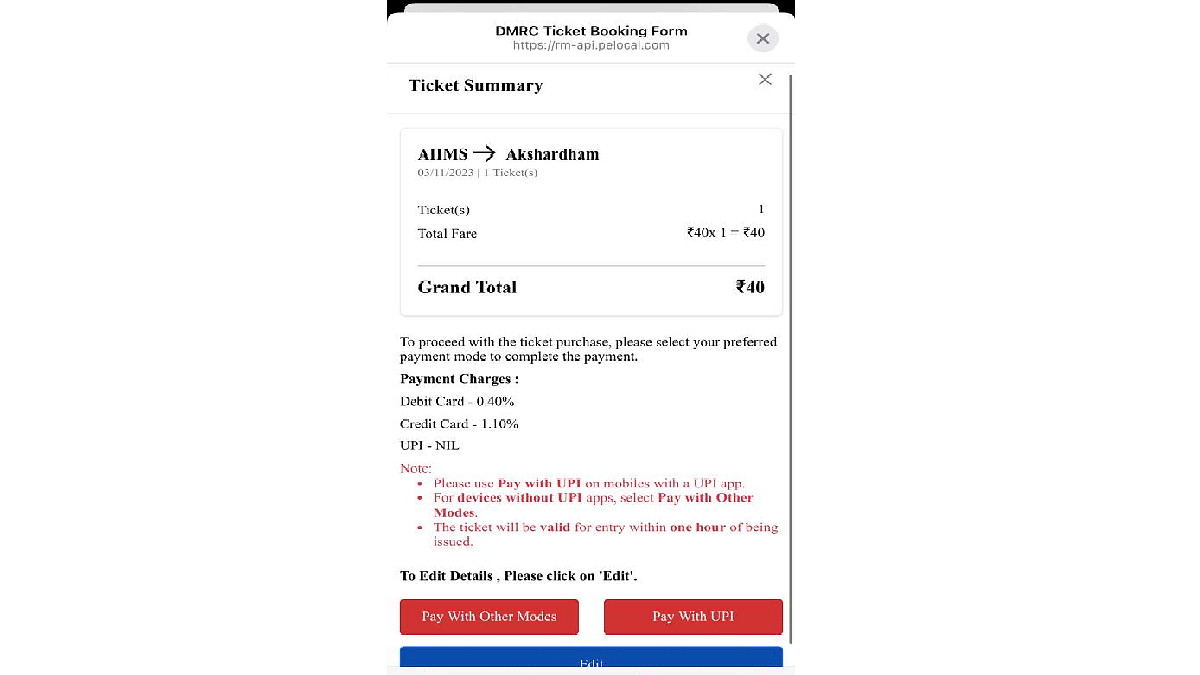
A summary of your Metro journey and the total ticket amount will be displayed on the following screen.

  • Step 9: Choose Payment Method

Debit and credit card users can opt for “Pay With Other Modes,” while UPI users can select “Pay With UPI.”

  • Step 10: Completing the Payment

You will be redirected back to the WhatsApp chat, where you’ll need to select the “Pay now” button.

  • Step 11: Select Payment Method

Choose your preferred payment method, complete the payment, and your Metro ticket will be generated in QR code format. That’s all.

Also Read | WhatsApp Enhances Group Calls For iOS Users: Up To 31 Participants Now Supported With Latest Update

Categories
Apps Featured

How To Use Instagram’s New Song Lyrics Feature In Reels: A Step-By-Step Guide

Key Highlights

  • Add song lyrics to Reels
  • Swipe left after selecting your favourite song.
  • Upcoming features: Collaborative posts and verified accounts.

Instagram has released an exciting new feature that lets users add song lyrics to their Reels, similar to what you can do on Instagram Stories. This is part of Instagram’s ongoing efforts to enhance user experience with innovative features. In this article, we’ll walk you through the steps to use this feature effectively.

Also Read: Instagram’s Latest Sticker Creation Tool: Users Can Now Separate Subjects From Backgrounds

Instagram’s head, Adam Mosseri, recently made the big announcement on his Broadcast Channel. He revealed that Instagram had noticed users manually adding song lyrics to their videos. To make things easier and more fun for users, they decided to introduce this new song lyrics feature. Mosseri also hinted that more exciting features are in the works for Reels.

Also Read: 100+ Catchy Instagram Username Ideas For Poetry Enthusiasts

How To Add Song Lyrics to Your Reel

To add song lyrics to your Instagram Reel, follow these simple steps:

  • First, open the Reel you want to edit.
  • Look for the music icon, usually located at the top.
  • Tap on the music icon, and a selection of songs will appear.
  • Choose the song that you want to use for your Reel.
  • After selecting the song, you can swipe left to add the lyrics.

This process is quite similar to the Music feature on Instagram Stories, which has allowed users to include song lyrics in their Stories for some time now.

Also Read: 100+ Best And Unique Instagram Usernames For Astrologers

Instagram: More Upcoming Features

Adam Mosseri also mentioned that Instagram is testing a feature that allows users to invite friends to collaborate on their feed posts, creating collaborative carousel posts. This means that your friends can add more images to your post, making it a shared experience.

Additionally, Instagram is testing a feature that might allow users to view posts exclusively from verified accounts. This move could help businesses and creators gain more visibility.

Also Read: How Can You Download And Watch Instagram Reels On Android, iOS Without Installing Third-Party Apps?

Ad-Free Subscription Plans

In recent news, Instagram and Facebook have announced ad-free subscription plans in Europe. Users in the European Union (EU), European Economic Area (EEA), and Switzerland can opt for these plans to enjoy a seamless browsing experience. For EUR 9.99 per month, users get ad-free access on the web, and for EUR 12.99 per month, they can enjoy ad-free access on iOS and Android platforms.

Also Read: How To Delete Your Instagram Threads Account

Categories
Apps Featured How To

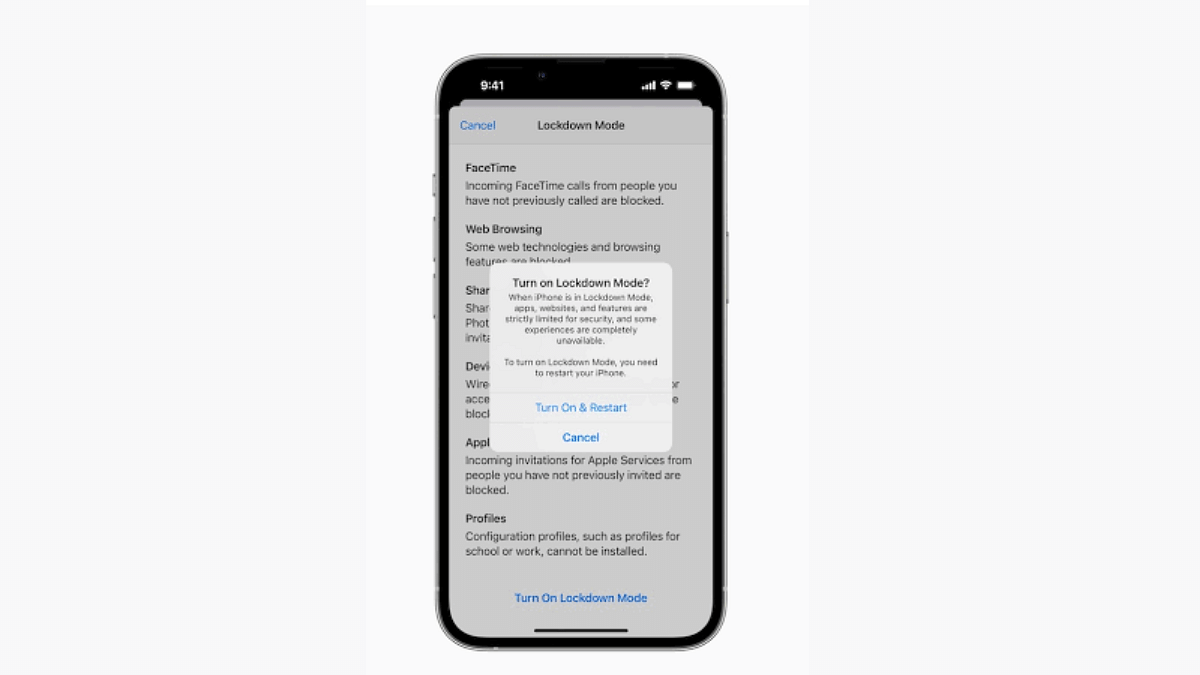
Apple Lockdown Mode: What Is This Security Feature? How To Use?

Key Highlights

  • Apple Lockdown model available
  • Alerts sent on multiple journalists and opposition leaders phone
  • Steps listed below activate Lockdown mode on Apple devices

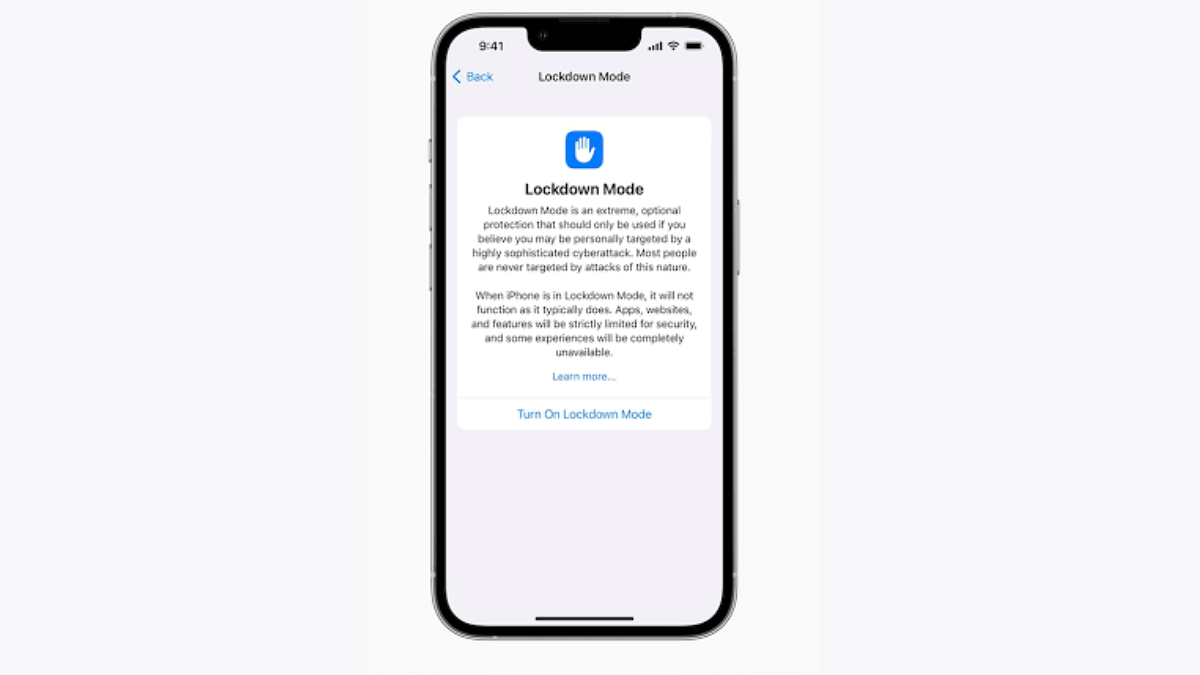
There have been several reports citing opposition party leaders and journalists have received a security message on their Apple iPhones. The alert stating “state-sponsored attackers” is being sent by Apple on these users’ devices which is an indication of a possible remote attack. Is this a new security feature that Apple is testing for iPhones and other devices? We have shared the relevant information and the steps to use this new Lockdown security mode below:

Apple Lockdown Mode: What Is It?

As previously mentioned, Apple Lockdown mode is a security tool that will safeguard a user’s phone of any remote phishing attack. Apple has reportedly sent the security alert on iPhones of multiple political party leaders from opposition and also several journalists.

According to the reports, the individuals that have received the alert notification for the “Lockdown Mode” have also received the precautionary guidelines on how to stay protected from any remote attack. The brand has also shared the steps with which one can activate and use Apple Lockdown mode on their respective iOS devices including iPhones and iPads.

Once an attack has been identified, all the services and access to the device will be locked. Devices running on iOS 16, iPadOS 16, and macOS ventura, and above will get this new Lockdown mode security feature.

Also Read: WhatsApp HD Photo Sharing On iPhone Finally Available: Steps To Share High Quality WhatsApp Photos

Apple Lockdown Mode Activation: How To Setup And Use

Step 1: On your respective Apple iPhones and iPads, open the settings menu

Step 2: Head to the Privacy and Security tab

Step 3: Tap on the Lockdown mode option

Step 4: Click on Enable

Step 5: Restart your device for proper functioning of this feature

Also Read: Lost Your Email Address? Don’t Panic! Follow These Steps To Recover It

Categories
Apps Featured How To

Google Pixel Car Crash Detection Comes To India: How To Use?

Key Highlights

  • Google releases Car crash detection system in India
  • Feature available for Pixel users
  • Tool was released back in 2014 for Google Pixel handsets

Google has one of the biggest ecosystem for user friendly apps and tools. The options are available across all Android smartphones. The Pixel lineup gets special access to various Google apps. One such applications was released for Google Pixel devices earlier in 2014 called Car Crash Detection. Designed as a safety features for smartphone users this feature made its way in the US and hasn’t been made available in other regions. However, Google has now increased the reach for the Car crash detection system to India and other markets. What is this feature and how can you use it? Read on the details below:

Google Car Crash Detection System Arrives In India: Here’s Its Functionality

Google Car crash detection system is designed as a crucial safety feature for Android smartphone users. Its functionality is to detect if the device user has met any accident in a car crash. In order to detect the car crash, the Pixel devices will utilize the integrated set of sensors.

Once the car crash is detected there will be a prompt which users can respond to within 60 seconds. If there is no response, an alert message of the car crash will be sent to the emergency services and contacts. This tool will prove essential in case of any mishaps and get help on time.

Notably, Google Car crash detection system has been available in the US only all this while. But now, it is made available in the Indian market. Other regions to receive the Car Crash detection system are Belgium, Austria, Switzerland, and Portugal.

Also Read: Google Introduces Emoji Reactions To Gmail For Android: Here’s How To Use It

How To Setup And Use Car Crash Detection System?

Before you setup the Car crash detection system, you need to make sure that you have the Personal Safety app installed on your device. It is compatible with all Pixel devices. Now follow the remaining steps below:

Step 1: Launch the Personal Safety app on your respective Pixel devices.

Step 2: Scroll to the Features option and tap on it.

Step 3: Now, locate the Car crash detection feature and select it.

Step 4: Tap on the “Set up” option.

Step 5: You will see a pop up confirming when to share location. Click on the “Allow while app is in use” option. You can also select “always in the background” option, but that will consume more battery.

Step 6: Allow permissions for physical activities and also microphone

Also Read: Paytm Unveils Guaranteed Seat Assistance Feature: Here’s How To Use

Categories
Apps Featured How To

Paytm Unveils Guaranteed Seat Assistance Feature: Here’s How To Use

Key Highlights

  • Paytm has added a new feature Guaranteed Seat Assistance
  • It lets customers reserve a confirmed seat on the train of their choice
  • It offers users with multiple train options

As the festive season approaches, many people plan their holidays and trips to celebrate Diwali and Chhath Pooja. However, with the peak of the festive season comes a surge in travel demand, leading to a rush for train tickets and long waiting lists. In response to this, Paytm has launched a new feature called ‘Guaranteed Seat Assistance’ to help travelers secure confirmed train tickets and make their journeys smoother. Also Read | Use Paytm To Book Your Bus Tickets: A Step-By-Step Guide

Confirmed Train Tickets

The ‘Guaranteed Seat Assistance’ feature offers users the opportunity to lock in a confirmed seat when booking train tickets. It offers users multiple train options to increase their chances of getting a confirmed booking on their preferred trains. This feature is particularly valuable during the festive season, as it eases concerns about ticket availability and long waiting lists.

Paytm’s ‘Guaranteed Seat Assistance’ feature goes the extra mile by recommending alternative train booking options from nearby boarding stations. This further enhances user convenience and increases the likelihood of securing a confirmed ticket.

Also Read | How Can You Delete Paytm Transaction History From Your Android And iOS Device

How To Use Paytm Guaranteed Seat Assistance

Here’s a step-by-step guide on how to use Paytm’s ‘Guaranteed Seat Assistance’ to book a confirmed train ticket:

Step 1: Open the Paytm App.

Step 2: Search for trains going to your travel destination.

Step 3: If the selected train ticket is on a waitlist, you will see the ‘Alternative Station’ option.

Step 4: Explore available ticket options from nearby alternative stations.

Step 5: Choose and book your tickets from your preferred boarding station to your travel destination.

Paytm also allows users to pay with UPI for train ticket bookings without incurring any payment gateway fees. Additionally, users can check the live train running status as well as the PNR status on the Paytm app.

Paytm Travel Carnival Sale

Paytm is also running a Travel Carnival Sale from October 27 to November 5. During this sale, travelers on a budget can enjoy multiple discounts on travel bookings. For domestic flights, customers can save 15 percent, and for international flights, they can save 10 percent. This offer applies to major airlines like IndiGo, Vistara, Air India, Air India Express, SpiceJet, Star Air, and Akasa. Keep in mind that these exclusive sale offers are valid only for bookings made during the sale period.

Also Read | Paytm Lite: What Is It? How To Setup And Use Paytm Lite On Smartphones?

Categories
Apps Featured Info

WhatsApp Enhances Group Calls For iOS Users: Up To 31 Participants Now Supported With Latest Update

Key Highlights

  • WhatsApp Group Calls Expanded to 31 Participants
  • Simplified Group Calling Experience
  • Enhanced Security with Passkeys and Fingerprint

WhatsApp has introduced an update for iOS users, elevating the group calling experience to a new level. The latest update, WhatsApp for iOS 23.22.72, brings a significant change by allowing users to initiate group conversations with up to 31 participants, as reported by the feature tracker, WABetaInfo.

This update builds upon the previous limit of 15 participants, making it easier for users to connect with a larger group seamlessly.

Also Read: WhatsApp HD Photo Sharing On iPhone Finally Available: Steps To Share High Quality WhatsApp Photos

Expanded Group Call Capacity

Before this update, WhatsApp users were limited to inviting up to 15 group members to join a call. However, with the rollout of WhatsApp for iOS version 23.22.72, the calling dynamics have undergone a change. According to reports from feature tracker WABetaInfo, this version permits users to initiate a group conversation with up to 31 participants, effectively doubling the previous limit.

Also Read: New WhatsApp User Interface In Works: When Will Is It Coming?

Notable Features And Functionality

Although the official changelog for the app does not explicitly mention the increased participant limit, it is a significant improvement rolled out in the latest update. WhatsApp has been continuously adding new features to its platform.

Recent updates have included options for logging in with multiple accounts on a single smartphone and introducing support for passkeys on Android, providing added security for user authentication.

Also Read: WhatsApp Channels Broadcast Tool Now Available In India: What Is It? How To Use?

Simplified Group Calls

This update streamlines the process of initiating group calls. In the past, WhatsApp restricted users to starting a group call with up to 15 participants, and additional members could only join the call manually. This upgrade allows users to create larger gatherings for voice and video calls, enabling more straightforward and efficient communication with a broader audience.

Also Read: WhatsApp Web Update: Chat Search By Date Feature Coming Soon To Both Windows And Mac?

Enhanced Security Measures

In addition to expanding the participant limit, WhatsApp has also taken steps to bolster security measures. The introduction of passkeys and fingerprint authentication on Android devices ensures a secure login process, eliminating the need for traditional passwords. This feature not only enhances user privacy but also integrates seamlessly with Google’s password manager, further strengthening the protection of user information.

Also Read: How to Use Multiple WhatsApp Accounts On A Single Mobile Device: A Step-by-Step Guide