Categories
Apps Featured Info

Bumble Partners With The Dialogue To Advance Gender Safety In India

Key Highlights

  • Bumble and The Dialogue join forces to advance gender safety in India
  • It focuses on addressing Technology Facilitated Gender-Based Violence
  • Bumble’s ongoing commitment to combating gender-based cyber violence includes AI-based moderation, partnerships, and support for victims within its global community

Bumble has unveiled its partnership with The Dialogue, a renowned research and public policy think-tank based in New Delhi. This collaboration aims to boost the research and initiatives dedicated to creating a safer online environment for women in India. Also Read | Bumble Introduces Limited-Edition ‘Cricket Fan’ Badge In India For Cricket Enthusiasts

#BreakTheSilo

With Bumble’s support, The Dialogue has released an insightful report titled “#BreakTheSilo: Streamlining Gender Safety in the Digital Space.” This report serves as a cornerstone for launching a multi-stakeholder responsibility framework, designed to foster public discourse on the critical issue of Technology Facilitated Gender-Based Violence (TFGBV) in India.

The research conducted by The Dialogue has unveiled a fragmented landscape in the efforts to combat tech-facilitated gender-based violence. Policymakers and non-profit organizations have been working diligently, but their interventions have often been disjointed, lacking a cohesive approach.

The Dialogue’s report introduces a comprehensive framework that identifies key stages where harm emerges and persists in the digital sphere. These stages include access, prevention, intervention, response & redressal, recovery, and research. By doing so, the report paves the way for more organized efforts among stakeholders to combat TFGBV in India.

Bumble’s Role In Uniting Stakeholders

Bumble pledges its support to The Dialogue as it convenes multi-stakeholder consultations with influential policymakers and leading experts. Together, they aim to create a unified and victim-survivor-centric approach to addressing online gender-based violence in India.

At the launch event in New Delhi, Dr. Shamika Ravi, Member of Economic Advisory Council to the Prime Minister, stressed the importance of this framework. She highlighted the need for a unified approach and called for socializing the framework across different sectors of society. Dr. Ravi emphasized the necessity of further research to design and implement better laws, ultimately creating a more equitable digital environment.

Also Read | WhatsApp Passkey Available For Android, iOS, And Web: How To Use?

Endorsement By Non-Profit Organizations

The framework developed by The Dialogue has garnered endorsements from reputable non-profit organizations with a longstanding commitment to online safety. These organizations, many of whom participated in the stakeholder consultation process, include the Centre for Social Research, Safetipin, Responsible Netism, Woman of Elements Trust, Red Dot Foundation, Breakthrough, Internet Freedom Foundation, Social Media Matters, Sayfty, Imaara Survivor Support Foundation, and more.

Bumble’s Ongoing Commitment

Bumble has a history of taking a stand against gender-based cyber violence. The app has consistently advocated for products and policies to combat online misogyny, harassment, and toxicity. Notably, Bumble introduced the Private Detector, a feature that uses AI to automatically detect and blur unsolicited nude images and has made this technology open source. In 2022, Bumble became the first dating app to partner with StopNCII.org to combat the sharing of non-consensual intimate images. In 2023, Bumble played a pivotal role as a founding member of the Partnership on AI, contributing to the development and ethical use of Artificial Intelligence. Furthermore, Bumble, in an industry-first partnership with Bloom, offers complimentary online trauma support to its global community members who have experienced sexual assault or relationship abuse.

Also Read | Best Money-Earning Apps For Android Phones In India

Categories
Apps Featured How To

WhatsApp Passkey Available For Android, iOS, And Web: How To Use?

Key Highlights

  • WhatsApp Passkey is released
  • Option available for all users
  • Private access allowed without using complex passsword

WhatsApp is an immensely popular instant messaging application that one can use on smartphones and web users. Privacy is the biggest highlight of this mobile messaging app. WhatsApp allows end-to-end encryption platform for personal conversations. The messaging app also offers standard password and biometric protection for added privacy. But now, Meta has released a new advanced protection called PassKey that will limit the usage of complex passwords. What is this new WhatsApp Passkey feature and how can you use it? Take a look:

WhatsApp Passkey Feature Rolling Out To All Devices: What Is It?

WhatsApp Passkey is security feature that will allow users access to WhatsApp chats securely without using complex passkeys. This is unlike the standard privacy protection where one needs to enter string passwords featuring a combination of letters, alphabets, and special characters.

This password protection service is being used for privacy by different applications since long. But we are now witnessing a transition towards Passkeys that safeguards all the personal and private data using biometrics instead of passwords. WhatsApp Passkeys functionality is also identical where you use biometrics to secure and lock the app instead of passwords.

WhatsApp Passkeys availability has been confirmed by Meta itself via a post on X. WhatsApp users on Android will be able to login and access their WhatsApp account with biometrics such as fingerprint and facial recognition. Users will also be able to use pin to login to WhatsApp account and access the chats.

It is worth mentioning that WhatsApp passkey wile unique for each account as well as device. This feature will use the same biometric authentication system as the device. For the devices that comes void of any biometric authentication system there will be pin passkey security option.

Currently, WhatsApp Passkey feature is made available to the users globally in a phased manner and is likely to complete its mass rollout gradually.

Also Read: WhatsApp Web Update: Chat Search By Date Feature Coming Soon To Both Windows And Mac?

How To Use WhatsApp Passkey?

Step 1: Open WhatsApp application

Step 2: Head to the settings menu

Step 3: Tap on the Privacy tab and locate WhatsApp Passkey option

Step 4: After clicking on the WhatsApp Passkey option select “Create a Passkey”

Step 5: Follow the on-screen instruction to register your WhatsApp Passkey

Also Read: Curious About AI Stickers On WhatsApp? Here’s How To Create Them

Categories
Apps Featured How To

WhatsApp Web Update: Chat Search By Date Feature Coming Soon To Both Windows And Mac?

Key Highlights

  • WhatsApp Web getting Chat search by date feature
  • Feature spotted with beta build
  • Option will allow searching chats with specific date

WhatsApp has been rapidly evolving its ecosystem with privacy-centric and user friendly features. The brand is consistent with bringing new features and tools to enhance the messaging experience for Android and iOS smartphone users. For the web users too, WhatsApp has been bringing in the best solutions for a better text and multimedia messaging. Meta is now bringing another popular feature to the WhatsApp Web version which will make it super easy to search older chats.

Also Read: Curious About AI Stickers On WhatsApp? Here’s How To Create Them

WhatsApp Web Chat Search By Date Feature: When Is The Update Coming?

WhatsApp Web is getting the Chat search by date feature in the coming months. A fresh report via WABetaInfo has confirmed this development across the upcoming messaging feature for WhatsApp Web version. The publication has also shared a screenshot that shows the Chat search by date feature being tested with the WhatsApp Web version.

The screenshot confirms the placement of the calendar icon next (on the left) to the chat search tab. Just for reference, Meta already has released the chat search by date feature for Android and iOS users and the functionality for the web version will be identical to the mobile app.

Speaking of the availability, it is unknown by when WhatsApp will rollout this update to all the WhatsApp Web users. Currently, this feature is in the development phase and will be made available to the Windows and Mac users in the coming months. Unfortunately, WhatsApp is yet to comment on the timeline for the same.

Also Read: Best Apps And Tools To Download High Quality Instagram Status On Any Phone

How To Search Chats By Date On WhatsApp Web Version?

The steps to same the chats by date on WhatsApp will be the same as the mobile version. Users would simply need to tap on the calendar icon which is located next to the chat search tab. Now, all one would need to do is select the date for which they wish to search the conversations. The user will be able to go through the received and sent messages of the dates searched.

This new feature will make it convenient for the WhatsApp Web users to find older conversations easily. Until now, it required WhatsApp Web users to enter a specific keyword to search a chat or conversation and scroll through the list using an upward and downward arrow icon.

Also Read: WhatsApp Channels Broadcast Tool Now Available In India: What Is It? How To Use?

Categories
Apps Featured How To TV

Learn How To Activate And Stream SonyLIV On Your Android Smart TV

Key Highlights

  • Sony LIV is available on major smart TV platforms
  • Users can seamlessly sync their smartphone login ID with Sony LIV on their smart TV
  • Activating Sony LIV on various smart TV platforms is an easy process

Sony LIV has expanded its reach to major smart TV platforms, allowing you to enjoy your beloved content on a larger screen. In this article, we will walk you through the activation process for Sony LIV on Android smart TV platforms. Additionally, we will provide insight into subscription plan details to enhance your viewing experience. Also Read | Want Free Subscription Of SonyLIV, Zee5, Hotstar, Alt Balaji, Eros Now, Netflix, And Prime Video? Here’s The Trick

How To Activate Sony LIV On Android TV

Follow this step-by-step guide to activate SonyLIV app on your Android smart TV:

Step 1: Power up your Android Smart TV.

Step 2: Access the Google Play Store in the All Apps section.

Step 3: Within the Play Store, search for “Sony LIV” using the search bar and proceed with the installation.

Step 4: Once the installation is complete, open the app and select any content from the home tab.

Also Read | How To Get Tata Play Binge App Access At Rs. 59; See All Steps Here

Step 5: An activation code will be displayed on your TV screen.

Step 6: Enter this code into the ‘Activate TV’ section via the Sony LIV mobile app or website. Alternatively, you can scan the QR code using the mobile app to activate your TV account.

Step 7: Open the SonyLIV app and log in if you haven’t already. Select the Menu option from the bottom and tap “Activate TV.” PC or laptop users can visit sonyliv.com/activate and input the code there.

Step 8: After successful verification of the code, you’ll gain access to your Sony LIV account on the TV.

Step 9: New subscribers can select a plan that suits their preferences and make the payment.

Step 10: Now, revel in shows, movies, and live sports from Sony LIV directly on your smart TV.

SonyLIV Subscription Plans

Mobile Only Plan (12 months)Benefit from movies, original shows, and live sports.
Single-device login for your convenience.
Enjoy content in 720p video quality.
Experience Stereo 2.1 sound output.
Priced at just Rs. 599 for a full year of entertainment.
LIV Premium Plan (Monthly)Unlock movies, original shows, and live sports.
Simultaneous login on up to 5 devices.
Delight in Full HD video quality.
Immerse yourself in Stereo 2.1 sound output.G
et started at Rs. 299 for a month’s subscription.
LIV Premium Plan (6 months)Available for Rs. 699 and covers you for 6 months.
LIV Premium Plan (Yearly)For year-long enjoyment, the annual subscription is available at Rs. 999.

Also Read | Netflix Begins Password Sharing Crackdown In India: Should You Be Worried?

Categories
Apps Info

Adobe’s Unveils Project Primrose: Shape-Shifting Dress With Reflective Light-Diffuser Modules

Key Highlights

  • Shape-shifting dress.
  • Innovative fabric display technology.
  • Adobe’s Primrose: A fashion revolution.

Fashion constantly pushes boundaries, from daring latex pants to extravagant fur ensembles. In an unexpected twist, Adobe, the software giant, unveiled “Project Primrose” at Adobe Max 2023, redefining fashion. It’s not a designer’s creation but a unique dress.

Also Read: Top Five Shopping Apps In India For Fashion Enthusiasts

A Dress With A Difference

Project Primrose is a revolutionary dress that can instantly change its shape and design. What’s unique is that it’s not made of typical fabric; it’s a flexible textile display. Imagine wearing a dress that can showcase patterns and images like a screen.

Adobe has already shown this technology on small things like handbags and canvases, but now they’ve taken it to a whole new level with a dress covered in tiny, scale-like displays.

Also Read: Four Best Shopping Apps In India For Fashion Enthusiasts

Tech-Powered Fashion

What sets Project Primrose apart is its technology. It employs wearable, flexible, non-emissive textiles, allowing the dress’s entire surface to display content created with Adobe’s tools. This includes Adobe Firefly, Adobe After Effects, Adobe Stock, and Adobe Illustrator. Recent advancements in smart materials have opened new possibilities for displays, expanding beyond flat surfaces.

Designers can integrate this technology into clothing, furniture, and various surfaces, offering endless style possibilities. You could even download and wear the latest designer creations instantly.

Also Read: List Of Top Four Antivirus Software To Protect Your PC From Malware, Phishing Attacks

Fashion’s Future

While the Project Primrose dress may not be your everyday attire, it symbolizes the future of fashion. As technology and fashion continue to merge, this creation demonstrates how our clothing can become dynamic canvases for self-expression and creativity. Adobe’s innovation might be the first step in revolutionizing the fashion industry and how we engage with it.

Also Read: List Of Best Drawing Apps For Your iPad

Categories
Apps Featured How To

Curious About AI Stickers On WhatsApp? Here’s How To Create Them

Key Highlights

  • Meta has introduced AI stickers for WhatsApp
  • Currently, WhatsApp’s AI stickers only work with descriptions in English
  • Additionally, WhatsApp users have the option to report any AI sticker

In a recent update, Meta unveiled a range of innovative AI-driven features for WhatsApp, geared towards enriching user interactions online. These updates aim to empower users with tools that provide creativity, expression, and productivity. Notably, one of these new features enables users to create their own personalized AI stickers. Also Read | Top Methods And Apps For Downloading WhatsApp Status In High Quality

Meta has underscored the potential of AI stickers to elevate the overall WhatsApp experience. According to a post on Meta’s official blog, this AI sticker feature leverages technology from Llama 2 and Emu, the foundational image generation model. The AI tool works its magic by transforming text prompts into a collection of unique, high-quality stickers within mere seconds.

While this feature was previously in beta testing, Meta has officially announced the rollout of AI stickers for WhatsApp. These stickers are generated through AI technology, responding to user prompts with relevant sticker suggestions. These AI stickers seamlessly integrate into the sticker tray, ready to be shared with contacts at any moment.

Also Read | WhatsApp HD Photo Sharing On iPhone Finally Available: Steps To Share High Quality WhatsApp Photos

Creating AI Stickers On WhatsApp: A Step-by-Step Guide

If you’re eager to create AI stickers on WhatsApp, follow these simple steps:

Step 1: Open the WhatsApp app on your mobile device.

Step 2: Initiate a conversation within WhatsApp.

Step 3: Click on the “More” icon, typically represented by a “>” symbol.

Step 4: If prompted, click “Continue” to proceed.

Step 5: Type in a description for the sticker you wish to create.

Step 6: Up to four stickers will be automatically generated based on your description.

Step 7: If needed, you can adjust your description and try generating stickers again.

Step 8: Tap a sticker to send it to your contact.

How To Report Inappropriate Stickers

WhatsApp ensures user safety by allowing individuals to report any AI sticker they find inappropriate. If you encounter an AI sticker generated in response to a text prompt that you consider inaccurate or unsuitable, follow these steps to report it:

Step 1: Press and hold the sticker you wish to report.

Step 2: Tap the “>” icon.

Step 3: Select “Report” and confirm your decision by clicking “Report” once more.

Meta’s recent AI-driven additions to WhatsApp aim to enhance the platform’s potential for creative expression and seamless connectivity, providing users with a safer and more dynamic chatting experience.

Also Read | WhatsApp Channels Broadcast Tool Now Available In India: What Is It? How To Use?

Categories
Apps Featured How To

Threads Rolls Out A Free Edit Button: Here’s How To Use It

Key Highlights

  • Unlike X, the edit button on Threads is free
  • After a post is shared, you have five minutes to update it
  • There are also Voice Threads, which are essentially audio posts

In an update from Meta, the parent company of Threads, the platform has now introduced a long-awaited feature – an edit button. This edit button allows users to modify their posts on Threads, even after they’ve been shared. Akin to its counterpart, X (Twitter), Threads’ edit button functionality is entirely free and doesn’t require a paid subscription. Alongside this, Meta has also unveiled ‘Voice Threads’ to enrich the user experience. Also Read | Instagram Threads: What Is It And How To Use Meta’s Twitter Alternative

How To Modify Your Threads Using Edit Button

Meta’s CEO, Mark Zuckerberg, conveyed the news of these new features on Threads itself. The edit button has already begun its rollout, and it’s available for users on both Android and iOS apps, as well as on the web platform. Threads permit users up to five minutes from the time of posting to edit their content. So, for the initial five minutes following the post, you have the freedom to make any desired changes. If you’re a Threads user and want to confirm if you’ve received the edit button, follow these steps:

Step 1: Open the Threads app or access it on the web and share a post.

Step 2: After sharing, tap the three-dot button.

Step 3: You’ll find an ‘Edit’ option at the top of the list.

Step 4: Select ‘Edit’ to make adjustments to your post.

Threads provide a visible timer to indicate how much time remains for you to edit the post.

Also Read | Twitter Users Can Now ‘Unmention’ Themselves From Threads: Here’s How To Use

It’s worth noting that Threads offers a shorter window for post editing compared to X. X allows users to edit for up to 30 minutes after sharing a post, but Threads’ free feature provides an attractive alternative. To unlock similar capabilities on X, users need to opt for a paid subscription, costing Rs. 650 per month and offering additional perks.

Voice Threads: Share with Audio

In tandem with the edit button, Threads introduces ‘Voice Threads.’ These are essentially posts enhanced with audio clips. With the addition of this feature, users can now share voice recordings as part of their Threads content. When composing a new thread, you’ll notice a microphone icon adjacent to the gallery button. Tap on it to commence recording your audio clip. Threads also goes the extra mile by providing a transcription alongside the voice recording, allowing users to include text with their audio clips when sharing them.

Also Read | No More Threads: Here’s How To Delete Your Instagram Threads Account

Categories
Apps Featured How To

Google Maps Tips & Tricks: How To Use Fuel-Efficient Routing In India

Key Highlights

  • Google has introduced new Google Maps features
  • Fuel-efficient routing feature is coming to Google Maps
  • It employs AI to recommend routes that save energy

Google Maps has unveiled an array of new features, including one specifically aimed at India, known as ‘fuel-efficient routing’. This feature employs AI to recommend routes that save energy, while maintaining similar estimated time of arrival (ETA) for users. Also Read | Find Nearest Grocery Store: Here’s How To Locate Closest Grocery Store Using Google Maps

Google Maps’ Fuel-Efficient Routing

Google Maps’ fuel-efficient routing uses artificial intelligence to suggest energy-efficient routes with fewer hills, reduced traffic, and consistent speeds. It strives to decrease fuel consumption, whether diesel, petrol, or gas, by proposing routes suitable for the specific type of vehicle users are driving, all while ensuring timely arrivals.

Google acknowledges that the ideal route depends on the engine type. For instance, diesel engines perform best at higher speeds, while hybrids and electric vehicles excel in stop-and-go traffic. Users can now specify their engine type – gas, diesel, hybrid, or electric – for more precise fuel or energy efficiency estimates.

Also Read | Google Maps Immersive View For Routes Shows Live Route Traffic, Weather, And More: How To Use?

How To Enable Fuel-Efficient Routing On Google Maps

Step 1: Open the Google Maps app on your smartphone.

Step 2: Tap your Profile Picture and then select Settings.

Step 3: Navigate to Navigation settings.

Step 4: Scroll to ‘Route Options’.

Step 5: Select ‘Prefer fuel-efficient routes’.

Step 6: Choose your engine type by tapping ‘Engine type’ and then make your selection.

Step 7: Tap Done.

In addition to suggesting energy-efficient routes, Google is developing a feature that will help users discover more sustainable transportation options, such as rail. They also plan to display public transit or walking recommendations when they are comparable to driving routes, available exclusively to Google Maps users in France.

Also Read | Want To Report Accidents And Road Closures On Google Maps? Learn How To Do It

Categories
Apps Featured Info

Bumble Introduces Limited-Edition ‘Cricket Fan’ Badge In India For Cricket Enthusiasts

Key Highlights

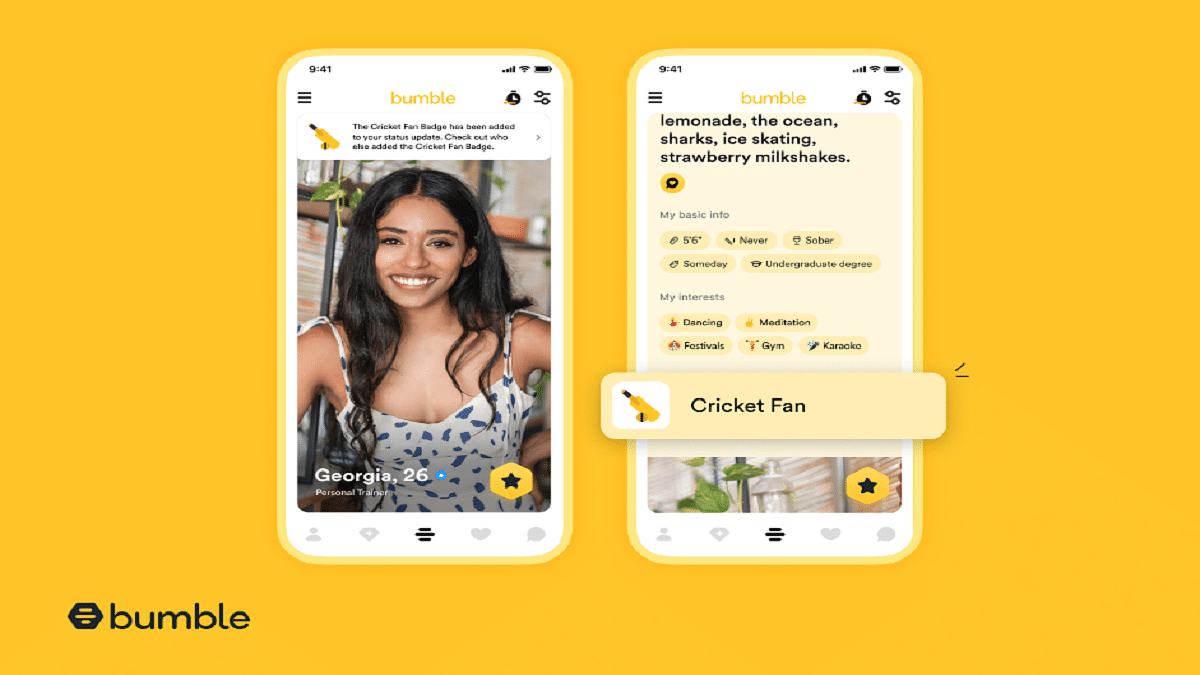
  • Bumble introduces the ‘Cricket Fan’ Badge
  • The badge is available only in India during October
  • Bumble’s study reveals that 78% of Indians believe cricket matches make excellent dates

Passionate about cricket and in search of a partner who shares your passion? If you’re someone who enjoys cricket dates and seeks a companion to revel in the game’s excitement, Bumble, the renowned dating app, has a special treat for you. In eagerness for the upcoming cricket season, Bumble is set to unveil a limited edition ‘Cricket Fan’ Badge, exclusively available in India throughout October. This feature aims to assist Bumble’s community in expressing their profound affection for the sport while facilitating connections with fellow cricket enthusiasts. Also Read | Best Money-Earning Apps For Android Phones In India

Cricket: A Game Of Love In India

In the Indian dating landscape, sports, and cricket, in particular, have significant influence, especially among Gen Z and Millennials. As the cricket fever builds with the upcoming tournament, a remarkable 78% of surveyed Indians, according to Bumble’s recent study, believe that cricket matches serve as excellent date opportunities. In fact, a substantial 75% of those surveyed actively seek romantic partners who share an interest in sports, considering it a crucial factor before embarking on a deeper connection.

Also Read | Unlock Exclusive Deals: Five Best Coupon Apps For Online Shopping In India

Conversations Through Shared Passions

Bumble is dedicated to empowering its users to spotlight and engage in conversations about their deepest passions. The introduction of the ‘Cricket Fan’ Badge to your profile enables you to proudly display your adoration for cricket. Additionally, it serves as a remarkable ice-breaker, facilitating engaging conversations with potential matches who share your passion for the sport. As you gear up to cheer for and support Team India in the upcoming matches, Bumble hopes that these connections forged through the love of the game will lead to meaningful and lasting relationships.

In conclusion, Bumble’s ‘Cricket Fan’ Badge is poised to bring cricket enthusiasts in India closer together, nurturing connections that extend beyond the boundaries of the game. With its launch in October, this limited-edition badge promises to make the cricket season even more exciting for the app’s users across the nation.

Also Read | Best Matrimonial Apps To Download In India: List Inside

Categories
Apps Featured How To

Google Introduces Emoji Reactions To Gmail For Android: Here’s How To Use It

Key Highlights

  • Gmail users get an emoji reactions feature on its platform
  • This feature is currently available exclusively for Android users
  • It is set to expand to other platforms in the near future

Google has followed the long-standing requests of Gmail users by introducing emoji reactions to the platform. This feature, currently exclusive to Android devices, offers a novel way to respond to emails with a touch of personalization. While Android users are the first to embrace this feature, it is expected to expand its reach to iOS and web platforms in the near future. Also Read | From Chaos To Clarity: Five Proven Methods To Keep Your Gmail Inbox Organized

How To Add An Emoji Reaction On Gmail

To engage with this new feature, Android users can follow these steps:

Step 1: Ensure that you are using an Android device, such as a smartphone or tablet.

Step 2: Open the Gmail app on your Android device.

Step 3: Navigate to the email you wish to respond to using an emoji reaction.

Step 4: Locate the ‘Add emoji reaction’ option situated beneath the email message. You will find a smiling emoji icon next to it.

Step 5: Google provides a selection of emojis for you to choose from in the emoji picker. Pick the one that best conveys your response.

Also Read | Running Low On Google Storage? Five Best Techniques To Clear Your Gmail Space

Things To Keep in Mind

While this new feature adds a layer of expressiveness to Gmail, there are some conditions to consider:

School and Work Accounts: Users with school or work accounts may not have access to the emoji reaction feature.

Gmail App Version: It’s important to keep your Gmail app up to date. Older versions may display an unusual message when someone reacts via Gmail.

Third-Party Apps: If you access your Gmail messages through third-party apps like Microsoft Outlook, emoji reactions may not be visible.

Frequency Limit: Gmail imposes a limit of 20 replies to the same message for emoji reactions. Additionally, this feature does not apply to group email lists.

Exploring Emoji Reactions

Emoji reactions on Gmail offer a spectrum of expressiveness. Some reactions are vibrant and entertaining, like the confetti reaction, which fills your Gmail page with virtual confetti. Others are more subtle, taking up minimal screen space. This range of reactions allows users to choose the one that best suits their mood or message.

Also Read | Gmail Tips And Tricks: How To Secure Your Google Account With Two-Factor Authentication