Categories
Apps Featured

100+ Creative And Memorable YouTube Channel Name Ideas For Unboxing

Key Highlights

  • Key to unboxing video success: a standout YouTube channel name
  • Memorable names set you apart and attract viewers
  • Our list offers attention-grabbing options for your unboxing videos

Finding the perfect YouTube channel name for your unboxing videos is crucial for establishing your brand and attracting a loyal audience. A catchy and memorable name can set you apart from the competition and give viewers a sense of what to expect from your content. Whether you’re unboxing tech gadgets, beauty products, or toys, we’ve compiled a list of creative and engaging YouTube channel name ideas that will make your unboxing videos stand out in the vast sea of content. Also Read | YouTube Channel Naming Ideas: 100+ Best Names For YouTube Educational Channels

Catchy YouTube Channel Name For Unboxing

Unbox UniverseUnbox OasisUnboxify World
Unboxing ExtravaganzaUnboxing DelightsUnbox Masters
The Unbox ShowThe Unbox LoungeThe Unboxing Guru
Unbox ManiaUnboxing GaloreUnbox Sensei
Unveil & RevealUnboxify It!Unbox Haven
Unbox ExplorerUncover the MysteryUnveil Marvels
The Unboxing ZoneThe Unbox VaultThe Unbox Empire
UnboxifyUnboxing JunctionUnbox Frenzy
Unbox PioneersLets UnboxUnboxing World

Trendy YouTube Channel Name For Unboxing

Unboxing UnleashedUnbox CentralThe Unbox Corner
Unbox ManiacUnbox DreamersUnbox Revolution
Unbox and BeyondUnboxify NationUnbox Haven
Unbox PhenomenonUnbox PursuitUnboxify Studio
The Unboxing ChroniclesThe Unboxing ExperienceUnbox Zen
Unbox SavvyUnbox QuestThe Unbox Depot
Unveil WondersUnveil TreasureUnbox Savants
The Unbox EnigmaUnbox SenseUnveil Excellence

Also Read | 100+ Best DIY YouTube Channel Name Ideas In 2023

Amazing YouTube Channel Name For Unboxing

Unbox FusionUnveil SpectacleUnbox Fusion
The Unboxing JunctionUnbox VisionUnveil Rapture
Unbox ProsThe Unbox AuthorityUnboxify Oasis
Unbox SerendipityUnbox LegendsUnbox Maestros
Unboxify XperienceUnboxify ChroniclesThe Unbox Universe
Unbox SensationUnbox PhenomenaUnbox Revolution
The Unboxing LabUnbox ParadigmUnboxify Masters
Unboxify EliteThe Unboxing GalleryUnveil Majesty

Cool YouTube Channel Name For Unboxing
Unboxify PhenomenonUnboxify RealmUnboxify Enigma
Unveil SymphoniesUnveil MarvelUnveil Valhalla
The Unbox FactoryThe Unboxing LabThe Unbox Empire
Unbox EnthusiastsUnbox AcademyUnbox Magicians
The Unboxing ManiaUnveil EmporiumUnveil Odyssey
Unbox ExpertsThe Unbox SanctuaryThe Unboxing Oasis
Unboxify EnigmaUnbox ProsUnbox Visionaries
Unbox QuestUnboxify XpertsUnbox Nexus
Unboxify SanctuaryUnveil UtopiaThe Unboxing Dream

Choosing the right YouTube channel name for your unboxing videos can greatly impact your success in the digital realm. A well-crafted name can draw attention, build anticipation, and reflect the essence of your content. Feel free to mix and match words or add your own creative touch to these suggestions. Good luck with your YouTube channel!
Categories
Apps Featured How To

Need Help With Zomato UPI Payments? Here’s A Step-by-Step Tutorial

Key Highlights

  • Zomato has launched Zomato UPI in India
  • Selected users can access Zomato UPI as part of a pilot program
  • This new feature has been introduced via a collaboration with ICICI Bank

Zomato has introduced its own unified payments interface (UPI) services in India to enhance customer payment convenience. In collaboration with ICICI Bank, Zomato now enables users to make UPI payments directly on their platform, offering a secure transaction experience. To add an extra security layer, users can set a security PIN for UPI transactions. This move comes at a time when merchant payments on UPI in India are projected to reach $1 trillion by FY26.

By launching Zomato UPI, the online food delivery platform aims to streamline the payment process for users, eliminating the need to switch between different payment apps like Google Pay, PhonePe, and Paytm.

Also Read | Hungry But Low On Budget? Here Are The Top Four Cheapest Food Delivery Apps In India

Zomato has provided instructions for users to apply for Zomato UPI via the iMobilePay app, as stated on their support page. The company also allows users to link their existing bank accounts to Zomato UPI, offering flexibility for those who prefer not to create a new UPI ID.

Currently, Zomato UPI is in its pilot stage and is accessible only to a limited number of users. However, Zomato plans to gradually expand this service to all its users in the future. If you happen to be one of the fortunate users with access to Zomato UPI, here’s a guide on how to use this feature.

How To Use Zomato UPI?

Follow these steps to use Zomato UPI and experience hassle-free transactions:

Step 1: Launch the Zomato app on your device.

Step 2: Navigate to the profile section within your Zomato account.

Also Read | Want To Make Paytm UPI Payments To Non-Paytm Users? Here’s The Trick

Step 3: Scroll down until you find the Zomato UPI feature.

Step 4: Tap on the ‘Activate Zomato UPI’ option.

Step 5: Choose your preferred Zomato UPI ID, which will serve as your unique identifier.

Step 6: Select the mobile number associated with your Zomato account.

Also Read | Everything You Should Know About Airtel And Axis Bank Credit Card: Here’s How To Use

Step 7: Connect your bank account to securely link it with Zomato UPI.

By following these simple steps, you can unlock the convenience of Zomato UPI, enabling seamless payments directly within the app. Enjoy a safe and streamlined payment experience with Zomato UPI, eliminating the need for external payment apps.

For the tech geeks, stay updated with the latest cutting-edge gadgets in the market, exclusive tech updates, gadget reviews, and more right on your phone’s screen. Join Giznext’s WhatsApp channel and receive the industry-first tech updates.

Categories
Apps Featured Info

ChatGPT Mobile App Finally Launched For Masses: Check Compatible Devices, Features Offered

Key Highlights

  • ChatGPT mobile app launched
  • Available only for iOS users
  • Introduced in the USA, global launch pending

ChatGPT has been a sensation in the AI space. Developed by the Microsoft-backed platform OpenAI, the AI-powered chatbot has been available for all desktop users globally. Other tech giants such as Google have also dived into this space with ChatGPT alternatives. To make the ChatGPT services accessible to a wider range of consumer base, the company has now released much awaited mobile version. Who can download and use ChatGPT on their smartphones and what all features can be used? Read the details below:

Also Read: The Ultimate Guide To Use ChatGPT On WhatsApp

ChatGPT For Mobile: Compatible Devices

OpenAI has currently released the ChatGPT mobile app for iPhone and iPad users only. All the iOS users can visit the Apple App Store and install the ChatGPT application to use the services. With the availability of the ChatGPT app, both Apple iPhone and iPad users won’t have to redirect to a web browser to use the AI messaging chatbot. But there’s another catch to this.

The ChatGPT app is available only for the iOS users in the USA. Open AI hasn’t revealed when exactly it plans to expand this app’s availability to the global regions including India. Also, we are expecting the company to be testing the ChatGPT mobile version’s response from the audience. The app could be available for download on Google Play Store in the coming months; but the timeline would be difficult to guess.

Also Read: How To Use Snapchat’s Cartoon Lens For Fun And Creative Snaps: Step-By-Step Guide

ChatGPT Mobile App Features

As mentioned above, ChatGPT will be offering the same set of services as the desktop version. The CHatGPT iOS app will allow users to get instant responses on different queries. The results will be detailed and accurate as on the desktop version.

In addition to instant responses, the ChatGPT mobile app will also help users with creative ideas to complete different presentations. Users will also be able to use the ChatGPT apps to write poems. Furthermore, the CHatGPT app will allow users to learn different new languages with ease. The ChatGPT mobile app will also help the users to get professional help/guidance on their writeups or different types of jobs.

Also Read: AI Chatbots Unmasked: Check Out The Four Best Chatbots Competing With ChatGPT

Categories
Apps Featured How To

Magnify Anything, Anywhere: Learn How To Use Your iPhone As A Magnifying Tool

Key Highlights

  • The Magnifier app helps you zoom in to the details of an object near you
  • Users can also adjust the image brightness and contrast, as well as apply color filters
  • There’s also the option to freeze one or more frames to review them

Our iPhones have replaced many tools and gadgets, including cameras, calculators, flashlights, notepads, GPS units, and compasses. Now, there’s another item your iPhone can replace—a magnifying glass. Today, we’ll explore the iPhone’s Magnifier app, a handy tool that magnifies objects or text using your iPhone’s camera.

Also Read | Invisible Messages On iPhone: How To Send Invisible Messages Using iMessage On iPhones?

The Magnifier App On iPhone

The iPhone’s Magnifier app turns your iPhone or iPad into a magnifying glass. This lets you zoom in on nearby objects or text. By utilizing your iPhone’s built-in camera, Magnifier enlarges the objects or text, enhancing visibility for your convenience.

How To Turn On Magnifier App

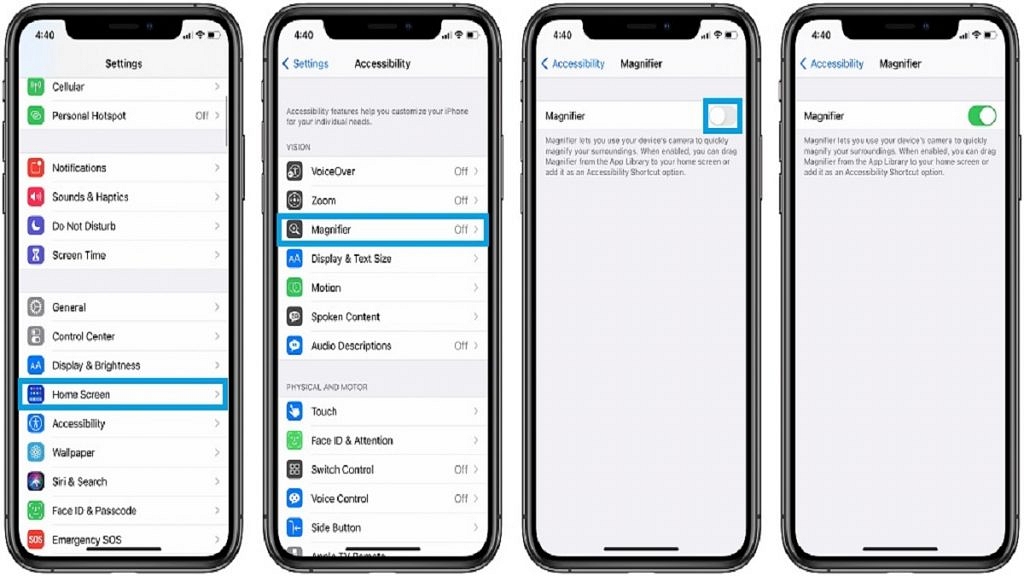
Enabling Magnifier is a simple process. Follow these steps:

Step 1: Go to Settings > General > Accessibility.

Step 2: Tap on “Accessibility.”

Step 3: Choose “Magnifier.”

Step 4: Activate the switch next to Magnifier.

Step 5: To enable automatic adjustment of brightness and contrast based on ambient light, toggle the switch next to Auto-Brightness.

Also Read | iOS Tips And Tricks: How To Setup And Use AutoFill For Contact Cards And Credit Cards In Safari On iPhones And iPads

How To Use Magnifier App

After enabling Magnifier, tap the button on the right side of your iPhone three times to activate it. For older iPhone models, press the home button to turn on the magnifier.

The Magnifier feature functions similarly to the iPhone’s camera app. Point it at the text or object you wish to magnify and take a picture. Adjust the magnification level by dragging the slider or lock the focus by tapping the lock button. In Magnifier, you can apply filters, activate the flashlight, freeze-frame the image, and zoom in or out using the available options.

For the tech geeks, stay updated with the latest cutting-edge gadgets in the market, exclusive tech updates, gadget reviews, and more right on your phone’s screen. Join Giznext’s WhatsApp channel and receive the industry-first tech updates.

Categories
Apps Featured Info

Gmail Help Me Write Feature: What Is It? How To Use?

As the world grows more digital, the need for efficient and effective communication has increased. Being one of the most popular forms of communication, people are continuously looking for ways to spend less time composing emails. At the Google I/O 2023 event, Google unveiled a new feature for Gmail to address this problem. This feature will make it easier and faster for users to compose emails. The “Help Me Write” function uses AI to generate email draughts that are in line with user input.

Also Read: Gmail Tips And Tricks: How To Secure Your Google Account With Two-Factor Authentication

What Is Gmail Help Me Write?

Picture yourself staring at a draught of an email while seated at your workstation. Though you know what you want to say, the words just can’t seem to come out correctly. That’s where “Help Me Write” comes in—the newest feature in Gmail’s toolbox meant to simplify your life.

This useful function uses artificial intelligence to suggest pertinent phrases and sentences as you type. But its talents go beyond that; it can even suggest whole paragraphs to help you make your argument clearly and concisely.

But it goes further than that! Additionally, “Help Me Write” will support you with grammar and spelling. This AI-powered tool will spot those annoying mistakes for you, so you won’t have to scramble to Google whether or not ‘impact’ or ‘effect’ is the proper term to use.

Additionally, “Help Me Write” has you covered if you need to converse with someone who speaks a different language. It can translate your emails into different languages, which makes cross-border (and cross-language) communication simple.

Despite being under beta testing, “Help Me Write” is accessible to all Gmail users. Why not use this clever feature the next time you get a writing block? You might only require it as the extra hand when creating the ideal email.

Also Read: Gmail Useful Tricks: How To Add, Customize Digital Signatures On Gmail

How To Use Gmail Help Me Write?

Step 1: In Gmail, begin writing an email.

Step 2: To assist you with your writing, select the “Help me write” button.

Step 3: Based on your input, the AI will create a draught of the email.

Step 4: The email can then be edited and finished.

Also Read: Google’s Big Clean-Up: Inactive Accounts To Be Deleted Starting December

How Can Gmail Help Me Write Be Useful?

When it comes to sending emails, the feature could help users be more productive and save time. To make the most of this feature, a few things must be kept in mind.

Be particular and provide details: It’s critical to offer specific details in order to raise the caliber of the writing. For instance, when drafting a job application email, it is important to include keywords like the user’s name, the job title, and the business name. As a result, the AI will be able to create an email that is well-written and contains all the important details.

Edit the draught carefully: Although the tool can create the template, users still need to put in the time and practice their writing abilities to make the email more unique and enjoyable to read.

Provide feedback: The more comments a user makes, the more effective the program will be at producing email draughts.

Also Read: Google Maps Immersive View For Routes Shows Live Route Traffic, Weather, And More: How To Use?

Categories
Apps Featured Gaming

BGMI Finally Making Comeback In India: But What’s The Catch

Key Highlights

  • BGMI returns with restrictions.
  • Continuous monitoring and time limits.
  • Violations may result in a ban.

The smartphone gaming and esports community eagerly awaits the comeback of Battlegrounds Mobile India (BGMI), which has been under a ban since July 2022. However, according to recent reports, there is a hope towards a potential comeback for the game, although it would come with certain accompanying restrictions.

Here is everything you need to know about this new report around the return of BGMI.

Also Read: BGMI Unban Date Rumors Surfaces Online: Everything You Need To Know

BGMI Returns with Restrictions

According to sources at News18, BGMI is set to make a comeback for a period of three months, albeit with certain restrictions imposed by the authorities. While this news is certainly exciting, it does come with a catch.

The restrictions imposed on BGMI aim to address concerns related to national security and excessive gaming addiction. Here are the key limits that players can expect:

  1. Continuous Monitoring: The application will be under constant surveillance to ensure that it does not pose any national security concerns. This step highlights the government’s commitment to safeguarding the interests of its citizens.
  2. Time-Restriction: To prevent excessive gaming and its potential impact on players’ well-being, the developers will be required to implement a time restriction feature. This will limit the time players can spend in the game, discouraging prolonged gaming sessions.
  3. Blood Color Change: One of the visual changes that players will notice is the alteration of the blood colour in the game. To make it less realistic and potentially less intense, the colour of the blood will be changed from red to some other colour.

Also Read: Four Games To Play After God of War Ragnarok

The Future of BGMI

While the news of BGMI’s potential return is undoubtedly exciting, it is important to note that these restrictions are in place to ensure compliance and address concerns raised previously. The game will undergo a comprehensive reassessment by the Ministry of Electronics and Information Technology (MeitY) during this three-month period.

It is worth mentioning that failure to abide by these restrictions may result in another ban on the game across all platforms. The authorities are determined to enforce the imposed guidelines strictly.

As of now, no specific re-release window has been disclosed. Players eagerly awaiting the return of BGMI will have to patiently await an official announcement from Krafton, the game’s developer. Once the game is officially back, players will be able to enjoy their favourite battle royale experience, albeit with the aforementioned limitations.

Also Read: Best Game Settings For BGMI, PUBG For A Premium Gaming Experience On Android, iOS

Categories
Apps Featured

100+ Brilliant YouTube Channel Name Ideas For Pranksters

Key Highlights

  • Starting a YouTube prank channel can be a thrilling and entertaining adventure
  • Choosing a captivating channel name is crucial to reflect your style and attract viewers
  • This article offers a handpicked selection of the best prank channel name ideas to inspire you

Welcome to the exciting world of YouTube prank channels! With millions of viewers seeking hilarious and entertaining content, starting your own prank channel can be a thrilling adventure. But before you dive into the world of pranks, you need a captivating channel name that reflects your unique style and attracts viewers.

In this article, we present a handpicked selection of the best YouTube prank channel name ideas to inspire you. From catchy and creative options to unique and memorable choices, we’ve got you covered. So, let’s explore these top-notch channel names and find the perfect one that will set you on the path to prankster stardom. Also Read | 100+ Best DIY YouTube Channel Name Ideas In 2023

Creative YouTube Prank Channel Names

SillyPranksterGigglingGinaTrickyTom
JokesterJokerPrankItUpGiggleGuru
MischievousMaxPlayfulPennyPranksterPaula
PrankMasterJesterJeffJokingJulian
TricksterTinaWittyWendyCheekyCharlie
FunnyBusinessSneakySamHilariousHannah
HoaxHackerMischiefMakerPrankAddict
LaughingLiamClownAroundGuffawGary

Catchy YouTube Prank Channel Names

WaggishWillowPranksterPalJokingJasmine
QuirkyQuinnJollyJoshMischievousMike
FunnyBoneWackyWandaWittyWhitney
HoaxsterHenryTeasingTrevorLaughterLiam
ChucklingChloeGigglingGraceGigglyGemma
PranksterPatTricksterTylerPranksterPenny
JesterJessieMirthfulMollyPlayfulParker
SillySandraPranksterPeteJesterJill

Also Read | YouTube Daily Vlog Channel Name Ideas: Top Cool Channel Name Ideas For Daily Vlogs On YouTube

Memorable YouTube Prank Channel Names

SillySammyMischiefMaverickClownishCarl
PranksterPaigeLaughingLeoSneakySarah
QuirkyQuentinHilariousHarperPranksterPhil
ChucklesCharlieGigglingGabbyTrickyTucker
WaggishWinnieFunnyFelixHoaxsterHaley
CheekyCameronJokerJackiePranksterPercy
JokingJoannaWittyWesleyJesterJocelyn
SillySebastianPranksterPenelopeMirthfulMelanie
WaggishWilmaPrank HouseLets Prank

Trendy YouTube Prank Channel Names

GigglingGavinJollyJordanWittyWyatt
TricksterTaraWackyWinstonLaughterLucy
PlayfulParkerFunnyFrancescaGigglyGeorge
TeasingTessaPranksterParkerPranksterPippa
GuffawingGregJokingJeremyChucklingChad
PranksterPaisleyMischievousMiaMischiefMarie
SillySimonJesterJuliaSneakyStan
QuirkyQuincyHilariousHazelPranksterPreston
LaughingLylaGigglingGideonTrickyTiffany

Also Read | YouTube Channel Naming Ideas: 100+ Best Names For YouTube Educational Channels

Choosing the right YouTube prank channel name is a crucial step in building your brand and attracting a loyal audience. By selecting a name that is catchy, creative, and aligned with your content, you can establish your presence in the prankster community and make a memorable impression. So go ahead, let your imagination run wild, and select a channel name that reflects your prankster personality. Get ready to create laughter, surprise, and unforgettable moments as you embark on your journey to become a YouTube prankster extraordinaire!

Categories
Apps Featured

AI Chatbots Unmasked: Check Out The Four Best Chatbots Competing With ChatGPT

Key Highlights

  • Conversational AI systems have made significant advancements in natural language processing
  • They have the ability to maintain context and remember previous interactions within a conversation
  • AI can understand user preferences and adapt to their unique conversational style

Bored with ChatGPT? Well, that’s unlikely considering its immense popularity in assisting millions of individuals with content writing, coding dilemmas, game development, and countless other astonishing tasks. Nevertheless, it’s completely understandable to take a break and explore the diverse range of alternative AI chatbots available. After all, ChatGPT isn’t the sole contender in this arena. In this article, we have compiled a selection of the best AI chatbots that you can experiment with in 2023. So, let’s delve into the list and discover these intriguing alternatives. Also Read | Microsoft Visual ChatGPT Is The New Hype: How To Use This Advanced AI Chatbot

Google Bard

Google has been actively participating in the AI race for a considerable period, integrating a range of AI features into its products. Alongside this effort, Google is also working on LaMDA (Language Model for Dialogue Applications), a large language model and competitor to GPT, which powers Google Bard. This conversational AI platform demonstrates immense potential, similar to ChatGPT, in understanding and generating human-like responses. Now accessible to users in over 180 countries worldwide, including India, Bard positions Google to showcase a novel approach to web searching in the future.

Microsoft Bing AI

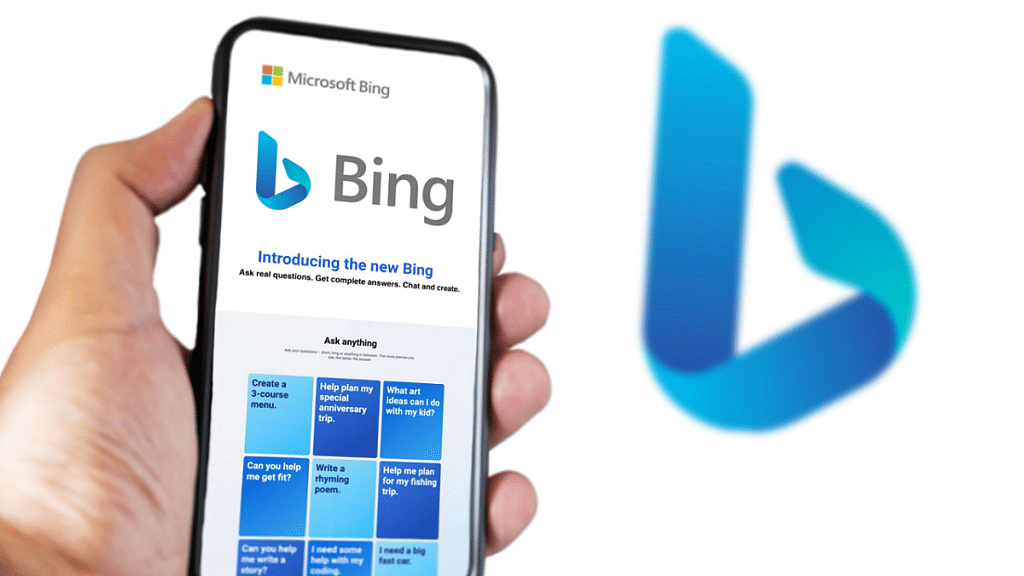
Microsoft Bing has introduced an AI chat feature designed to enhance your web searching experience. After inputting your query, it will scour the internet, analyze the findings, and provide you with a response that includes the relevant links it used as references. It’s worth noting that ChatGPT lacks awareness of events beyond 2021 and lacks internet connectivity, as it constantly reminds users. However, Bing AI utilizes the same AI model while surpassing these limitations. Nevertheless, it is crucial to verify information independently, as it may still exhibit an overly confident demeanor when presenting “facts.”

Also Read | Use ChatGPT On Apple Watch? Here’s The Step-By-Step Guide

SwiftChat

SwiftChat has rapidly gained over 70 million registered profiles nationwide. It offers seamless learning experiences in multiple languages through 100+ educational bots, including Hindi, Marathi, Punjabi, Telugu, Gujarati, Urdu, and English. Acting as a feature-rich distribution marketplace, SwiftChat connects people and technology, providing engaging experiences. It has attracted leading brands like Google, Doubtnut, and Times Group, expanding its reach. SwiftChat’s bots provide accessible and elevated information, captivating users and prompting them to immerse themselves in the brand’s offerings.

Jasper AI

If you are seeking a solution tailored to meet the professional creative requirements of your company or organization, Jasper AI stands out as one of the top choices available. Its greatest strength lies in assisting creative professionals by allowing them to precisely specify the type of text they need. Whether it’s a captivating caption for an Instagram post, a polished email for business purposes, a script for a YouTube video, or even a fully-developed blog post, JasperAI claims to excel in catering to these specific platforms and formats. While JasperAI primarily focuses on professional use cases, the company also offers a free Chrome extension.

Also Read | The Ultimate Guide To Use ChatGPT On WhatsApp

Categories
Apps Info

Google’s Big Clean-Up: Inactive Accounts To Be Deleted Starting December

Key highlights

  • Google to delete inactive accounts from December 2023
  • Accounts that haven’t been used in two years might get deleted
  • Google will send notifications prior to deleting accounts

Starting December 2023, Google may automatically erase accounts for users who haven’t used them in the previous two years. On the company’s The Keyword blog, Google today disclosed a modification to the company’s dormant account policy. Ruth Kricheli, VP of Product Management at Google, disclosed the modification on the website.

Inactive Google accounts are frequently less secure than those of active accounts. These dormant accounts can have weaker passwords from earlier times and lack multi-factor authentication security. Google estimates that the danger of abuse for accounts without two-factor authentication is up to ten times higher.

Also Read: Google Maps Immersive View For Routes Shows Live Route Traffic, Weather, And More: How To Use?

Google intends to start with unused accounts and then broaden the selection of accounts from there. According to Google, different teams would notify account owners “over the months leading up to the deletion”. Notifications will be sent to account email addresses and also to recovery addresses.

When a Google account is deleted, all related data is also deleted, including any posted, made, or shared files, videos from YouTube, photos from Google Photos, emails from Gmail, documents from Google Drive, and anything else.

Also Read: Gmail Tips And Tricks: How To Secure Your Google Account With Two-Factor Authentication

How Users May Keep Their Accounts Active

Google users have a variety of alternatives for maintaining an active account status. It typically suffices to use a Google product while logged in to keep the account active. Google expressly lists the following activities:

  • Sending or reading an email
  • Google Drive use
  • watching videoes on YouTube
  • installing an app from Google Play Store
  • Google Search
  • Sign in with Google to a third-party app or service

Even if the accounts are not used, customers who already have subscriptions set up, such as Google One or YouTube Premium, won’t have their accounts considered inactive.

Users must sign in to Google Photos at least every two years to keep their accounts from being deemed inactive, according to Google. Google states that otherwise, content like images might be destroyed. Google will notify users several times if it thinks that their photo storage might be put on inactive status. Google advises users to use the takeout function to download important data to their devices for backups.

Google advises users to routinely sign in to their accounts if they wish to maintain them. To maintain the active status, any of the other actions on the list—including utilizing a third-party program like Thunderbird to fetch Gmail emails—is adequate. Old Google accounts could be deleted to make username space available for Gmail and other Google services.

Also Read: Google Photos Hacks: How To Edit Videos And Adding Effects Such As Filters On Google Photos

Categories
Apps Featured How To

WhatsApp Chat Lock Privacy Feature Released For Android, iOS: How To Lock WhatsApp Chats Using This New Feature?

Key Highlights

  • WhatsApp Chat Lock feature introduced
  • Creates a separate chat folder for privacy
  • Locked chats remain hidden from plain sight
  • Locked WhatsApp chats cab be accessed using a device password

WhatsApp is the best private instant messaging application that Android and iOS users can download on their respective devices. Besides the end-to-end encryption, WhatsApp has several other security layers that make this platform secure for personal conversations and the brand is consistently adding new features to further boost user privacy. In a bid to do so, WhatsApp has recently added yet another privacy-centered feature for chats. The latest security feature released by WhatsApp is the Chat Lock feature. What is this new chat lock security feature released for WhatsApp users and how can you use it? Read the details below:

Also Read: How To Upload WhatsApp Status In High Quality (Images, Videos) On Android, iOS?

WhatsApp Chat Lock Feature: What Is It?

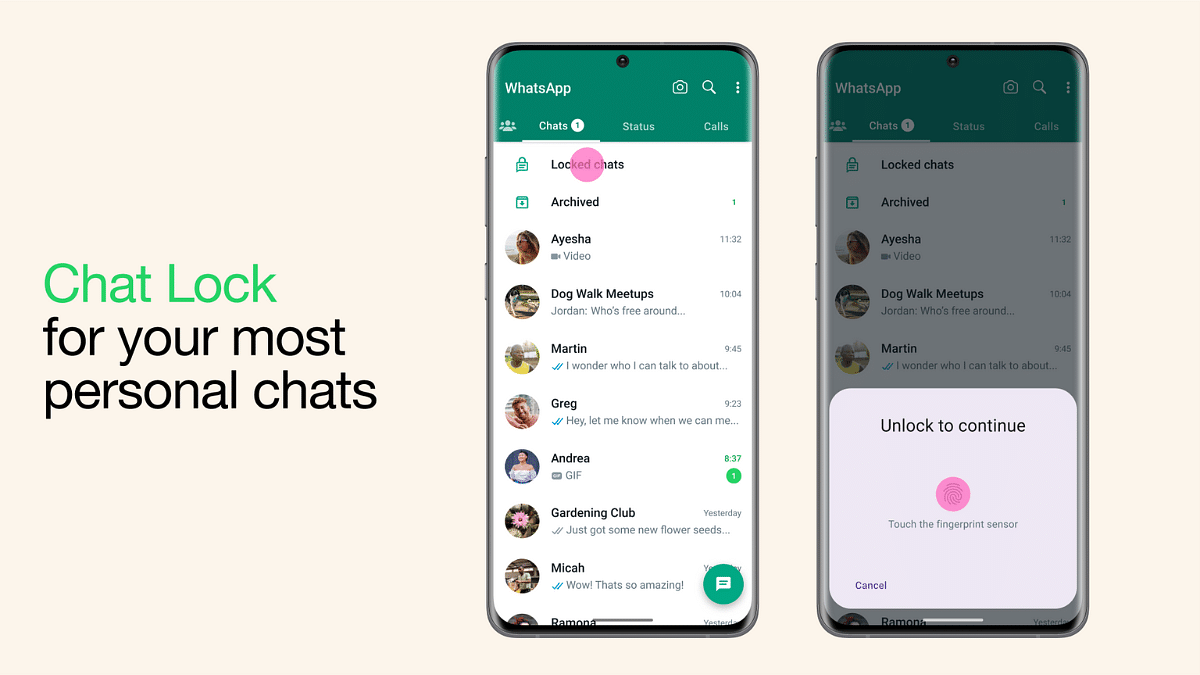
The WhatsApp Chat Lock security feature is designed to keep all personal chats private without directly using any biometric authentication feature such as PIN, Password, Face, and fingerprint unlock. With this feature, all the personal chats will be moved to a private safe (separate folder) which can only be accessed using the device password.

Once the chats are moved to the chat lock folder all the content in the chat including text messages and media files including images and videos. Once the chats are moved all the content will be hidden automatically. This new privacy feature is quite handy for users who need to keep all their personal chats secure from getting into wrong hands.

WhatsApp is rolling out the Chat Lock feature as an OTA update in a phased manner and it should be available to all the respective units going forward. Users can also check if there is any update pending manually to get access to the Chat Lock feature on WhatsApp.

Also Read: Best Websites For Perfect WhatsApp DP For Girls

How To Use WhatsApp Chat Lock Feature?

Step 1: Launch the WhatsApp application on your respective devices. Do check if the app is updated to the latest version. If not, do check for updates manually.

Step 2: Scroll to the chat window that you wish to lock

Step 3: Now, click on the contact or group profile picture icon

Step 4: From the list of available options select the Chat Lock feature. This new option can be located next to the Disappearing Messages option.

Step 5: Toggle on the Chat Lock option

Step 6: Complete the authentication by entering the device lock password

Also Read: WhatsApp Tips & Tricks: How To Unblock Yourself And Regain Access

How To See Locked WhatsApp Chat Messages

Once the chats are locked become hidden and can only be accessed by using the steps listed below.

Step 1: Launch WhatsApp application again on your respective devices

Step 2: From the homepage, swipe down on the screen for the locked messages to become visible.

Step 3: Now, tap on the locked chat that you wish to read or see and unlock using the device password

Also Read: WhatsApp Chat Transfer Without Google Drive Backup: What Is This Feature And How To Use?